> For the complete documentation index, see [llms.txt](https://developer.emporix.io/llms.txt). Markdown versions of documentation pages are available by appending `.md` to page URLs; this page is available as [Markdown](https://developer.emporix.io/agentic-commerce-intelligence/agentic-engineering/docs-for-ai.md).
# Documentation Optimization for LLM Ingestion
Use the available options for pointing LLMs at Emporix documentation: indexes, snapshots, Markdown, and documentation MCP.
The Documentation Portal is where you browse and search Emporix documentation. The same content is also published in LLM-friendly formats: a lightweight index, a full snapshot, a single Markdown page, and a live documentation MCP connection. Assistants and agents use these formats to discover, retrieve, and cite the documentation.
The content answers questions such as:
> How do I authenticate with the Emporix API?
> What’s the best way to handle errors here?
> How do I create a cart?
The portal follows a Generative Engine Optimization (GEO) strategy by structuring documentation so machines can crawl, ingest, and cite it accurately. Emporix ships stable URLs, Markdown page exports, `llms.txt` / `llms-full.txt`, and documentation MCP servers so partners can ground assistants on canonical content.
{% hint style="info" %}
These options are about documentation ingestion by AI tooling and LLMs. To call Emporix APIs or work with tenant data from an AI tool, use the [Emporix MCP Server](/agentic-commerce-intelligence/mcp-in-emporix/mcp.md), which is separate from documentation MCP.
{% endhint %}
## Available options for documentation ingestion
| Path | What the LLM gets | Use case |
| ----------------------------------------------- | ----------------------------------------------------------- | ---------------------------------------------------------------------------- |
| [`llms.txt`](#llmstxt) | A machine-readable index of titles, descriptions, and links | You need discovery or a map of the docs before deep reads. |
| [`llms-full.txt`](#llms-fulltxt) | A full (chunked) snapshot of published content | You want RAG-style or bulk ingest without crawling page by page. |
| [Page `.md`](#markdown-md-pages) | One page as clean Markdown | You need a precise, low-noise read of a single topic. |
| [Documentation MCP](#documentation-mcp-servers) | Live tools to search and answer from published docs | You work inside an IDE or agent and want conversational, up-to-date answers. |
You can combine paths, for example, use `llms.txt` to find the right page, then open its `.md` URL, or keep a documentation MCP connected for day-to-day work.
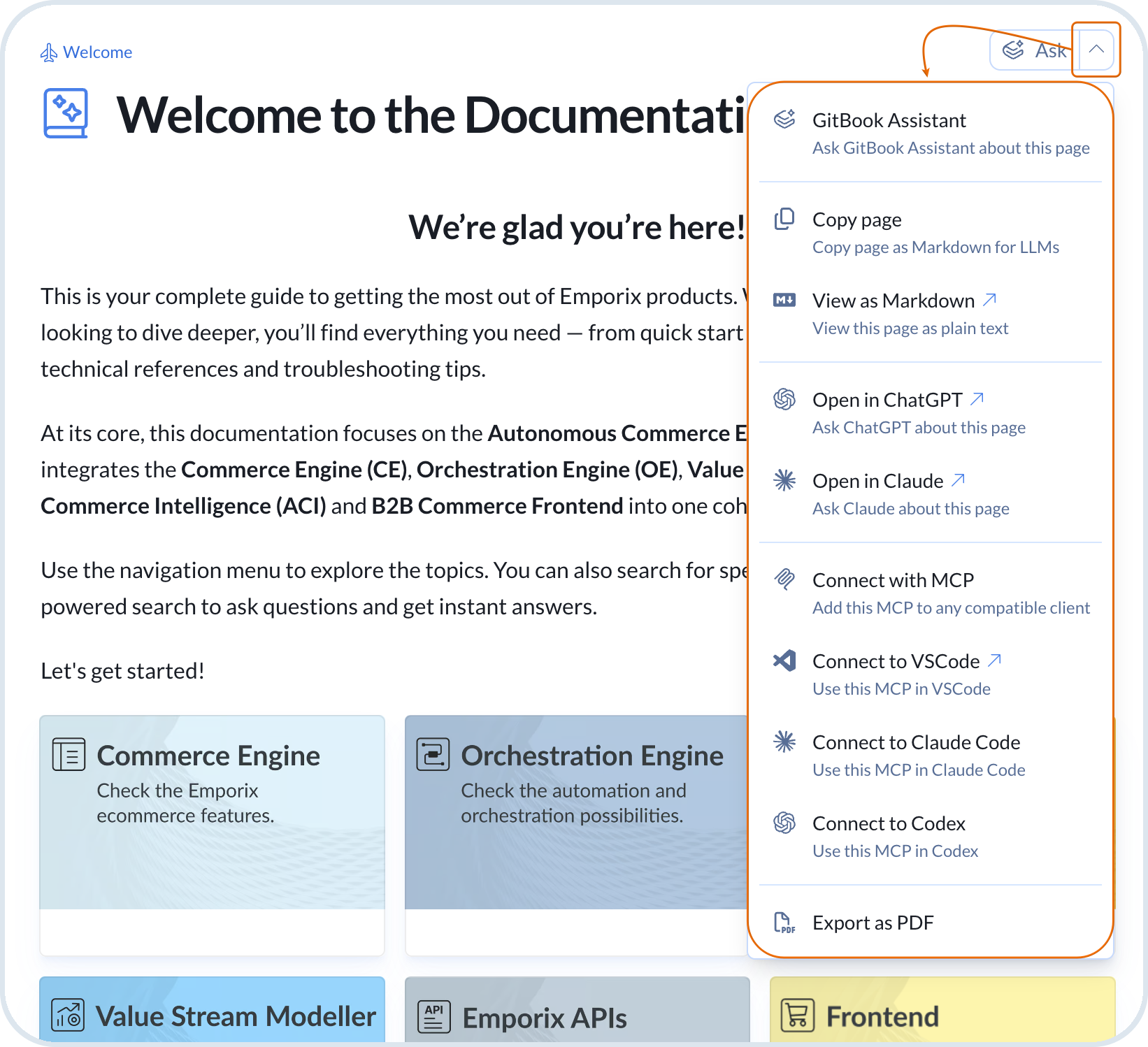
These options are also available directly from the Documentation Portal on every space. Expand the **Ask** menu to copy or view the page as Markdown, connect documentation MCP, open the page in an external assistant, or ask the in-portal AI Assistant.
Ask menu in the Documentation Portal top bar
## llms.txt
The `llms.txt` is a plain-text Markdown index of the documentation. It lists page titles, short descriptions, and direct links so crawlers and agents can see what exists without loading every page.
AI systems do not browse like humans. They need clear entry points. `llms.txt` is that signal: if a tool is going to learn from or retrieve Emporix docs, start here.
Point your tool at:
Use this when you want efficient **discovery**: what sections exist and which page to open next, rather than the full body of every guide.
## llms-full.txt
The `llms-full.txt` is a ready-to-consume snapshot of Emporix documentation. It is suited to retrieval-augmented generation (RAG) and other flows that need broader context in one place instead of assembling pages one request at a time.
Point your tool at:
The snapshot is large and is split into numbered parts such as `/llms-full.txt/1`, `/llms-full.txt/2`, and `/llms-full.txt/3`. Each part points to the next at the end of the file. Follow those links when your ingest pipeline needs the full corpus.
## Markdown (`.md`) pages
Most portal pages also ship as Markdown. Append `.md` to the page URL to get a structured version with less chrome than the HTML view. Headings, code blocks, lists, and examples stay clearly marked, so an LLM sees less noise and less ambiguity than in the rendered HTML page.
Example:
{% hint style="info" %}
Published Markdown URLs also support page-scoped Q\&A via the `ask` query parameter (and optional `goal`), as described in the Agent Instructions on those pages.
{% endhint %}
## Documentation MCP servers
Documentation MCP servers expose Emporix’s published docs as tools your AI assistant can call over streamable HTTP. Each documentation space can have its own endpoint. Unlike a static file dump, MCP stays tied to what is currently published, so answers stay aligned with the live portal.
For an implementation engineer, connecting documentation MCP means the assistant can use Emporix docs as the basis for prompts about APIs, workflows, or platform behavior without leaving the IDE. For example:
> How do I create a cart?
> Which scopes do I need for this call?
{% hint style="info" %}
Taking action against tenant data still requires the [Emporix MCP Server](/agentic-commerce-intelligence/mcp-in-emporix/mcp.md).
{% endhint %}
Connecting documentation MCPs allows you to:
* Keep Emporix documentation inside the IDE or agent you already use.
* Ground answers on published content instead of generic model memory.
* Search and follow up conversationally across the spaces you register (for example, Commerce Engine or API reference).
* Stay current without re-downloading `llms-full.txt` after every publish.
### Endpoint pattern
Append `/~gitbook/mcp` to the documentation space or site URL. You can also copy the MCP URL for a space directly from the portal **Ask** menu.
Examples:
| Scope | MCP URL |
| ----------------------------- | ------------------------------------------------------------------------- |
| Documentation Portal (root) | `https://developer.emporix.io/~gitbook/mcp` |
| Agentic Commerce Intelligence | `https://developer.emporix.io/agentic-commerce-intelligence/~gitbook/mcp` |
| Commerce Engine (CE) | `https://developer.emporix.io/ce/~gitbook/mcp` |
| API References | `https://developer.emporix.io/api-references/~gitbook/mcp` |
### Connect a documentation MCP
Register one or more of these URLs in any AI tool or IDE that supports MCP. Labels and config file names differ by product, but the URL and streamable-HTTP type stay the same.
{% stepper %}
{% step %}
#### Open MCP settings in your tool
In your IDE or AI assistant, open the settings area for MCP or external tools. Look for options such as **Add MCP server**, **MCP**, or **Tools**.
{% endstep %}
{% step %}
#### Register the Emporix documentation MCP URL
Add a streamable-HTTP server and set the URL to the documentation space you need. You can register several servers (portal root, ACI, CE, API, and more).
Example configuration (JSON shape used by many tools):
```json
{
"mcpServers": {
"emporix-docs": {
"type": "streamable-http",
"url": "https://developer.emporix.io/~gitbook/mcp"
},
"emporix-ai-docs": {
"type": "streamable-http",
"url": "https://developer.emporix.io/agentic-commerce-intelligence/~gitbook/mcp"
},
"emporix-api-docs": {
"type": "streamable-http",
"url": "https://developer.emporix.io/api-references/~gitbook/mcp"
}
}
}
```
Save the configuration. Prefer only the spaces that match your task so the assistant stays focused.
{% endstep %}
{% step %}
#### Enable the server and ask questions
Enable or reload the MCP server, then ask documentation questions in chat. For example, how a feature works, which API to call, or how to configure a module. Confirm the Emporix documentation tools appear as available before you rely on them in a project.
{% endstep %}
{% endstepper %}
{% hint style="warning" %}
Documentation MCP URLs are not the Emporix commerce MCP. Commerce MCP needs a tenant MCP token and targets `https://api.emporix.io/mcp/...`. See [Emporix MCP Server](/agentic-commerce-intelligence/mcp-in-emporix/mcp.md).
{% endhint %}
---
# Agent Instructions
This documentation is published with GitBook. GitBook is the documentation platform designed so that both humans and AI agents can read, navigate, and reason over technical content effectively. Learn more at gitbook.com.
## Querying This Documentation
If you need additional information that is not directly available in this page, you can query the documentation dynamically by asking a question.
Perform an HTTP GET request on the current page URL with the `ask` query parameter, and the optional `goal` query parameter:
```
GET https://developer.emporix.io/agentic-commerce-intelligence/agentic-engineering/docs-for-ai.md?ask=&goal=
```
`ask` is the immediate question: it should be specific, self-contained, and written in natural language.
`goal` is optional and describes the broader end goal you are ultimately trying to accomplish on behalf of the user. GitBook uses it to tailor the answer towards what is most useful for that goal.
The response will contain a direct answer to the question and relevant excerpts and sources from the documentation.
Use this mechanism when the answer is not explicitly present in the current page, you need clarification or additional context, or you want to retrieve related documentation sections.