> For the complete documentation index, see [llms.txt](https://developer.emporix.io/llms.txt). Markdown versions of documentation pages are available by appending `.md` to page URLs; this page is available as [Markdown](https://developer.emporix.io/agentic-commerce-intelligence/agentic-intelligence/configuration/oauth-gateway.md).
# AI OAuth-Based Gateway
Configure AI gateway access and OAuth-based authentication for custom LLMs.
{% hint style="danger" %}
This documentation describes a preview version of the feature, which is not fully functional yet. Some capabilities may be incomplete or subject to change.
Use this feature for evaluation purposes. If you have any questions, contact the [Emporix Support Team](mailto:support@emporix.com) or post directly in the [Community](https://community.emporix.io/).
{% endhint %}
Use **AI OAuth** to create a reusable authentication configuration for self-hosted or gateway-backed LLMs. An OAuth-managed gateway layer may be necessary when your company's security and compliance policy does not allow sending prompts directly to public LLM providers. The same configuration can be reused across external models.
{% hint style="success" %}
Choosing the provider connection depends on how your company wants to manage LLM access:
* Use a direct provider connection when your company allows direct access to the provider and a token-based setup is sufficient.
* Use a self-hosted option when the model endpoint is managed within your own infrastructure, or when you need an additional governance layer between Emporix and the LLM provider. Self-hosted LLMs can use the custom OAuth configuration described on this page.
{% endhint %}
## Supported authentication option
You can enable the following authentication method:
* **OAuth 2.0 client credentials** – Use `client_credentials` when the agent authenticates server-to-server on its own behalf. This is the standard choice for managed gateway or self-hosted model connections that do not require end-user consent during runtime.
## Configure reusable OAuth access
Create the OAuth configuration once and reuse it across multiple agents that connect to the same gateway or provider.
### Prerequisites
Gather the OAuth details from your gateway provider:
* Required – **Client ID** and **Token URL**
* Optional – **Scopes**, if your gateway provider requires them
* Optional – a **Client Secret** stored as an [AI Token](/agentic-commerce-intelligence/agentic-intelligence/configuration/tokens.md)
{% stepper %}
{% step %}
#### Navigate to AI OAuth
In the Management Dashboard, go to **Agentic AI** -> **AI OAuth** and choose **Add new OAuth** to start configuration.
{% endstep %}
{% step %}
#### Provide the authentication credentials
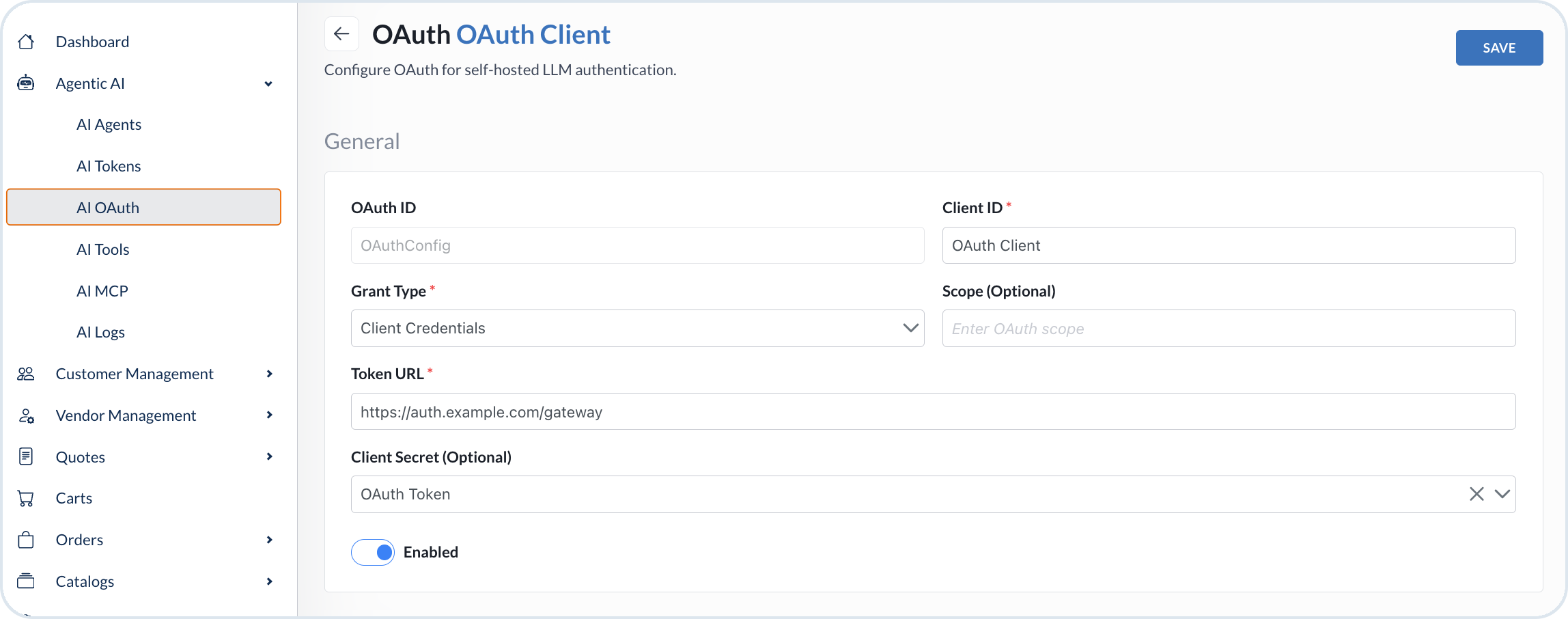
Fill in the details for your OAuth configuration:
* **OAuth ID** – Enter a unique identifier for the configuration.
* **Client ID** – Enter the client ID provided by the authentication provider.
* **Grant Type** – Choose **Client credentials**.
* **Token URL** – Enter the URL used to issue the access token.
* **Scopes** – Optional. Enter the scopes required for restricted LLM access, if your gateway provider uses them.
* **Client Secret** – Optional. Select a token defined in [AI Tokens](/agentic-commerce-intelligence/agentic-intelligence/configuration/tokens.md).
* **Enabled** – Leave the toggle on. Toggle it off only when you want to disable the configuration temporarily.
When done, choose **Save**.
OAuth configuration with client credentials grant_type
{% endstep %}
{% step %}
#### Use the OAuth configuration in the custom agent
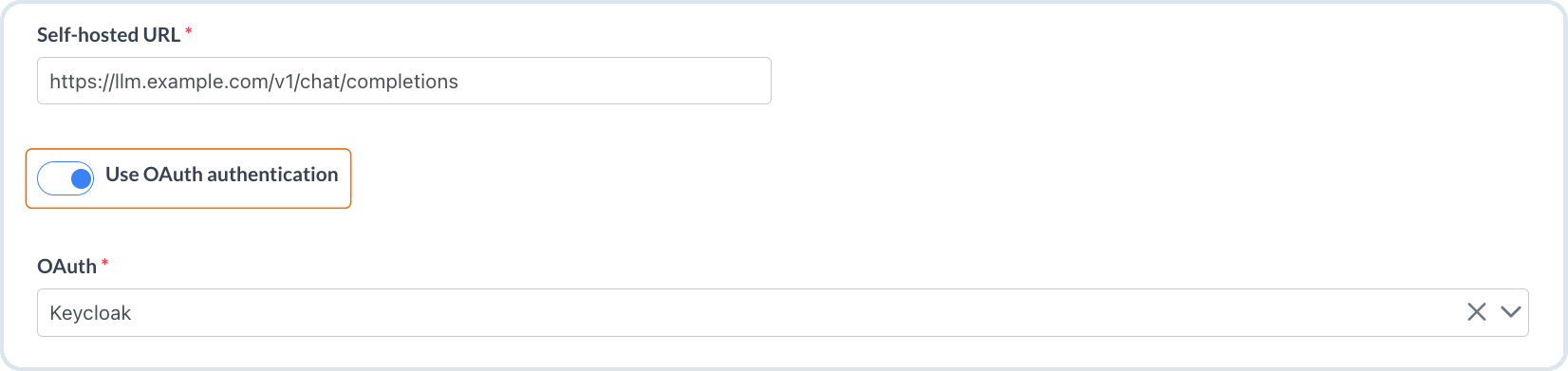
The OAuth configuration is ready to use with an agent that uses a self-hosted LLM. The agent references the configuration instead of embedding secrets directly in the agent definition.
1. In the Management Dashboard, go to **Agentic AI** -> **AI Agents**.
2. Open the **Model** tab.
3. Choose **Self-hosted Ollama** or **Self-hosted vLLM**.
4. Toggle on **Use OAuth authentication**.
5. Select the OAuth configuration you created.
Configuring self-hosted LLM model with OAuth config
{% hint style="info" %}
For the full agent creation flow, see [AI Agents](/agentic-commerce-intelligence/agentic-intelligence/agents.md).
{% endhint %}
{% hint style="success" %}
Reusable OAuth configuration reduces duplication and makes secret rotation easier because multiple agents can reference the same authentication setup.
{% endhint %}
{% endstep %}
{% endstepper %}
---
# Agent Instructions
This documentation is published with GitBook. GitBook is the documentation platform designed so that both humans and AI agents can read, navigate, and reason over technical content effectively. Learn more at gitbook.com.
## Querying This Documentation
If you need additional information that is not directly available in this page, you can query the documentation by asking a question.
Perform an HTTP GET request on the following URL with the `ask` and `goal` query parameters:
```
GET https://developer.emporix.io/agentic-commerce-intelligence/agentic-intelligence/configuration/oauth-gateway.md?ask=&goal=
```
`ask` is the immediate question: it should be specific, self-contained, and written in natural language.
`goal` is what the user is ultimately trying to achieve, the reason they need the answer. Sharing it helps GitBook give you a better, more relevant answer. A goal is most helpful when it describes the outcome the user wants rather than restating the question. For example, with `ask=how do I create an API token`, a goal like `automate deployments from our CI pipeline` lets GitBook tailor the answer to that use case.
The response will contain a direct answer to the question and relevant excerpts and sources from the documentation.
Use this mechanism when the answer is not explicitly present in the current page, you need clarification or additional context, or you want to retrieve related documentation sections.