> For the complete documentation index, see [llms.txt](https://developer.emporix.io/llms.txt). Markdown versions of documentation pages are available by appending `.md` to page URLs; this page is available as [Markdown](https://developer.emporix.io/agentic-commerce-intelligence/agentic-intelligence/configuration/tools/rag/rag-custom.md).
# RAG Custom Tool
Configure the RAG Custom tool to perform semantic search against an external vector database such as Qdrant.
A tool of type `RAG_CUSTOM` enables integration with an external (custom) vector database, not managed by the Emporix platform. This allows the system to perform semantic search operations using embeddings stored outside of the native infrastructure.
This tool type is intended for advanced use cases where organizations prefer complete control over their vector storage, scalability, performance tuning, or cost management.
## Configuring RAG Custom tool
To configure a `RAG_CUSTOM` tool, provide valid and accessible settings so the tool can execute Retrieval-Augmented Generation (RAG) queries successfully.
{% hint style="info" %}
Before you begin, ensure a Qdrant collection with indexed products already exists and is accessible from the running environment. The tool connects to this external collection rather than creating or managing it.
{% endhint %}
Follow these steps:
{% stepper %}
{% step %}
#### Define general tool details
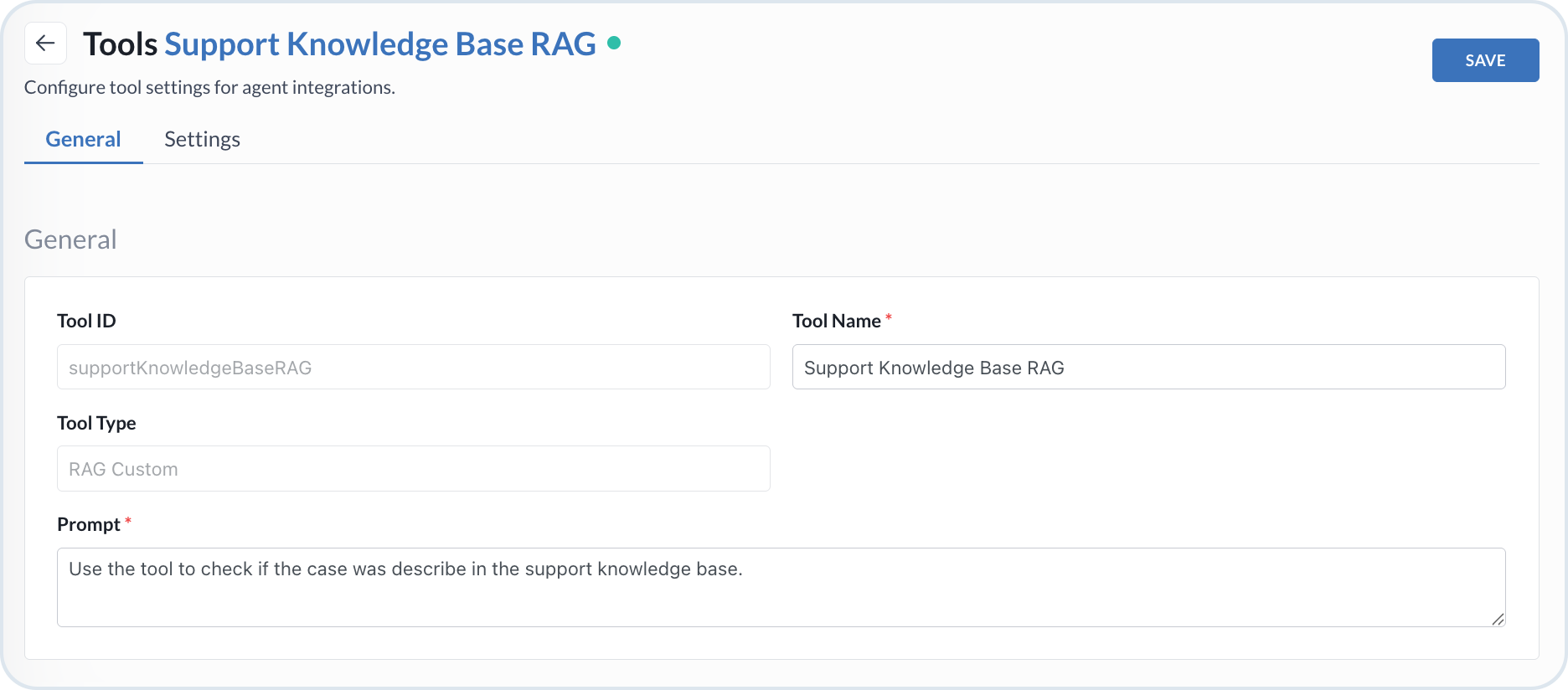
Open the **General** tab and set the tool basis:
* **Tool Type** – Select *RAG Custom*.
* **Tool ID** – The identifier of the tool.
* **Tool Name** – The name displayed in the UI.
* **Prompt** – Instructions for when the agent should invoke this tool once it is attached.
RAG custom tool configuration
{% endstep %}
{% step %}
#### Connect to the external vector database
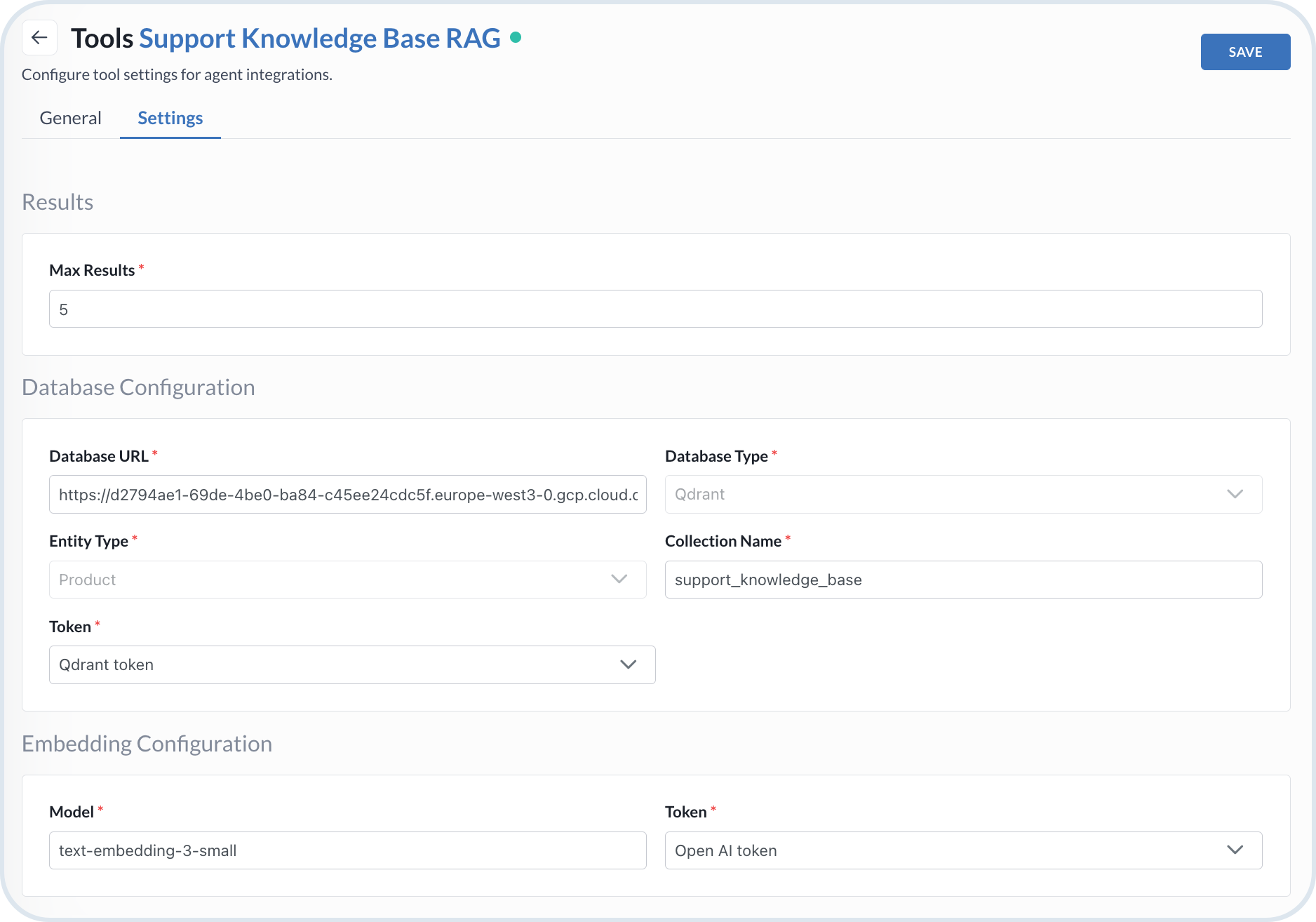
Open the **Settings** tab and configure the external database connection:
* **Database URL** – The URL of the database where data is stored.
* **Database Type** – Type of the database.
* **Collection Name** – The name of the collection where products are stored.
* **Database Token** – The token for authentication to the database.
{% hint style="warning" %}
Currently, the only available database type is `Qdrant`.
{% endhint %}
{% endstep %}
{% step %}
#### Configure retrieval settings
Define how the tool queries and returns results from the external database:
* **Max Results** – The maximum number of documents returned by an agent that uses this tool.
* **Entity Type** – The entity type to retrieve from the database.
{% hint style="warning" %}
Currently, the only available entity type is `Product`.
{% endhint %}
{% endstep %}
{% step %}
#### Configure embeddings
Specify the LLM used to compute embeddings for entities in the collection:
* **Model** – The model used to compute embeddings.
* **Embeddings Token** – The token required for computing embeddings.
{% endstep %}
{% step %}
#### Save the tool configuration
When ready, choose **Save** to store the tool configuration.
RAG custom tool settings
{% endstep %}
{% endstepper %}
## Retrieving stage
To enhance search for the indexed products with custom-defined RAG, attach the `RAG_CUSTOM` tool to an agent. The agent uses the available tool according to the specified prompt definition.
## Example `RAG_CUSTOM` AI tool flow
The flowchart represents the process flow of the `RAG_CUSTOM` tool.
```mermaid
---
config:
layout: fixed
theme: base
look: classic
themeVariables:
background: transparent
lineColor: "#9CBBE3"
arrowheadColor: "#9CBBE3"
edgeLabelBackground: "#FFC128"
edgeLabelTextColor: "#4C5359"
---
flowchart TD
subgraph subGraph0["TOOL SETUP"]
direction TB
A["Create RAG_CUSTOM tool"]
B["Connect to Qdrant collection with indexed products"]
end
subgraph subGraph1["RETRIEVAL"]
direction TB
C["Attach tool to frontend agent"]
D["User query from storefront"]
E["RAG search against external collection"]
F["Display results to user"]
end
A --> B
B -->|"integrate"| C
C --> D --> E --> F
style A fill:#3B73BB,stroke:#4C5359,color:#FFFFFF
style B fill:#DDE6EE,stroke:#4C5359
style C fill:#3B73BB,stroke:#4C5359,color:#FFFFFF
style D fill:#DDE6EE,stroke:#4C5359
style E fill:#DDE6EE,stroke:#4C5359
style F fill:#F2F6FA,stroke:#4C5359
classDef Class_01 stroke-width:1px,stroke-dasharray:0,stroke:#A1BDDC,fill:#DDE6EE
class subGraph0 Class_01
class subGraph1 Class_01
style subGraph0 color:#4C5359
style subGraph1 color:#4C5359
A@{ shape: rounded}
B@{ shape: rounded}
C@{ shape: rounded}
D@{ shape: rounded}
E@{ shape: rounded}
F@{ shape: rounded}
```
---
# Agent Instructions
This documentation is published with GitBook. GitBook is the documentation platform designed so that both humans and AI agents can read, navigate, and reason over technical content effectively. Learn more at gitbook.com.
## Querying This Documentation
If you need additional information that is not directly available in this page, you can query the documentation dynamically by asking a question.
Perform an HTTP GET request on the current page URL with the `ask` query parameter, and the optional `goal` query parameter:
```
GET https://developer.emporix.io/agentic-commerce-intelligence/agentic-intelligence/configuration/tools/rag/rag-custom.md?ask=&goal=
```
`ask` is the immediate question: it should be specific, self-contained, and written in natural language.
`goal` is optional and describes the broader end goal you are ultimately trying to accomplish on behalf of the user. GitBook uses it to tailor the answer towards what is most useful for that goal.
The response will contain a direct answer to the question and relevant excerpts and sources from the documentation.
Use this mechanism when the answer is not explicitly present in the current page, you need clarification or additional context, or you want to retrieve related documentation sections.