# Price Tutorials
## How to set up your first price
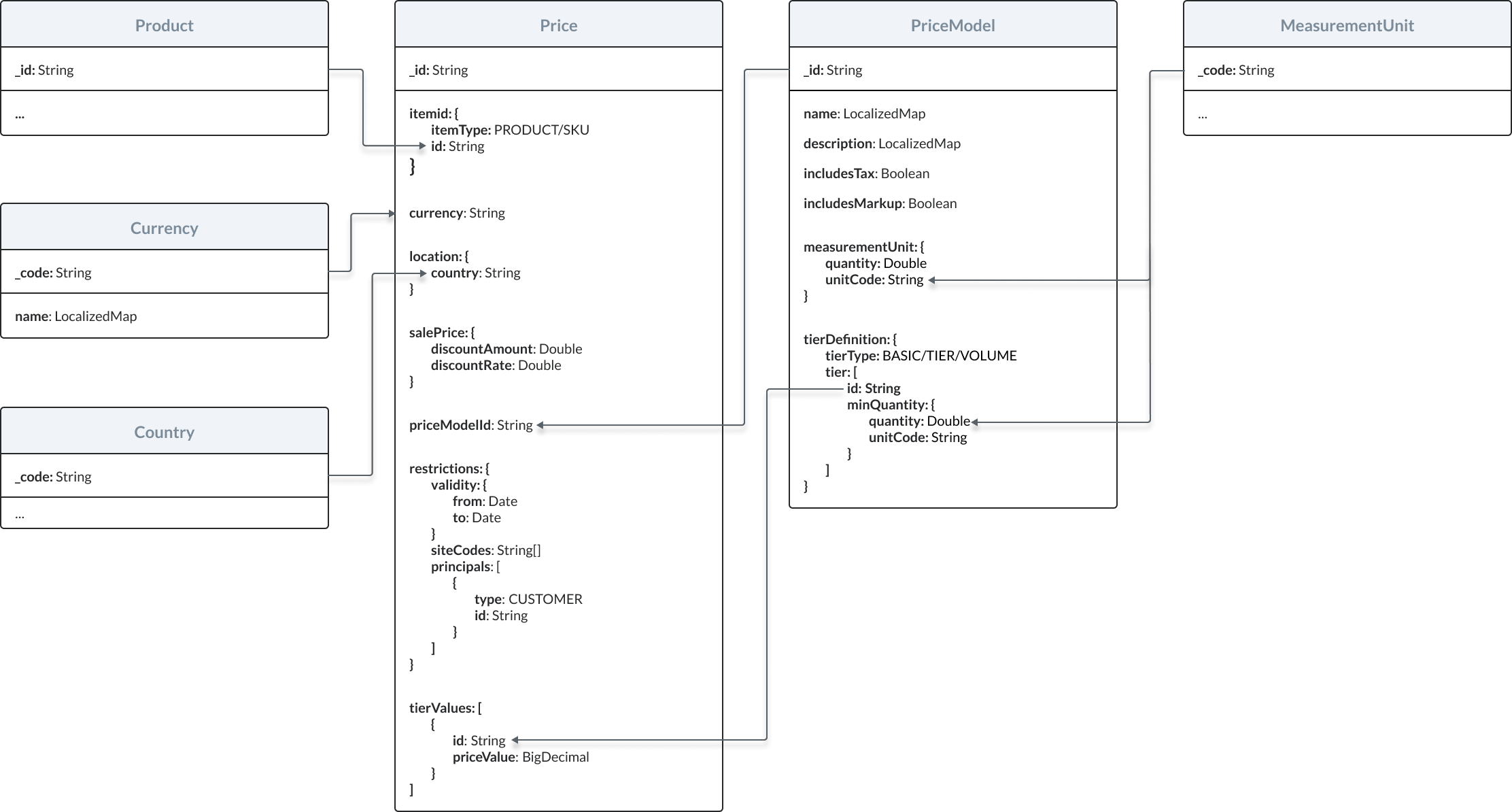
Take a look at the relationships between prices and other resources in the Emporix Commerce Engine.
This tutorial will walk you through the following steps:
1. [Specifying accepted currencies](#specify-accepted-currencies).
2. [Creating a price model](#create-a-price-model).
3. [Retrieving a tier ID](#retrieve-a-tier-id).
4. [Defining a price](#define-the-price).
{% hint style="warning" %}
The tutorial skips the step of creating a new measurement unit as your Emporix tenant is configured with the most commonly used measurement units out-of-the-box.
To learn more about measurement units in the Emporix Commerce Engine, check out the [Measurement units guide](https://developer.emporix.io/user-guides/core-commerce/unit-handling/unit-handling).
{% endhint %}
### Specify accepted currencies
Each currency accepted by your business is stored as a separate object that can be managed through the Emporix API [Currency Service](https://github.com/emporix/api-references/blob/main/openapi/currency/README.md).
To add a new entry to your configuration of currencies, you need to send a request to the Creating a new currency endpoint.
{% hint style="success" %}
To test the endpoint, open the API reference below or check the example of a curl request.
{% endhint %}
{% content-ref url="api-reference" %}
[api-reference](https://developer.emporix.io/api-references/~/changes/115/prices-and-taxes/price-service/api-reference)
{% endcontent-ref %}
```bash
curl -i -X POST \
'https://api.emporix.io/currency/{tenant}/currencies' \
-H 'Authorization: Bearer ' \
-H 'Content-Language: de' \
-H 'Content-Type: application/json' \
-d '{
"code": "EUR",
"name": {
"en": "Euro",
"pl": "Euro"
}
}'
```
### Create a price model
A price model defines a repeatable way to sell products. You can create separate price models depending on measurement units for which prices are expressed or depending on products' pricing strategies.
{% hint style="warning" %}
To learn more about price models in the Emporix Commerce Engine, check out the [Pricing guide](https://developer.emporix.io/user-guides/core-commerce/pricing/pricing-v2#price-models).
{% endhint %}
To create a new price model, you need to send a request to the Creating a new price model endpoint.
{% hint style="success" %}
To test the endpoint, open the API reference below or check the example of a curl request.
{% endhint %}
{% content-ref url="api-reference" %}
[api-reference](https://developer.emporix.io/api-references/~/changes/115/prices-and-taxes/price-service/api-reference)
{% endcontent-ref %}
```bash
curl -i -X POST \
'https://api.emporix.io/price/{tenant}/priceModels' \
-H 'Authorization: Bearer ' \
-H 'Content-Language: string' \
-H 'Content-Type: application/json' \
-d '{
"includesTax": true,
"includesMarkup": false,
"name": {
"en": "Price model - per piece",
"de": "Preismodell - pro Stück"
},
"description": {
"en": "Price model for goods sold by the piece.",
"de": "Preismodell für stückweise verkaufte Ware."
},
"tierDefinition": {
"tierType": "BASIC",
"tiers": [
{
"minQuantity": {
"quantity": 0,
"unitCode": "pc"
}
}
]
},
"measurementUnit": {
"quantity": 1,
"unitCode": "pc"
}
}'
```
### Retrieve a tier ID
When specifying a price for a product, you need to reference two values from a corresponding price model:
* ID of the price model
* ID of the model's relevant pricing tier
Price models that use the basic pricing strategy have one tier. To retrieve its ID, you need to send a request to the Retrieving a price model endpoint.
{% hint style="success" %}
To test the endpoint, open the API reference below or check the example of a curl request.
{% endhint %}
{% content-ref url="api-reference" %}
[api-reference](https://developer.emporix.io/api-references/~/changes/115/prices-and-taxes/price-service/api-reference)
{% endcontent-ref %}
```bash
curl -i -X GET \
'https://api.emporix.io/price/{tenant}/priceModels/{priceModelId}' \
-H 'Accept-Language: string' \
-H 'Authorization: Bearer '
```
The ID can be found in the `tierDefinition.tiers.id` field.
### Define the price
To define a new price for a product, you need to send a request to the Creating a new price endpoint.
{% hint style="success" %}
To test the endpoint, open the API reference below or check the example of a curl request.
{% endhint %}
{% content-ref url="api-reference" %}
[api-reference](https://developer.emporix.io/api-references/~/changes/115/prices-and-taxes/price-service/api-reference)
{% endcontent-ref %}
```bash
curl -i -X POST \
'https://api.emporix.io/price/{tenant}/prices' \
-H 'Authorization: Bearer ' \
-H 'Content-Language: string' \
-H 'Content-Type: application/json' \
-d '{
"id": "6245aa0a78a8576e338fa9c4",
"itemId": {
"itemType": "PRODUCT",
"id": " "
},
"currency": "EUR",
"location": {
"countryCode": "DE"
},
"priceModelId": " ",
"restrictions": {
"siteCodes": [
"main"
]
},
"tierValues": [
{
"priceValue": 15.99
}
]
}'
```
***
## How to implement different pricing strategies
{% hint style="warning" %}
To learn more about pricing strategies available in the Emporix Commerce Engine, check out the [Pricing guide](https://developer.emporix.io/user-guides/core-commerce/pricing/pricing-v2#price-models).
{% endhint %}
Implementing any pricing strategy is a process made up of three steps:
1. Creating a `PriceModel` object through the Creating a price model endpoint.
2. Retrieving IDs of the model's pricing tiers through the Retrieving a price model endpoint.
3. Creating a `Price` object through the Creating a price endpoint.
### Before you start
Make sure you have already finished the [How to set up your first price](#how-to-set-up-your-first-price) tutorial.
### Basic pricing
To define basic pricing in a `PriceModel` object, you need to perform the following actions:
* Set the `tierDefinition.tierType` field to `"BASIC"`.
* Add a single tier to the `tiers` array and set its `quantity` field to `0`.
Here's an example of a request body for a basic price model:
```json
{
"name": "Basic pricing - per piece.",
"description": "Basic price model for goods sold by the piece.",
"includesTax": true,
"includesMarkup": false,
"measurementUnit": {
"quantity": 1,
"unitCode": "pc"
},
"tierDefinition": {
"tierType": "BASIC",
"tiers": [
{
"minQuantity": {
"quantity": 0,
"unitCode": "pc"
}
}
]
}
}
```
To create a `Price` object for basic pricing, you need to perform the following actions:
* Set the `priceModelId` field to the basic price model's ID.
* Retrieve the price model's `tierDefinition.tiers.id` value.
* Add a single object to the `tierValues` array.
Here's an example of a request body for a basic price:
```json
{
"itemId": {
"itemType": "PRODUCT",
"id": "624c3a5c3c4f072b9460bb7a"
},
"currency": "EUR",
"location": {
"countryCode": "DE"
},
"priceModelId": "624c28503406122baacc7e92",
"restrictions": {
"validity": {
"from": "2022-04-01T00:00:00Z"
},
"siteCodes": [
"main"
]
},
"tierValues": [
{
"id": "425e4055-1720-4933-a789-6076a455f255",
"priceValue": "629.00"
}
]
}
```
### Tiered and volume pricing
To create a price model for tiered or volume pricing, you need to perform the following actions:
* Set the `tierDefinition.tierType` field to `"TIERED"` or `"VOLUME"`, respectively.
* Define quantities for pricing tiers in the `tiers` array.
{% hint style="danger" %}
When defining pricing tiers, be aware of the following restrictions to the `PriceModel` object:
* Each `minQuantity.quantity` field must contain a unique value.
* The tiers must be defined in an ascending order based on their `quantity` value.
* The `quantity` field in the first tier must be set to `0`.
* All `unitCode` fields must contain the same value.
{% endhint %}
Here are examples of request bodies for tiered and volume price model:
```json
{
"name": "Tiered pricing - per kilogram",
"description": "Tiered price model for goods sold by the kilogram.",
"includesTax": true,
"includesMarkup": false,
"measurementUnit": {
"quantity": 1,
"unitCode": "kg"
},
"tierDefinition": {
"tierType": "TIERED",
"tiers": [
{
"minQuantity": {
"quantity": 0,
"unitCode": "kg"
}
},
{
"minQuantity": {
"quantity": 5,
"unitCode": "kg"
}
},
{
"minQuantity": {
"quantity": 10,
"unitCode": "kg"
}
}
]
}
}
```
```json
{
"name": "Volume pricing - per 100 gram",
"description": "Volume price model for goods sold by 100 gram.",
"includesTax": true,
"includesMarkup": false,
"measurementUnit": {
"quantity": 100,
"unitCode": "g"
},
"tierDefinition": {
"tierType": "VOLUME",
"tiers": [
{
"minQuantity": {
"quantity": 0,
"unitCode": "g"
}
},
{
"minQuantity": {
"quantity": 500,
"unitCode": "g"
}
},
{
"minQuantity": {
"quantity": 1000,
"unitCode": "g"
}
}
]
}
}
```
To create a `Price` object for tiered or volume pricing, you need to perform the following actions:
* Set the `priceModelId` field to the corresponding price model's ID.
* Retrieve the price model's `tierDefinition.tiers.id` values.
* Add an object for each tier to the `tierValues` array.
Here's an example of a request body for a tiered and volume-based price:
```json
{
"itemId": {
"itemType": "PRODUCT",
"id": "624c3a5c3c4f072b9460bb7a"
},
"currency": "EUR",
"location": {
"countryCode": "DE"
},
"restrictions": {
"validity": {
"from": "2022-04-01T00:00:00.000Z"
},
"siteCodes": [
"main"
]
},
"priceModelId": "624ec1b03406122baacc7e94",
"tierValues": [
{
"id": "bad42e2f-37d1-49df-8ad9-1045e4c09e9b",
"priceValue": "3.00"
},
{
"id": "474fb617-02f7-47d2-91a6-a4a602b73518",
"priceValue": "2.00"
},
{
"id": "7b819c35-2dc6-4a27-ae1d-2a4d7dc1d5b1",
"priceValue": "1.00"
}
]
}
```
***
## How to personalize prices
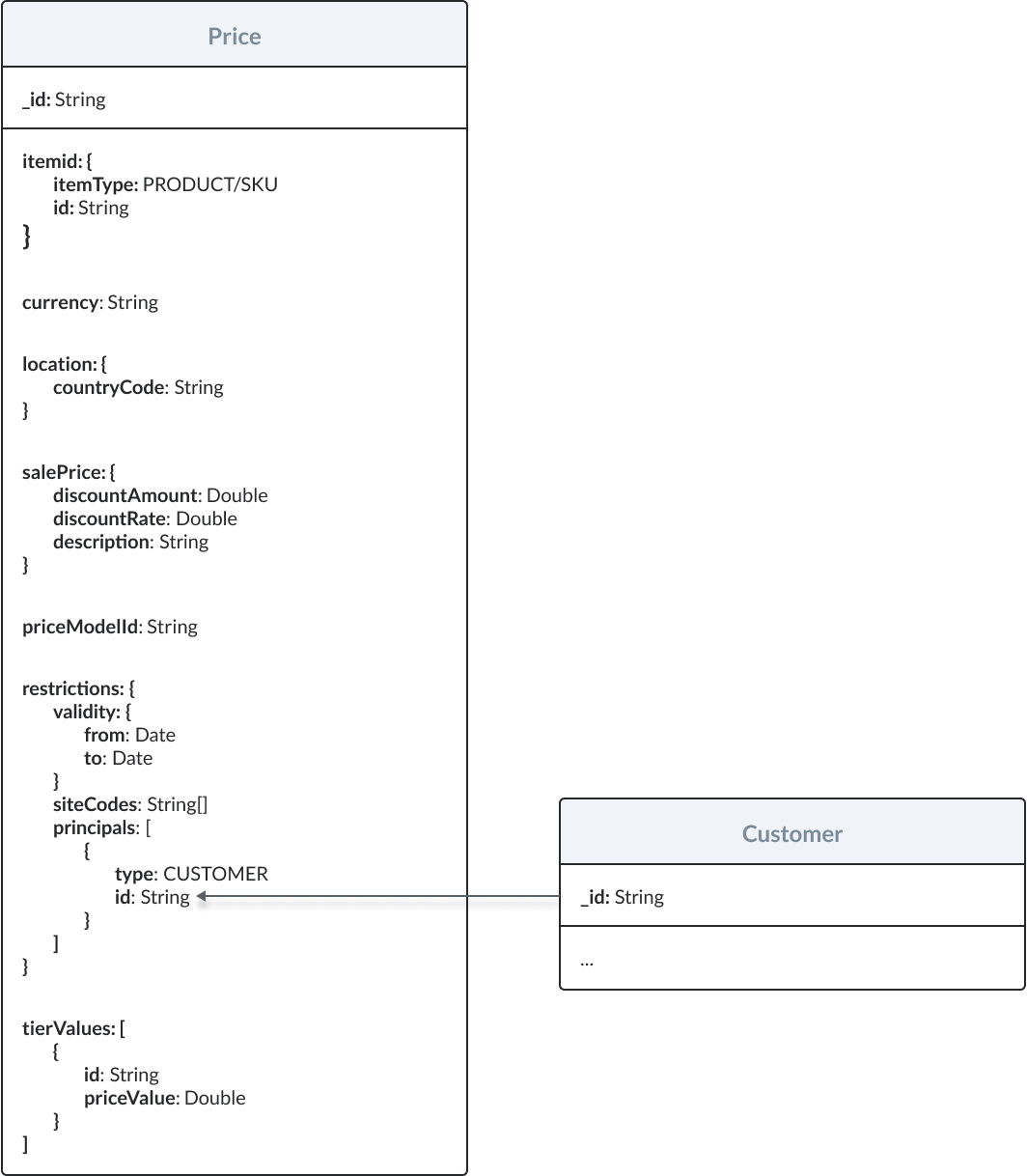
Take a look at the relationship between prices and customers in the Emporix Commerce Engine:
To make a price valid only for specific customers, you need to add their IDs to the `principals` array inside an applicable `Price` object.
{% hint style="warning" %}
`Customer` objects are managed through the Emporix API [Customer Service](https://github.com/emporix/api-references/blob/main/openapi/customer-tenant/README.md).
{% endhint %}
Here's an example of a customer-restricted price:
```json
{
"itemId": {
"itemType": "PRODUCT",
"id": "5f5a1fe55bac380024b936ad"
},
"currency": "EUR",
"location" : {
"countryCode": "DE"
},
"priceModelId": "624db246d2730b6011dbfd74",
"restrictions": {
"principals": [
{
"type": "CUSTOMER",
"id": "71842741" // customer's ID generated by the Customer Service
}
],
"siteCodes": [
"main"
]
},
"tierValues": [
{
"id": "7b819c35-2dc6-4a27-ae1d-2a4d7dc1d5b1",
"priceValue": "2.34"
}
]
}
```
***
## How to configure a price list
Price lists allow you to create personalized sets of prices for selected products. You can manage price lists and their prices through the Emporix API Price Service.
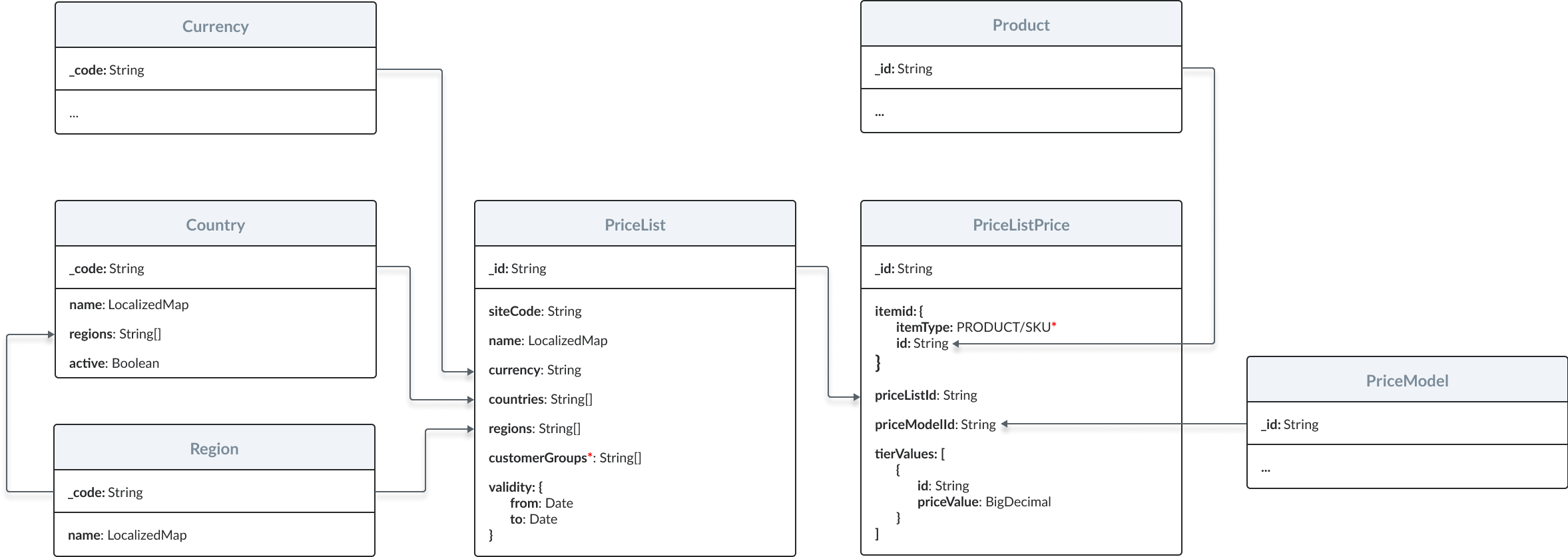
Take a look at the relationships between price lists and other resources in the Emporix Commerce Engine.
{% hint style="warning" %}
Countries and regions are predefined in the Emporix API Country Service. You can check which countries and regions are available by sending requests to the following endpoints:
* Retrieving all countries
* Retrieving all regions
{% endhint %}
### Before you start
Make sure you have already finished the [How to set up your first price](#how-to-set-up-your-first-price) tutorial.
### Create a price list
Price lists are site-specific. You can restrict a price list to particular groups of customers with the `countries`, `regions`, and `customerGroups` fields, and make the list time-limited with the `validity` field.
Prices in a list can be expressed in a different currency than originally defined for the list's products.
To create a new price list, you need to send a request to the Creating a new price list endpoint.
{% hint style="danger" %}
Make sure to set a value for the `currency` field in the request body. Otherwise, the endpoint will respond with a `400` error.
{% endhint %}
{% hint style="success" %}
To test the endpoint, open the API reference below or check the example of a curl request.
{% endhint %}
{% content-ref url="api-reference" %}
[api-reference](https://developer.emporix.io/api-references/~/changes/115/prices-and-taxes/price-service/api-reference)
{% endcontent-ref %}
```bash
curl -i -X POST \
'https://api.emporix.io/price/{tenant}/price-lists' \
-H 'Authorization: Bearer ' \
-H 'Content-Language: string' \
-H 'Content-Type: application/json' \
-d '{
"name": {
"en": "Germany price list"
},
"currency": "EUR",
"countries": [
"DE"
],
"customerGroups": [
" "
],
"siteCode": "main",
"validity": {
"from": "2022-05-01T00:00:00.000Z",
"to": "2025-05-01T00:00:00.000Z"
}
}'
```
### Create a price in the list
Prices in lists are structured differently from catalog prices. Catalog prices are the ones defined for products in `Price` objects, as opposed to `PriceListPrice` objects. While each catalog price can be personalized on its own, the validity of all prices in a list is determined by the list's restrictions. A price in a price list needs to reference a relevant product, price model, and pricing tiers.
{% hint style="danger" %}
A single price list can be associated with multiple regions or countries. For this reason, all prices within a list are treated as net values, regardless of the `includesTax` value in their indicated price models.
{% endhint %}
To create a new list-specific price, you need to send a request to the Adding a new price to a price list endpoint.
{% hint style="success" %}
To test the endpoint, open the API reference below or check the example of a curl request.
{% endhint %}
{% content-ref url="api-reference" %}
[api-reference](https://developer.emporix.io/api-references/~/changes/115/prices-and-taxes/price-service/api-reference)
{% endcontent-ref %}
```bash
curl -i -X POST \
'https://api.emporix.io/price/{tenant}/price-lists/{priceListId}/prices' \
-H 'Authorization: Bearer ' \
-H 'Content-Type: application/json' \
-d '{
"itemId": {
"itemType": "PRODUCT",
"id": " "
},
"priceModelId": " ",
"tierValues": [
{
"priceValue": "16.99",
"id": " "
},
{
"priceValue": "15.99",
"id": " "
},
{
"priceValue": "14.99",
"id": " "
}
]
}'
```
{% hint style="warning" %}
Bulk price creation
You can add multiple prices to a list at once by sending a request to the Creating multiple prices for a price list endpoint.
{% endhint %}
***
## How to use the price matching functionality
The price matching functionality compares all prices defined for specified products and retrieves the best ones based on a set of criteria. The criteria include:
* `targetCurrency` — Currency in which the prices should be returned.
{% hint style="danger" %}
If you want the price matching functionality to compare prices expressed in multiple currencies, you need to define exchange rates between these currencies and the `targetCurrency` through the Creating a new exchange rate endpoint.
{% endhint %}
* `siteCode` — Site for which the prices will be matched. The price matching functionality will only compare prices assigned to this site.
* `targetLocation` — Country for which the prices should be returned.
* `items` — List of products (and their quantities) for which the prices should be compared.
* `principal` — Customer to whom the prices should apply. When specified, the price matching functionality will compare both non-personalized prices as well as the ones offered exclusively to the specified customer.
* `useFallback` — If no price that matches the criteria is found for the specified site, the price matching functionality will try to find the best price for the main site. To enable this option, this field needs to be set to `true`.
Prices are stored in the system as defined in the price model, with no initial net or gross calculations. Calculations occur during the PriceMatch and PriceSearch algorithms. However, PriceSearch is related to catalog prices only.
The `includesTax` setting, defined at the site or price model level, determines if the algorithm returns net or gross prices. The tax service then manages specific cases:
* Gross to Net: Returns a net price from a gross price for a specific country.
* Net to Gross: Converts a net price to a gross price using a country's specific tax class.
* Gross to Gross: Adjusts a gross price between countries by first converting to net, then applying the destination country's tax class.
To find out how the price matching functionality works in detail, check out the flowchart.
{% hint style="warning" %}
The process shown in the flowchart is repeated for each product indicated in the request.
{% endhint %}
To find out how the price matching functionality works in detail, check out the flowchart.
{% hint style="warning" %}
To check out the flowchart for the *Look for the best price in price lists* subprocess, check out the [Influence of price lists on price matching](#influence-of-price-lists-on-price-matching) section.
{% endhint %}
### Influence of price lists on price matching
Price lists take precedence over catalog prices. Catalog prices are the ones defined for products in `Price` objects, as opposed to `PriceListPrice` objects. If there are price lists that match the request criteria, the price matching algorithm checks whether these lists contain prices for requested products before searching through catalog prices.
To find out how the price matching functionality handles price lists, check out the flowchart.
### Before you start
Make sure you have already finished the [How to set up your first price](#how-to-set-up-your-first-price) tutorial.
### Create a product
Create a sample product through the Creating a new product endpoint. For this tutorial, we've chosen bananas as an example:
{% hint style="success" %}
To test the endpoint, open the API reference below or check the example of a curl request.
{% endhint %}
{% content-ref url="api-reference" %}
[api-reference](https://developer.emporix.io/api-references/~/changes/115/prices-and-taxes/price-service/api-reference)
{% endcontent-ref %}
```bash
curl -i -X POST \
'https://api.emporix.io/product/{tenant}/products?skipVariantGeneration=false&doIndex=true' \
-H 'Authorization: Bearer ' \
-H 'Content-Language: string' \
-H 'Content-Type: application/json' \
-d '{
"name": {
"en": "Bananas"
},
"code": "BANANAS_KG",
"description": {
"en": "Fresh bananas. Yum!"
},
"published": true,
"taxClasses": {
"EN": "STANDARD",
"DE": "STANDARD"
},
"productType": "BASIC",
"template": {
"id": "634cea2740033d7c2e7b03a8",
"version": 1
},
"relatedItems": [
{
"refId": "634cea2740033d7c2e7b03a9",
"type": "CONSUMABLE"
}
],
"mixins": {
"salePricesData": [
{
"salePriceStart": "2021-07-20T22:00:00.000+0000",
"salePriceAmount": 6.7,
"salePriceEnd": "2021-07-25T21:59:59.000+0000",
"enabled": false
}
],
"productCustomAttributes": {
"pricingMeasurePrice": 13,
"unitPricingMeasure": {
"value": 133,
"unitCode": "GRM"
},
"unitPricingBaseMeasure": {
"value": 100,
"unitCode": "GRM"
},
"pricingMeasure": {
"value": 100,
"unitCode": "GRM"
},
"orderUnit": "H87",
"minOrderQuantity": 2,
"maxOrderQuantity": 10,
"defaultOrderQuantity": 5
}
},
"metadata": {
"mixins": {
"productCustomAttributes": "https://res.cloudinary.com/saas-ag/raw/upload/schemata/productCustomAttributesMixIn.v29.json",
"salePricesData": "https://res.cloudinary.com/saas-ag/raw/upload/schemata/salePriceData.json"
}
}
}'
```
### Define multiple prices
Now, define a couple of prices that the price matching functionality will be able to compare.
Start with defining a price model with Creating a price model endpoint where the bananas' price per kilogram is constant regardless of the ordered quantity:
{% hint style="success" %}
To test the endpoint, open the API reference below or check the example of a curl request.
{% endhint %}
{% content-ref url="api-reference" %}
[api-reference](https://developer.emporix.io/api-references/~/changes/115/prices-and-taxes/price-service/api-reference)
{% endcontent-ref %}
```bash
curl -i -X POST \
'https://api.emporix.io/price/{tenant}/priceModels' \
-H 'Authorization: Bearer ' \
-H 'Content-Language: string' \
-H 'Content-Type: application/json' \
-d '{
"includesTax": true,
"includesMarkup": false,
"name": {
"en": "Bananas - basic pricing",
"de": " "
},
"description": {
"en": "Basic price model for bananas.",
"de": " "
},
"tierDefinition": {
"tierType": "BASIC",
"tiers": [
{
"minQuantity": {
"quantity": 0,
"unitCode": "kg"
}
}
]
},
"measurementUnit": {
"quantity": 1,
"unitCode": "kg"
}
}'
```
Now, retrieve the automatically-generated ID of the pricing tier, use the Retrieve a price model endpoint
{% hint style="success" %}
To test the endpoint, open the API reference below or check the example of a curl request.
{% endhint %}
{% content-ref url="api-reference" %}
[api-reference](https://developer.emporix.io/api-references/~/changes/115/prices-and-taxes/price-service/api-reference)
{% endcontent-ref %}
```bash
curl -i -X GET \
'https://api.emporix.io/price/{tenant}/priceModels/{priceModelId}' \
-H 'Accept-Language: string' \
-H 'Authorization: Bearer '
```
Once you know the tier ID, define a price for the bananas, use the Creating a new price endpoint:
{% hint style="success" %}
To test the endpoint, open the API reference below or check the example of a curl request.
{% endhint %}
{% content-ref url="api-reference" %}
[api-reference](https://developer.emporix.io/api-references/~/changes/115/prices-and-taxes/price-service/api-reference)
{% endcontent-ref %}
```bash
curl -i -X POST \
'https://api.emporix.io/price/{tenant}/prices' \
-H 'Authorization: Bearer ' \
-H 'Content-Language: string' \
-H 'Content-Type: application/json' \
-d '{
"id": "6245aa0a78a8576e338fa9c4",
"itemId": {
"itemType": "PRODUCT",
"id": " "
},
"currency": "EUR",
"location": {
"countryCode": "DE"
},
"priceModelId": " ",
"restrictions": {
"siteCodes": [
"main"
]
},
"tierValues": [
{
"priceValue": "1.50",
"id": " "
}
]
}'
```
Then, define a price model where the price per kilogram changes based on the ordered quantity:
{% hint style="success" %}
To test the endpoint, open the API reference below or check the example of a curl request.
{% endhint %}
{% content-ref url="api-reference" %}
[api-reference](https://developer.emporix.io/api-references/~/changes/115/prices-and-taxes/price-service/api-reference)
{% endcontent-ref %}
```bash
curl -i -X POST \
'https://api.emporix.io/price/{tenant}/priceModels' \
-H 'Authorization: Bearer ' \
-H 'Content-Language: string' \
-H 'Content-Type: application/json' \
-d '{
"name": {
"en": "Bananas - volume pricing"
},
"description": {
"en": "Volume price model for bananas."
},
"includesTax": true,
"includesMarkup": false,
"measurementUnit": {
"quantity": 1,
"unitCode": "kg"
},
"tierDefinition": {
"tierType": "VOLUME",
"tiers": [
{
"minQuantity": {
"quantity": 0,
"unitCode": "kg"
}
},
{
"minQuantity": {
"quantity": 5,
"unitCode": "kg"
}
},
{
"minQuantity": {
"quantity": 10,
"unitCode": "kg"
}
}
]
}
}'
```
Now, retrieve the automatically-generated IDs of the pricing tiers, use the Retrieve a price model endpoint
{% hint style="success" %}
To test the endpoint, open the API reference below or check the example of a curl request.
{% endhint %}
{% content-ref url="api-reference" %}
[api-reference](https://developer.emporix.io/api-references/~/changes/115/prices-and-taxes/price-service/api-reference)
{% endcontent-ref %}
```bash
curl -i -X GET \
'https://api.emporix.io/price/{tenant}/priceModels/{priceModelId}' \
-H 'Accept-Language: string' \
-H 'Authorization: Bearer '
```
Once you know the tier IDs, define another price for the bananas, use the Creating a new price endpoint
{% hint style="success" %}
To test the endpoint, open the API reference below or check the example of a curl request.
{% endhint %}
{% content-ref url="api-reference" %}
[api-reference](https://developer.emporix.io/api-references/~/changes/115/prices-and-taxes/price-service/api-reference)
{% endcontent-ref %}
```bash
curl -i -X POST \
'https://api.emporix.io/price/{tenant}/prices' \
-H 'Authorization: Bearer ' \
-H 'Content-Language: string' \
-H 'Content-Type: application/json' \
-d '{
"id": "6245aa0a78a8576e338fa9c4",
"itemId": {
"itemType": "PRODUCT",
"id": " "
},
"currency": "EUR",
"location": {
"countryCode": "DE"
},
"priceModelId": "6245a8f578a8576e338fa9c3",
"restrictions": {
"siteCodes": [
"main"
]
},
"tierValues": [
{
"priceValue": "1.50",
"id": " "
},
{
"priceValue": "1.25",
"id": " "
},
{
"priceValue": "1.00",
"id": " "
}
]
}'
```
### Find the best price
Now that you have defined multiple prices for the bananas, you can send a request to the Matching prices for specific attributes endpoint to find which price is the lowest.
Check the best price for both one kilogram and ten kilograms of bananas:
{% hint style="success" %}
To test the endpoint, open the API reference below or check the example of a curl request.
{% endhint %}
{% content-ref url="api-reference" %}
[api-reference](https://developer.emporix.io/api-references/~/changes/115/prices-and-taxes/price-service/api-reference)
{% endcontent-ref %}
```bash
curl -i -X POST \
'https://api.emporix.io/price/{tenant}/match-prices' \
-H 'Authorization: Bearer ' \
-H 'Content-Type: application/json' \
-d '{
"targetCurrency": "EUR",
"siteCode": "main",
"targetLocation": {
"countryCode": "DE"
},
"items": [
{
"itemId": {
"itemType": "PRODUCT",
"id": " "
},
"quantity": {
"quantity": 1,
"unitCode": "kg"
}
},
{
"itemId": {
"itemType": "PRODUCT",
"id": " "
},
"quantity": {
"quantity": 10,
"unitCode": "kg"
}
}
]
}'
```
The lowest prices are returned in the `priceId` fields. The total price for defined quantities is returned in the `totalValue` fields.
***
## How to calculate gross prices between countries
You can calculate gross prices between countries through the Matching prices for specific attributes endpoint.
{% hint style="warning" %}
This tutorial presents how to calculate gross prices between countries based on `Price` objects.
To learn how to calculate gross prices between countries based on specific values, check out [*How to calculate gross values between countries*](https://github.com/emporix/api-references/blob/main/content/tax/README.md#how-to-calculate-gross-values-between-countries) tutorial in the Tax classes — Developer Guide.
{% endhint %}
### Before you start
Make sure you have already finished the [How to set up your first price](#how-to-set-up-your-first-price) tutorial.
### Define sales tax rates for the desired country
Gross prices between countries are calculated based on these countries' sales tax rates.
Define sales tax rates for the desired country by sending a request to the Creating a new tax configuration endpoint.
{% hint style="success" %}
To test the endpoint, open the API reference below or check the example of a curl request.
{% endhint %}
{% content-ref url="api-reference" %}
[api-reference](https://developer.emporix.io/api-references/~/changes/115/prices-and-taxes/price-service/api-reference)
{% endcontent-ref %}
```bash
curl -i -X POST \
'https://api.emporix.io/tax/{tenant}/taxes' \
-H 'Authorization: Bearer ' \
-H 'Content-Language: string' \
-H 'Content-Type: application/json' \
-d '{
"location": {
"countryCode": "AT"
},
"taxClasses": [
{
"code": "STANDARD",
"name": {
"en": "Standard"
},
"order": 0,
"rate": 20,
"isDefault": true
},
{
"code": "REDUCED_13",
"name": {
"en": "Reduced - 13%"
},
"order": 0,
"rate": 13
},
{
"code": "REDUCED_10",
"name": {
"en": "Reduced - 10%"
},
"order": 0,
"rate": 10
},
{
"code": "ZERO",
"name": {
"en": "Zero"
},
"order": 0,
"rate": 0
}
]
}'
```
### Update the product's tax classes
When calculating a gross price for another country, the price matching functionality checks tax classes assigned to the product that the original price is defined for.
To update a product with applicable tax classes, send a request to the Partially updating a product endpoint.
{% hint style="success" %}
To test the endpoint, open the API reference below or check the example of a curl request.
{% endhint %}
{% content-ref url="api-reference" %}
[api-reference](https://developer.emporix.io/api-references/~/changes/115/prices-and-taxes/price-service/api-reference)
{% endcontent-ref %}
```bash
curl -i -X PATCH \
'https://api.emporix.io/product/{tenant}/products/{productId}?skipVariantGeneration=false&doIndex=true' \
-H 'Authorization: Bearer ' \
-H 'Content-Language: string' \
-H 'Content-Type: application/json' \
-d '{
"published": true,
"taxClasses": {
"DE": "STANDARD",
"AT": "STANDARD"
},
"metadata": {}
}'
```
### Calculate the price for the desired country
To calculate a gross price between countries, send a request to the Matching prices for specific attributes endpoint.
{% hint style="success" %}
To test the endpoint, open the API reference below or check the example of a curl request.
{% endhint %}
{% content-ref url="api-reference" %}
[api-reference](https://developer.emporix.io/api-references/~/changes/115/prices-and-taxes/price-service/api-reference)
{% endcontent-ref %}
```bash
curl -i -X POST \
'https://api.emporix.io/price/{tenant}/match-prices' \
-H 'Authorization: Bearer ' \
-H 'Content-Type: application/json' \
-d '{
"targetCurrency": "EUR",
"siteCode": "main",
"targetLocation": {
"countryCode": "AT"
},
"items": [
{
"itemId": {
"itemType": "PRICE",
"id": " "
},
"quantity": {
"quantity": 1,
"unitCode": "pc"
}
}
]
}'
```
The gross price calculated for the specified country is returned in the `totalValue` field.
***
## How to retrieve a price in another currency
You can calculate a price's value in another currency through the Matching prices for specific attributes endpoint.
### Before you start
Make sure you have already finished the [How to set up your first price](#how-to-set-up-your-first-price) tutorial.
### Add a new currency
Add the currency in which the price will be retrieved to your configuration of currencies by sending a request to the Creating a new currency endpoint.
{% hint style="success" %}
To test the endpoint, open the API reference below or check the example of a curl request.
{% endhint %}
{% content-ref url="api-reference" %}
[api-reference](https://developer.emporix.io/api-references/~/changes/115/prices-and-taxes/price-service/api-reference)
{% endcontent-ref %}
```bash
curl -i -X POST \
'https://api.emporix.io/currency/{tenant}/currencies' \
-H 'Authorization: Bearer ' \
-H 'Content-Language: de' \
-H 'Content-Type: application/json' \
-d '{
"code": "USD",
"name": {
"en": "United States Dollar",
"pl": "Dolar amerykański",
"de": "US-Dollar"
}
}'
```
### Define a currency exchange rate
When calculating a price in another currency, the price matching functionality checks the defined exchange rate between the desired currency and the one in which price is originally expressed.
{% hint style="danger" %}
Important
Currently, the exchange rates are defined statically and are not influenced by actual currency exchange rates. If you want the statically defined exchange rates to reflect the actual rates more closely, you will need to manually update these on a regular basis.
{% endhint %}
To define a new exchange rate, send a request to the Creating a new exchange rate endpoint:
{% hint style="success" %}
To test the endpoint, open the API reference below or check the example of a curl request.
{% endhint %}
{% content-ref url="api-reference" %}
[api-reference](https://developer.emporix.io/api-references/~/changes/115/prices-and-taxes/price-service/api-reference)
{% endcontent-ref %}
```bash
curl -i -X POST \
'https://api.emporix.io/currency/{tenant}/exchanges' \
-H 'Authorization: Bearer ' \
-H 'Content-Type: application/json' \
-d '{
"sourceCurrency": "EUR",
"targetCurrency": "USD",
"rate": "1.00"
}'
```
### Retrieve a price in the desired currency
To retrieve a price in the desired currency, send a request to the Matching prices for specific attributes endpoint.
{% hint style="success" %}
To test the endpoint, open the API reference below or check the example of a curl request.
{% endhint %}
{% content-ref url="api-reference" %}
[api-reference](https://developer.emporix.io/api-references/~/changes/115/prices-and-taxes/price-service/api-reference)
{% endcontent-ref %}
```bash
curl -i -X POST \
'https://api.emporix.io/price/{tenant}/match-prices' \
-H 'Authorization: Bearer ' \
-H 'Content-Type: application/json' \
-d '{
"targetCurrency": "USD",
"siteCode": "main",
"targetLocation": {
"countryCode": "DE"
},
"items": [
{
"itemId": {
"itemType": "PRICE",
"id": " "
},
"quantity": {
"quantity": 1,
"unitCode": "pc"
}
}
]
}'
```
The price calculated in the specified currency is returned in the `totalValue` field.
***
## How to configure a site to express all prices as net values
When you retrieve prices through the Retrieving all prices endpoint, their values will be gross or net based on the `includesTax` value specified in these prices' models.
To retrieve prices as gross or net based on their sites' settings, you need to retrieve them with the [price matching functionality](#how-to-use-the-price-matching-functionality).
To always retrieve prices for a particular site as net values, you need to set that site's `includesTax` field to `false`.
{% hint style="warning" %}
If you don't specify a site's `includesTax` value, the price matching functionality will return a price as gross or net based on the `includesTax` value specified in the price's model.
{% endhint %}
You can manage your sites through the Emporix API [Site Settings Service](https://github.com/emporix/api-references/blob/main/openapi/site-settings/README.md).
### Update your site's `includesTax` field
To add or update the `includesTax` field in your site's settings, you need to send a request to the Partially updating a site endpoint.
{% hint style="success" %}
To test the endpoint, open the API reference below or check the example of a curl request.
{% endhint %}
{% content-ref url="api-reference" %}
[api-reference](https://developer.emporix.io/api-references/~/changes/115/prices-and-taxes/price-service/api-reference)
{% endcontent-ref %}
```bash
curl -i -X PATCH \
'https://api.emporix.io/site/{tenant}/sites/{siteCode}' \
-H 'Authorization: Bearer ' \
-H 'Content-Type: application/json' \
-d '{
"defaultLanguage": "en",
"includesTax": true
}'
```
***