# Product Tutorial
## How to add your first products
{% hint style="warning" %}
This tutorial presents how to create a basic product. To learn more about types of products available in the Emporix Commerce Engine, check out the [Products guide](https://developer.emporix.io/user-guides/core-commerce/products/product-user-guide#overview).
{% endhint %}
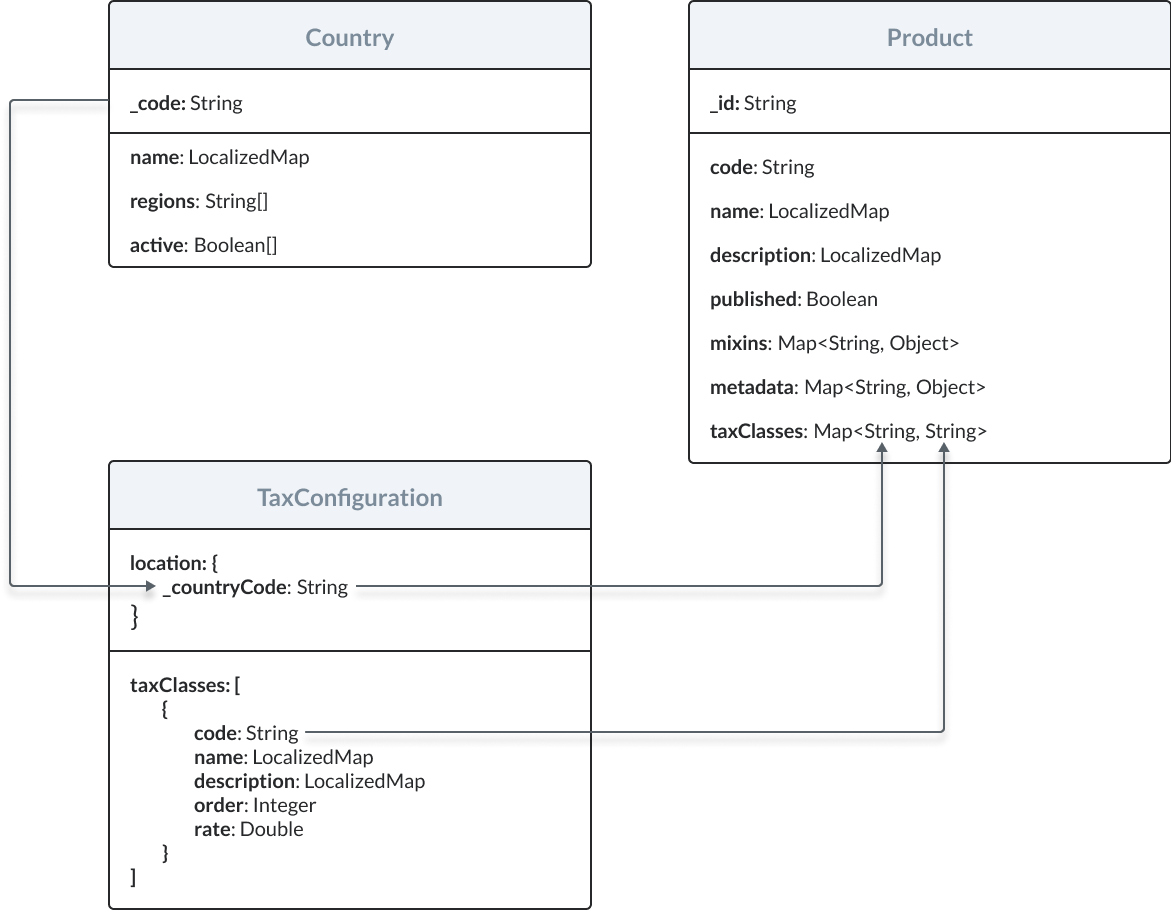
Take a look at the relationships between prices and other resources in the Emporix Commerce Engine:
{% hint style="warning" %}
Countries and regions are predefined in the Emporix API Country Service. You can check which countries and regions are available by sending requests to the following endpoints:
* Retrieving all countries
* Retrieving all regions
{% endhint %}
Adding your first product is a process made up of two main steps:
1. [Defining sales tax rates](#define-sales-tax-rates).
2. [Adding products](#add-products).
3. [Adding media files for a product](#add-media-for-a-product).
### Define sales tax rates
Sales tax rates are stored in tax configurations. Each configuration indicates a country and defines tax classes applicable to it.
You can manage your tax configurations through the Emporix API [Tax Service](https://github.com/emporix/api-references/blob/main/openapi/tax/README.md).
{% hint style="warning" %}
For more information, check out the [Tax classes guide](https://developer.emporix.io/user-guides/core-commerce/taxes/taxes-v2).
{% endhint %}
To define sales tax rates for a country, you need to send a request to the Creating a new tax configuration endpoint.
{% hint style="success" %}
To test the endpoint, open the API reference below or check the example of a curl request.
{% endhint %}
{% content-ref url="api-reference" %}
[api-reference](https://developer.emporix.io/api-references/~/changes/115/products-labels-and-brands/product-service/api-reference)
{% endcontent-ref %}
```bash
curl -i -X POST \
'https://api.emporix.io/tax/{tenant}/taxes' \
-H 'Authorization: Bearer ' \
-H 'Content-Language: string' \
-H 'Content-Type: application/json' \
-d '{
"location": {
"countryCode": "DE"
},
"taxClasses": [
{
"code": "STANDARD",
"name": {
"en": "Standard"
},
"order": 0,
"rate": 19,
"isDefault": true
},
{
"code": "REDUCED",
"name": {
"en": "Reduced"
},
"order": 1,
"rate": 7
},
{
"code": "ZERO",
"name": {
"en": "Zero"
},
"order": 2,
"rate": 0
}
]
}'
```
### Add products
To add a single basic product, you need to send a request to the Creating a new product endpoint.
{% hint style="success" %}
To test the endpoint, open the API reference below or check the example of a curl request.
{% endhint %}
{% content-ref url="api-reference" %}
[api-reference](https://developer.emporix.io/api-references/~/changes/115/products-labels-and-brands/product-service/api-reference)
{% endcontent-ref %}
```bash
curl -i -X POST \
'https://api.emporix.io/product/{tenant}/products?skipVariantGeneration=false&doIndex=true' \
-H 'Authorization: Bearer ' \
-H 'Content-Language: string' \
-H 'Content-Type: application/json' \
-d '{
"name": "Smartphone Zony Yperia X2",
"code": "BASIC001",
"description": "The world'\''s best camera and camcorder in a waterproof smartphone.",
"published": false,
"taxClasses": {
"EN": "STANDARD"
},
"productType": "BASIC",
"template": {
"id": "634cea2740033d7c2e7b03a8",
"version": 1
},
"relatedItems": [
{
"refId": "634cea2740033d7c2e7b03a9",
"type": "CONSUMABLE"
}
],
"mixins": {
"salePricesData": [
{
"salePriceStart": "2021-07-20T22:00:00.000+0000",
"salePriceAmount": 6.7,
"salePriceEnd": "2021-07-25T21:59:59.000+0000",
"enabled": false
}
],
"productCustomAttributes": {
"pricingMeasurePrice": 13,
"unitPricingMeasure": {
"value": 133,
"unitCode": "GRM"
},
"unitPricingBaseMeasure": {
"value": 100,
"unitCode": "GRM"
},
"pricingMeasure": {
"value": 100,
"unitCode": "GRM"
},
"orderUnit": "H87",
"minOrderQuantity": 2,
"maxOrderQuantity": 10,
"defaultOrderQuantity": 5
}
},
"metadata": {
"mixins": {
"productCustomAttributes": "https://res.cloudinary.com/saas-ag/raw/upload/schemata/productCustomAttributesMixIn.v29.json",
"salePricesData": "https://res.cloudinary.com/saas-ag/raw/upload/schemata/salePriceData.json"
}
}
}'
```
You can also add multiple basic products at the same time. To achieve that, you need to send a request to the Creating multiple products endpoint.
{% hint style="success" %}
To test the endpoint, open the API reference below or check the example of a curl request.
{% endhint %}
{% content-ref url="api-reference" %}
[api-reference](https://developer.emporix.io/api-references/~/changes/115/products-labels-and-brands/product-service/api-reference)
{% endcontent-ref %}
```bash
curl -i -X POST \
'https://api.emporix.io/product/{tenant}/products/bulk?skipVariantGeneration=false&doIndex=true' \
-H 'Authorization: Bearer ' \
-H 'Content-Language: string' \
-H 'Content-Type: application/json' \
-d '{ [
{
"id": "abc-123",
"code": "532432412331",
"name": "Product 1",
"productType": "BASIC"
},
{
"id": "abc-124",
"code": "532432412332",
"name": "Product 2",
"productType": "BASIC"
},
{
"id": "abc-125",
"code": "532432412333",
"name": "Product 3",
"productType": "BASIC"
}
]
}'
```
### Add media for a product
To add media files, for example images or videos, for a particular product, you can upload them directly to the Emporix database, or link to their location on an external website.\
In the following example, we are creating a `public` type of an asset that is linked to the product of our choice by sending a request to the Creating an asset endpoint with the `media.asset_manage` scope.
{% hint style="warning" %}
Sending a json/application request to the Creating an asset endpoint does **not** mean that the asset is uploaded to the database. It is only linked to the resource (category or product).\
If you want to upload the asset to the database, you need to send a multipart request to the Creating an asset endpoint.\
For more information, check out the [*Media Management Tutorials*](https://github.com/emporix/api-references/blob/main/content/media/README.md).
{% endhint %}
{% hint style="success" %}
To test the endpoint, open the API reference below or check the example of a curl request.
{% endhint %}
{% content-ref url="api-reference" %}
[api-reference](https://developer.emporix.io/api-references/~/changes/115/products-labels-and-brands/product-service/api-reference)
{% endcontent-ref %}
```bash
curl -i -X POST \
'https://api.emporix.io/media/{tenant}/assets' \
-H 'Authorization: Bearer ' \
-H 'Content-Type: multipart/form-data' \
-F 'file=[object Object]' \
-F 'body=[object Object]'
```
## How to create a bundle of personalized products
With Emporix API, you can group together two or more products that already exist in the system so that they can be sold at one collective price.
You can also personalize your products by using the Emporix-provided templates, or by creating your own ones. The values of the template's attributes are specified in the product's `mixins.productTemplateAttributes` field.
{% hint style="warning" %}
To learn more about product bundles and templates, check out the [Products guide](https://developer.emporix.io/user-guides/core-commerce/products/product-user-guide).
{% endhint %}
To create personalized products and then group them in a bundle, perform the following steps:
1. [Create a template for your product.](#create-a-product-template)
2. [Create a product by using a product template.](#create-a-product-by-using-a-product-template)
3. [Create a bundle of products.](#create-a-bundle-of-products)
### Before you start
{% hint style="warning" %}
The `product.product_publish` scope is only required if you want to publish the product on its creation.
{% endhint %}
[Ensure that you have defined sales tax rates.](#define-sales-tax-rates)
### Create a product template
You can create a product template that contains additional attributes describing your product. To create a new product template, you need to call the Creating a new product template endpoint.
{% hint style="success" %}
To test the endpoint, open the API reference below or check the example of a curl request.
{% endhint %}
{% content-ref url="api-reference" %}
[api-reference](https://developer.emporix.io/api-references/~/changes/115/products-labels-and-brands/product-service/api-reference)
{% endcontent-ref %}
```bash
curl -i -X POST \
'https://api.emporix.io/product/{tenant}/product-templates' \
-H 'Authorization: Bearer ' \
-H 'Content-Language: string' \
-H 'Content-Type: application/json' \
-d '{
"id": "545b4e3dfaee4c10def3db24",
"name": {
"en": "T-shirt"
},
"attributes": [
{
"key": "size",
"name": {
"en": "Size",
"pl": "Rozmiar"
},
"type": "BOOLEAN",
"metadata": {
"mandatory": false,
"variantAttribute": true,
"defaultValue": true
},
"values": [
{
"key": "XS"
},
{
"key": "S"
},
{
"key": "M"
},
{
"key": "L"
},
{
"key": "XL"
}
]
}'
```
The `id` from the response is further referred to as {{product\_template\_Id}}.
### Create a product by using a product template
By applying a product template, you can create a product that contains additional attributes, which are included in the product's `mixins.productTemplateAttributes` field.
To create a new product by applying a product template to it, you need to call the Creating a new product endpoint and provide the template's ID in the request body.
{% hint style="warning" %}
\
In this example, we assign a template to a product on its creation. The created product can be a standalone one, or contain variants. Here, the product does not contain any variants. For creating a parent variant product with variants, check out the [How to create a parent product with variants](#how-to-create-a-parent-product-with-variants) tutorial.
{% endhint %}
{% hint style="warning" %}
When creating or updating a product of the `PARENT_VARIANT` type, by default, product variants are generated. If you do **not** want to create product variants for the product, set the `skipVariantGeneration` parameter to `true`.
{% endhint %}
{% hint style="success" %}
To test the endpoint, open the API reference below or check the example of a curl request.
{% endhint %}
{% content-ref url="api-reference" %}
[api-reference](https://developer.emporix.io/api-references/~/changes/115/products-labels-and-brands/product-service/api-reference)
{% endcontent-ref %}
```bash
curl -i -X POST \
'https://api.emporix.io/product/{tenant}/products?skipVariantGeneration=false&doIndex=true' \
-H 'Authorization: Bearer ' \
-H 'Content-Language: string' \
-H 'Content-Type: application/json' \
-d '{
"name": {
"en": "T-shirt",
"de": "T-shirt"
},
"code": "tshirt01",
"description": "Cotton T-shirt",
"published": false,
"taxClasses": {
"EN": "STANDARD",
"DE": "STANDARD"
},
"productType": "BASIC",
"template": {
"id": "{{product_template_Id}}",
"version": "1"
},
"relatedItems": [
{
"refId": "634cea2740033d7c2e7b03a9",
"type": "CONSUMABLE"
}
],
"mixins": {
"salePricesData": [
{
"salePriceStart": "2021-07-20T22:00:00.000+0000",
"salePriceAmount": 6.7,
"salePriceEnd": "2021-07-25T21:59:59.000+0000",
"enabled": false
}
],
"productCustomAttributes": {
"pricingMeasurePrice": 13,
"unitPricingMeasure": {
"value": 133,
"unitCode": "GRM"
},
"unitPricingBaseMeasure": {
"value": 100,
"unitCode": "GRM"
},
"pricingMeasure": {
"value": 100,
"unitCode": "GRM"
},
"orderUnit": "H87",
"minOrderQuantity": 2,
"maxOrderQuantity": 10,
"defaultOrderQuantity": 5
},
"productTemplateAttributes": {
"color": "GREEN",
"size": "L",
"discount": 30
}
},
"metadata": {
"mixins": {
"productCustomAttributes": "https://res.cloudinary.com/saas-ag/raw/upload/schemata/productCustomAttributesMixIn.v29.json",
"salePricesData": "https://res.cloudinary.com/saas-ag/raw/upload/schemata/salePriceData.json"
}
}
}
```
### Create a bundle of products
You can group together two or more products that already exist in the system so that they can be sold at one collective price. To achieve that, you need to call the Creating a new product endpoint.
In this example, we will create a bundle of the T-shirt product we created above, and join it with the socks product that already exists.
{% hint style="success" %}
To test the endpoint, open the API reference below or check the example of a curl request.
{% endhint %}
{% content-ref url="api-reference" %}
[api-reference](https://developer.emporix.io/api-references/~/changes/115/products-labels-and-brands/product-service/api-reference)
{% endcontent-ref %}
```bash
curl -i -X POST \
'https://api.emporix.io/product/{tenant}/products?skipVariantGeneration=false&doIndex=true' \
-H 'Authorization: Bearer ' \
-H 'Content-Language: string' \
-H 'Content-Type: application/json' \
-d '{
"name": "T-shirt and socks bundle",
"code": "tshirt_socks_bundle",
"description": "A bundle of t-shirt and socks.",
"published": false,
"taxClasses": {
"EN": "STANDARD",
"DE": "STANDARD"
},
"bundledProducts": [
{
"id": "{{bundled_product_1_Id}}",
"amount": 1
},
{
"id": "{{bundled_product_2_Id}}",
"amount": 2
}
],
"productType": "BUNDLE",
"template": {
"id": "634cea2740033d7c2e7b03a8",
"version": 1
},
"relatedItems": [
{
"refId": "634cea2740033d7c2e7b03a9",
"type": "CONSUMABLE"
}
],
"mixins": {
"productCustomAttributes": {
"pricingMeasurePrice": 1,
"unitPricingMeasure": {
"value": 1350,
"unitCode": "H87"
},
"unitPricingBaseMeasure": {
"value": 1,
"unitCode": "H87"
},
"pricingMeasure": {
"value": 1,
"unitCode": "H87"
},
"orderUnit": "H87",
"minOrderQuantity": 1,
"maxOrderQuantity": 10,
"defaultOrderQuantity": 1
}
},
"metadata": {
"mixins": {
"productCustomAttributes": "https://res.cloudinary.com/saas-ag/raw/upload/schemata/productCustomAttributesMixIn.v29.json"
}
}
}
```
The value of the `productId` from the response is the {{bundle\_Id}}.
## How to create a parent variant product with variants
Variants are derivatives of the parent variant product. They contain the same attributes as their parent variant, but assume different attribute values.
{% hint style="warning" %}
The `product.product_publish` scope is only required if you want to publish the product on its creation.
{% endhint %}
### Create a parent variant product
Variants are created automatically whenever their parent variant product is created or updated. The combinations of variants are created based on the attributes defined in the product template applied to the parent variant, and the attributes and values specified in the `variantAttributes` field of the parent variant.
Before you start, ensure that the `skipVariantGeneration` parameter is set to `false`.
{% hint style="warning" %}
When creating or updating a product of the `PARENT_VARIANT` type, by default, product variants are generated. If you do **not** want to create product variants for the product, set the `skipVariantGeneration` parameter to `true`.
{% endhint %}
{% hint style="warning" %}
The product template can contain more attributes and values than are needed to create a parent variant. In the `variantAttributes` field, you need to specify the attributes and values from the product template that are relevant to the particular parent variant product and its variants.
{% endhint %}
To create a single `parent_variant` type of product with variants, you need to send a request to the Creating a new product endpoint.
{% hint style="success" %}
To test the endpoint, open the API reference below or check the example of a curl request.
{% endhint %}
{% content-ref url="api-reference" %}
[api-reference](https://developer.emporix.io/api-references/~/changes/115/products-labels-and-brands/product-service/api-reference)
{% endcontent-ref %}
```bash
curl -i -X POST \
'https://api.emporix.io/product/{tenant}/products?skipVariantGeneration=false&doIndex=true' \
-H 'Authorization: Bearer ' \
-H 'Content-Language: string' \
-H 'Content-Type: application/json' \
-d '{
"name": "T-shirt with variants",
"code": "PARENT001",
"description": "Plain cotton T-shirt.",
"published": false,
"taxClasses": {
"EN": "STANDARD"
},
"productType": "PARENT_VARIANT",
"template": {
"id": "634cea2740033d7c2e7b03a8",
"version": 1
},
"relatedItems": [
{
"refId": "634cea2740033d7c2e7b03a9",
"type": "CONSUMABLE"
}
],
"variantAttributes": {
"color": [
{
"key": "RED"
},
{
"key": "GREEN"
},
{
"key": "BLUE"
}
],
"size": [
{
"key": "XS"
},
{
"key": "S"
},
{
"key": "M"
},
{
"key": "L"
},
{
"key": "XL"
}
]
},
"mixins": {
"productCustomAttributes": {
"pricingMeasurePrice": 13,
"unitPricingMeasure": {
"value": 133,
"unitCode": "GRM"
},
"unitPricingBaseMeasure": {
"value": 100,
"unitCode": "GRM"
},
"pricingMeasure": {
"value": 100,
"unitCode": "GRM"
},
"orderUnit": "H87",
"minOrderQuantity": 2,
"maxOrderQuantity": 10,
"defaultOrderQuantity": 5
},
"productTemplateAttributes": {
"color": [
{
"key": "RED"
},
{
"key": "GREEN"
},
{
"key": "BLUE"
}
]
}
},
"metadata": {
"mixins": {
"productCustomAttributes": "https://res.cloudinary.com/saas-ag/raw/upload/schemata/productCustomAttributesMixIn.v29.json"
}
}
}'
```
If you want to create multiple `parent_variant` products at the same time, send a request to the Creating multiple products endpoint.
{% hint style="success" %}
To test the endpoint, open the API reference below or check the example of a curl request.
{% endhint %}
{% content-ref url="api-reference" %}
[api-reference](https://developer.emporix.io/api-references/~/changes/115/products-labels-and-brands/product-service/api-reference)
{% endcontent-ref %}
```bash
curl -i -X POST \
'https://api.emporix.io/product/{tenant}/products/bulk?skipVariantGeneration=false&doIndex=true' \
-H 'Authorization: Bearer ' \
-H 'Content-Language: string' \
-H 'Content-Type: application/json' \
-d '{[
{
"id": "abc-123",
"code": "532432412331",
"name": "Dress 1 with variants",
"productType": "PARENT_VARIANT",
"description": "Plain cotton dress",
"published": "false",
"taxClasses": {
"EN": "STANDARD"
},
"template": {
"id": "908cdv2740033d7c2e7b03b9",
"version": 1
},
"relatedItems": [
{
"refId": "908cea2740033d7c2e7b03a9",
"type": "CONSUMABLE"
}
],
"variantAttributes": {
"color": [
{
"key": "RED"
},
{
"key": "BLUE"
},
{
"key": "YELLOW"
}
],
"size": [
{
"key": "XS"
},
{
"key": "S"
},
{
"key": "M"
},
{
"key": "L"
},
{
"key": "XL"
}
]
},
"mixins": {
"productCustomAttributes": {
"pricingMeasurePrice": 13,
"unitPricingMeasure": {
"value": 133,
"unitCode": "GRM"
},
"unitPricingBaseMeasure": {
"value": 100,
"unitCode": "GRM"
},
"pricingMeasure": {
"value": 100,
"unitCode": "GRM"
},
"orderUnit": "H87",
"minOrderQuantity": 2,
"maxOrderQuantity": 10,
"defaultOrderQuantity": 5
},
"productTemplateAttributes": {
"color": [
{
"key": "RED"
},
{
"key": "BLUE"
},
{
"key": "YELLOW"
}
]
}
},
"metadata": {
"mixins": {
"productCustomAttributes": "https://res.cloudinary.com/saas-ag/raw/upload/schemata/productCustomAttributesMixIn.v29.json"
}
}
},
{
"id": "abc-124",
"code": "532432412332",
"name": "Dress 2 with variants",
"productType": "PARENT_VARIANT",
"description": "Pleaded cotton dress",
"published": "false",
"taxClasses": {
"EN": "STANDARD"
},
"template": {
"id": "908cdv2740033d7c2e7b03b9",
"version": 1
},
"relatedItems": [
{
"refId": "908cea2740033d7c2e7b03a9",
"type": "CONSUMABLE"
}
],
"variantAttributes": {
"color": [
{
"key": "RED"
},
{
"key": "BLUE"
},
{
"key": "YELLOW"
}
],
"size": [
{
"key": "XS"
},
{
"key": "S"
},
{
"key": "M"
},
{
"key": "L"
},
{
"key": "XL"
}
]
},
"mixins": {
"productCustomAttributes": {
"pricingMeasurePrice": 13,
"unitPricingMeasure": {
"value": 133,
"unitCode": "GRM"
},
"unitPricingBaseMeasure": {
"value": 100,
"unitCode": "GRM"
},
"pricingMeasure": {
"value": 100,
"unitCode": "GRM"
},
"orderUnit": "H87",
"minOrderQuantity": 2,
"maxOrderQuantity": 10,
"defaultOrderQuantity": 5
},
"productTemplateAttributes": {
"color": [
{
"key": "RED"
},
{
"key": "BLUE"
},
{
"key": "YELLOW"
}
]
}
},
"metadata": {
"mixins": {
"productCustomAttributes": "https://res.cloudinary.com/saas-ag/raw/upload/schemata/productCustomAttributesMixIn.v29.json"
}
}
},
{
"id": "abc-125",
"code": "532432412336",
"name": "Dress 3 with variants",
"productType": "PARENT_VARIANT",
"description": "Cotton dress with lace",
"published": "false",
"taxClasses": {
"EN": "STANDARD"
},
"template": {
"id": "908cdv2740033d7c2e7b03c7",
"version": 1
},
"relatedItems": [
{
"refId": "908cea2740033d7c2e7b03a9",
"type": "CONSUMABLE"
}
],
"variantAttributes": {
"color": [
{
"key": "RED"
},
{
"key": "BLUE"
},
{
"key": "YELLOW"
}
],
"size": [
{
"key": "XS"
},
{
"key": "S"
},
{
"key": "M"
},
{
"key": "L"
},
{
"key": "XL"
}
]
},
"mixins": {
"productCustomAttributes": {
"pricingMeasurePrice": 13,
"unitPricingMeasure": {
"value": 133,
"unitCode": "GRM"
},
"unitPricingBaseMeasure": {
"value": 100,
"unitCode": "GRM"
},
"pricingMeasure": {
"value": 100,
"unitCode": "GRM"
},
"orderUnit": "H87",
"minOrderQuantity": 2,
"maxOrderQuantity": 10,
"defaultOrderQuantity": 5
},
"productTemplateAttributes": {
"color": [
{
"key": "RED"
},
{
"key": "BLUE"
},
{
"key": "YELLOW"
}
]
}
},
"metadata": {
"mixins": {
"productCustomAttributes": "https://res.cloudinary.com/saas-ag/raw/upload/schemata/productCustomAttributesMixIn.v29.json"
}
}
}
]
}'
```
## How to create variants with new attributes and values
If you want to create variants by adding new variant attributes and/or values for a parent variant, you need to perform the following actions:
1. [Update the product template with new variant attributes and values.](#update-a-product-template-with-new-attributes-and-values)
2. [Update the parent variant product with the newly updated product template.](#update-the-existing-parent-variant-product-with-the-new-product-template)
{% hint style="warning" %}
\
You can add new attribute values either by adding them to the product template and then updating the product, or by updating the product with new values under `variantAttributes`, if they already exist in the product template.
{% endhint %}
{% hint style="warning" %}
The `product.product_publish` scope is only required if you want to publish the product on its creation.
{% endhint %}
### Update a product template with new attributes and values
To specify new attributes for your product's variants, you need to add them in the attributes field by calling the Updating a product template endpoint. Here, we've added a new key `size` to the list of available attributes.
{% hint style="warning" %}
\
Each of the attributes has its own metadata element, where you can specify whether the attribute is mandatory, if it can be used as a variant attribute, and what its default value is.
{% endhint %}
To specify new values for your product's attributes, you need to add them in the `values` field. Here, we've added `PURPLE` to the list of available attribute values.
{% hint style="success" %}
To test the endpoint, open the API reference below or check the example of a curl request.
{% endhint %}
{% content-ref url="api-reference" %}
[api-reference](https://developer.emporix.io/api-references/~/changes/115/products-labels-and-brands/product-service/api-reference)
{% endcontent-ref %}
```bash
curl -i -X PUT \
'https://api.emporix.io/product/{tenant}/product-templates/{product-template-id}' \
-H 'Authorization: Bearer ' \
-H 'Content-Language: string' \
-H 'Content-Type: application/json' \
-d '{
"name": {
"en": "T-shirt"
},
"attributes": [
{
"key": "color",
"name": {
"en": "Color",
"pl": "Kolor"
},
"type": "TEXT",
"metadata": {
"mandatory": false,
"variantAttribute": true,
"defaultValue": null
},
"values": [
{
"key": "GREEN"
},
{
"key": "RED"
},
{
"key": "BLUE"
},
{
"key": "PURPLE"
}
]
},
{
"key": "discount",
"name": {
"en": "Discount"
},
"type": "NUMBER",
"metadata": {
"mandatory": false,
"defaultValue": 0
},
"values": [
{
"key": 0
},
{
"key": 30
},
{
"key": 40
},
{
"key": 50
},
{
"key": 60
}
]
},
{
"key": "size",
"name": {
"en": "Size",
"pl": "Rozmiar"
},
"type": "TEXT",
"metadata": {
"mandatory": false,
"variantAttribute": true,
"defaultValue": null
},
"values": [
{
"key": "XS"
},
{
"key": "S"
},
{
"key": "M"
},
{
"key": "L"
},
{
"key": "XL"
}
]
}
],
"metadata": {
"version": 1
}
}'
```
### Update the existing parent variant product with the new product template
Since updating the product template results in it being assigned a new version, you need to update the parent variant by sending a request to the Partially updating a product endpoint and providing the new `template.version` value.
{% hint style="warning" %}
\
In the `variantAttributes` field, you need to specify the attributes and attribute values that the variant products will assume. Based on the specified attributes, variant product combinations will be created automatically.
{% endhint %}
{% hint style="warning" %}
When creating or updating a product of the `PARENT_VARIANT` type, by default, product variants are generated. If you do **not** want to create product variants for the product, set the `skipVariantGeneration` parameter to `true`.
{% endhint %}
{% hint style="success" %}
To test the endpoint, open the API reference below or check the example of a curl request.
{% endhint %}
{% content-ref url="api-reference" %}
[api-reference](https://developer.emporix.io/api-references/~/changes/115/products-labels-and-brands/product-service/api-reference)
{% endcontent-ref %}
```bash
curl -i -X PATCH \
'https://api.emporix.io/product/{tenant}/products/{productId}?skipVariantGeneration=false&doIndex=true' \
-H 'Authorization: Bearer ' \
-H 'Content-Language: string' \
-H 'Content-Type: application/json' \
-d '{
"published": true
"template": {
"id": "634cea2740033d7c2e7b03a8",
"version": 2
},
"variantAttributes": {
"color": [
{
"key": "GREEN"
},
{
"key": "RED"
},
{
"key": "BLUE"
},
{
"key": "PURPLE"
}
],
"size": [
{
"key": "XS"
},
{
"key": "S"
},
{
"key": "M"
},
{
"key": "L"
},
{
"key": "XL"
}
]
}
}'
```
As a result, new product variants are created automatically, in combinations that include the newly specified attributes and values.
## How to override variant attribute values
You may choose to update the basic fields of a particular variant, for example `name`, `description`, or `relatedItems`.
{% hint style="warning" %}
\
The `product.product_publish` and `product.product_unpublish` scopes are only required if you want to publish or unpublish the product on its update.
{% endhint %}
### Updating a variant with new attribute values
By default, all variant products inherit their attributes from the parent variant. You need to include the name of the attribute in the `metadata.overriden` field to be able to replace the attribute values.
{% hint style="warning" %}
You cannot override the following attributes: `id`, `code`, `template`, `variantAttributes`.
{% endhint %}
Update a specific variant product by sending a request to the Upserting a product endpoint.
In the following example, we override the following fields:
* `published`
* `taxClasses`
{% hint style="success" %}
To test the endpoint, open the API reference below or check the example of a curl request.
{% endhint %}
{% content-ref url="api-reference" %}
[api-reference](https://developer.emporix.io/api-references/~/changes/115/products-labels-and-brands/product-service/api-reference)
{% endcontent-ref %}
```bash
curl -i -X PUT \
'https://api.emporix.io/product/{tenant}/products/{productId}?partial=false&skipVariantGeneration=false&doIndex=true' \
-H 'Authorization: Bearer ' \
-H 'Content-Language: string' \
-H 'Content-Type: application/json' \
-d '{
"name": "Blue T-shirt M",
"code": "VARIANT001",
"description": "The best T-shirt ever.",
"published": true,
"taxClasses": {
"EN": "STANDARD",
"PL": "STANDARD"
},
"productType": "VARIANT",
"parentVariantId": "214cah2245033d9d2a2b17f1",
"relatedItems": [
{
"refId": "634cea2740033d7c2e7b03a9",
"type": "CONSUMABLE"
}
],
"metadata": {
"version": 1,
"overridden": [
"published",
"taxClasses"
]
},
"mixins": {
"productVariantAttributes": {
"color": "Blue",
"size": "M"
}
}
}'
```
## How to update multiple products in one operation
If you want to update multiple products, use the bulk update feature to update several products in one operation. Send a request to the Upserting multiple products endpoint.
{% hint style="warning" %}
\
The `product.product_update` scope is required.\
The `product.product_publish` and `product.product_unpublish` scopes are only required if you want to publish or unpublish the products on the update.
{% endhint %}
{% hint style="success" %}
To test the endpoint, open the API reference below or check the example of a curl request.
{% endhint %}
{% content-ref url="api-reference" %}
[api-reference](https://developer.emporix.io/api-references/~/changes/115/products-labels-and-brands/product-service/api-reference)
{% endcontent-ref %}
```bash
curl -i -X PUT \
'https://api.emporix.io/product/{tenant}/products/bulk?skipVariantGeneration=false&doIndex=true' \
-H 'Authorization: Bearer ' \
-H 'Content-Language: string' \
-H 'Content-Type: application/json' \
-d '{
"id": "65492420e492d916983c8431",
"code": "pa-1",
"name": {
"en": "Product_A"
},
"metadata": {
"version": 1,
"mixins": {
"productCustomAttributes": "https://res.cloudinary.com/saas-ag/raw/upload/schemata/productCustomAttributesMixIn.v29.json"
},
"schema": "https://res.cloudinary.com/saas-ag/raw/upload/v1544786405/schemata/CAAS/product.v2"
},
"description": {
"en": "Some product"
},
"productType": "BASIC",
"published": false
},
{
"id": "6549262ce492d916983c8432",
"code": "pb-2",
"name": {
"en": "Product_B"
},
"metadata": {
"version": 2,
"mixins": {
"productCustomAttributes": "https://res.cloudinary.com/saas-ag/raw/upload/schemata/productCustomAttributesMixIn.v29.json"
},
"schema": "https://res.cloudinary.com/saas-ag/raw/upload/v1544786405/schemata/CAAS/product.v2"
},
"description": {
"de": "",
"ar": "",
"en": "",
"fr": ""
},
"productType": "BASIC",
"published": false
},
{
"id": "654926f4e492d916983c8433",
"code": "pc-3",
"name": {
"en": "Product_C"
},
"metadata": {
"version": 1,
"mixins": {
"productCustomAttributes": "https://res.cloudinary.com/saas-ag/raw/upload/schemata/productCustomAttributesMixIn.v29.json"
},
"schema": "https://res.cloudinary.com/saas-ag/raw/upload/v1544786405/schemata/CAAS/product.v2"
},
"description": {
"en": "Another product"
},
"productType": "BASIC",
"mixins": {
"productCustomAttributes": {
"brand": "63e9570adee051597612e36c"
}
},
"published": true
}'
```
When the update request is sent successfully, the response for a particular product is returned at the same position (index) at which it is located in the request body.\
The expected response is as follows:
```xml
[
{
"index": 0,
"id": "65492420e492d916983c8431",
"code": 204,
"status": "NO_CONTENT"
},
{
"index": 1,
"id": "6549262ce492d916983c8432",
"code": 204,
"status": "NO_CONTENT"
},
{
"index": 2,
"id": "654926f4e492d916983c8433",
"code": 204,
"status": "NO_CONTENT"
}
]
```
When something goes wrong, you might see some error message in the response. See some examples of error notifications you might encounter:
```xml
[
{
"index": 0,
"id": "65492420e492d916983c8431",
"code": 404,
"status": "NOT_FOUND",
"message": "The product with id 65492420e492d916983c8431 has not been found."
}
]
```
`404`: The first product was not found, check if you have provided the correct id.
```xml
[
{
"index": 1,
"id": "6549262ce492d916983c8432",
"code": 409,
"status": "CONFLICT",
"message": "The resource that was requested for update has changed. Please retry your request with valid version."
}
]
```
`409`: The second product returns conflict, check if you have provided the correct product schema version.
```xml
[
{
"index": 2,
"id": "654926f4e492d916983c8433",
"code": 404,
"status": "NOT_FOUND",
"message": "Product template with id 634cea2740033d7c2e7b03a8 is not present in the database."
}
]
```
`404`: The third product cannot be updated because the product template provided in the payload was not found, check if you have provided the correct data.