> For the complete documentation index, see [llms.txt](https://developer.emporix.io/llms.txt). Markdown versions of documentation pages are available by appending `.md` to page URLs; this page is available as [Markdown](https://developer.emporix.io/document-intake-cockpit/cockpit-views/inbox-queue.md).

# Inbox Queues

Each Inbox queue lists documents for review under a Menu name from Queue Configuration. Filter the list, open items, and customize the layout in this browser.

Use **Inbox** queues to find documents that need review. Each saved [Queue Configuration](/document-intake-cockpit/configuration/queue-configuration.md) appears under **Inbox** as its own side-menu item. The label and page title are that configuration's **Menu name** (for example **Orders** or **Invoices**). Each extra configuration adds another **Inbox** item, so you can keep different document types, tabs, or scopes on separate queues.

If the tenant has no saved configurations, **Inbox** shows a single **Queue** item. The page title is **Work Queue**.

{% hint style="info" %}
[Access Configuration](/document-intake-cockpit/configuration/access-configuration.md) can hide or disable each queue page separately.
{% endhint %}

## Tabs, filters, and the list

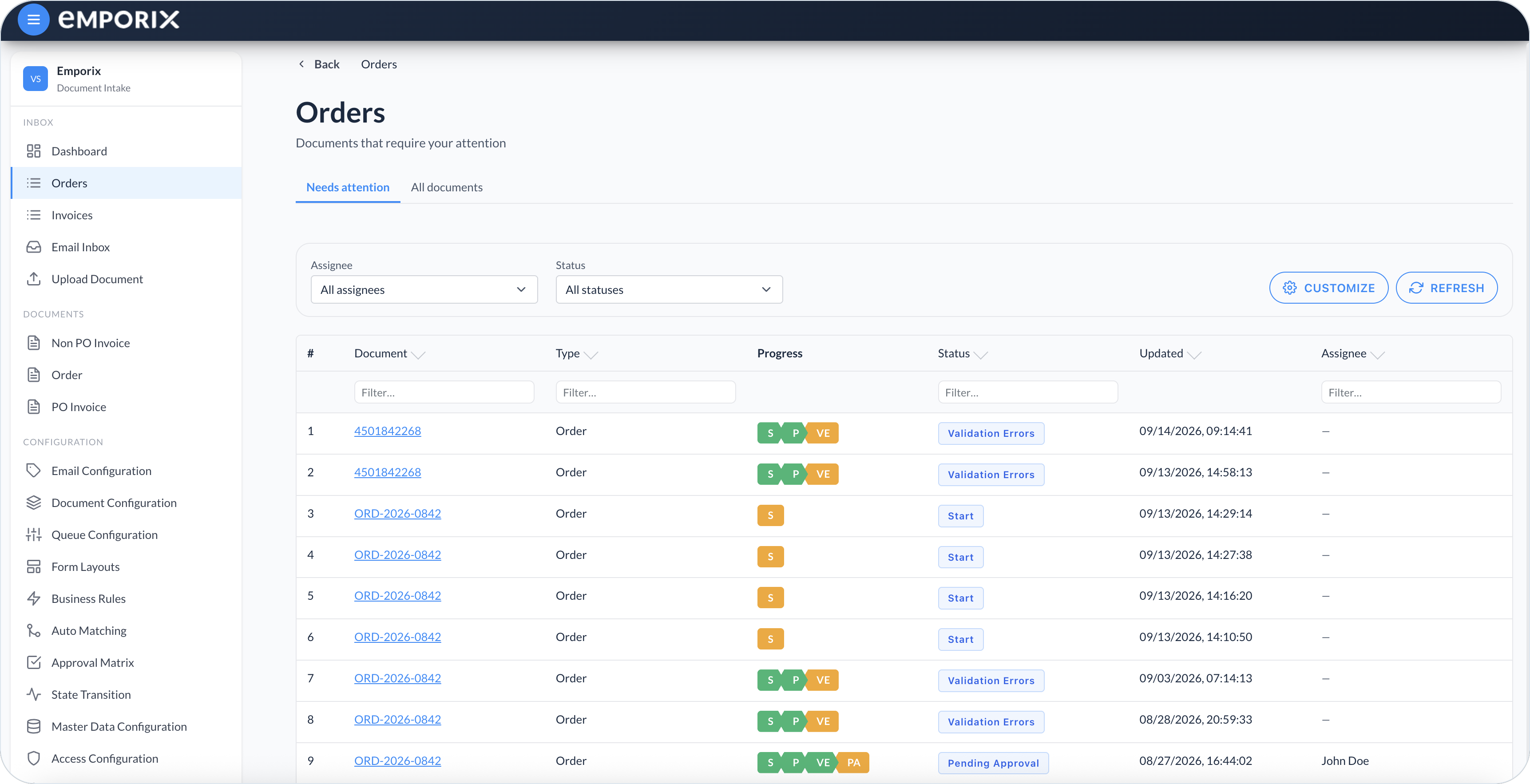
Tabs come from that queue's [Queue Configuration](/document-intake-cockpit/configuration/queue-configuration.md). When none are configured, the built-in tabs are **Needs attention** and **All documents**. **Needs attention** lists the queue's document types in non-terminal (open) workflow statuses. **All documents** lists those types in any workflow status, including terminal statuses. A saved queue can limit a tab to one document type. The page hides tabs when only one is visible. Switching a tab resets **Assignee**, **Status**, **Sort**, and column filters.

{% hint style="info" %}
The **Needs attention** tab is not the same as the **Requires my attention** widget on the [Dashboard](/document-intake-cockpit/cockpit-views/dashboard.md), which lists assigned work. It is also not the same as the **Requires my attention** tab on the document validation panel in [Managing Documents](/document-intake-cockpit/cockpit-views/managing-a-document.md).
{% endhint %}

Use the filters in the table to narrow down the documents by:

* **Assignee**
  * **Assigned to me** – you, your groups, and the direct assignments of people you currently cover through [Substitutions](/document-intake-cockpit/configuration/substitutions.md) (default)
  * **Delegated to me** – only documents you cover through [Substitutions](/document-intake-cockpit/configuration/substitutions.md)
  * **All assignees** – every document in the active tab, regardless of assignee
* **Status** – **All statuses**, or search for one [State Transition](/document-intake-cockpit/configuration/state-transition.md) name

Use **Sort** to order documents by **Updated (newest)**, **Updated (oldest)**, **Created (newest)**, or **Created (oldest)** when the tab has no sortable columns.

<figure><img src="https://1808414410-files.gitbook.io/~/files/v0/b/gitbook-x-prod.appspot.com/o/spaces%2FPBaf05o2vgbdikMFDTyz%2Fuploads%2Fgit-blob-da21f7c596b8ecd19a67ab9cd783c7608e5d9008%2Fdocument_intake_cockpit_work_queue_assignee.png?alt=media" alt="Assignee filter with Assigned to me, Delegated to me, and All assignees"><figcaption><p>Assignee filter with assigned to me, delegated to me, and all assignees</p></figcaption></figure>

<figure><img src="https://1808414410-files.gitbook.io/~/files/v0/b/gitbook-x-prod.appspot.com/o/spaces%2FPBaf05o2vgbdikMFDTyz%2Fuploads%2Fgit-blob-47504530f0b037787e0aff8ca3c1faebd84c8b5a%2Fdocument_intake_cockpit_work_queue_status.png?alt=media" alt="Status filter with All statuses and workflow statuses"><figcaption><p>Status filter with all statuses and workflow statuses</p></figcaption></figure>

The active tab already limits which document types and statuses appear. Search the **Status** filter to find a status name. Select **Refresh** to update the list. When a column is marked sortable, sort from that column header instead.

Filterable columns show a **Filter…** field in the table header.

Your tenant can change which columns appear in [Queue Configuration](/document-intake-cockpit/configuration/queue-configuration.md). The **Assignee** column can show **Substituting for** plus the covered person's name.

<figure><img src="https://1808414410-files.gitbook.io/~/files/v0/b/gitbook-x-prod.appspot.com/o/spaces%2FPBaf05o2vgbdikMFDTyz%2Fuploads%2Fgit-blob-3387fe7280cf54b80239f158a95e1425d4ccfafb%2Fdocument_intake_cockpit_work_queue.png?alt=media" alt="Orders queue table with filters, Progress, and document links"><figcaption><p>Orders queue on the Needs attention tab with progress, status, and document links</p></figcaption></figure>

## Opening a document

Select the **Document** link to open the side-by-side review view. For reviewing extracted data, fixing validation issues, matching, and approvals, see [Managing Documents](/document-intake-cockpit/cockpit-views/managing-a-document.md).

## Customizing the layout

Select **Customize** to open **Customize queue view**. Reorder or hide tabs and columns. The layout is stored in this browser and does not change the admin [Queue Configuration](/document-intake-cockpit/configuration/queue-configuration.md) for other users. Each queue has its own browser layout.

You can hide, show, and move tabs when more than one tab is available, and do the same for columns. When more than one tab exists, **For tab** chooses which tab those column changes apply to. You cannot hide the last remaining tab or the last remaining column.

When you are done, choose one of the following:

* **Apply** – Save this browser layout for this tenant and this queue.
* **Cancel** – Close without saving.
* **Reset to defaults** – Clear this browser layout and restore the admin configuration for this queue.

<figure><img src="https://1808414410-files.gitbook.io/~/files/v0/b/gitbook-x-prod.appspot.com/o/spaces%2FPBaf05o2vgbdikMFDTyz%2Fuploads%2Fgit-blob-9b395345f0f94df1f14ef91a69d55864385a4262%2Fdocument_intake_cockpit_work_queue_customize.png?alt=media" alt="Customize queue view dialog with tabs, columns, Apply, Cancel, and Reset to defaults"><figcaption><p>Customize queue view with tabs, columns, and apply, cancel, and reset to defaults</p></figcaption></figure>


---

# Agent Instructions
This documentation is published with GitBook. GitBook is the documentation platform designed so that both humans and AI agents can read, navigate, and reason over technical content effectively. Learn more at gitbook.com.

## Querying This Documentation
If you need additional information that is not directly available in this page, you can query the documentation dynamically by asking a question.

Perform an HTTP GET request on the current page URL with the `ask` query parameter, and the optional `goal` query parameter:

```
GET https://developer.emporix.io/document-intake-cockpit/cockpit-views/inbox-queue.md?ask=<question>&goal=<endgoal>
```

`ask` is the immediate question: it should be specific, self-contained, and written in natural language.
`goal` is optional and describes the broader end goal you are ultimately trying to accomplish on behalf of the user. GitBook uses it to tailor the answer towards what is most useful for that goal.

The response will contain a direct answer to the question and relevant excerpts and sources from the documentation.

Use this mechanism when the answer is not explicitly present in the current page, you need clarification or additional context, or you want to retrieve related documentation sections.