> For the complete documentation index, see [llms.txt](https://developer.emporix.io/llms.txt). Markdown versions of documentation pages are available by appending `.md` to page URLs; this page is available as [Markdown](https://developer.emporix.io/document-intake-cockpit/configuration-examples/order-intake/business-rules.md).
# Business Rules
Create the Order validation rule that requires Company ID and Company Name before the document can leave Validation Errors.
Create the **Mandatory fields must not be empty** validation rule for **Order**. The rule blocks approval until the document has both a company ID and a company name.
{% hint style="info" %}
For the general UI procedure, see [Business Rules](/document-intake-cockpit/configuration/business-rules.md). The Order list, AI assistant, Parameters, and Test screens on that page are the same editors this walkthrough uses.
{% endhint %}
## Prerequisites
Before you start, complete the [Document Type](/document-intake-cockpit/configuration-examples/order-intake/document-type.md). Confirm that `header.company.id` and `header.company.name` appear in field pickers.
{% stepper %}
{% step %}
#### Open Business Rules
In the Document Intake Cockpit, open **Configuration** → **Business Rules**. Select the **Order** tab, then **New rule**.
{% endstep %}
{% step %}
#### Set the Settings tab
Enter the values from [Rule settings](#rule-settings).
{% endstep %}
{% step %}
#### Generate the rule
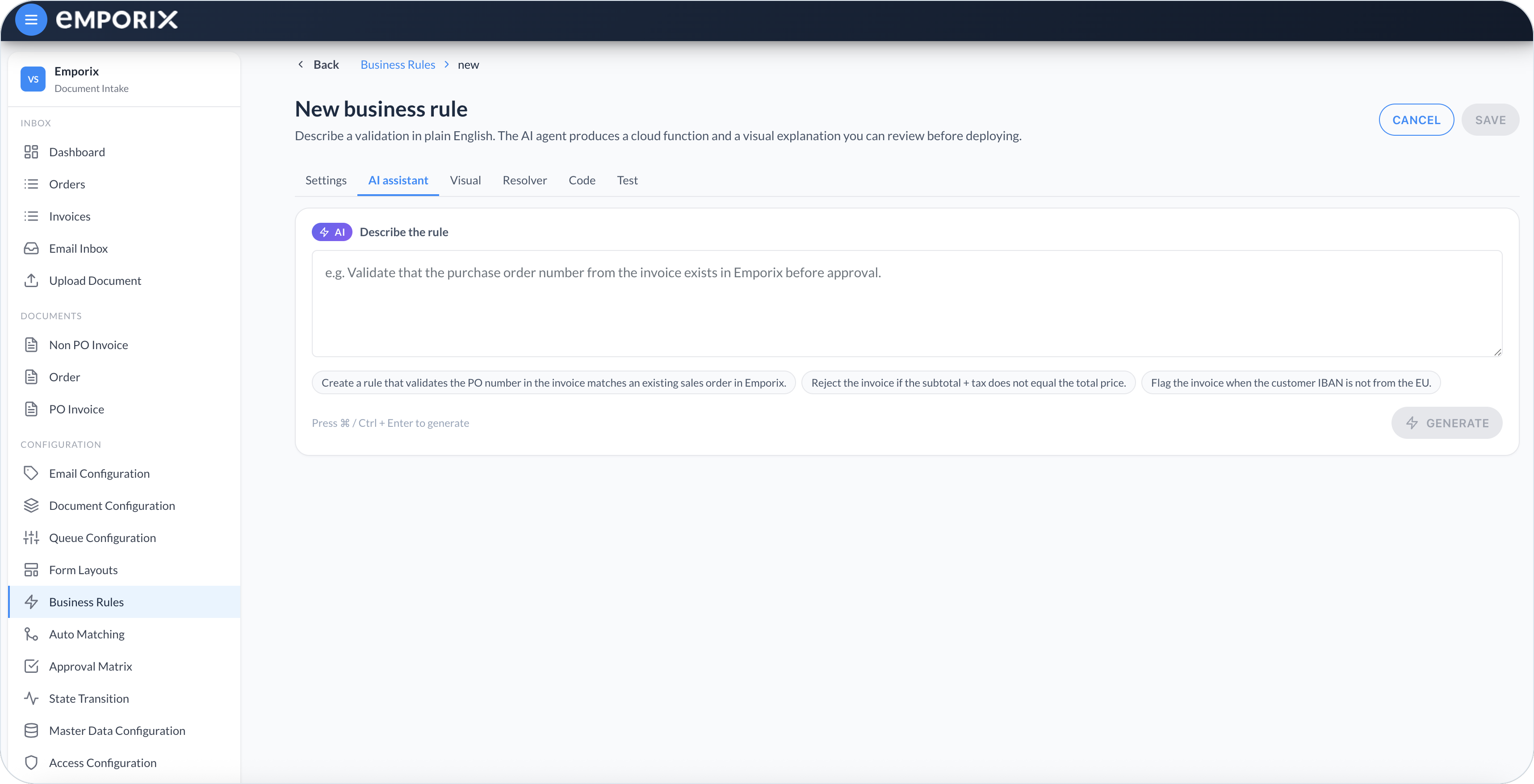
Open **AI assistant** and enter:
> Check that every field selected in a field-path-list parameter with key `fieldsToCheck` and label Mandatory Fields is present and is not null or an empty string. Return one validation error for each missing field.
Select **Generate**.
AI assistant generating the required-company rule
{% endstep %}
{% step %}
#### Review the generated rule
On **Visual**, confirm that the rule checks every field in **Mandatory Fields** for a present, non-empty value. On **Code**, confirm that `fieldsToCheck` is exposed as a **Field path list** parameter named **Mandatory Fields**. If the result differs, refine the prompt and regenerate before continuing.
{% endstep %}
{% step %}
#### Set the parameter values
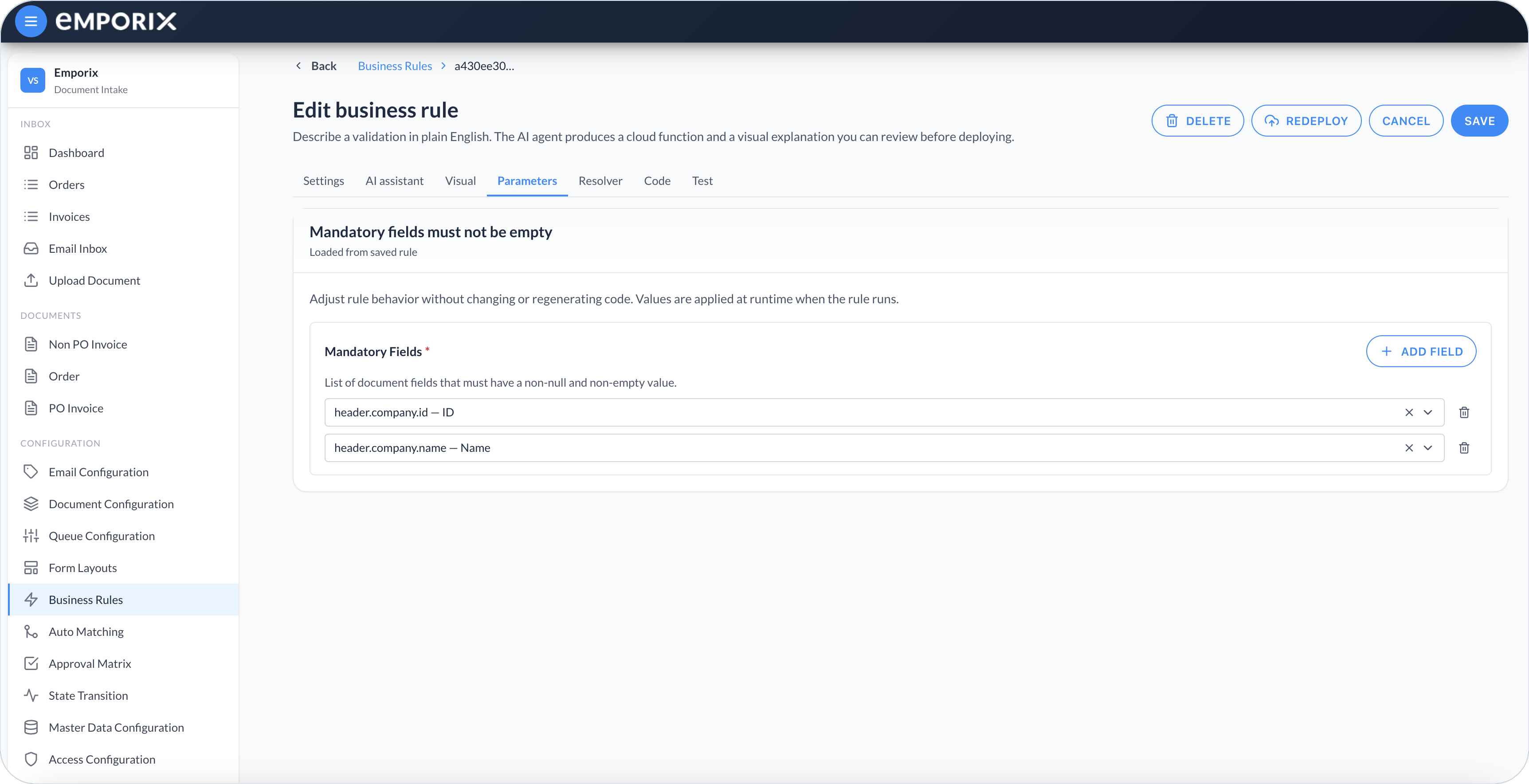
On **Parameters**, add `header.company.id` and `header.company.name`.
{% endstep %}
{% step %}
#### Test the rule
On **Test**, generate an example. Run once with both company values filled and confirm the result succeeds. Clear either value, run again, and confirm the result contains a validation error for that field.
{% endstep %}
{% step %}
#### Save and deploy
Select **Save**, then **Deploy**. If you change generated code later, select **Redeploy**. Leave **Active** on. These settings make the rule eligible to run. In this walkthrough, **Revalidate** invokes `business-rules-supervisor`, which runs the rule.
{% endstep %}
{% endstepper %}
## Rule settings
| Field | Value |
| ------------------------------ | ------------------------------------------- |
| **Rule name** | **Mandatory fields must not be empty** |
| **Document type** | **Order** |
| **Applies to sub-types** | Empty – the rule runs for every **Order** |
| **Rule type** | **Validation** |
| **Execution order** | `10` |
| **Stop on validation failure** | On |
| **Active** | On |
| **Skippable** | Off – a company is required before approval |
## Mandatory Fields
The **Parameters** tab lists the fields the rule checks. Paths are relative to the **Order** mixin.
| Path | Label |
| --------------------- | -------- |
| `header.company.id` | **ID** |
| `header.company.name` | **Name** |
The rule passes when both values are present and not empty. It fails if either is missing, null, or an empty string. Correct the company on the [Form Layout](/document-intake-cockpit/configuration-examples/order-intake/form-layout.md), select **Save**, and run **Revalidate**.
Parameters with mandatory fields (this walkthrough adds Company ID and Company Name)
## Checkpoint
Return to the **Order** rules list. Confirm that **Mandatory fields must not be empty** is **Active** and **Deployed**. Do not continue while it is **Draft** or **Not deployed**.
{% hint style="info" %}
This rule validates the required company fields only. The next step adds a second validation rule that selects the approval matrix and first approver.
{% endhint %}
Next, configure [Approval and Rejection](/document-intake-cockpit/configuration-examples/order-intake/approval.md).
---
# Agent Instructions
This documentation is published with GitBook. GitBook is the documentation platform designed so that both humans and AI agents can read, navigate, and reason over technical content effectively. Learn more at gitbook.com.
## Querying This Documentation
If you need additional information that is not directly available in this page, you can query the documentation by asking a question.
Perform an HTTP GET request on the following URL with the `ask` and `goal` query parameters:
```
GET https://developer.emporix.io/document-intake-cockpit/configuration-examples/order-intake/business-rules.md?ask=&goal=
```
`ask` is the immediate question: it should be specific, self-contained, and written in natural language.
`goal` is what the user is ultimately trying to achieve, the reason they need the answer. Sharing it helps GitBook give you a better, more relevant answer. A goal is most helpful when it describes the outcome the user wants rather than restating the question. For example, with `ask=how do I create an API token`, a goal like `automate deployments from our CI pipeline` lets GitBook tailor the answer to that use case.
The response will contain a direct answer to the question and relevant excerpts and sources from the documentation.
Use this mechanism when the answer is not explicitly present in the current page, you need clarification or additional context, or you want to retrieve related documentation sections.