> For the complete documentation index, see [llms.txt](https://developer.emporix.io/llms.txt). Markdown versions of documentation pages are available by appending `.md` to page URLs; this page is available as [Markdown](https://developer.emporix.io/document-intake-cockpit/configuration-examples/order-intake/state-transitions.md).
# State Transitions
Create the six Order statuses and the conditions that move a document from Start to Approved or Rejected.
Create the **Order** workflow that routes validation errors to correction, successful orders to approval, and approval decisions to terminal statuses.
{% hint style="info" %}
For the general UI procedure, see [State Transition](/document-intake-cockpit/configuration/state-transition.md).
{% endhint %}
## Prerequisites
Before you start, complete the [Document Type](/document-intake-cockpit/configuration-examples/order-intake/document-type.md), [Business Rules](/document-intake-cockpit/configuration-examples/order-intake/business-rules.md), and [Approval and Rejection](/document-intake-cockpit/configuration-examples/order-intake/approval.md). Confirm that these functions are available in cloud-function selectors:
* `document-status-state-machine`
* `business-rules-supervisor`
* `invoice-approval-engine`
Ask the team that provisions your tenant to invoke `document-status-state-machine` after intake persists the Order mixin. This first invocation moves a new document from **Start** to **Parsed**. Each later invocation can take one more transition.
{% hint style="info" %}
Use only the **Order** tab. Do not change workflows for other document types.
{% endhint %}
## Creating the workflow
{% stepper %}
{% step %}
#### Open State Transition
In the Document Intake Cockpit, open **Configuration** → **State Transition**. Select the **Order** tab.
{% endstep %}
{% step %}
#### Create the six statuses
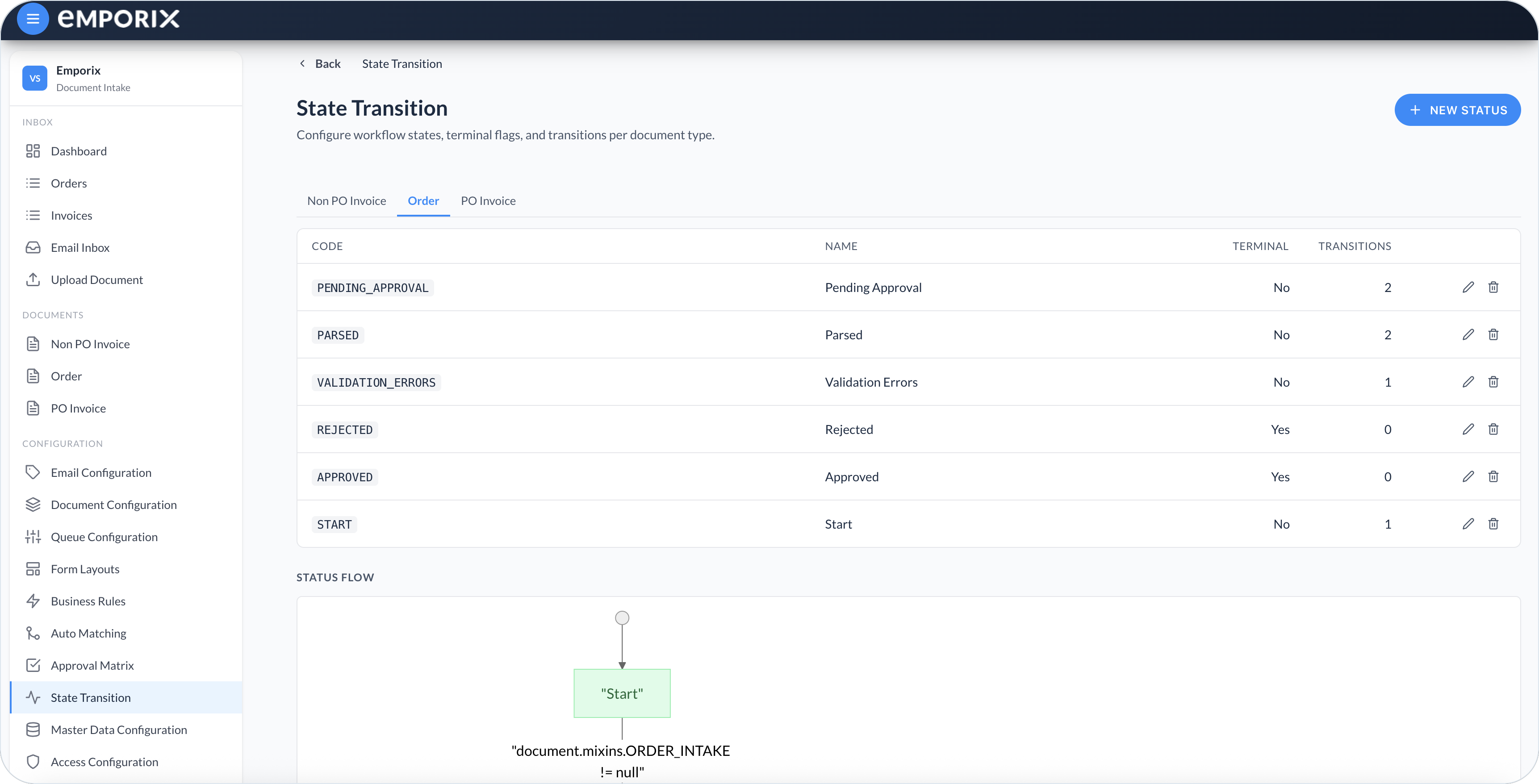
Select **New status** for each row. Set **Document type** to **Order**. Create the statuses from the [Order statuses](#order-statuses) table before you add transitions, so each **Target status** already exists. Turn on **No further transitions allowed from this state** only for **Approved** and **Rejected**.
{% endstep %}
{% step %}
#### Add the outgoing transitions
Open each non-terminal status and select **Add transition**. Enter each **Condition** with **Compare**, or paste the **Advanced expression**. Then set **Priority**, **Target status**, **Cloud function**, and **Assignment** as in [Order transitions](#order-transitions).
{% endstep %}
{% step %}
#### Save and check the flow
Select **Save** on each status. On the **Order** tab, confirm the table and **Status flow** match this example.
{% endstep %}
{% endstepper %}
State Transition on the Order tab with six statuses for this example
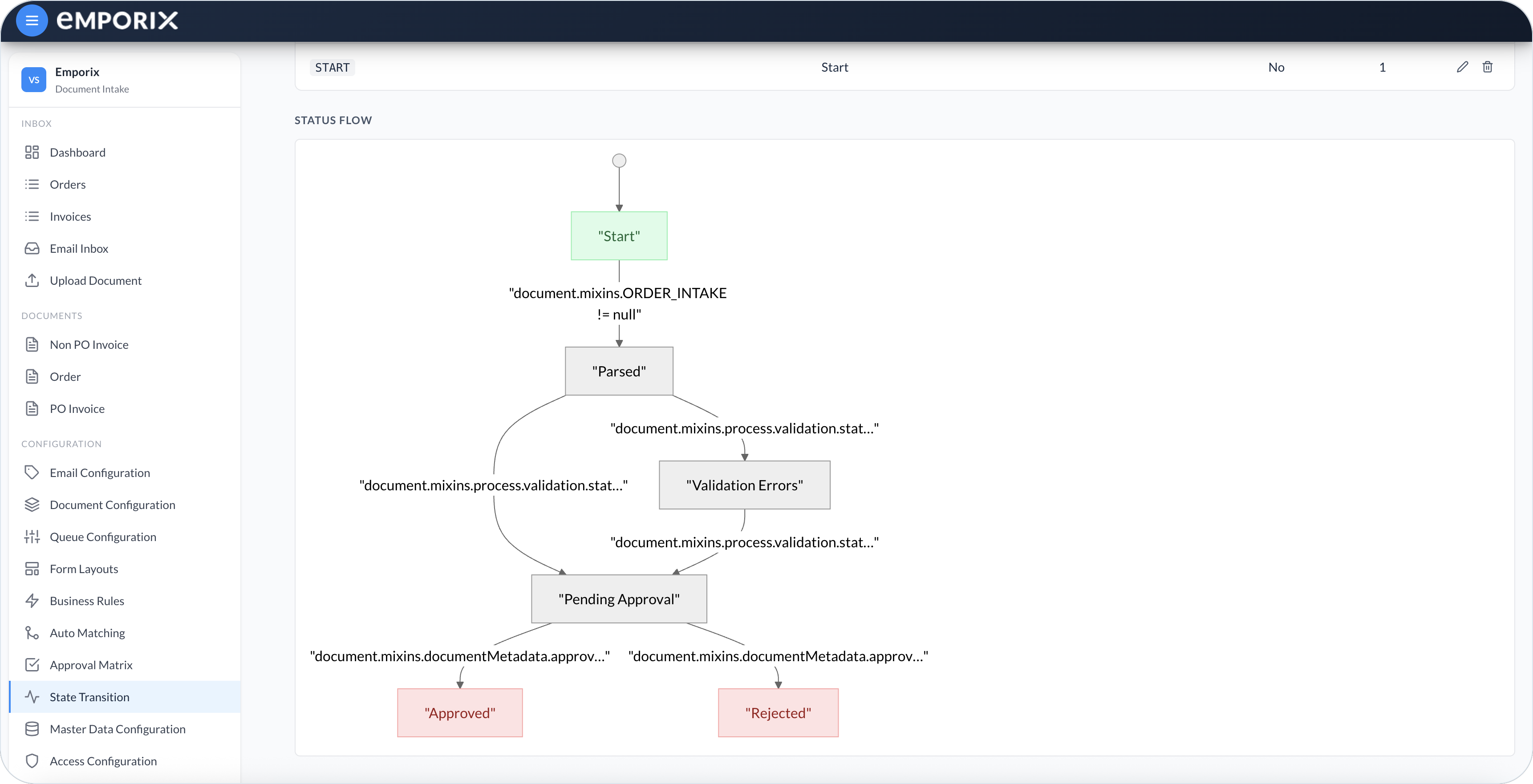
Status flow for Order
```mermaid
---
config:
theme: base
look: classic
themeVariables:
background: transparent
lineColor: "#9CBBE3"
arrowheadColor: "#9CBBE3"
edgeLabelBackground: "#FFC128"
edgeLabelTextColor: "#4C5359"
---
flowchart TD
Start@{ shape: stadium, label: "Start" }
Parsed@{ shape: rounded, label: "Parsed" }
Errors@{ shape: rounded, label: "Validation Errors" }
Pending@{ shape: rounded, label: "Pending Approval" }
Approved@{ shape: stadium, label: "Approved" }
Rejected@{ shape: stadium, label: "Rejected" }
Start -->|Order mixin exists| Parsed
Parsed -->|Validation error| Errors
Parsed -->|Validation success| Pending
Errors -->|Corrected and revalidated| Pending
Pending -->|Accepted| Approved
Pending -->|Rejected| Rejected
classDef step fill:#F2F6FA,stroke:#4C5359,stroke-width:1px
classDef waiting fill:#DDE6EE,stroke:#4C5359,stroke-width:1px
classDef done fill:#3B73BB,stroke:#3B73BB,color:#FFFFFF,stroke-width:1px
classDef stop fill:#F2F6FA,stroke:#E86C07,stroke-width:1px
class Start,Parsed step
class Errors,Pending waiting
class Approved done
class Rejected stop
```
## Order statuses
| Status code | Name | Terminal | Purpose |
| ------------------- | --------------------- | -------- | ------------------------------------------------------------------------------------------------------------- |
| `START` | **Start** | No | Initial workflow status. When the **Order** mixin exists, its transition can move the document to **Parsed**. |
| `PARSED` | **Parsed** | No | The **Order** mixin is filled. The next status depends on validation. |
| `VALIDATION_ERRORS` | **Validation Errors** | No | Checks failed. Fix the fields and run **Revalidate**. |
| `PENDING_APPROVAL` | **Pending Approval** | No | Checks passed. The **Approval** action is available. The matrix uses **Company ID** and **Total**. |
| `APPROVED` | **Approved** | Yes | The approver accepted the order. |
| `REJECTED` | **Rejected** | Yes | The approver rejected the order and selected a reason such as **The product is not available anymore**. |
Terminal statuses are excluded from **Needs attention** on the **Orders** queue and count as **Completed** on the Dashboard.
## Order transitions
Enter each **Condition** with **Compare**, or paste the **Advanced expression**. Lower priority numbers run first. The two **Parsed** conditions are mutually exclusive, but distinct priorities make their evaluation order explicit.
| From | Priority | Condition | Target status | Cloud function | Assignment |
| --------------------- | -------- | --------------------------------------------------------------- | --------------------- | -------------- | ----------------- |
| **Start** | `1` | `document.mixins.ORDER_INTAKE != null` | **Parsed** | **None** | **No assignment** |
| **Parsed** | `1` | `document.mixins.process.validation.status == 'SUCCESS'` | **Pending Approval** | **None** | **No assignment** |
| **Parsed** | `2` | `document.mixins.process.validation.status == 'ERROR'` | **Validation Errors** | **None** | **No assignment** |
| **Validation Errors** | `1` | `document.mixins.process.validation.status == 'SUCCESS'` | **Pending Approval** | **None** | **No assignment** |
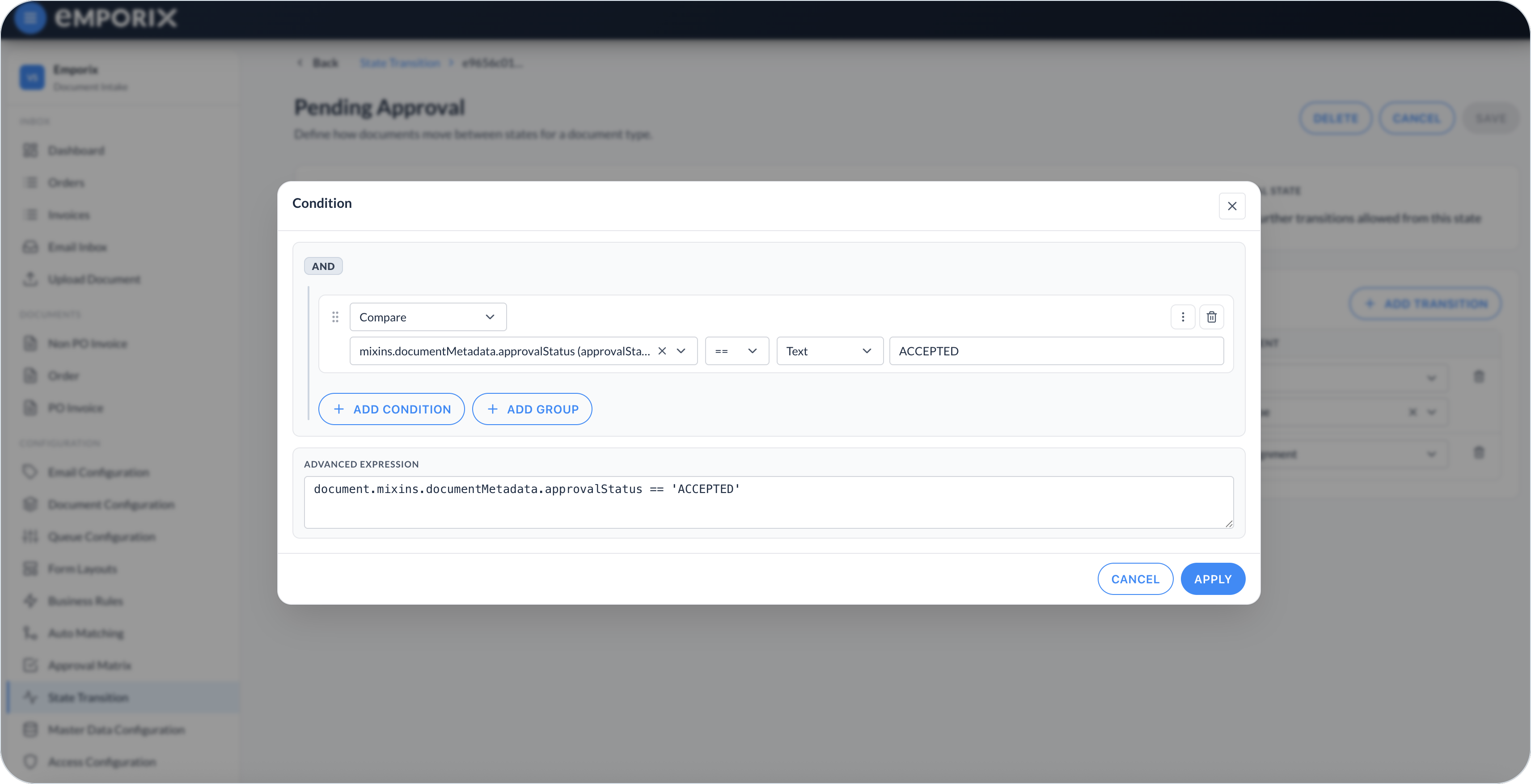
| **Pending Approval** | `1` | `document.mixins.documentMetadata.approvalStatus == 'ACCEPTED'` | **Approved** | **None** | **No assignment** |
| **Pending Approval** | `2` | `document.mixins.documentMetadata.approvalStatus == 'REJECTED'` | **Rejected** | **None** | **No assignment** |
There is no transition back from **Pending Approval** to **Validation Errors**. After the order is waiting for approval, later validation errors stay on that status unless you add another transition.
The matrix-selection business rule already stores the approval snapshot and assigns the first approver during **Revalidate**. Do not add `invoice-approval-engine` to the transitions into **Pending Approval**. The [State Transition](/document-intake-cockpit/configuration/state-transition.md) editor for **Pending Approval** can show a different tenant function or assignment; this walkthrough uses **None** and **No assignment**.
{% hint style="info" %}
The baseline flow ends at **Approved**. If approval must create a sales order or notify another system, deploy and test a separate cloud function before selecting it on the transition to **Approved**.
{% endhint %}
Condition dialog comparing approval status to ACCEPTED
## Wiring the state machine
Creating the statuses does not make them run on document updates. In the [Form Layout](/document-intake-cockpit/configuration-examples/order-intake/form-layout.md), configure these ordered function chains:
| Action | Cloud functions in order |
| -------------- | ----------------------------------------------------------------- |
| **Revalidate** | `business-rules-supervisor`, then `document-status-state-machine` |
| **Approval** | `invoice-approval-engine`, then `document-status-state-machine` |
Enable **Refresh document after execution** for both actions. The first function writes the validation or approval result. The state machine then reads that result and evaluates one transition from the current status.
## Checkpoint
Check that the saved Order workflow matches this example:
* Confirm all six status rows exist.
* Confirm only **Approved** and **Rejected** show **Terminal: Yes**.
* Confirm the flow has no disconnected status.
* Reopen **Parsed** and **Pending Approval** and compare every saved transition with the table above.
* Confirm tenant intake automation invokes `document-status-state-machine` after it persists the Order mixin.
Next, create the [Form Layout](/document-intake-cockpit/configuration-examples/order-intake/form-layout.md).
---
# Agent Instructions
This documentation is published with GitBook. GitBook is the documentation platform designed so that both humans and AI agents can read, navigate, and reason over technical content effectively. Learn more at gitbook.com.
## Querying This Documentation
If you need additional information that is not directly available in this page, you can query the documentation by asking a question.
Perform an HTTP GET request on the following URL with the `ask` and `goal` query parameters:
```
GET https://developer.emporix.io/document-intake-cockpit/configuration-examples/order-intake/state-transitions.md?ask=&goal=
```
`ask` is the immediate question: it should be specific, self-contained, and written in natural language.
`goal` is what the user is ultimately trying to achieve, the reason they need the answer. Sharing it helps GitBook give you a better, more relevant answer. A goal is most helpful when it describes the outcome the user wants rather than restating the question. For example, with `ask=how do I create an API token`, a goal like `automate deployments from our CI pipeline` lets GitBook tailor the answer to that use case.
The response will contain a direct answer to the question and relevant excerpts and sources from the documentation.
Use this mechanism when the answer is not explicitly present in the current page, you need clarification or additional context, or you want to retrieve related documentation sections.