> For the complete documentation index, see [llms.txt](https://developer.emporix.io/llms.txt). Markdown versions of documentation pages are available by appending `.md` to page URLs; this page is available as [Markdown](https://developer.emporix.io/document-intake-cockpit/configuration/access-configuration.md).
# Access Configuration
Assign access controls to Document Intake Cockpit pages and choose how denied pages appear in the side menu.
Use **Access Configuration** to assign a required access control to each Document Intake Cockpit page. When a user does not have that access control, the page is either hidden from the side menu or visible but disabled there.
Before configuring page access, create the tenant IAM controls in [Access Controls](/user-guides/management-dashboard/administration/access-controls.md) and assign them through [Users and Groups](/user-guides/management-dashboard/administration/usersandgroups.md). Document Intake displays those controls for selection.
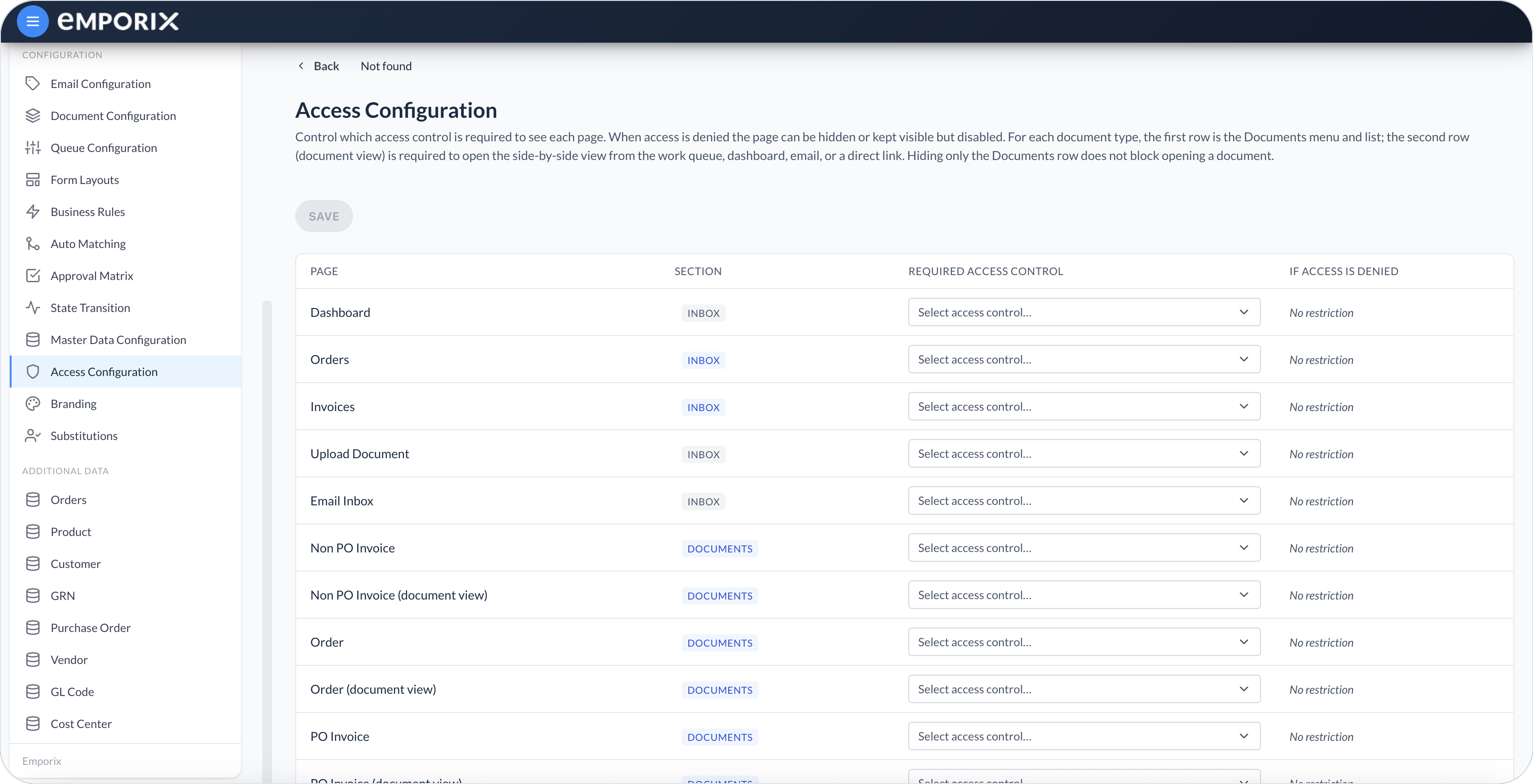
The second **(document view)** row (for example **Order (document view)**) is the [Managing Documents](/document-intake-cockpit/cockpit-views/managing-a-document.md) workspace opened from an inbox queue, dashboard, email, or a direct link. Hiding only the Documents row does not block opening a document. Empty **Required access control** still shows **No restriction** on that row.
Access Configuration with Inbox and Documents rows
## Page access
Set access for each view under its side menu section:
* **Inbox** – **Dashboard**, **Email Inbox**, and [**Upload Document**](/document-intake-cockpit/cockpit-views/upload-document.md), plus each saved queue under its **Menu name** (for example **Orders** or **Invoices**), or one **Queue** row for the default [Inbox Queues](/document-intake-cockpit/cockpit-views/inbox-queue.md) when none are saved.
* **Documents** – Two rows per configured document type: the type name (the Documents menu and list) and a **(document view)** row (for example **Order (document view)**) for the side-by-side view from an inbox queue, dashboard, email, or a direct link.
* **Configuration** – Setup pages such as **Document Configuration**, **Form Layouts**, **Business Rules**, **Branding**, **Substitutions**, and **Access Configuration** itself.
* **Additional Data** – One row per type from [Master Data](/document-intake-cockpit/configuration/master-data.md), for example **Vendor** or **Customer**.
Each row names the view, where it sits, who can open it, and what denied users see:
| Column | What it controls |
| --------------------------- | --------------------------------------------------------------------------------------------- |
| **Page** | The cockpit view name shown to users |
| **Section** | Where the page appears in the side menu |
| **Required access control** | The tenant IAM control evaluated for the page |
| **If access is denied** | How the page appears in the side menu when the user does not have the required access control |
### No restriction
If you leave **Required access control** empty, the row shows **No restriction**.
### Hide page or Disable page
When you select a required access control, choose what happens for users without it:
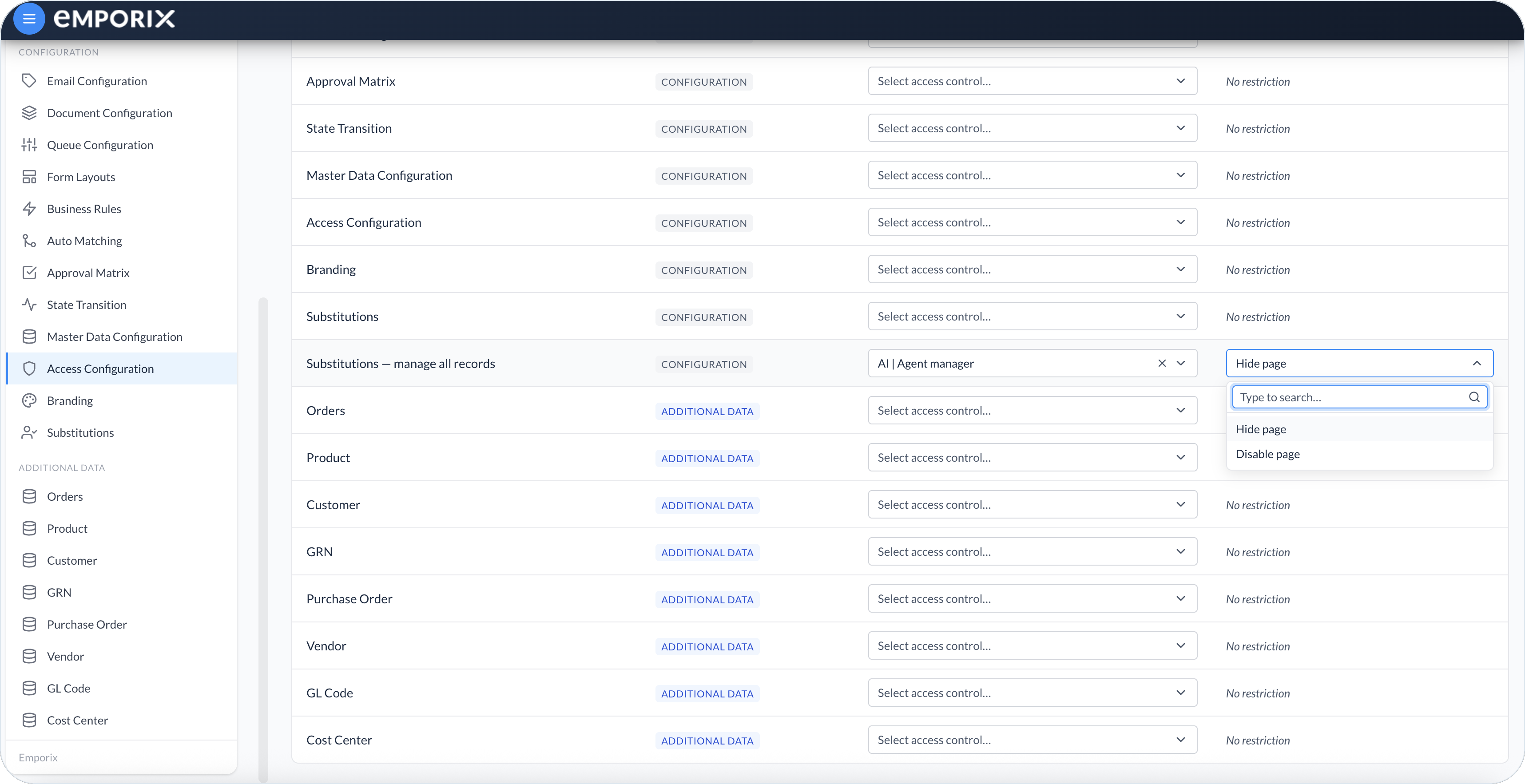
* **Hide page** – The page does not appear in the side menu for that user.
* **Disable page** – The page remains visible but disabled and cannot be selected from the side menu.
{% hint style="info" %}
**Hide page** is the default when you first assign an access control. Use **Disable page** when you want users to see the menu entry without being able to select it from the menu.
{% endhint %}
## Static and dynamic pages
**Dashboard**, **Email Inbox**, and **Upload Document** are static **Inbox** pages. You can require an access control for **Upload Document**, then hide its side-menu entry or keep it visible but disabled for users who do not have that access.
Other rows appear automatically based on your tenant setup:
* **Document types** – Each type under **Documents** gets two access rows: the Documents menu and list, and a **(document view)** row. Hiding only the Documents row does not block opening a document from an inbox queue, dashboard, email, or a direct link.
* **Inbox queues** – Each saved [Queue Configuration](/document-intake-cockpit/configuration/queue-configuration.md) appears as its own **Inbox** row, and the **Page** column shows that queue's **Menu name** (for example **Orders**). If you have not saved any queues, one **Queue** row represents the default [Inbox Queues](/document-intake-cockpit/cockpit-views/inbox-queue.md).
* **Additional Data** – Each type you save in [Master Data](/document-intake-cockpit/configuration/master-data.md) (Master Data Configuration) appears as its own row under **Additional Data**, for example **Vendor** or **Customer**.
When you add or remove document types, queues, or master data configurations, the Access Configuration list updates to match.
## Substitutions manage-all access
The list includes a special Configuration row: **Substitutions – manage all records**.
* The normal **Substitutions** page controls who can open the substitutions area for their own coverage setup.
* **Substitutions – manage all records** controls who can view and manage substitutions for other users.
{% hint style="warning" %}
Unlike regular pages, manage-all access for substitutions is denied until you assign an access control. If this row has no access control, nobody gets the manage-all view.
{% endhint %}
For more about day-to-day substitution use, see [Substitutions](/document-intake-cockpit/configuration/substitutions.md).
## Configuring page access
{% stepper %}
{% step %}
#### Open Access Configuration
In the Document Intake Cockpit, go to **Configuration** → **Access Configuration**.
{% endstep %}
{% step %}
#### Choose the required access control
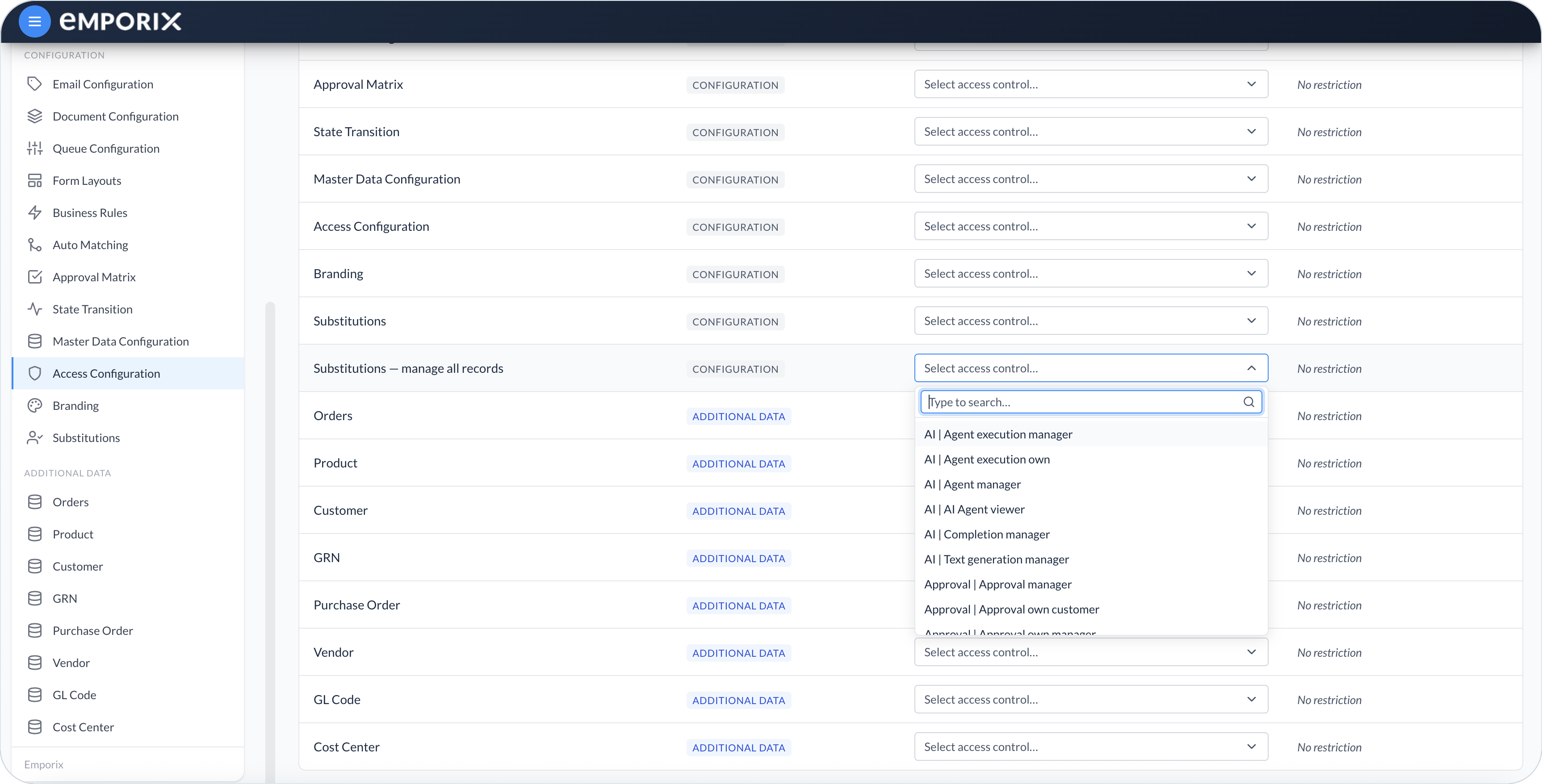
For each page you want to limit, open **Required access control** and select an access control from the list. Filter the list with **Type to search…**.
Leave the field empty for pages that everyone in the cockpit can use. Empty rows show **No restriction** under **If access is denied**. The exception is **Substitutions – manage all records**: if that row has no access control, nobody gets the manage-all view.
Required access control with type to search
{% endstep %}
{% step %}
#### Set the denial behavior
If an access control is selected, choose **Hide page** or **Disable page** under **If access is denied**.
If access is denied, hide page or disable page
{% endstep %}
{% step %}
#### Save the configuration
Select **Save**. The new side-menu rules apply the next time users open or refresh the cockpit.
{% endstep %}
{% endstepper %}
## Suggested setup patterns
Use access configuration to match how your team works:
* **Document review** – Allow **Inbox** pages, relevant document types, and **Substitutions** for self-service coverage. Hide **Configuration** pages reviewers do not need.
* **Approvers** – Allow **Inbox** queues, **Documents**, and any pages needed to review and approve. Keep setup pages hidden.
* **Administrators** – Allow **Configuration** pages, including **Access Configuration**, **Document Configuration**, and related setup views. Assign **Substitutions – manage all records** only to users who maintain coverage for others.
{% hint style="info" %}
See the [Order Intake Example](/document-intake-cockpit/configuration-examples/order-intake.md) for a worked tenant configuration in this cockpit.
{% endhint %}
---
# Agent Instructions
This documentation is published with GitBook. GitBook is the documentation platform designed so that both humans and AI agents can read, navigate, and reason over technical content effectively. Learn more at gitbook.com.
## Querying This Documentation
If you need additional information that is not directly available in this page, you can query the documentation by asking a question.
Perform an HTTP GET request on the following URL with the `ask` and `goal` query parameters:
```
GET https://developer.emporix.io/document-intake-cockpit/configuration/access-configuration.md?ask=&goal=
```
`ask` is the immediate question: it should be specific, self-contained, and written in natural language.
`goal` is what the user is ultimately trying to achieve, the reason they need the answer. Sharing it helps GitBook give you a better, more relevant answer. A goal is most helpful when it describes the outcome the user wants rather than restating the question. For example, with `ask=how do I create an API token`, a goal like `automate deployments from our CI pipeline` lets GitBook tailor the answer to that use case.
The response will contain a direct answer to the question and relevant excerpts and sources from the documentation.
Use this mechanism when the answer is not explicitly present in the current page, you need clarification or additional context, or you want to retrieve related documentation sections.