> For the complete documentation index, see [llms.txt](https://developer.emporix.io/llms.txt). Markdown versions of documentation pages are available by appending `.md` to page URLs; this page is available as [Markdown](https://developer.emporix.io/document-intake-cockpit/configuration/document-configuration.md).

# Document Configuration

Use Document Configuration to create the document types your team processes. Define fields, sub-types, approval settings, and rejection reasons.

Use **Document Configuration** to create and maintain the document types your team processes, such as invoices, orders, quotes, or returns. Each type has its own field schema, sub-types, approval settings, and rejection reasons. Types also drive the **Documents** menu and appear as separate rows in [Access Configuration](/document-intake-cockpit/configuration/access-configuration.md).

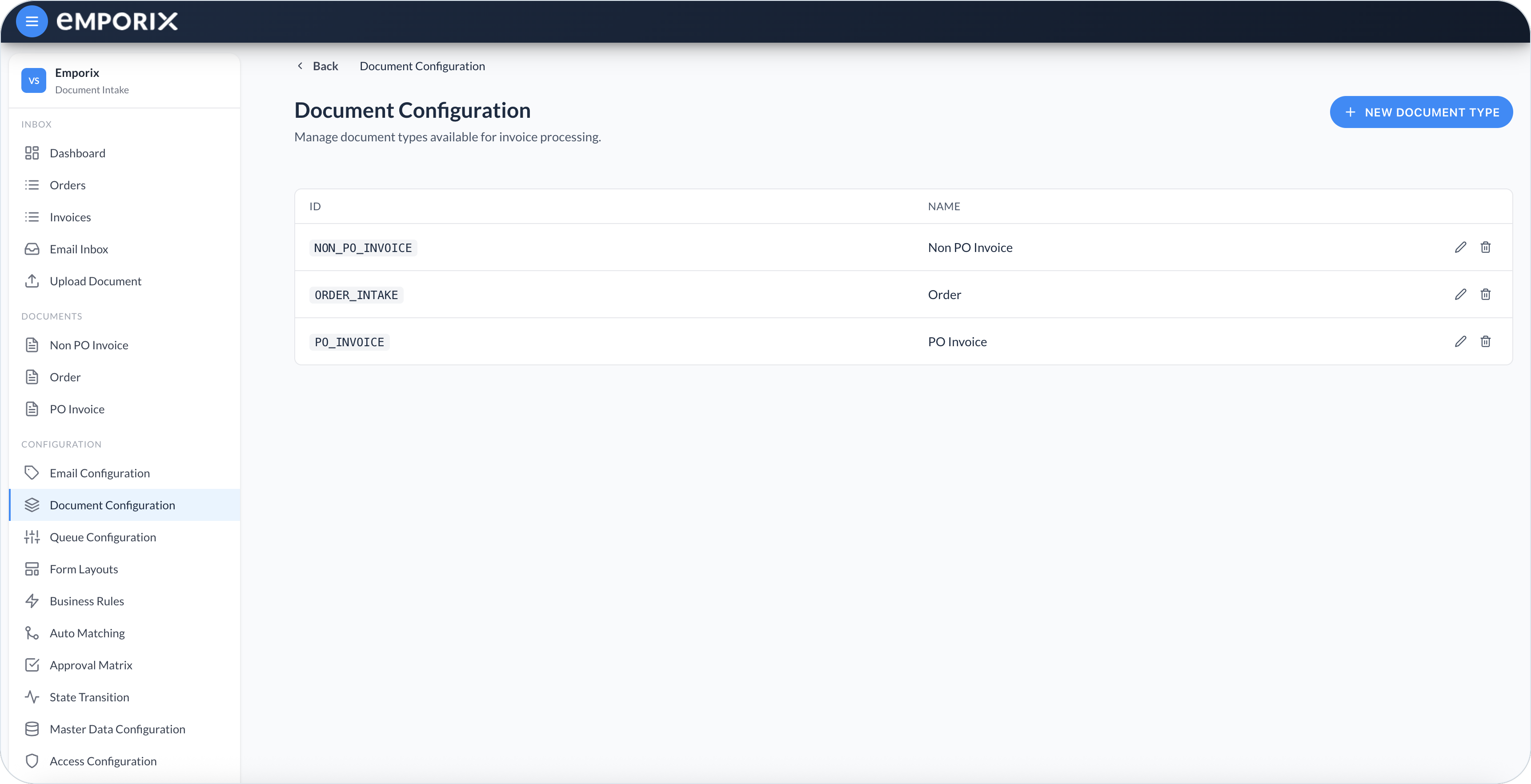
The list shows each type's **ID** and **Name**. From here you can create a type, open **Schema Editor** with a row's edit action, or delete a type you no longer need.

<figure><img src="https://1808414410-files.gitbook.io/~/files/v0/b/gitbook-x-prod.appspot.com/o/spaces%2FPBaf05o2vgbdikMFDTyz%2Fuploads%2Fgit-blob-63612b490e410403f1e56a9d888a50efa948ad18%2Fdocument_configuration.png?alt=media" alt="Document Configuration list with ID, name, edit, and delete for each type"><figcaption><p>Document Configuration with document types, ID, and name</p></figcaption></figure>

{% hint style="warning" %}
Deleting a document type cannot be undone. The cockpit does not check dependencies or clean up related configuration. Before you delete a type, retire or update its form layouts, states, queues, business rules, matching configurations, approval matrices, and schemas. Existing documents of that type remain.
{% endhint %}

## Creating a document type

{% stepper %}
{% step %}

#### Open Document Configuration

In the Document Intake Cockpit, open **Configuration** → **Document Configuration**.
{% endstep %}

{% step %}

#### Enter the ID and name

Select **New Document Type**. Enter a unique **ID** (stored in uppercase), for example `ORDER_INTAKE`, and a **Name (EN)** shown under **Documents**, for example `Order`.
{% endstep %}

{% step %}

#### Save and reload

Select **Save**. The type appears in the list. Reload the cockpit so the new entry shows under **Documents**.
{% endstep %}
{% endstepper %}

<figure><img src="https://1808414410-files.gitbook.io/~/files/v0/b/gitbook-x-prod.appspot.com/o/spaces%2FPBaf05o2vgbdikMFDTyz%2Fuploads%2Fgit-blob-7a52efc87bcb5642fb7b0c4443a6e15e03c8b68e%2Fdocument_configuration_new_type.png?alt=media" alt="New document type dialog with ID and name (EN)"><figcaption><p>New document type with ID and name (EN)</p></figcaption></figure>

{% hint style="info" %}
Choose an ID you can keep long term. Related setup such as [Form Layouts](/document-intake-cockpit/configuration/form-layouts.md), [State Transition](/document-intake-cockpit/configuration/state-transition.md), and [Approval Matrix](/document-intake-cockpit/configuration/approval-matrix.md) refers to this type. For the full sequence across Configuration pages, see [Suggested setup order](#suggested-setup-order).
{% endhint %}

## Schema editor

Select a row's edit action to open **Schema Editor**. It shows the type ID and related tabs. Each tab saves on its own, and unsaved changes are flagged.

* **Attributes** – Fields used for extraction, forms, matching, and approval bindings.
* **Sub-types** – Variants within this document type.
* **Approval Configuration** – Fields that select the approval matrix and the amount used for thresholds.
* **Rejection Reasons** – Coded reasons an approver can select when rejecting a document of this type.

{% hint style="info" %}
**Sub-types**, **Approval Configuration**, and **Rejection Reasons** need the `documentSubTypes`, `approvalConfig`, and `rejectionReasons` mixin schemas registered for the tenant. If a tab says its schema is unavailable, ask the team that provisions your Emporix tenant to create that named schema.
{% endhint %}

## Attributes

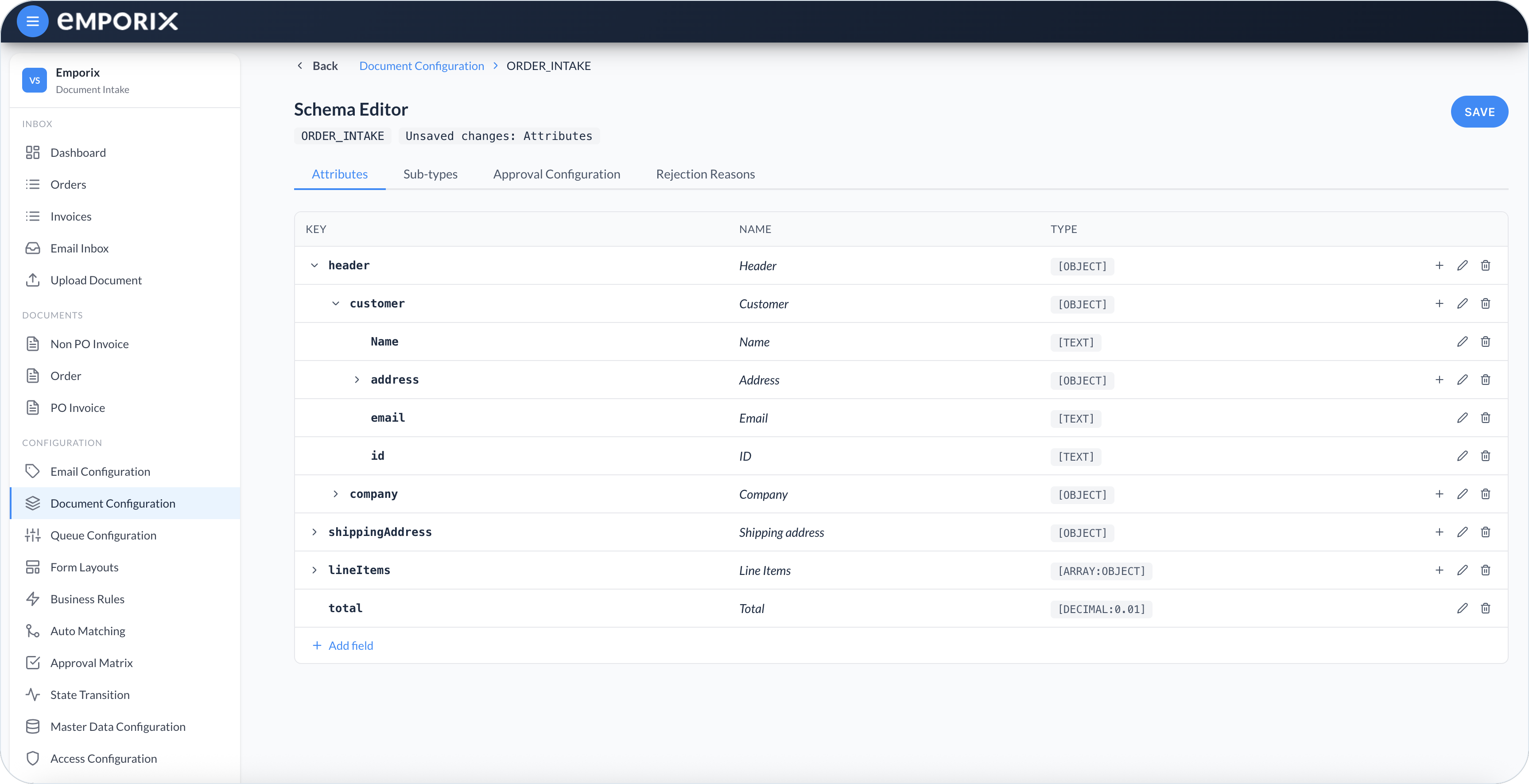
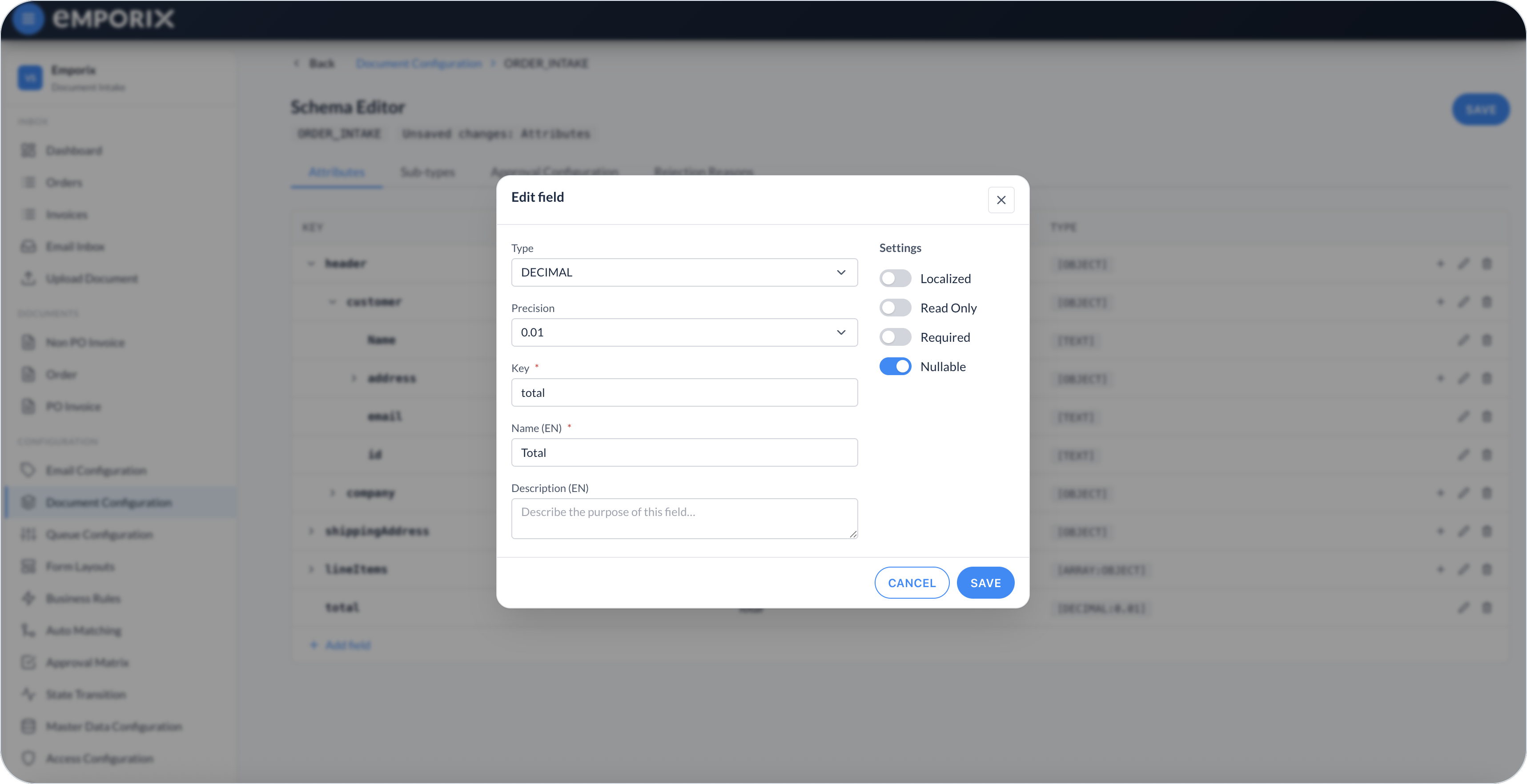
On **Attributes**, the tree lists **Key**, **Name**, and **Type**. Select **Add field** for a top-level field, or use a row's add action to nest under an **OBJECT** (or an **ARRAY** whose item type is **OBJECT**). When you change an existing field, the same form is labeled **Edit field**.

Set **Type**, **Key**, **Name (EN)**, **Description (EN)**, and **Settings**. **ARRAY** also needs **Array item type**. **REFERENCE** also needs **Referenced entity**. **DECIMAL** and an **ARRAY** of **DECIMAL** also have **Precision**.

<figure><img src="https://1808414410-files.gitbook.io/~/files/v0/b/gitbook-x-prod.appspot.com/o/spaces%2FPBaf05o2vgbdikMFDTyz%2Fuploads%2Fgit-blob-97f71a84c016c1ad2bf185a0db75b153bbb15d73%2Fdocument_configuration_schema.png?alt=media" alt="Schema editor attributes tree with nested header, customer, line items, and total"><figcaption><p>Schema editor attributes with key, name, and type</p></figcaption></figure>

<figure><img src="https://1808414410-files.gitbook.io/~/files/v0/b/gitbook-x-prod.appspot.com/o/spaces%2FPBaf05o2vgbdikMFDTyz%2Fuploads%2Fgit-blob-fd1ee6bc13bdbee81e8107d02a98b4eba7c437cb%2Fdocument_configuration_add_field.png?alt=media" alt="Edit field dialog with Type DECIMAL, Precision, Key, Name (EN), Description (EN), and Settings"><figcaption><p>Edit field with type, precision, key, name (EN), description (EN), and settings</p></figcaption></figure>

**Settings** control how Schema Service treats the field when document data is created or updated:

* **Required** – The field must be present.
* **Nullable** – The field may contain an explicit `null`.
* **Read Only** – The field cannot be edited through the schema.
* **Localized** – The value is stored per language.

{% hint style="info" %}
Data that does not meet these constraints fails when it is written. For a missing business value that can be fixed after intake, prefer a skippable validation in [Business Rules](/document-intake-cockpit/configuration/business-rules.md). You can also mark a control **Read-only** in [Form Layouts](/document-intake-cockpit/configuration/form-layouts.md) so the value is visible during review but cannot be changed.
{% endhint %}

### Field types

Choose a **Type** that matches the data:

* **TEXT** – Strings such as IDs, names, and emails.
* **NUMBER** – Whole numbers such as quantities.
* **DECIMAL** – Amounts, with a **Precision** setting.
* **DATE**, **TIME**, and **DATE\_TIME** – Calendar and clock values.
* **BOOLEAN** – Yes or no.
* **ENUM** – A closed list of allowed values. Define the options as **Enum options** on an **enum** control in [Form Layouts](/document-intake-cockpit/configuration/form-layouts.md).
* **OBJECT** – A group of nested fields. Add children with the row's add action.
* **ARRAY** – A repeating list with an **Array item type**, typically an **ARRAY** of **OBJECT** for line items.
* **REFERENCE** – A link to a **Referenced entity** (tenant master-data or custom-entity types, or platform entities such as customer, company, or product).

A **REFERENCE** value is picked later with **dropdown** or **lookupModal** in [Form Layouts](/document-intake-cockpit/configuration/form-layouts.md).

For **DECIMAL** (and an **ARRAY** of **DECIMAL**), **Precision** lists `0.1`, `0.01` (default), `0.001`, `0.0001`, and **None (−1)**. Each number is the smallest step the field allows. For example, `0.01` allows hundredths, which is typical for currency. **None (−1)** turns the step constraint off.

### Description (EN)

{% hint style="info" %}
**Description (EN)** tells the extraction AI how to pull the value from the source PDF and how to avoid common mapping errors. Write a short instruction, not a restatement of the field name.
{% endhint %}

Examples:

* **Country** – Use the two-letter ISO country code from the address, not the full country name.
* **Customer** – Identify the customer (buyer) party, not the company (seller) party.
* **Amount** – Use the net amount before tax, not the gross or tax-inclusive total.

### Example order schema

Nest **OBJECT** under **OBJECT** for grouped header data, for example **Header** → **Customer** → **Address**. Put repeating rows such as line items in an **ARRAY** of **OBJECT**. Form layouts and approval bindings later use dotted paths such as `header.customer.id`.

For a full **Order** schema, see [Document Type](/document-intake-cockpit/configuration-examples/order-intake/document-type.md) in the [Order Intake Example](/document-intake-cockpit/configuration-examples/order-intake.md). Keep keys such as `header`, `lineItems`, and `total` stable once forms and approval start using them.

## Sub-types

Use **Sub-types** when one document type needs different forms, validation rules, or matching for distinct variants. Each definition has a localized name, an order, and one or more field/value discriminators.

{% stepper %}
{% step %}

#### Open Sub-types

On the Document Configuration list, use the row's edit action for the parent document type to open **Schema Editor**. Select the **Sub-types** tab.
{% endstep %}

{% step %}

#### Add the sub-type

Select **Add sub-type**, then enter a unique **ID** and a localized **Name**. The ID must start with a letter and contain only letters, digits, or underscores, for example `NON_PO_CREDIT_MEMO`. Use the move controls to set its order. After you save, the **ID** becomes read-only.
{% endstep %}

{% step %}

#### Add discriminators

Select **Add discriminator**. Set **Binding** to the schema field and **Value** to the document value that must match, for example **Header › Company › ID** and `C00001`. A discriminator can use a string, number, boolean, or enum leaf, including a nested field path.

Every discriminator on the definition must match. Missing or `null` values do not match. Strings are trimmed and case-sensitive. Numbers and booleans use their typed values.
{% endstep %}

{% step %}

#### Save and check conflicts

Select **Save**. Duplicate sub-type IDs block saving. Duplicate discriminator combinations show a warning but do not block saving; resolve the warning so two definitions do not represent the same match. You can edit, remove, or reorder definitions.
{% endstep %}
{% endstepper %}

<figure><img src="https://1808414410-files.gitbook.io/~/files/v0/b/gitbook-x-prod.appspot.com/o/spaces%2FPBaf05o2vgbdikMFDTyz%2Fuploads%2Fgit-blob-f5791cecf79d54a4d5c635ddaf0cd1bfba2a28ad%2Fdocument_configuration_subtypes.png?alt=media" alt="Sub-types tab with ID, localized Name, and a Header Company ID discriminator"><figcaption><p>Schema Editor Sub-types with ID, name, and discriminators</p></figcaption></figure>

When several definitions match:

* The definition with more matching discriminators takes precedence.
* The lower **Order** value breaks ties between equally specific definitions.

The resolved sub-type decides which [Form Layouts](/document-intake-cockpit/configuration/form-layouts.md), [Business Rules](/document-intake-cockpit/configuration/business-rules.md), and [Auto Matching](/document-intake-cockpit/configuration/auto-matching.md) apply. The cockpit resolves it from current document values; it does not store the sub-type as a separate document field.

Create sub-type definitions after the **Attributes** they use as discriminators. Keep localized names clear so administrators can pick the right sub-type on related configuration pages.

## Approval configuration

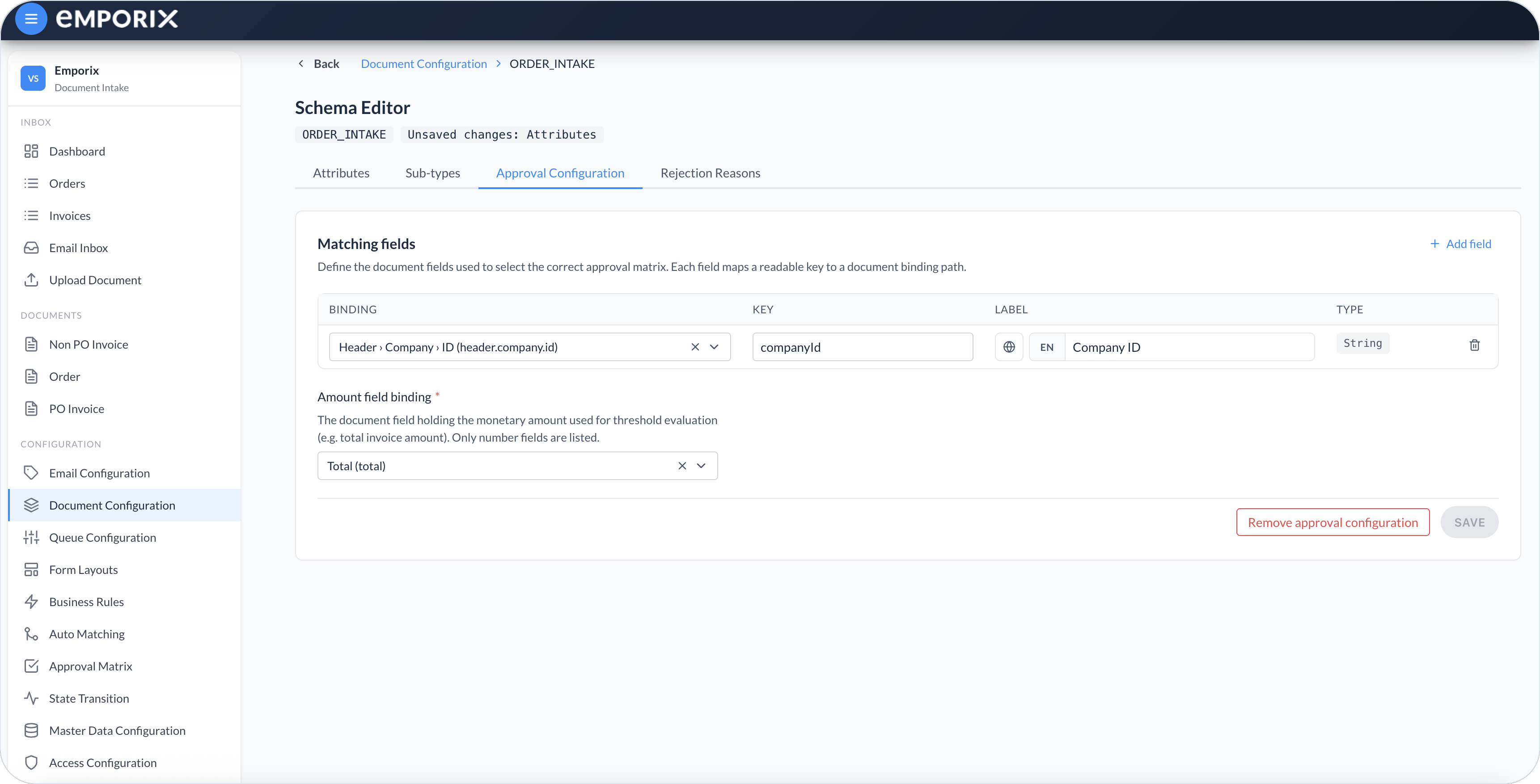
On **Approval Configuration**, define how the cockpit selects an approval matrix for documents of this type.

<figure><img src="https://1808414410-files.gitbook.io/~/files/v0/b/gitbook-x-prod.appspot.com/o/spaces%2FPBaf05o2vgbdikMFDTyz%2Fuploads%2Fgit-blob-7bc0dcf91d01abac5e447e05783a3c90ca0627ec%2Fdocument_configuration_approval.png?alt=media" alt="Approval Configuration with matching fields, amount field binding, and Remove approval configuration"><figcaption><p>Schema Editor Approval Configuration with matching fields and amount binding</p></figcaption></figure>

Under **Matching fields**, select **Add field** for each value that picks the correct matrix. For each row, set:

* **Binding** – The schema field, shown as a path such as **Header › Company › ID**.
* **Key** – Unique short identifier the [Approval Matrix](/document-intake-cockpit/configuration/approval-matrix.md) uses for that matching column, for example `companyId`. Do not use the reserved key `comment`.
* **Label** – Name shown on the matrix.
* **Type** – **String** (**TEXT** or **ENUM**) or **Number** (**NUMBER** or **DECIMAL**), taken from the bound field.

{% hint style="info" %}
Only **TEXT**, **ENUM**, **NUMBER**, and **DECIMAL** leaves appear in **Binding**. Nested **OBJECT** paths work; **ARRAY**, **BOOLEAN**, **DATE**, **TIME**, **DATE\_TIME**, and **REFERENCE** are not listed.
{% endhint %}

**Amount field binding** is required. It points to the document field whose value is compared with each approver's **Limit (amount)** in [Approval Matrix](/document-intake-cockpit/configuration/approval-matrix.md) – for example the order or invoice total. The picker lists only **NUMBER** and **DECIMAL** fields. Use **DECIMAL** for a currency-style **Total**.

Select **Save** when the matching fields and amount binding are complete. Then build the chains and limits in [Approval Matrix](/document-intake-cockpit/configuration/approval-matrix.md). That page lists only types with a complete **Approval Configuration** – at least one matching field and an amount binding.

**Remove approval configuration** clears this type's approval setup. The type is no longer eligible on [Approval Matrix](/document-intake-cockpit/configuration/approval-matrix.md) until you save matching fields and an amount binding again. Existing matrix rows for that type stay stored but cannot be used until the type is eligible again.

## Rejection reasons

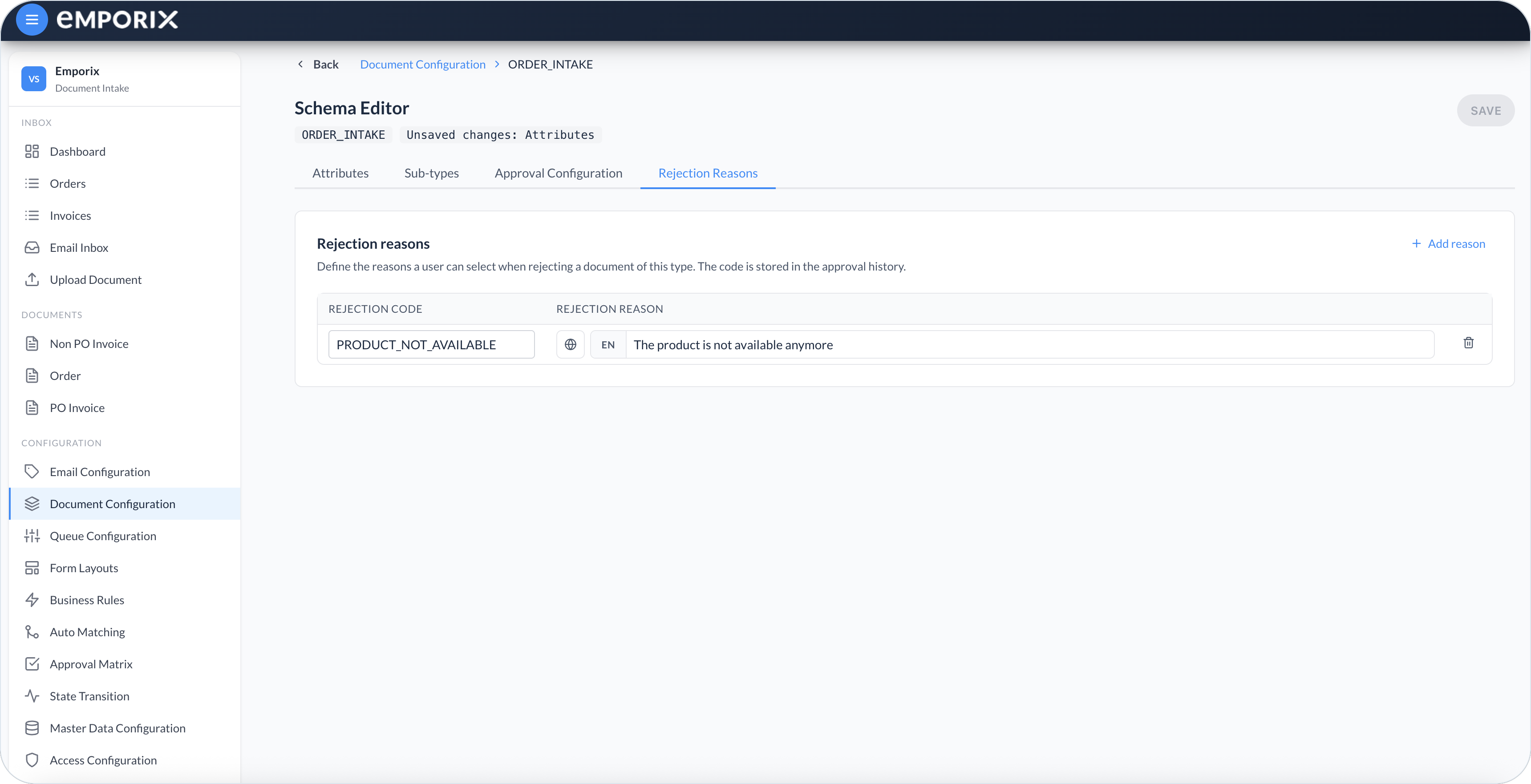
On **Rejection Reasons**, define the coded reasons an approver can select when rejecting a document of this type. The **Rejection Code** is stored in approval history; the **Rejection Reason** is the label shown in the dialog.

<figure><img src="https://1808414410-files.gitbook.io/~/files/v0/b/gitbook-x-prod.appspot.com/o/spaces%2FPBaf05o2vgbdikMFDTyz%2Fuploads%2Fgit-blob-f0806bf123ebf9e9c2bbcc83e3763983f73b6813%2Fdocument_configuration_rejection.png?alt=media" alt="Rejection Reasons with Rejection Code and localized Rejection Reason"><figcaption><p>Schema Editor Rejection Reasons with code and reason</p></figcaption></figure>

Select **Add reason**, then enter a unique **Rejection Code** and a localized **Rejection Reason**. Each row needs a code and a reason in at least one language before you can save. When reasons exist, the approver must select one of them. The message remains optional. If no reasons are configured, the approver enters only an optional message.

## Document types in the cockpit

After you create a type and reload the cockpit, it appears under **Documents** using the type **Name**. Open that entry to work through the [Documents](/document-intake-cockpit/cockpit-views/documents.md) list for the type and continue into [Managing Documents](/document-intake-cockpit/cockpit-views/managing-a-document.md). [Access Configuration](/document-intake-cockpit/configuration/access-configuration.md) adds separate rows for the type's document list and document view so you can restrict each page.

## Suggested setup order

{% stepper %}
{% step %}

#### Create the document type

Create the type and define its **Attributes** schema.
{% endstep %}

{% step %}

#### Define sub-types

Add **Sub-types** before you create sub-type-specific configurations.
{% endstep %}

{% step %}

#### Design the review form

Design the review form in [Form Layouts](/document-intake-cockpit/configuration/form-layouts.md).
{% endstep %}

{% step %}

#### Define the workflow

Define statuses and transitions in [State Transition](/document-intake-cockpit/configuration/state-transition.md).
{% endstep %}

{% step %}

#### Configure queues and email categories

Add queues in [Queue Configuration](/document-intake-cockpit/configuration/queue-configuration.md) and categories in [Email Configuration](/document-intake-cockpit/configuration/email-configuration.md) when you use them for this type.
{% endstep %}

{% step %}

#### Configure matching and validation

Configure [Master Data](/document-intake-cockpit/configuration/master-data.md) before [Auto Matching](/document-intake-cockpit/configuration/auto-matching.md), then add [Business Rules](/document-intake-cockpit/configuration/business-rules.md).
{% endstep %}

{% step %}

#### Configure approval

Complete **Approval Configuration**, then build chains in [Approval Matrix](/document-intake-cockpit/configuration/approval-matrix.md). Add **Rejection Reasons** when approvers must select a coded reason.
{% endstep %}

{% step %}

#### Configure access

Restrict the new **Documents** entry in [Access Configuration](/document-intake-cockpit/configuration/access-configuration.md).
{% endstep %}
{% endstepper %}

{% hint style="info" %}
See the [Order Intake Example](/document-intake-cockpit/configuration-examples/order-intake.md) for a worked tenant configuration in this cockpit.
{% endhint %}


---

# Agent Instructions
This documentation is published with GitBook. GitBook is the documentation platform designed so that both humans and AI agents can read, navigate, and reason over technical content effectively. Learn more at gitbook.com.

## Querying This Documentation
If you need additional information that is not directly available in this page, you can query the documentation dynamically by asking a question.

Perform an HTTP GET request on the current page URL with the `ask` query parameter, and the optional `goal` query parameter:

```
GET https://developer.emporix.io/document-intake-cockpit/configuration/document-configuration.md?ask=<question>&goal=<endgoal>
```

`ask` is the immediate question: it should be specific, self-contained, and written in natural language.
`goal` is optional and describes the broader end goal you are ultimately trying to accomplish on behalf of the user. GitBook uses it to tailor the answer towards what is most useful for that goal.

The response will contain a direct answer to the question and relevant excerpts and sources from the documentation.

Use this mechanism when the answer is not explicitly present in the current page, you need clarification or additional context, or you want to retrieve related documentation sections.