> For the complete documentation index, see [llms.txt](https://developer.emporix.io/llms.txt). Markdown versions of documentation pages are available by appending `.md` to page URLs; this page is available as [Markdown](https://developer.emporix.io/document-intake-cockpit/configuration/form-layouts/form-layout-lookups.md).

# Lookups and Dropdowns

Configure fixed or API-backed dropdowns and searchable lookups for document fields, including mappings that populate related values.

Use a **dropdown** to present fixed choices or search options from an API. Use a **lookupModal** when a filterable result table is needed with several columns. Dynamic selections can populate related document fields.

A **dropdown** is a compact list that stores one value. A **lookupModal** opens a table where you can filter configured columns, compare records, and select one result.

Configure these controls on the **Form Sections** tab of a [Form Layout](/document-intake-cockpit/configuration/form-layouts.md). Saving a [Master Data](/document-intake-cockpit/configuration/master-data.md) type does not enable document lookups. The field must use one of these controls and have its options configured.

## Static dropdown

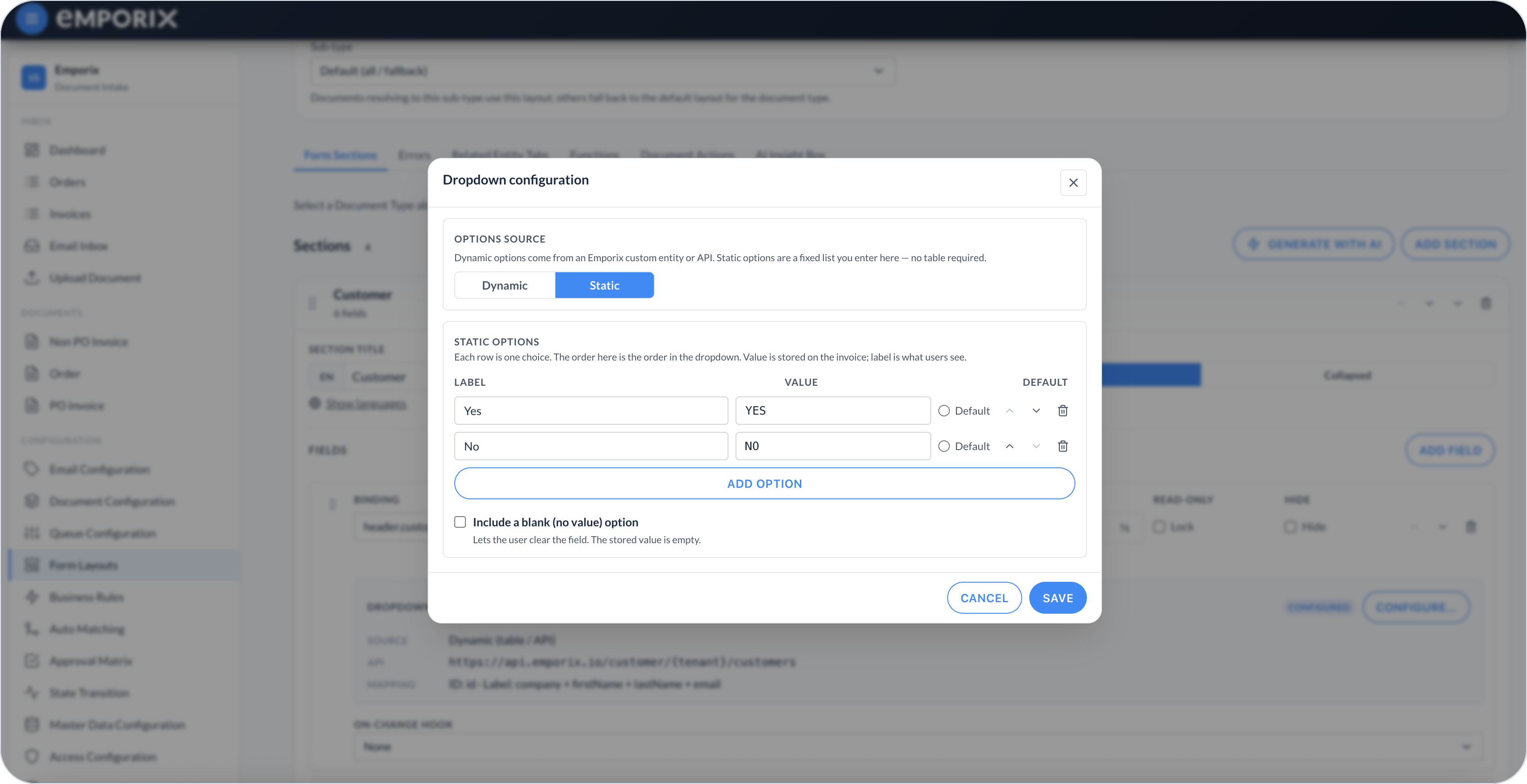
Use a static dropdown for a short fixed list that belongs to the layout. Set **Options source** to **Static**, then add each **Label** and **Value**. The label is shown; the document stores the value. Use the move controls to set the option order.

Optionally select one row as **Default**. When edit mode starts and the document has no stored value, the cockpit writes the default to the draft and runs the field's on-change hook. The document's configured save action is still required to persist it.

Enable **Include a blank (no value) option** when the field must be clearable. Clearing an existing value does not reapply the default during the same edit.

Static options do not need an API or custom-entity table. They cannot use **Populate from selection** because they contain only the configured label and value. Use an on-change hook when selecting a static value must update other fields.

<figure><img src="https://1808414410-files.gitbook.io/~/files/v0/b/gitbook-x-prod.appspot.com/o/spaces%2FPBaf05o2vgbdikMFDTyz%2Fuploads%2Fgit-blob-4fe5379281af7b5f323a269560382114028f8202%2Fform_layouts_dropdown_static.png?alt=media" alt="Dropdown configuration Static options with Label, Value, Default, and Include a blank option"><figcaption><p>Static dropdown with label, value, default, and blank option</p></figcaption></figure>

## Dynamic dropdown

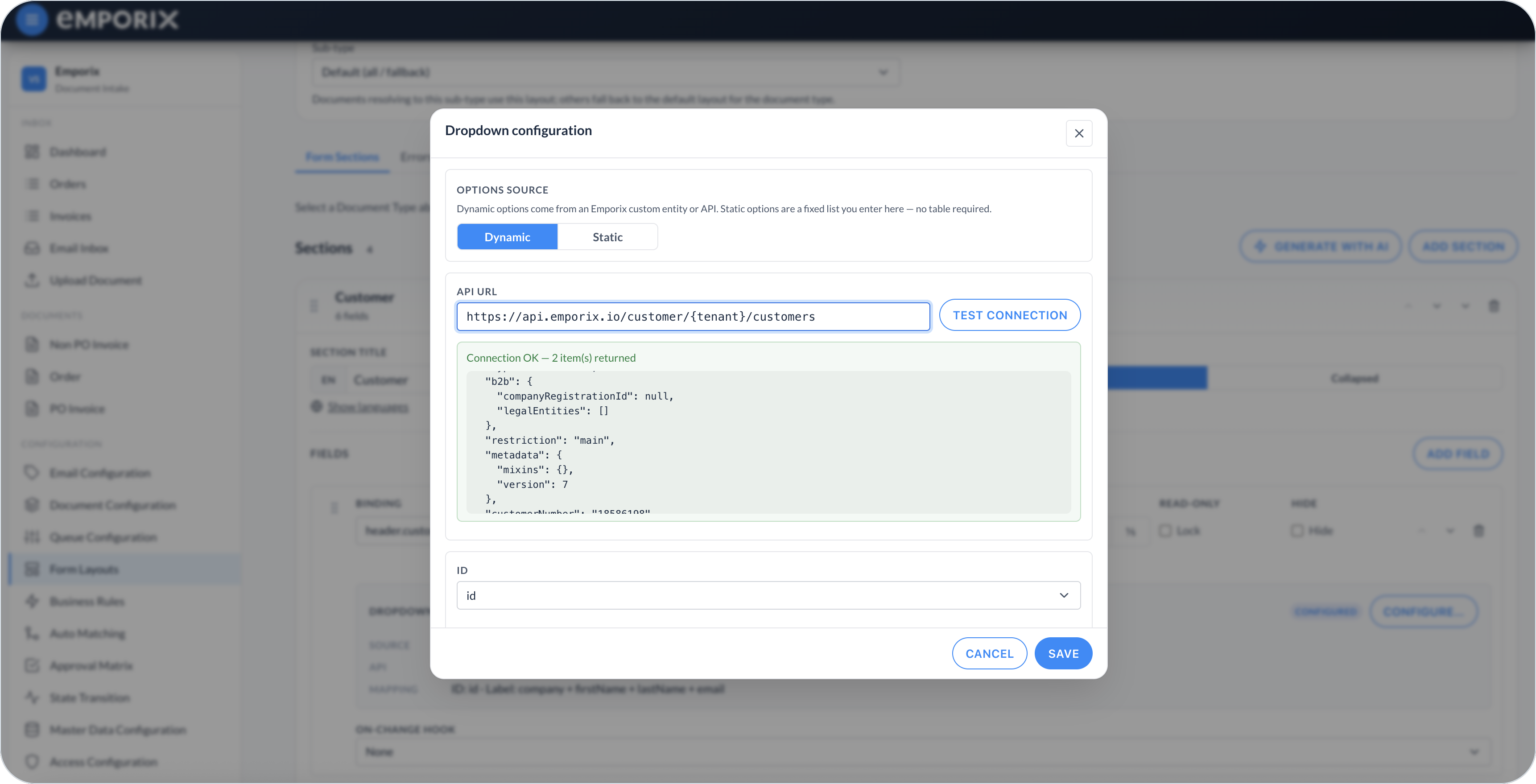
Set **Options source** to **Dynamic**, then set **API URL** to the list endpoint. Use `{tenant}` for the current tenant and `{query}` for the search text, for example `https://api.emporix.io/customer/{tenant}/customers?q={query}`.

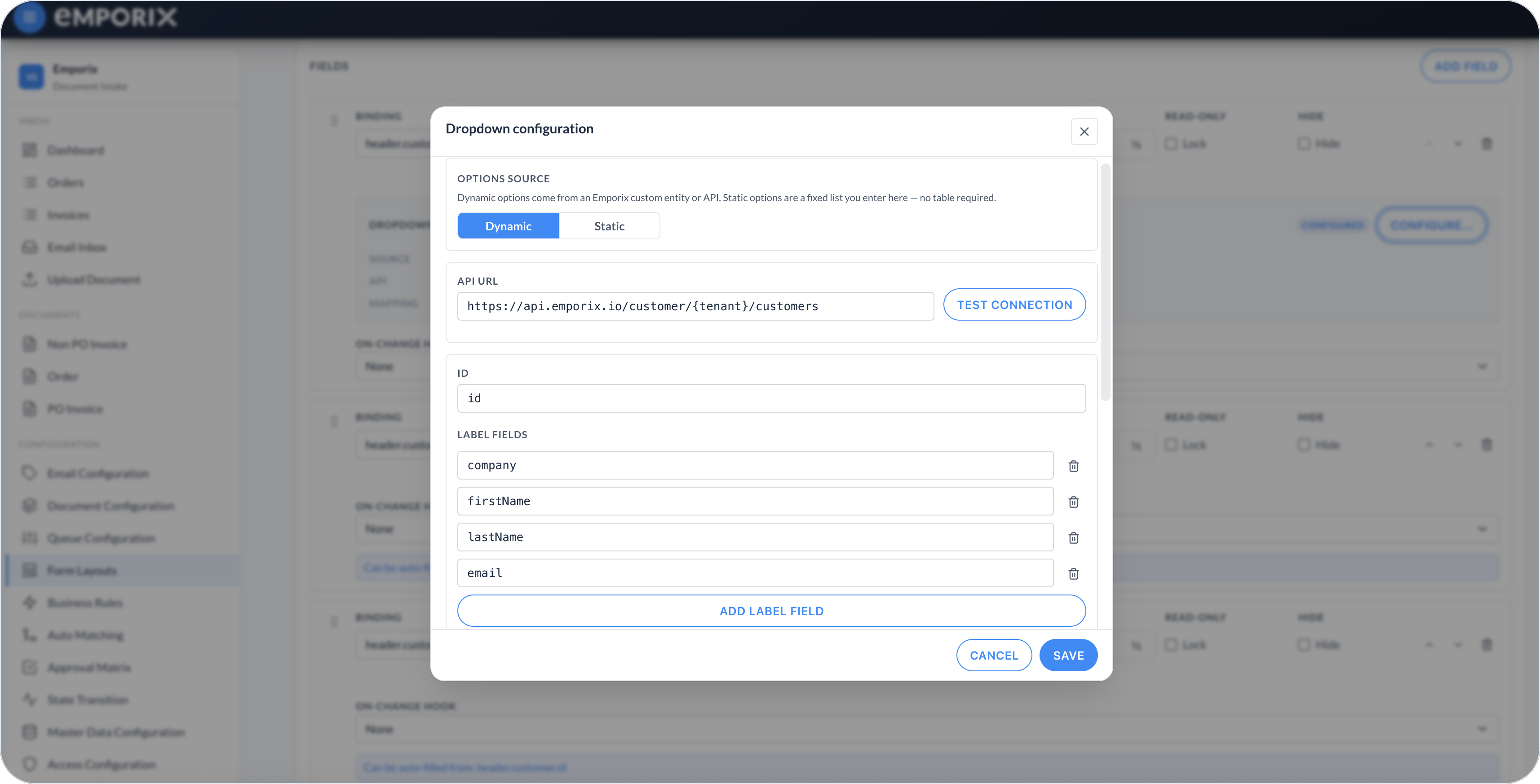
**ID** is the value stored on the document. **Label fields** are joined to form the text shown after a value is picked; when no label field is set, the ID is the label. Dynamic dropdowns can be cleared.

<figure><img src="https://1808414410-files.gitbook.io/~/files/v0/b/gitbook-x-prod.appspot.com/o/spaces%2FPBaf05o2vgbdikMFDTyz%2Fuploads%2Fgit-blob-b30bec6f08ef91aff4f575b76f434ccbb7b2419b%2Fform_layouts_dropdown_dynamic.png?alt=media" alt="Dropdown configuration Dynamic with API URL, Test connection, and Connection OK"><figcaption><p>Dynamic dropdown with API URL and test connection</p></figcaption></figure>

<figure><img src="https://1808414410-files.gitbook.io/~/files/v0/b/gitbook-x-prod.appspot.com/o/spaces%2FPBaf05o2vgbdikMFDTyz%2Fuploads%2Fgit-blob-72df0274af5c15e868557a2f54e8fa377ab33e04%2Fform_layouts_dropdown_labels.png?alt=media" alt="Dropdown configuration Label fields company, firstName, lastName, and email"><figcaption><p>Dynamic dropdown with label fields</p></figcaption></figure>

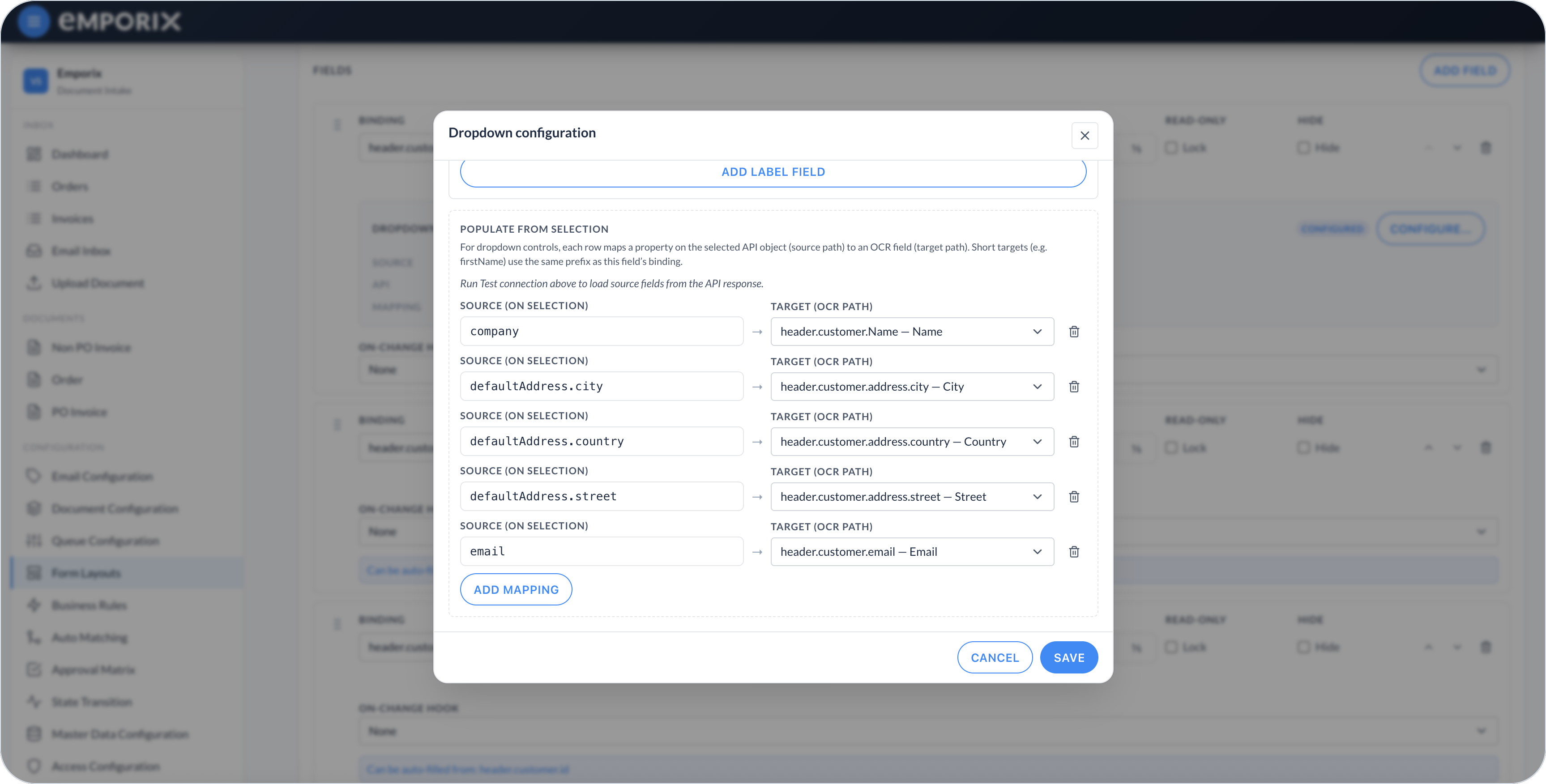
**Populate from selection** maps a source property on the selected API record to a target document field. The mappings run immediately after selection and before the field's optional on-change hook. In the dialog, source rows are **Source (on selection)** and targets are **Target (OCR path)**.

<figure><img src="https://1808414410-files.gitbook.io/~/files/v0/b/gitbook-x-prod.appspot.com/o/spaces%2FPBaf05o2vgbdikMFDTyz%2Fuploads%2Fgit-blob-0633ff19995b2b6146d1452e92dcd0c4fafe1afe%2Fform_layouts_dropdown_populate.png?alt=media" alt="Dropdown configuration Populate from selection with Source and Target OCR path mappings"><figcaption><p>Populate from selection with source (on selection) and target (OCR path)</p></figcaption></figure>

## Lookup

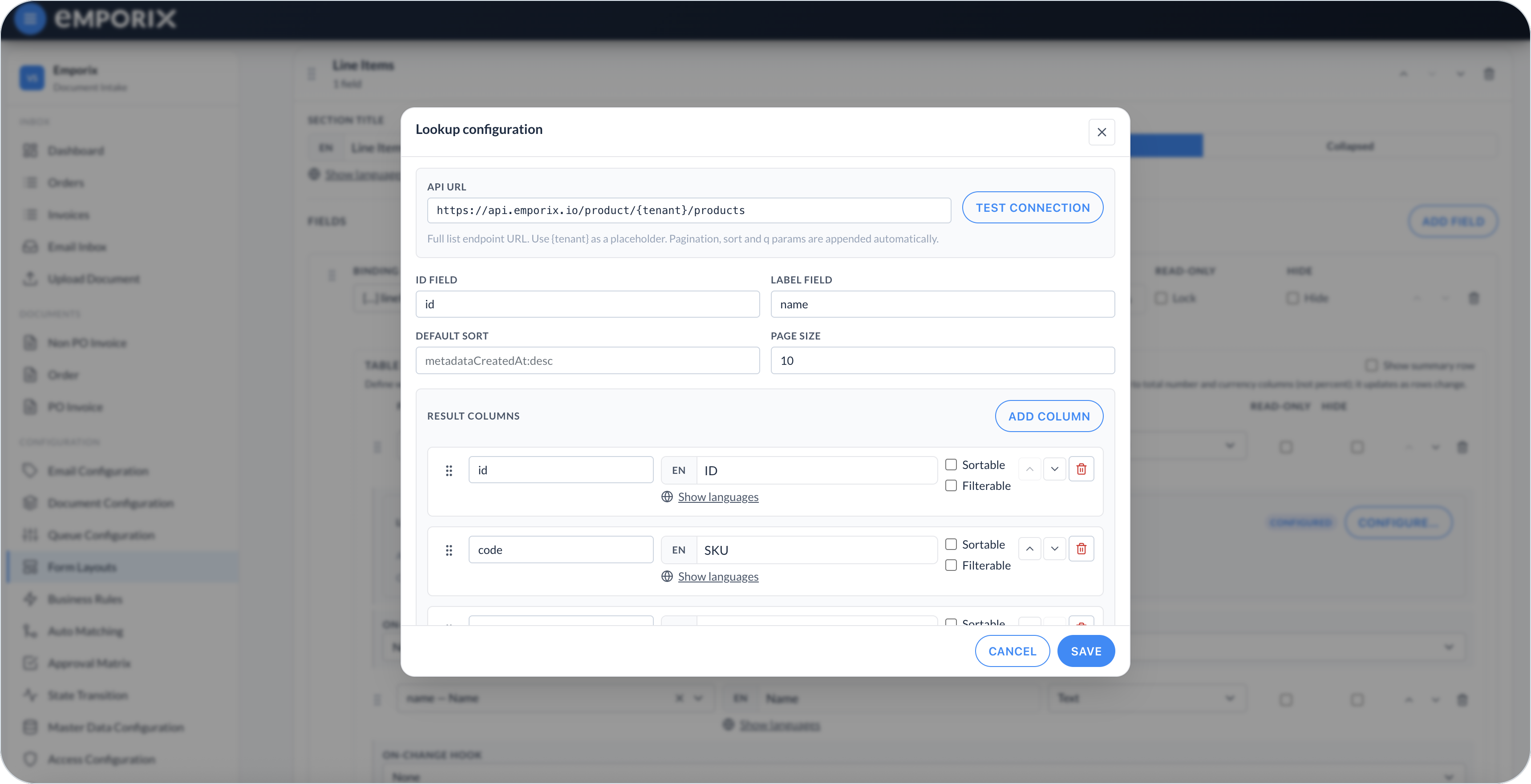
Set **API URL** to the list endpoint and use `{tenant}` for the current tenant, for example `https://api.emporix.io/schema/{tenant}/custom-entities/ZG_VENDOR/instances`. Pagination, sort, and filter parameters are appended automatically. **ID field** is the value stored on the document. **Label field** is the text shown after a value is picked. **Result columns** are the columns in the lookup table. A **lookupModal** also has **Populate from selection**, with the same source-to-target mapping as a dropdown.

Use **Default sort** in the form `field:asc` or `field:desc` to control the initial result order. **Page size** controls how many records each request returns. For each result column, choose whether sorting or filtering is available for it. The lookup has per-column filters rather than one general search field. When a result field is an array, select its **Array item** fields to show values from each item; leave them empty to show only the item count.

<figure><img src="https://1808414410-files.gitbook.io/~/files/v0/b/gitbook-x-prod.appspot.com/o/spaces%2FPBaf05o2vgbdikMFDTyz%2Fuploads%2Fgit-blob-bf207777fdac397dd4d93edf31ceea255a390c02%2Fform_layouts_lookup.png?alt=media" alt="Lookup configuration with API URL, ID field, Label field, Default sort, Page size, and Result columns"><figcaption><p>Lookup configuration with API URL, identity fields, and result columns</p></figcaption></figure>

**Static filters** always apply a **Field path** and **Value**. **Dynamic filters** apply a **Field path** whose **Document field path** is read from the current document. Select **Add filter** for either list. Use a static filter for a value that never changes, such as an open status. Use a dynamic filter when the lookup follows a value already on the document, such as vendor ID.

<figure><img src="https://1808414410-files.gitbook.io/~/files/v0/b/gitbook-x-prod.appspot.com/o/spaces%2FPBaf05o2vgbdikMFDTyz%2Fuploads%2Fgit-blob-823416f85a1a36121b249994502ab191237815c6%2Fform_layouts_lookup_filters.png?alt=media" alt="Lookup configuration Static filters, Dynamic filters, and Populate from selection"><figcaption><p>Lookup with Static filters, Dynamic filters, and Populate from selection</p></figcaption></figure>

If a dynamic filter's document field is empty, that filter is omitted. The lookup can therefore return an unfiltered result set. Mark the driver field as required in [Document Configuration](/document-intake-cockpit/configuration/document-configuration.md), or require it to be selected first, when opening an unfiltered lookup would be unsafe.

Enable **Select a nested line item** when a nested line inside a parent record must be chosen. Set **Line items array**, **Line ID field**, and **Line label field**, then configure the line-item columns. The lookup expands the parent record, displays its lines, and stores the selected line's ID. A populate source can use a field from the selected line or `parent.*` for a property on its parent record.

## Dynamic endpoint requirements

The cockpit calls dynamic endpoints with the signed-in user's bearer token and the current `emporix-tenant` header.

For a dynamic dropdown, the cockpit replaces `{tenant}` and `{query}` in **API URL**. The endpoint must return a JSON array, an object containing an array under `items`, `results`, or `data`, or one object that represents one result. The configured **ID** and **Label fields** must exist on each returned record.

For a lookup, the cockpit replaces `{tenant}` and adds `q`, `pageSize`, `sort`, and the cursor parameter `next` or `prev` when needed. Column filters use contains matching in `q`; static and dynamic filters use exact matching. The response uses the same array shapes as a dynamic dropdown. Cursor-based endpoints return the next and previous values in the `x-next-cursor` and `x-prev-cursor` response headers. Without those headers, the lookup cannot move beyond the returned page.

For a standard lookup, the cockpit resolves an existing selection by requesting **API URL** followed by `/{id}`. For nested line-item selection, it queries the list endpoint with a `q` filter for **Line items array** and **Line ID field**, then finds the selected line in the returned parent records.

Use **Test connection** with representative records before saving. If your endpoint does not support these parameters or response shapes, ask the endpoint owner to provide a compatible list API.

## Populate related fields

Add a **Populate from selection** row for each value copied from the selected API record:

* **Source (on selection)** – Path on the selected record
* **Target (OCR path)** – Document field to fill. A short target such as `firstName` uses the same prefix as this field's binding

For example, a vendor dropdown bound to `header.vendor.id` can use:

| Source (on selection) | Target (OCR path)     |
| --------------------- | --------------------- |
| `id`                  | `header.vendor.id`    |
| `name`                | `header.vendor.name`  |
| `address.city`        | `header.vendor.city`  |
| `paymentTerms`        | `header.paymentTerms` |

You can enter the complete document path or a short target that uses the field's binding prefix.

Clearing the selection writes an empty string to all mapped targets. Use populate only with targets where that is a valid cleared value. When a selected record does not contain one mapped source property, that target keeps its current value. Populate targets can be read-only or hidden, but they must use valid paths from the primary schema. The layout editor marks top-level targets with **Can be auto-filled from**.

For a dropdown or lookup in a table column, use row-relative targets such as `productName` or `unitPrice`. The values are written to the selected row.

## Dependent lookup

Use a dynamic filter when one field limits the available values in another. For example, configure a purchase-order lookup that depends on a vendor selection:

{% stepper %}
{% step %}

#### Configure the driver field

Configure the vendor dropdown to store its ID in `header.vendor.id`.
{% endstep %}

{% step %}

#### Add a dynamic filter

On the purchase-order lookup, add a **Dynamic filter**. Set **Field path** to the vendor field expected by the purchase-order API, for example `vendorId`. Set **Document field path** to `header.vendor.id`.
{% endstep %}

{% step %}

#### Test both cases

Test first with a vendor selected, then with an empty vendor field.
{% endstep %}
{% endstepper %}

Changing the vendor does not automatically clear an already selected purchase order. Add an [on-change hook](/document-intake-cockpit/configuration/form-layouts/form-layout-sections.md#shared-functions-and-field-hooks) to the vendor field when the dependent value must be cleared:

```javascript
return {
  'header.purchaseOrder.id': '',
  'header.purchaseOrder.number': ''
}
```

Return every dependent field from the same hook. Use the cleared value allowed by each schema field: for example, `''` for optional text or `null` for a nullable number or reference.

## Configuring a lookup or dropdown

{% stepper %}
{% step %}

#### Choose the control and source

Select **dropdown** or **lookupModal** as the field control. For a dropdown, select **Static** or **Dynamic** under **Options source**.
{% endstep %}

{% step %}

#### Configure the options or API

For a static dropdown, add the label/value rows. For a dynamic dropdown or lookup, set the **API URL** and identity fields.
{% endstep %}

{% step %}

#### Test the connection

For a dynamic control, select **Test connection** so source fields become available. Skip this step for a static dropdown.
{% endstep %}

{% step %}

#### Map populate or result columns

For a dynamic dropdown or lookup, add **Populate from selection** mappings when the choice must fill other document fields. For a lookup, also define **Result columns**.
{% endstep %}

{% step %}

#### Save and verify

Select **Save** on the layout, then open a representative document and verify:

* The selected label and stored ID.
* Every populated target, including behavior when the selection is cleared.
* Dynamic filters with a filled and empty driver field.
* Defaults and blank options.
* Table-row mappings when the control is in a table.

Return to the layout to correct and save any unexpected behavior.
{% endstep %}
{% endstepper %}


---

# Agent Instructions
This documentation is published with GitBook. GitBook is the documentation platform designed so that both humans and AI agents can read, navigate, and reason over technical content effectively. Learn more at gitbook.com.

## Querying This Documentation
If you need additional information that is not directly available in this page, you can query the documentation dynamically by asking a question.

Perform an HTTP GET request on the current page URL with the `ask` query parameter, and the optional `goal` query parameter:

```
GET https://developer.emporix.io/document-intake-cockpit/configuration/form-layouts/form-layout-lookups.md?ask=<question>&goal=<endgoal>
```

`ask` is the immediate question: it should be specific, self-contained, and written in natural language.
`goal` is optional and describes the broader end goal you are ultimately trying to accomplish on behalf of the user. GitBook uses it to tailor the answer towards what is most useful for that goal.

The response will contain a direct answer to the question and relevant excerpts and sources from the documentation.

Use this mechanism when the answer is not explicitly present in the current page, you need clarification or additional context, or you want to retrieve related documentation sections.