> For the complete documentation index, see [llms.txt](https://developer.emporix.io/llms.txt). Markdown versions of documentation pages are available by appending `.md` to page URLs; this page is available as [Markdown](https://developer.emporix.io/import-tool/ai-agents.md).
# AI Agents
Use an AI agent to build and monitor imports. Attach Import Tool domain tools so the agent can create the import and watch how it runs.
Use an AI agent to build and monitor imports. Attach **Import Tool Domain Tools** so the agent can create jobs, streams, and mappings, work with existing connections, and check runs, errors, and imported records. When you create or edit an agent in the Management Dashboard, those tools are on the **Tools** tab.
{% hint style="info" %}
For how domain tools fit into Emporix MCP, see [Emporix MCP Server](/agentic-commerce-intelligence/mcp-in-emporix/mcp.md). For the full agent setup procedure, see [AI Agents guide](/agentic-commerce-intelligence/agentic-intelligence/agents.md).
{% endhint %}
## Attaching Import Tool domain tools
{% stepper %}
{% step %}
#### Open AI Agents
In **Management Dashboard**, go to **Agentic AI** -> **AI Agents**.
{% endstep %}
{% step %}
#### Open or create an agent
Open an existing agent, or choose **Add new agent** to create one. See [Creating a custom agent](/agentic-commerce-intelligence/agentic-intelligence/agents.md#creating-a-custom-agent).
{% endstep %}
{% step %}
#### Open the Tools tab
On the agent configuration page, choose the **Tools** tab.
{% endstep %}
{% step %}
#### Find Import Tool Domain Tools
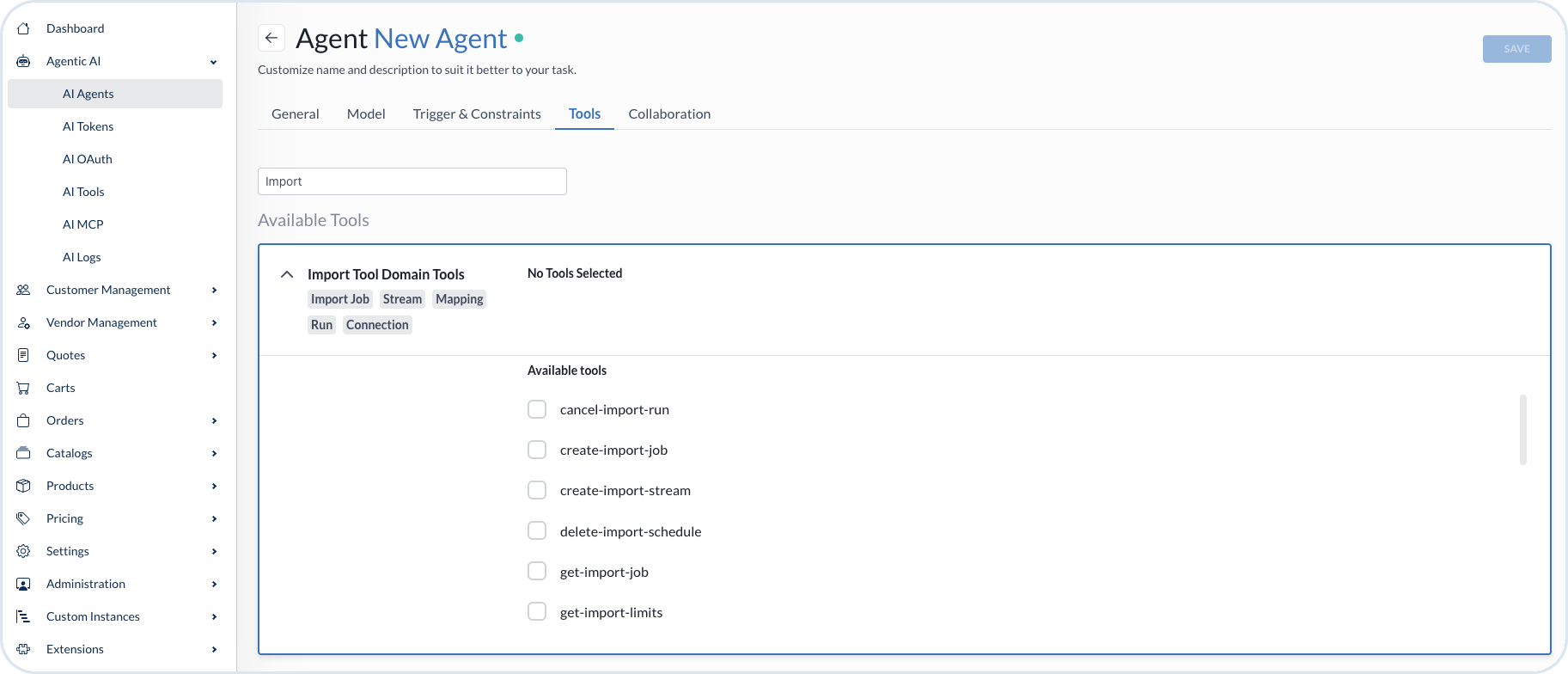
In the tools search, enter `Import`. Open **Import Tool Domain Tools**. The group includes tools tagged **Import Job**, **Stream**, **Mapping**, **Run**, and **Connection**.
Choose the tools your agent needs, for example `create-import-job`, `create-import-stream`, `get-import-job`, or `cancel-import-run`. Then choose **Save**.
{% endstep %}
{% endstepper %}
Import Tool Domain Tools on the agent Tools tab
{% hint style="info" %}
The tools you attach determine what the agent can do with the Import Tool. Attach only the tools required for the agent's task. For attaching domain tools, native tools, and MCP servers, see [Attach tools](/agentic-commerce-intelligence/agentic-intelligence/agents.md#attach-tools) in the AI Agents guide.
{% endhint %}
## Import Tool MCP server
The Import Tool MCP server exposes tools the agent uses to build, run, and monitor imports. Tools that change state are marked as **writes**, so you can see at a glance which are safe to call while exploring.
| Item | Value |
| ---------- | ------------------------------------------ |
| Transports | `/mcp` · `/sse` |
| Config | `IMPORTTOOL_URL` · `BASIC_AUTH` · `TENANT` |
| Scopes | `import_trigger` · `import_manage` |
### Jobs and streams
| Tool | Access | Description |
| ---------------------- | ------ | -------------------------------------------------------------------------------------------------------------- |
| `list-import-jobs` | read | Lists the tenant's import jobs. Start here — it yields the job ID every other tool needs. |
| `get-import-job` | read | Returns one job, with its streams. |
| `create-import-job` | writes | Creates an empty job. |
| `update-import-job` | writes | Changes a job's name, description, default connection, or enabled flag. |
| `create-import-stream` | writes | Adds a stream: one source dataset into one Emporix target type. |
| `update-import-stream` | writes | Changes stream settings. Only the arguments supplied are touched. |
| `get-import-limits` | read | Returns the licence limits in force for the tenant — records per entity, concurrency, batch size, and workers. |
### Connections
| Tool | Access | Description |
| --------------------------- | ------ | ----------------------------------------------------------------------------------------------------------------------------------- |
| `list-import-connections` | read | Lists the source connections available, and what each one connects to. Credentials are never returned. |
| `list-connection-resources` | read | Lists resources a connection's discovered schema offers — REST operations, GraphQL queries — so a stream can name one. |
| `test-import-connection` | read | Checks that the connection can reach its source, and reports why if it cannot. Use this before you build streams on the connection. |
| `sample-connection` | read | Reads records live and reports the fields they contain, with an inferred type. |
### Mappings
| Tool | Access | Description |
| -------------------------- | ------ | -------------------------------------------------------------------------------------------------------------------------------- |
| `get-stream-mappings` | read | Returns a stream's mappings: each source field, the target attribute it writes to, and its declared type. |
| `list-source-fields` | read | Lists fields the source provides, with an inferred type and a sample value. |
| `list-target-fields` | read | Lists attributes the target type actually has, with each one's declared type. The declared type is authoritative. |
| `list-target-types` | read | Lists custom-entity types that already exist on the tenant. |
| `generate-stream-mappings` | writes | Matches source fields against the target's real attributes and saves the result. Not a dry run. |
| `set-stream-mappings` | writes | Replaces a stream's mappings with the list given. |
| `preview-stream-mappings` | read | Runs sample records through the mappings and returns what would be written. Writes nothing. |
| `publish-stream-mappings` | writes | Publishes the saved draft so real runs use it. Until published, a stream's mappings are a draft and real runs skip it. |
| `list-mapping-versions` | read | Lists published versions, newest first, and where the draft currently stands relative to them. |
| `restore-mapping-version` | writes | Replaces the draft with an earlier published version — step one of a rollback. Publish to make it live. |
| `check-schema-drift` | writes | Compares the source's current fields against what the stream last saw. Advances the stored baseline, so it is not purely a read. |
| `list-transforms` | read | Lists transformations a mapping can apply, each with syntax, behaviour, and an example. |
### Running
| Tool | Access | Description |
| ------------------------ | ------ | --------------------------------------------------------------------------------------------------- |
| `trigger-import-run` | writes | Starts a run — full, incremental, or dry — and returns the run it created. |
| `cancel-import-run` | writes | Stops a running import. |
| `retry-failed-records` | writes | Re-runs only a finished run's failed records, as a new run. |
| `get-import-schedule` | read | Returns a job's schedule: cron expression, timezone, whether it is enabled, and when it next fires. |
| `set-import-schedule` | writes | Creates or replaces a job's schedule. |
| `delete-import-schedule` | writes | Removes the schedule, so the job runs only when triggered. |
### Monitoring
| Tool | Access | Description |
| ----------------------- | ------ | -------------------------------------------------------------------------------------- |
| `list-import-runs` | read | Lists recent runs of a job, newest first. |
| `get-import-run` | read | Returns one run: its status and record counters. |
| `get-import-run-errors` | read | Returns the per-record errors from a run — what failed and why. |
| `get-import-stats` | read | Returns aggregated statistics for a time window: totals, rates, and per-stream health. |
| `search-imported-data` | read | Searches the records this tenant has imported, optionally scoped to one stream. |
---
# Agent Instructions
This documentation is published with GitBook. GitBook is the documentation platform designed so that both humans and AI agents can read, navigate, and reason over technical content effectively. Learn more at gitbook.com.
## Querying This Documentation
If you need additional information that is not directly available in this page, you can query the documentation by asking a question.
Perform an HTTP GET request on the following URL with the `ask` and `goal` query parameters:
```
GET https://developer.emporix.io/import-tool/ai-agents.md?ask=&goal=
```
`ask` is the immediate question: it should be specific, self-contained, and written in natural language.
`goal` is what the user is ultimately trying to achieve, the reason they need the answer. Sharing it helps GitBook give you a better, more relevant answer. A goal is most helpful when it describes the outcome the user wants rather than restating the question. For example, with `ask=how do I create an API token`, a goal like `automate deployments from our CI pipeline` lets GitBook tailor the answer to that use case.
The response will contain a direct answer to the question and relevant excerpts and sources from the documentation.
Use this mechanism when the answer is not explicitly present in the current page, you need clarification or additional context, or you want to retrieve related documentation sections.