> For the complete documentation index, see [llms.txt](https://developer.emporix.io/llms.txt). Markdown versions of documentation pages are available by appending `.md` to page URLs; this page is available as [Markdown](https://developer.emporix.io/import-tool/import-configuration-examples/celonis-example.md).

# Importing from Celonis

This example shows how to configure Celonis permissions, a Celonis connection, and a stream in the Import Tool.

This example shows how to use the Import Tool with Celonis: grant Celonis permissions, create a Celonis connection with a key type and catalog selection, then create a stream that imports Knowledge Model records into Emporix.

{% hint style="info" %}
Complete the Emporix [Prerequisites for the Import Tool](/import-tool/import-setup-and-jobs/prerequisites.md) first. For the general UI procedures, see [Connections](/import-tool/import-setup-and-jobs/connections.md), [Imports](/import-tool/import-setup-and-jobs/imports.md), and [Streams](/import-tool/import-setup-and-jobs/imports/streams.md).
{% endhint %}

## Celonis permissions

On the Celonis side, grant access to the Studio space and the data pool that the Import Tool connection will use. Without these permissions, the catalog fields in the connection configuration stay empty or unavailable.

### Grant Celonis Studio space permissions

{% stepper %}
{% step %}

#### Open the Studio space

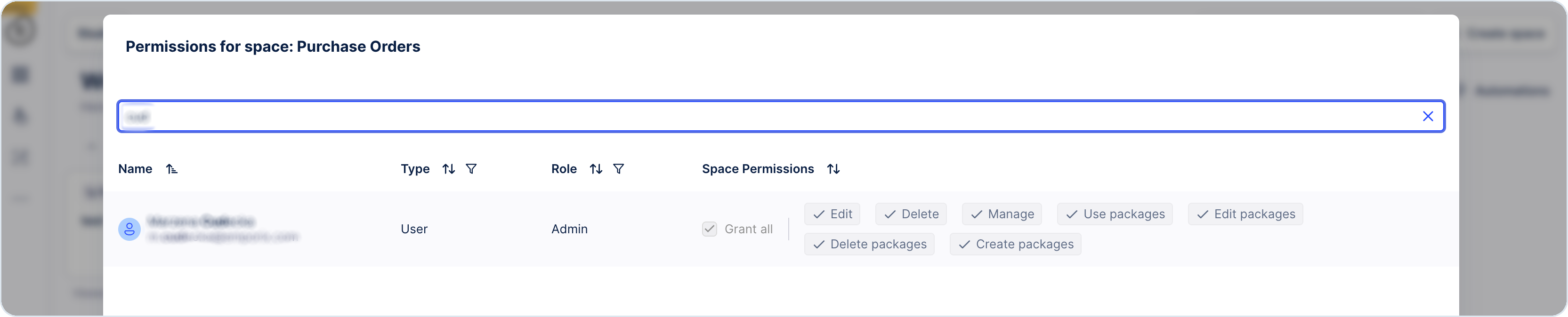
In Celonis Studio, open the space that the Import Tool must use—for example **Purchase Orders**.
{% endstep %}

{% step %}

#### Open permissions

Use the three-dot menu for the space and open the permissions configuration.
{% endstep %}

{% step %}

#### Add the user

Search for the user and grant the permissions required to use packages in that space. Then save your changes.
{% endstep %}
{% endstepper %}

<figure><img src="https://2637457592-files.gitbook.io/~/files/v0/b/gitbook-x-prod.appspot.com/o/spaces%2F9VS91qn3Ylwd58YivX1A%2Fuploads%2Fgit-blob-203906a484a76ee86e065f5f74a99258d8012575%2Fit_celonis_permissions.png?alt=media" alt="Celonis permissions dialog for the Purchase Orders Studio space"><figcaption><p>Permissions for a Celonis Studio space, with package-related access granted to the user</p></figcaption></figure>

{% hint style="info" %}
To learn more about Celonis Studio, see the [Celonis Product Documentation](https://docs.celonis.com/?lang=en).
{% endhint %}

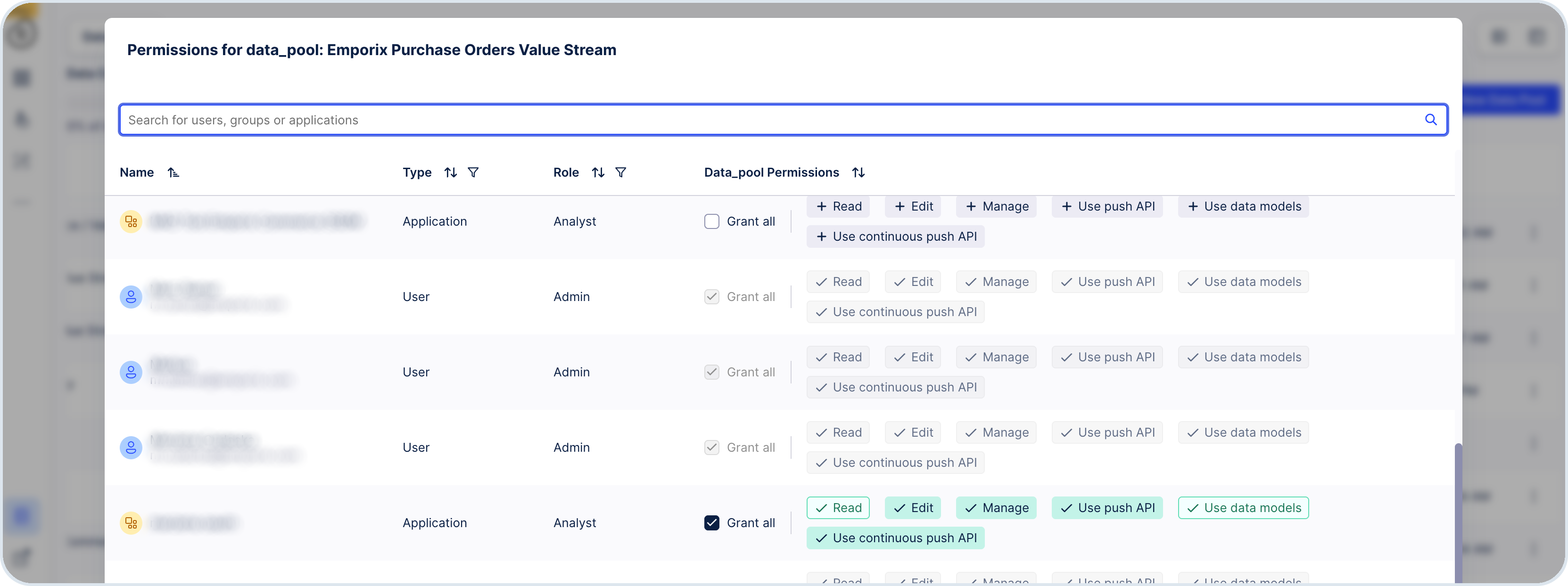
### Grant the data pool permissions

{% stepper %}
{% step %}

#### Open Data Integration

In Celonis, go to **Data Integration** and open the data pool that provides the data—for example **Emporix Purchase Orders Value Stream**.
{% endstep %}

{% step %}

#### Open data pool permissions

Open the permissions configuration for that data pool.
{% endstep %}

{% step %}

#### Add the user or application

Search for the user or OAuth application used by the Import Tool connection, grant the required data pool permissions, and save your changes.
{% endstep %}
{% endstepper %}

<figure><img src="https://2637457592-files.gitbook.io/~/files/v0/b/gitbook-x-prod.appspot.com/o/spaces%2F9VS91qn3Ylwd58YivX1A%2Fuploads%2Fgit-blob-fc568c87f1157618f36327b9fbdc072bf96a85cc%2Fit_celonis_data_permissions.png?alt=media" alt="Celonis permissions dialog for a data pool with users and applications"><figcaption><p>Permissions for a Celonis data pool, including users and OAuth applications used by the Import Tool</p></figcaption></figure>

## Create a Celonis connection

Follow [Create a connection](/import-tool/import-setup-and-jobs/connections.md#create-a-connection) and [Celonis](/import-tool/import-setup-and-jobs/connections.md#celonis). For this example, use a clear name such as `celonis-import` and the credential type available for your Celonis environment.

In the [Celonis catalog](/import-tool/import-setup-and-jobs/connections.md#catalog), choose the data pool and Studio space configured above, then save and test the connection.

## Create a stream from Celonis

{% stepper %}
{% step %}

#### Create the stream

[Create a stream](/import-tool/import-setup-and-jobs/imports/creating-streams.md) from the Celonis connection. Choose the required Knowledge Model record, matching keys, and Emporix target type.
{% endstep %}

{% step %}

#### Complete the stream setup

Complete the stream's [source and target configuration](/import-tool/import-setup-and-jobs/imports/configuring-streams.md), then [map and publish its fields](/import-tool/import-setup-and-jobs/imports/field-mapping.md).
{% endstep %}
{% endstepper %}

{% hint style="info" %}
If invoice and invoice line records are separate in the Celonis Knowledge Model, keep the invoice stream as **Standalone** and set the invoice-line stream to **Composite child**, with the invoice as **Parent stream**, the foreign key as **Linking field**, and the invoice array as **Embed as attribute**. Check the sequence in **Run order** and on the **Dependency graph** tab. See [Composite configuration](/import-tool/import-setup-and-jobs/imports/configuring-streams.md#composite).
{% endhint %}

## Next steps

* Use **Dry run**, **Run options**, and the schedule described in [Running and Monitoring Imports](/import-tool/import-setup-and-jobs/imports/running-imports.md).
* Review [Run history](/import-tool/import-setup-and-jobs/imports/running-imports.md#run-history) and [Run order](/import-tool/import-setup-and-jobs/imports/running-imports.md#run-order-and-dependencies).
* Monitor health and failures on the [Dashboard](/import-tool/dashboard.md).
* Inspect record-level results in [Imported Data](/import-tool/import-setup-and-jobs/imported-data.md).


---

# Agent Instructions
This documentation is published with GitBook. GitBook is the documentation platform designed so that both humans and AI agents can read, navigate, and reason over technical content effectively. Learn more at gitbook.com.

## Querying This Documentation
If you need additional information that is not directly available in this page, you can query the documentation dynamically by asking a question.

Perform an HTTP GET request on the current page URL with the `ask` query parameter, and the optional `goal` query parameter:

```
GET https://developer.emporix.io/import-tool/import-configuration-examples/celonis-example.md?ask=<question>&goal=<endgoal>
```

`ask` is the immediate question: it should be specific, self-contained, and written in natural language.
`goal` is optional and describes the broader end goal you are ultimately trying to accomplish on behalf of the user. GitBook uses it to tailor the answer towards what is most useful for that goal.

The response will contain a direct answer to the question and relevant excerpts and sources from the documentation.

Use this mechanism when the answer is not explicitly present in the current page, you need clarification or additional context, or you want to retrieve related documentation sections.