> For the complete documentation index, see [llms.txt](https://developer.emporix.io/llms.txt). Markdown versions of documentation pages are available by appending `.md` to page URLs; this page is available as [Markdown](https://developer.emporix.io/import-tool/import-setup-and-jobs/imports.md).
# Imports
Create and manage import jobs on the Imports view, then open a job to configure its streams.
In the Import Tool, you create **imports** that work like extraction or import jobs. Each import pulls one or more feeds of data from an external system and writes it into Emporix.
An import is organized in one or more **streams**. A stream is a feed of records from a selected source that the Import Tool writes to target entities in your tenant. You can divide a broader import into multiple streams when you need separate source records, keys, or targets. When you run the import, all enabled streams in that import run together.
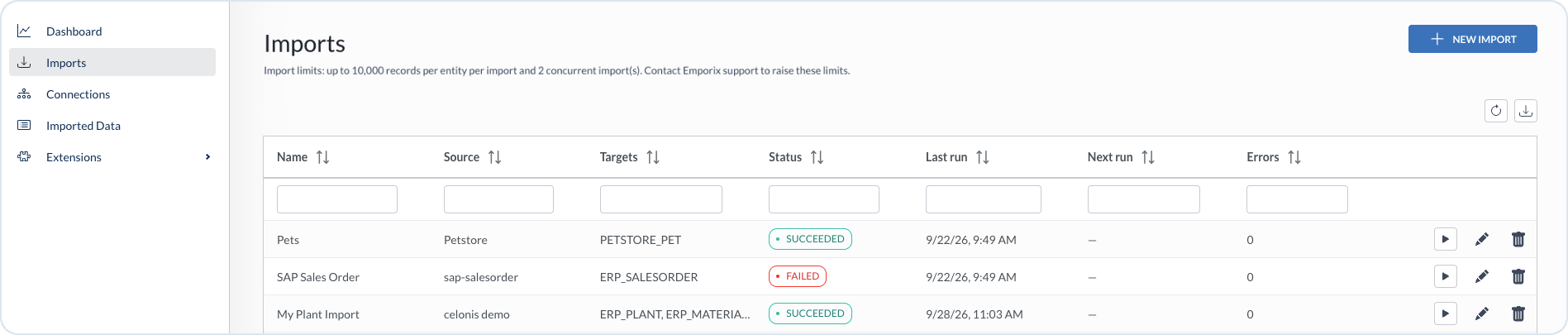
Open **Imports** in the sidebar to list your import jobs.
Imports with source, targets, status, run times, errors, and row actions
{% hint style="warning" %}
* You can import up to 10,000 records per entity in one import and run up to 2 imports concurrently. To request higher limits, contact the [Emporix Support Team](mailto:support@emporix.com).
* Before you create an import, complete the [Prerequisites](/import-tool/import-setup-and-jobs/prerequisites.md) and set up a [connection](/import-tool/import-setup-and-jobs/connections.md) to the source system. To configure streams inside an import, see [Streams](/import-tool/import-setup-and-jobs/imports/streams.md).
{% endhint %}
## Creating an import
{% stepper %}
{% step %}
#### Starting a new import
Choose **+ New import** in the **Imports** view.
{% endstep %}
{% step %}
#### Adding the import name and description
Enter a name and description for the import, then continue to the import details view.
{% endstep %}
{% endstepper %}
{% hint style="warning" %}
Use a clear import name that identifies the source and purpose, for example `SAP Sales Order` or `Celonis invoices`. You select this import later when you monitor status on the [Dashboard](/import-tool/dashboard.md).
{% endhint %}
## Managing imports
From the **Imports** list you can:
* **Run** – use the play action to run the import immediately.
* **Edit** – open the [Streams](/import-tool/import-setup-and-jobs/imports/streams.md) view for that import.
* **Delete** – remove the import.
Select **Refresh** after a run to update status, last run time, next run time, and error counts.
{% hint style="info" %}
To review the records written by an import, open [Imported Data](/import-tool/import-setup-and-jobs/imported-data.md).
{% endhint %}
---
# Agent Instructions
This documentation is published with GitBook. GitBook is the documentation platform designed so that both humans and AI agents can read, navigate, and reason over technical content effectively. Learn more at gitbook.com.
## Querying This Documentation
If you need additional information that is not directly available in this page, you can query the documentation dynamically by asking a question.
Perform an HTTP GET request on the current page URL with the `ask` query parameter, and the optional `goal` query parameter:
```
GET https://developer.emporix.io/import-tool/import-setup-and-jobs/imports.md?ask=&goal=
```
`ask` is the immediate question: it should be specific, self-contained, and written in natural language.
`goal` is optional and describes the broader end goal you are ultimately trying to accomplish on behalf of the user. GitBook uses it to tailor the answer towards what is most useful for that goal.
The response will contain a direct answer to the question and relevant excerpts and sources from the documentation.
Use this mechanism when the answer is not explicitly present in the current page, you need clarification or additional context, or you want to retrieve related documentation sections.