> For the complete documentation index, see [llms.txt](https://developer.emporix.io/llms.txt). Markdown versions of documentation pages are available by appending `.md` to page URLs; this page is available as [Markdown](https://developer.emporix.io/import-tool/import-setup-and-jobs/imports/configuring-streams.md).

# Configuring Streams

Configure stream source, target, key resolution, composite behavior, delete detection, routing, and health.

After you create a stream, expand its row to access the configuration tabs. Save each tab after you change it.

## Source

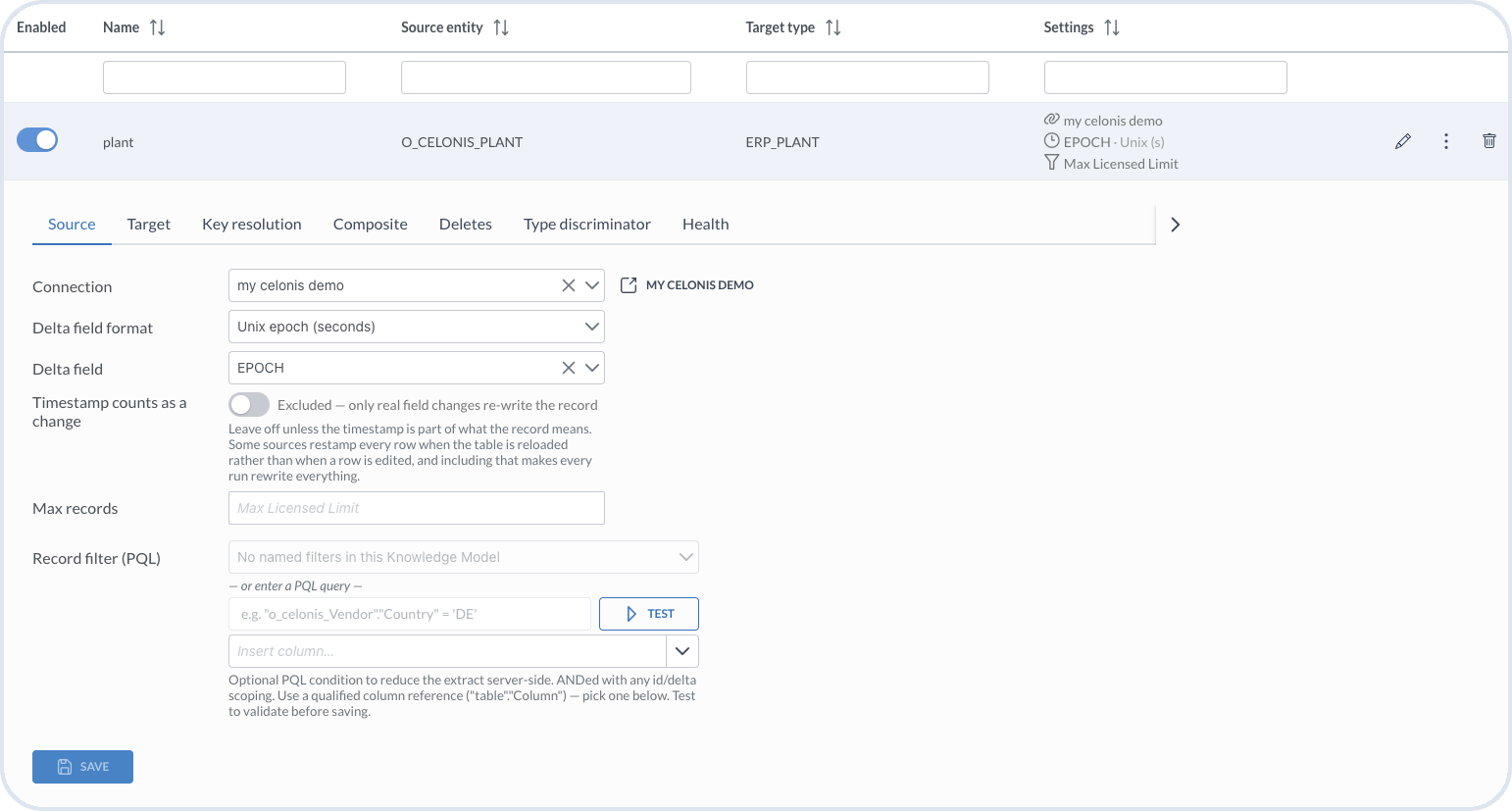
On the **Source** tab, set:

* **Connection** – the [connection](/import-tool/import-setup-and-jobs/connections.md) that points to the source system
* **Delta field format** – the format used by the source field, for example **Unix epoch (seconds)**. A Unix timestamp represents a point in time as the number of seconds elapsed since the Unix epoch: 1 January 1970 at 00:00 UTC.
* **Delta field** – a modified or created timestamp used to detect changes during delta runs
* **Timestamp counts as a change** – include a record when only its timestamp changes
* **Max records** – an optional limit on how many records to import
* **Record filter (PQL)** – optional filter for Celonis sources. PQL is Process Query Language, the Celonis query language for process data. Enter a condition here when you want to import only rows that match a rule, for example `"o_Celonis_Vendor"."Country" = 'DE'`. The Import Tool evaluates this filter in Celonis before records are extracted, so fewer rows are read from the source.

  Use PQL together with the run mode and limits on this tab. On a **delta** run, import only records that changed since the last watermark (**Delta field**). On a **full** run, import all eligible records, respecting **Max records** when you set a limit. When you add PQL, a row is imported only if it matches your condition **and** still qualifies under that run mode and those limits. For example, on a delta run you might import changed vendors, and PQL `"Country" = 'DE'` imports only the changed rows where the country is Germany.

For a PQL condition, use **Insert column** to add a qualified column reference (`"table"."Column"`), then choose **Test** to validate the condition before saving.

<figure><img src="https://2637457592-files.gitbook.io/~/files/v0/b/gitbook-x-prod.appspot.com/o/spaces%2F9VS91qn3Ylwd58YivX1A%2Fuploads%2Fgit-blob-c38eecce0298f21e64a83efa002e7ed1df0836c8%2Fit_stream_source.png?alt=media" alt="Source tab with connection, delta settings, record limit, and PQL filter"><figcaption><p>Source settings for a Celonis stream</p></figcaption></figure>

## Target

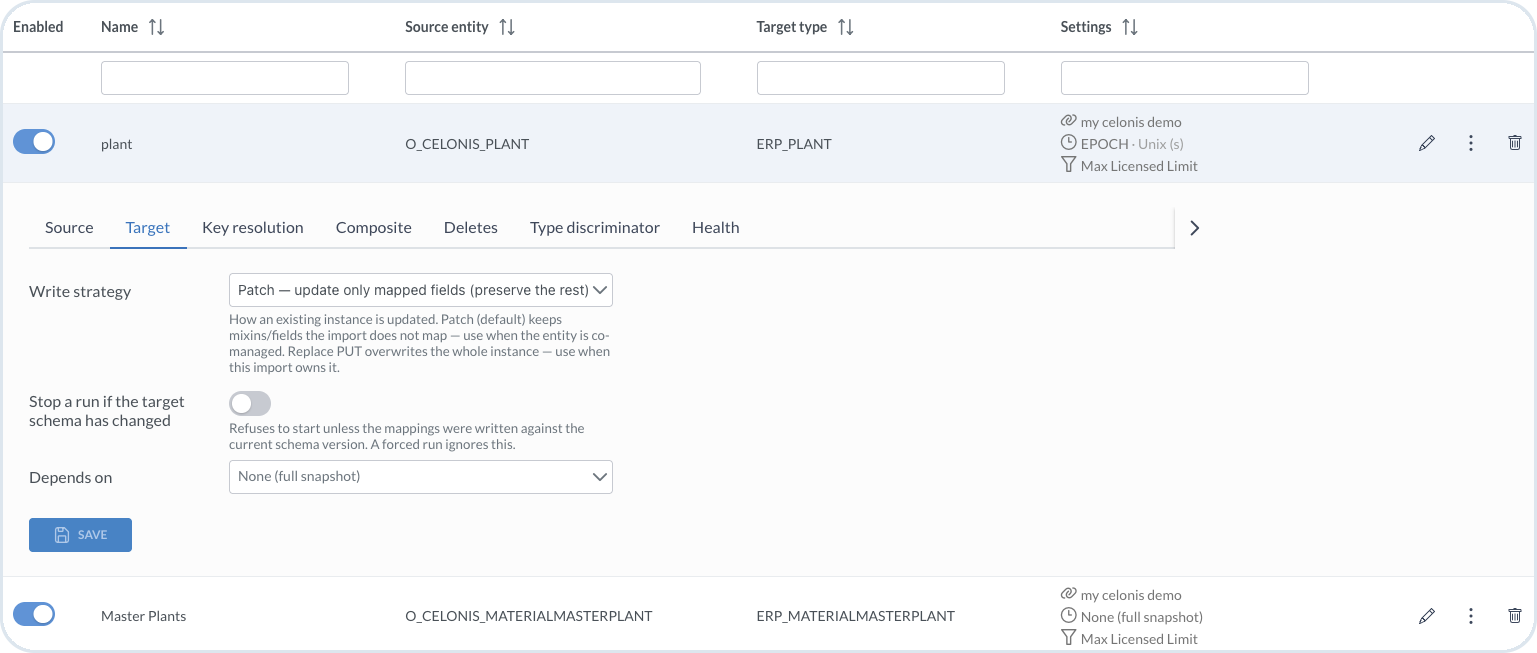
On the **Target** tab, set:

* **Write strategy** – choose **Patch** to update only mapped fields and keep the rest, or **Replace PUT** to overwrite the whole instance
* **Stop a run if the target schema has changed** – prevent standard runs when the mapping was created for an earlier target schema version; forced runs ignore this protection
* **Depends on** – select another stream that must run first, or **None (full snapshot)**

Use **Patch** when another process also manages the entity. Use **Replace PUT** when this import owns the complete instance.

<figure><img src="https://2637457592-files.gitbook.io/~/files/v0/b/gitbook-x-prod.appspot.com/o/spaces%2F9VS91qn3Ylwd58YivX1A%2Fuploads%2Fgit-blob-9eef48e21a68f499d0a475a21c7c56d4b4c69264%2Fit_streams_target.png?alt=media" alt="Target tab with write strategy, schema-change protection, and dependency settings"><figcaption><p>Target settings for writing entities and controlling stream dependencies</p></figcaption></figure>

## HTTP endpoint

When the stream uses an **HTTP / REST API** connection, configure the request on the **HTTP endpoint** tab.

{% tabs %}
{% tab title="Endpoint" %}
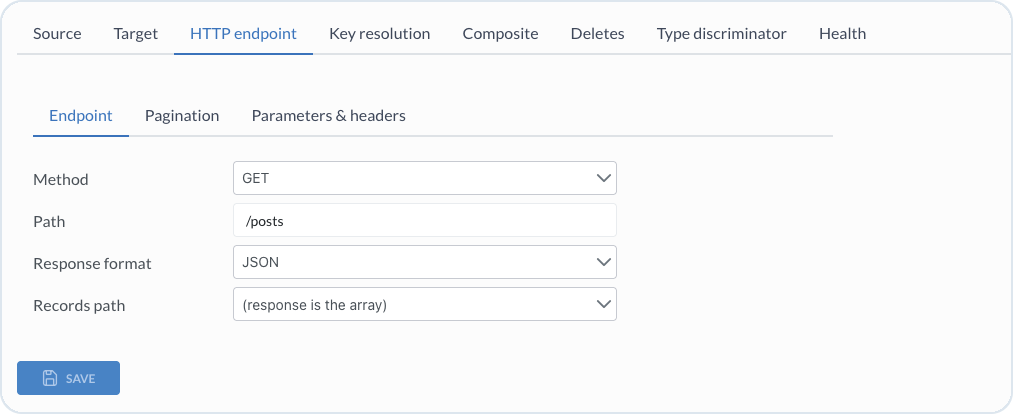
On the **Endpoint** sub-tab, set:

* **Method** – the HTTP method, for example **GET**
* **Path** – the path appended to the connection base URL
* **Response format** – the format returned by the source, for example **JSON**
* **Records path** – the path to the records array, or **(response is the array)** when the response body is the array

Choose **Save**.

<figure><img src="https://2637457592-files.gitbook.io/~/files/v0/b/gitbook-x-prod.appspot.com/o/spaces%2F9VS91qn3Ylwd58YivX1A%2Fuploads%2Fgit-blob-eabdb59cebfa6088511bb6e366dafdc6d7e00b5d%2Fit_http_endpoint.png?alt=media" alt="HTTP endpoint settings for method, path, response format, and records path" width="700"><figcaption><p>Endpoint settings for an HTTP source</p></figcaption></figure>
{% endtab %}

{% tab title="Pagination" %}
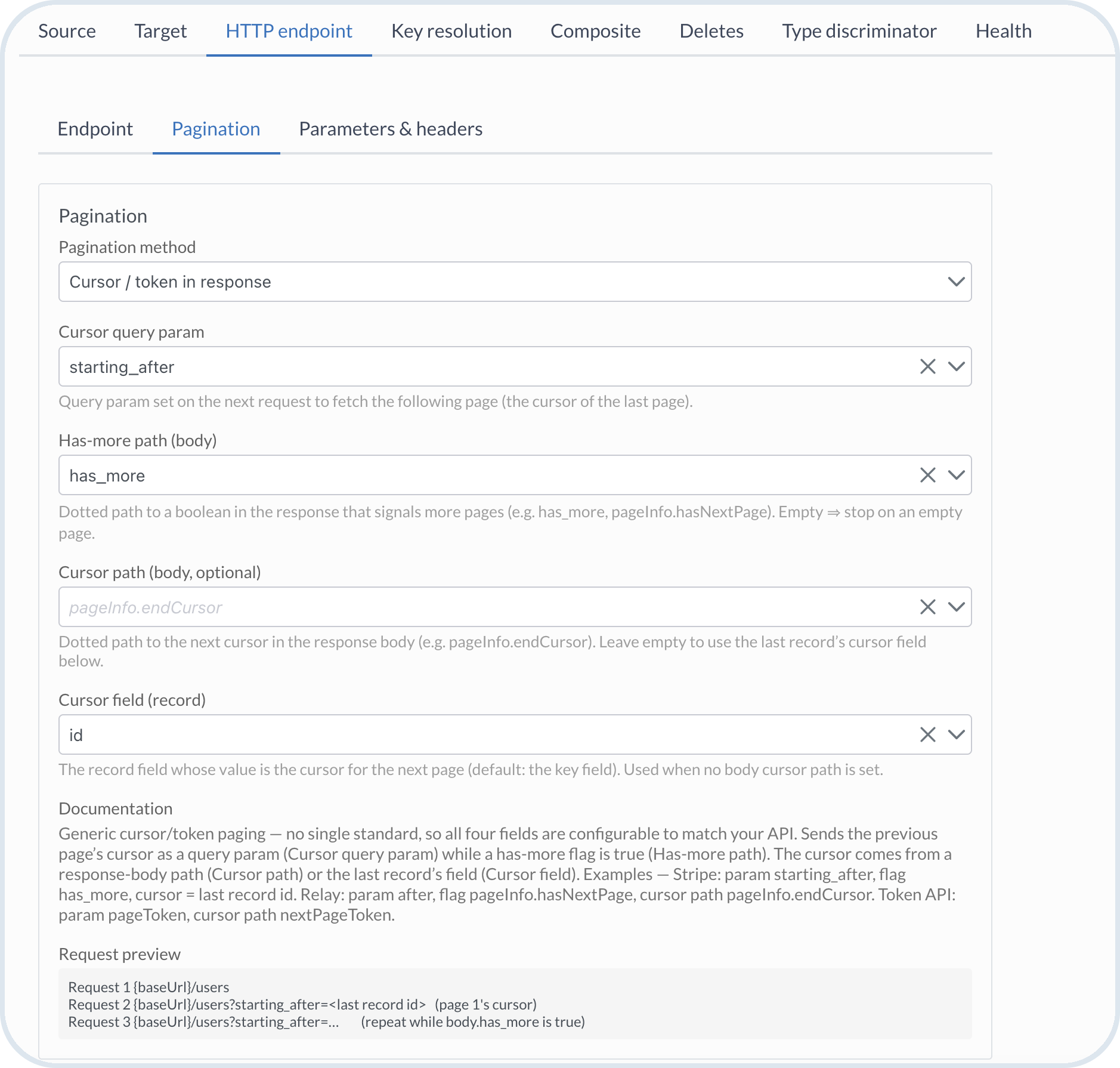
On the **Pagination** sub-tab, choose the pagination method used by the source API. For **Cursor / token in response**, configure:

* **Cursor query param** – the query parameter that sends the previous page's cursor in the next request
* **Has-more path (body)** – the dotted path to the response field that indicates whether more pages are available. Leave it empty to stop pagination when the API returns an empty page.
* **Cursor path (body, optional)** – the dotted path to the next cursor in the response body
* **Cursor field (record)** – the record field used as the next cursor when **Cursor path** is empty; the key field is the default

Review **Request preview** to verify how the Import Tool builds subsequent requests.

<figure><img src="https://2637457592-files.gitbook.io/~/files/v0/b/gitbook-x-prod.appspot.com/o/spaces%2F9VS91qn3Ylwd58YivX1A%2Fuploads%2Fgit-blob-675b9c864f5faa539ebac229e2f3896b828b0d8d%2Fit_http_pagination.png?alt=media" alt="Cursor pagination settings and request preview for an HTTP endpoint" width="700"><figcaption><p>Cursor-based pagination with configurable query parameter and response paths</p></figcaption></figure>
{% endtab %}

{% tab title="Parameters & headers" %}
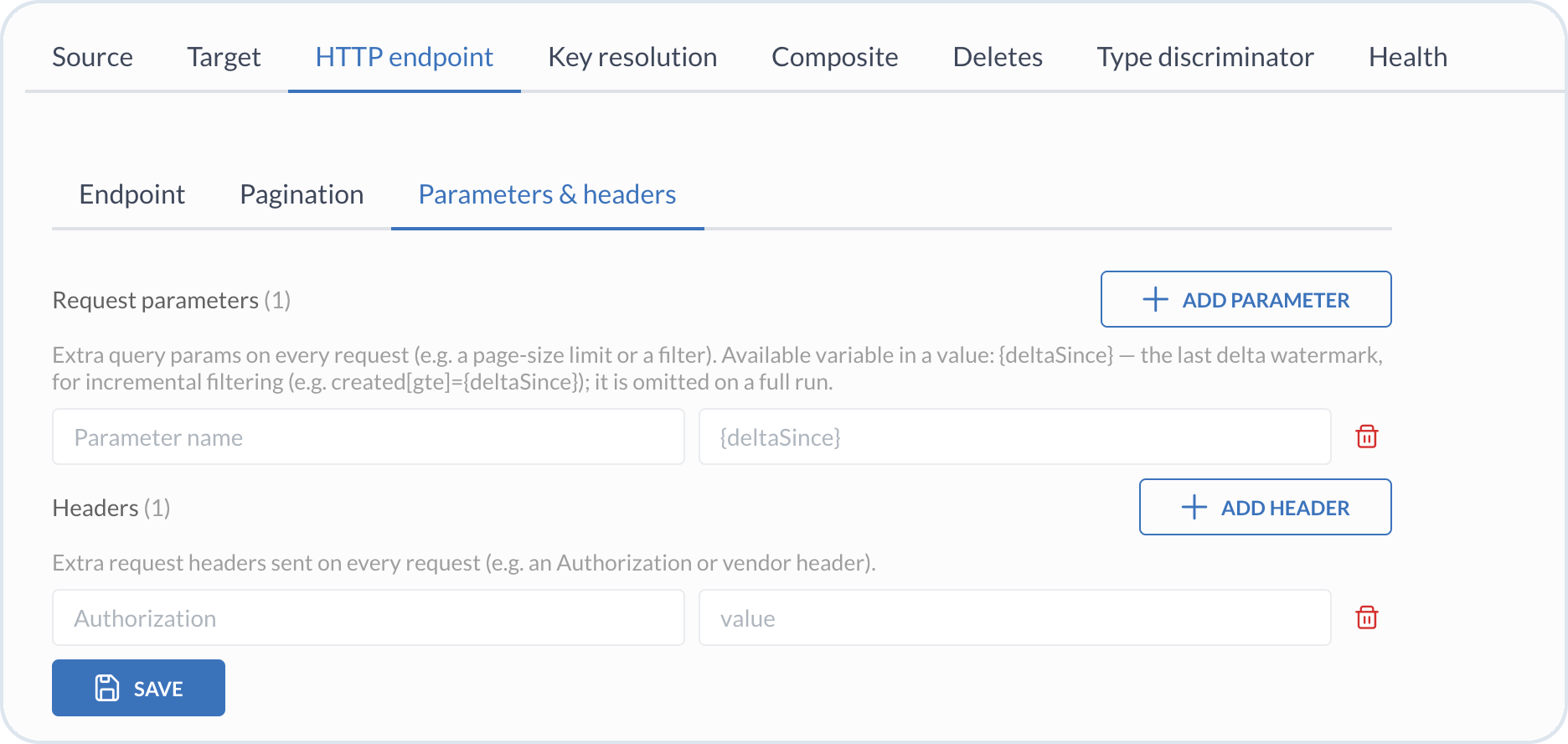
On the **Parameters & headers** sub-tab, configure values sent with every request:

* **Request parameters** – add query parameter names and values. Use `{deltaSince}` in a value to pass the last delta watermark during a delta run; the parameter is omitted during a full run.
* **Headers** – add request header names and values, for example an authorization or vendor-specific header.

Choose **Save**.

<figure><img src="https://2637457592-files.gitbook.io/~/files/v0/b/gitbook-x-prod.appspot.com/o/spaces%2F9VS91qn3Ylwd58YivX1A%2Fuploads%2Fgit-blob-6f1283199c127aa1f9a02c2cbf6366b3c753cdf3%2Fit_http_parameters.png?alt=media" alt="Request parameters and headers configured for an HTTP endpoint" width="700"><figcaption><p>Query parameters and headers sent with each HTTP request</p></figcaption></figure>
{% endtab %}
{% endtabs %}

## GraphQL query

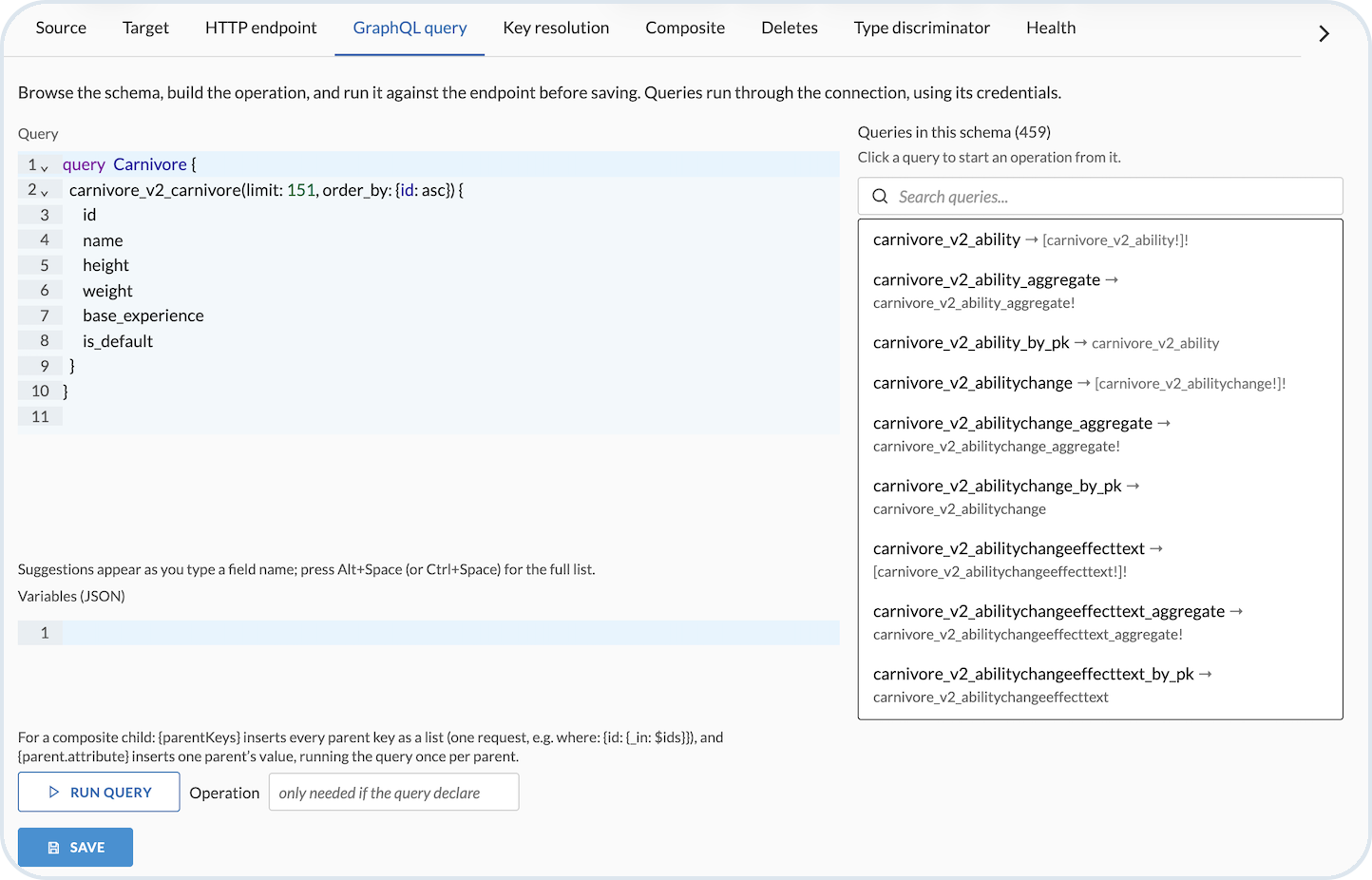
When the stream uses a **GraphQL** connection, define which data to read on the **GraphQL query** tab. Build the operation against the connection endpoint and credentials, then run it to confirm the response before you save the stream.

* **Query** – write the GraphQL operation that returns the fields and records to import. Use the schema list on the right to choose an available query, and complete the query in the editor. Press **Alt+Space** or **Ctrl+Space** to open field suggestions.
* **Variables (JSON)** – optional JSON variables for the query when the operation declares variables (for example filters or limits).
* **Schema explorer** – search and choose a root query to insert a starting operation, then adjust fields to match what you need in Emporix.
* **Operation** – enter the operation name only when the query text defines more than one named operation.
* **Run query** – execute the query against the live endpoint and check that the returned records look correct.

For a **composite child** stream, you can parameterize the query with placeholders:

* `{parentKeys}` – expands to every parent key as a list so the child can fetch related records in one request (for example `where: { id: { _in: $ids } }`).
* `{parent.attribute}` – expands to one parent’s value and runs the query once per parent.

Choose **Save** when the query and variables are ready.

<figure><img src="https://2637457592-files.gitbook.io/~/files/v0/b/gitbook-x-prod.appspot.com/o/spaces%2F9VS91qn3Ylwd58YivX1A%2Fuploads%2Fgit-blob-83ba38cade2353ef4db38fb300308462c9ec10ba%2Fit_graphQL.png?alt=media" alt="GraphQL query tab with query editor, variables, schema explorer, and run query"><figcaption><p>GraphQL query editor with schema explorer and variables</p></figcaption></figure>

## Key resolution

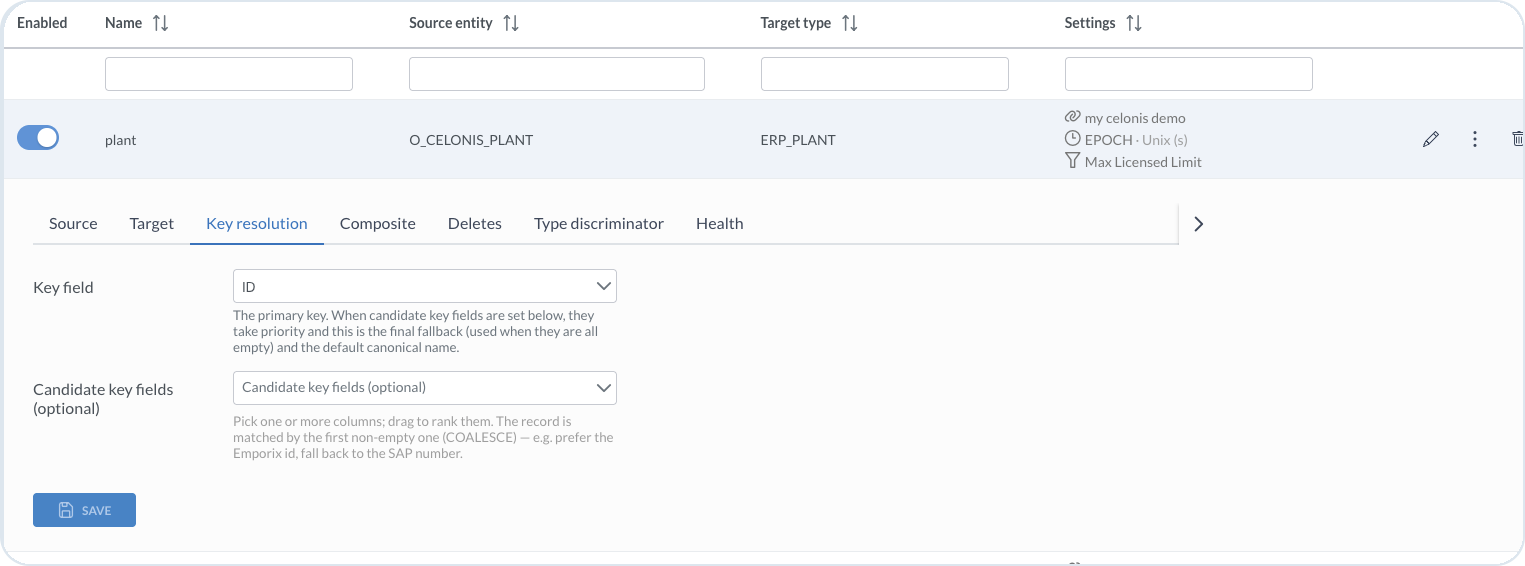
On the **Key resolution** tab, select the **Key field** used as the primary key for matching and upserting records.

Optionally add **Candidate key fields** and rank them. The record is matched by the first non-empty candidate (`COALESCE`). For example, prefer an Emporix ID and fall back to an SAP number. The key field is the final fallback when candidate keys are empty.

<figure><img src="https://2637457592-files.gitbook.io/~/files/v0/b/gitbook-x-prod.appspot.com/o/spaces%2F9VS91qn3Ylwd58YivX1A%2Fuploads%2Fgit-blob-fff900294d960145b289a9cf98a87a5a9f1dbf12%2Fit_streams_key_resolution.png?alt=media" alt="Key resolution tab showing key field and candidate key fields"><figcaption><p>Key resolution with a primary key and optional ranked candidate keys</p></figcaption></figure>

## Composite

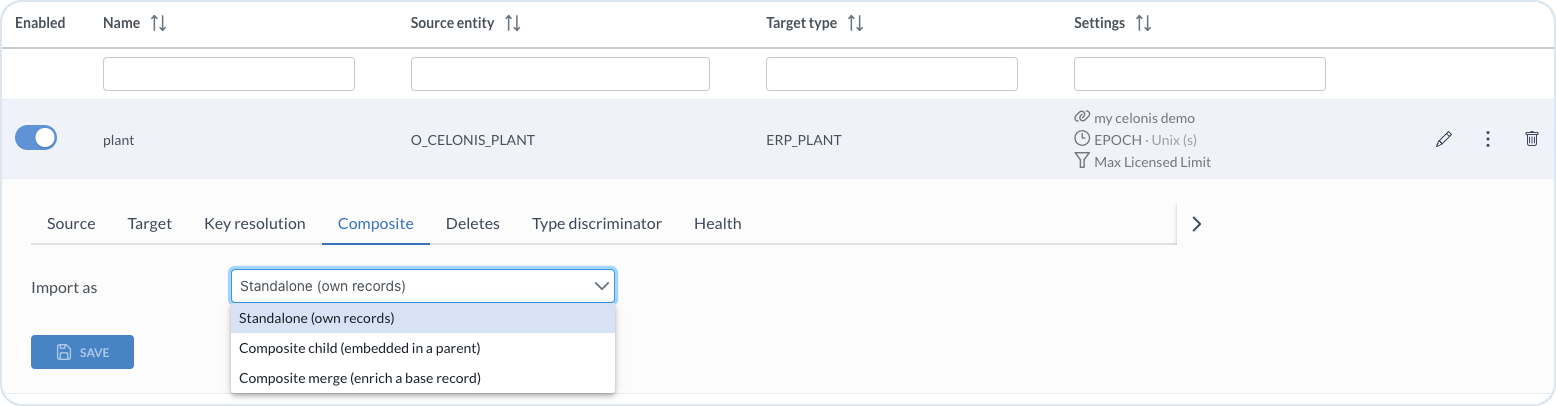
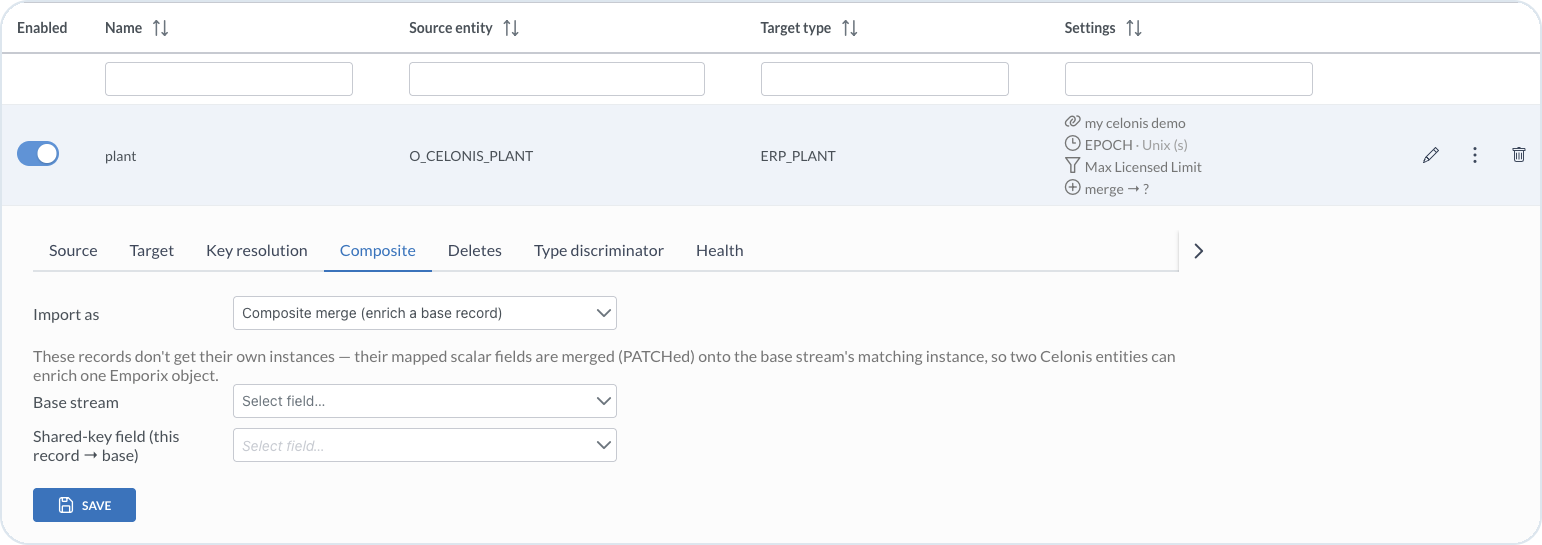
On the **Composite** tab, choose how the stream is imported:

* **Standalone (own records)** – import the records as their own Emporix documents. This is the default.
* **Composite child (embedded in a parent)** – embed records as an array inside a parent stream. Typical for line items.
* **Composite merge (enrich a base record)** – merge mapped scalar fields onto a matching base stream instance instead of creating separate records.

<figure><img src="https://2637457592-files.gitbook.io/~/files/v0/b/gitbook-x-prod.appspot.com/o/spaces%2F9VS91qn3Ylwd58YivX1A%2Fuploads%2Fgit-blob-58fdd428f6b77304def5c7528de36ac9430d5d7f%2Fit_stream_composite.png?alt=media" alt="Composite tab with Import as options"><figcaption><p>Composite tab with Import as options: Standalone, Composite child, and Composite merge</p></figcaption></figure>

Use composites when the source system has separate records, but you want to aggregate them into one Emporix document. For example, invoices and invoice lines can be separate source records, while in Emporix you want one invoice document with the lines embedded in it.

### Composite child

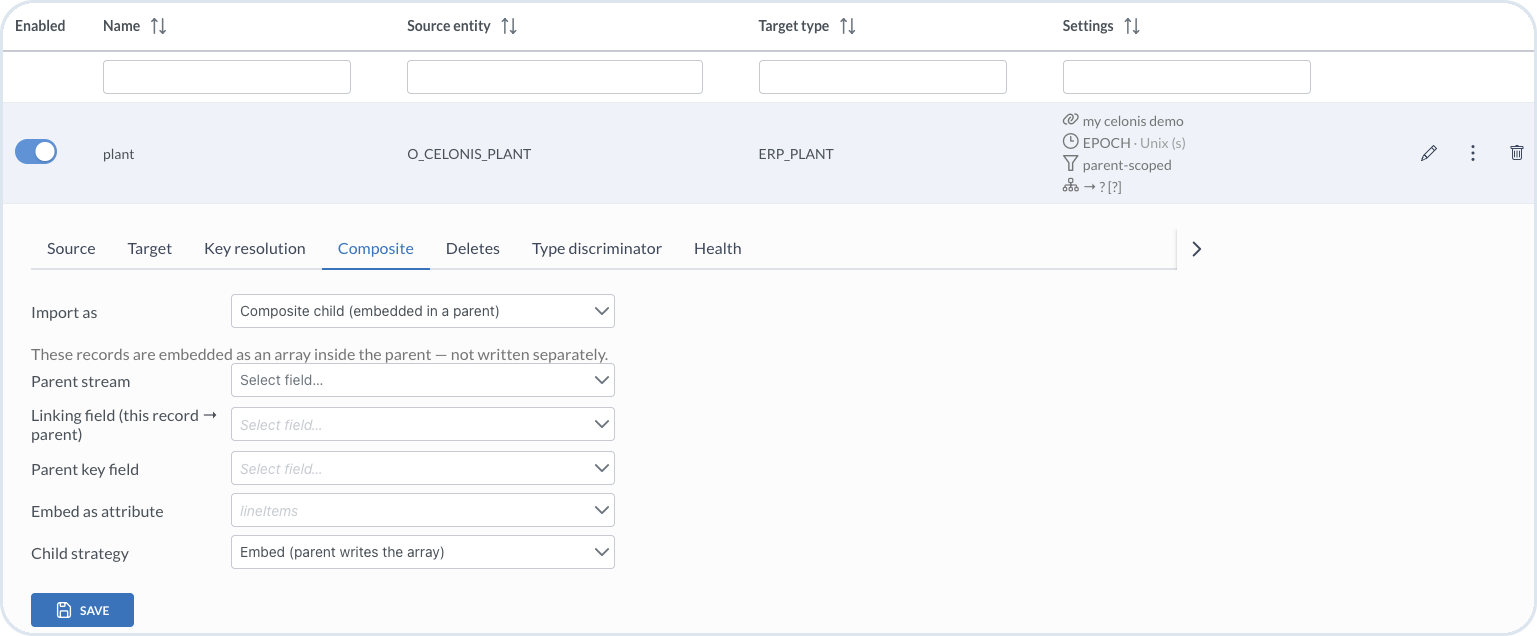
Use **Composite child (embedded in a parent)** for array data such as line items. Child records are embedded as an array inside the parent and are not written as separate instances.

Configure:

* **Parent stream** – the stream that owns the parent document. For example, an invoice-line stream uses the invoice stream as its parent.
* **Linking field (this record → parent)** – the field on the child record that points to the parent. In database terms, this is the foreign key on the line, for example a payable item ID that references the invoice.
* **Parent key field** – the key field on the parent record that the linking field matches. This is often the same as the parent stream's key field, but you can set a different field when needed.
* **Embed as attribute** – the array attribute on the parent target type that receives the embedded children. If the parent type has more than one array, select the correct one, for example `lineItems`.
* **Child strategy** – how child data is applied during import. For example, **Embed (parent writes the array)** fetches the child records, stores them temporarily, and attaches them while the parent record is imported.

<figure><img src="https://2637457592-files.gitbook.io/~/files/v0/b/gitbook-x-prod.appspot.com/o/spaces%2F9VS91qn3Ylwd58YivX1A%2Fuploads%2Fgit-blob-f57b8eec18a2cad0bf2ddc82ae49e4805906894c%2Fit_composite_parent.png?alt=media" alt="Composite child settings with parent stream, linking field, parent key, embed attribute, and child strategy"><figcaption><p>Composite child configuration with the parent stream, linking field, parent key, embed attribute, and child strategy</p></figcaption></figure>

Check the relationship in [Run order](/import-tool/import-setup-and-jobs/imports/running-imports.md#run-order-and-dependencies) or on the **Dependency graph** tab. The parent stream must run before the composite child stream.

### Composite merge

Use **Composite merge (enrich a base record)** when separate source records enrich one Emporix object with additional scalar fields. Merged records do not get their own instances; their mapped fields are patched onto the matching base stream instance.

Configure:

* **Base stream** – the stream whose instances are enriched
* **Shared-key field (this record → base)** – the field used to match this record to the base stream instance

<figure><img src="https://2637457592-files.gitbook.io/~/files/v0/b/gitbook-x-prod.appspot.com/o/spaces%2F9VS91qn3Ylwd58YivX1A%2Fuploads%2Fgit-blob-c8f18612e79b50c6f181a5f32c628c17d3b68ddf%2Fit_composite_base.png?alt=media" alt="Composite merge settings with base stream and shared-key field"><figcaption><p>Composite merge configuration with base stream and shared-key field for enriching a base record</p></figcaption></figure>

## Deletes

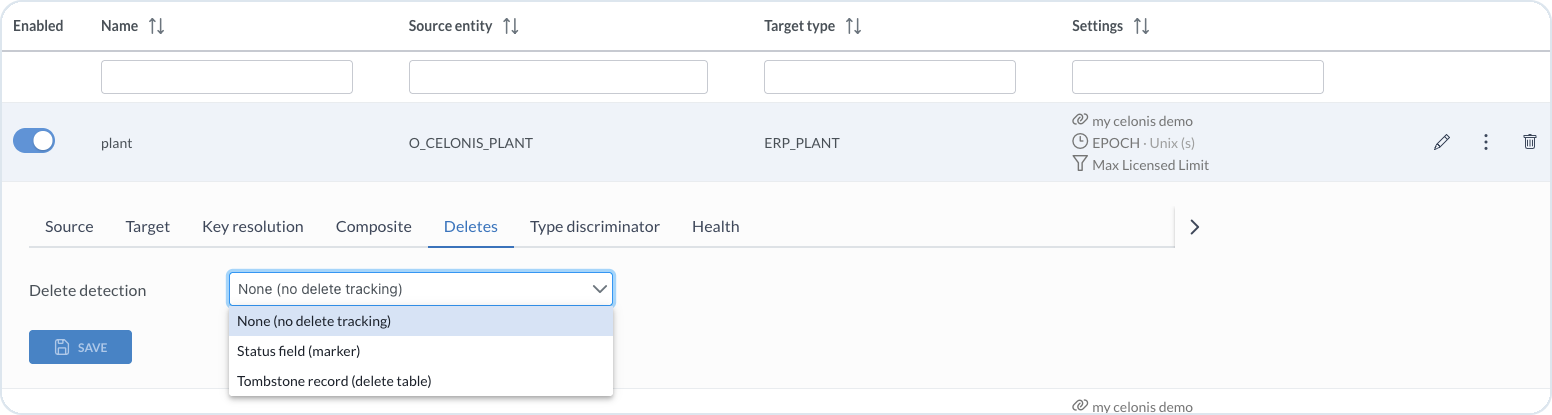
On the **Deletes** tab, use **Delete detection** to choose how deleted source records are handled:

* **None (no delete tracking)** – do not delete Emporix records based on source deletes
* **Status field (marker)** – delete when a source status field marks the record for deletion
* **Tombstone record (delete table)** – delete based on tombstone or delete-table records

<figure><img src="https://2637457592-files.gitbook.io/~/files/v0/b/gitbook-x-prod.appspot.com/o/spaces%2F9VS91qn3Ylwd58YivX1A%2Fuploads%2Fgit-blob-4efb465723f2580fdcc7c53ecc96a04c56031941%2Fit_stream_deletes.png?alt=media" alt="Deletes tab with delete detection options"><figcaption><p>Deletes tab with delete detection options</p></figcaption></figure>

## Type discriminator

On the **Type discriminator** tab, optionally route each source row to a specific target type based on a field value. For example, use an invoice type column to send PO and non-PO invoices to different target types. Values that are not listed use the stream target type.

<figure><img src="https://2637457592-files.gitbook.io/~/files/v0/b/gitbook-x-prod.appspot.com/o/spaces%2F9VS91qn3Ylwd58YivX1A%2Fuploads%2Fgit-blob-39eda71f846eb106b7b502855da98ab117f3a816%2Fit_stream_type_discriminator.png?alt=media" alt="Type discriminator tab with field and target type mappings"><figcaption><p>Type discriminator for routing source records to different target types</p></figcaption></figure>

## Stream health

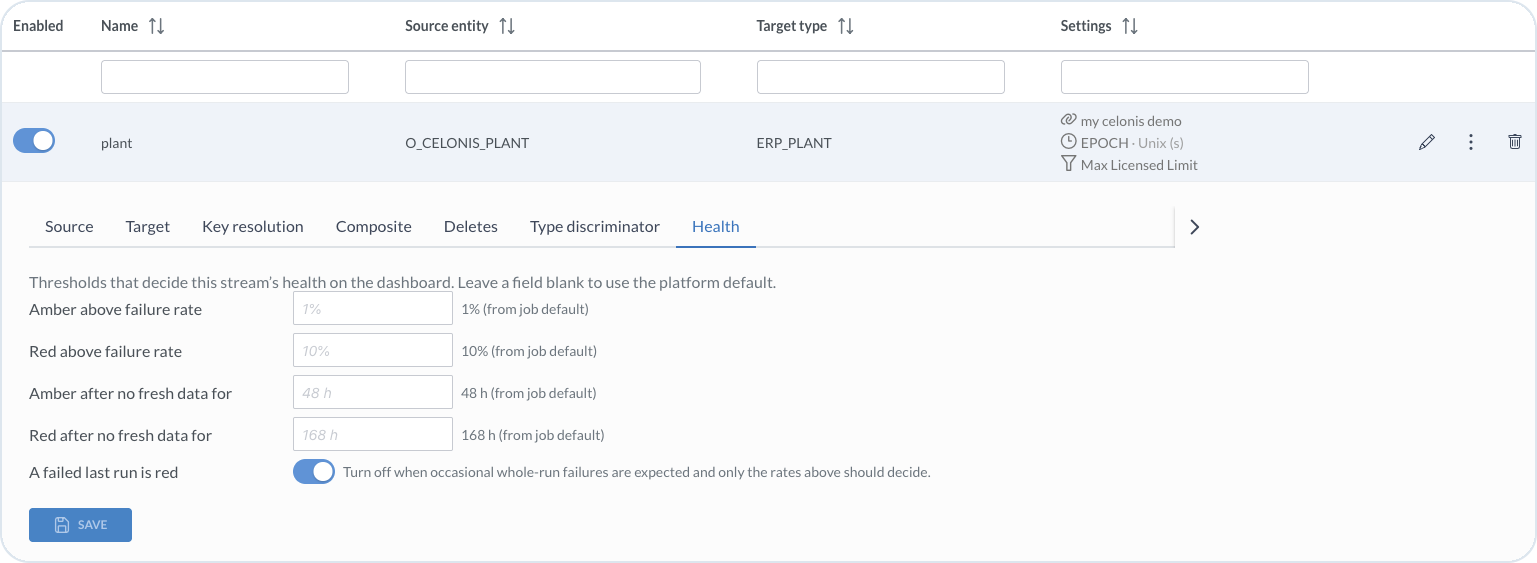
On the **Health** tab, set thresholds that determine this stream's health on the [Dashboard](/import-tool/dashboard.md). Leave a field blank to use the **job default**, which is the import-level setting shown in the UI.

<figure><img src="https://2637457592-files.gitbook.io/~/files/v0/b/gitbook-x-prod.appspot.com/o/spaces%2F9VS91qn3Ylwd58YivX1A%2Fuploads%2Fgit-blob-5f011d77d62266b69a4d1264f9cf751a81688775%2Fit_stream_health.png?alt=media" alt="Health tab with failure rate and freshness thresholds"><figcaption><p>Health tab with per-stream overrides for failure rate, freshness, and failed last run</p></figcaption></figure>

You can override:

* **Amber above failure rate**
* **Red above failure rate**
* **Amber after no fresh data for**
* **Red after no fresh data for**
* **A failed last run is red** – turn off when occasional whole-run failures are expected and only the rates above decide health

{% hint style="success" %}
After you configure the tabs, continue with [Field Mapping](/import-tool/import-setup-and-jobs/imports/field-mapping.md), then [run the import](/import-tool/import-setup-and-jobs/imports/running-imports.md).
{% endhint %}


---

# Agent Instructions
This documentation is published with GitBook. GitBook is the documentation platform designed so that both humans and AI agents can read, navigate, and reason over technical content effectively. Learn more at gitbook.com.

## Querying This Documentation
If you need additional information that is not directly available in this page, you can query the documentation dynamically by asking a question.

Perform an HTTP GET request on the current page URL with the `ask` query parameter, and the optional `goal` query parameter:

```
GET https://developer.emporix.io/import-tool/import-setup-and-jobs/imports/configuring-streams.md?ask=<question>&goal=<endgoal>
```

`ask` is the immediate question: it should be specific, self-contained, and written in natural language.
`goal` is optional and describes the broader end goal you are ultimately trying to accomplish on behalf of the user. GitBook uses it to tailor the answer towards what is most useful for that goal.

The response will contain a direct answer to the question and relevant excerpts and sources from the documentation.

Use this mechanism when the answer is not explicitly present in the current page, you need clarification or additional context, or you want to retrieve related documentation sections.