> For the complete documentation index, see [llms.txt](https://developer.emporix.io/llms.txt). Markdown versions of documentation pages are available by appending `.md` to page URLs; this page is available as [Markdown](https://developer.emporix.io/import-tool/import-setup-and-jobs/imports/running-imports.md).

# Running and Monitoring Imports

Schedule, run, and monitor imports, then review run history, stream dependencies, and imported records.

After you [configure streams](/import-tool/import-setup-and-jobs/imports/configuring-streams.md) and publish their [field mappings](/import-tool/import-setup-and-jobs/imports/field-mapping.md), run the import on demand or schedule automated runs.

## Schedule an import

{% stepper %}
{% step %}

#### Open the schedule

At the top of the import details view, choose the schedule summary.
{% endstep %}

{% step %}

#### Configure the schedule

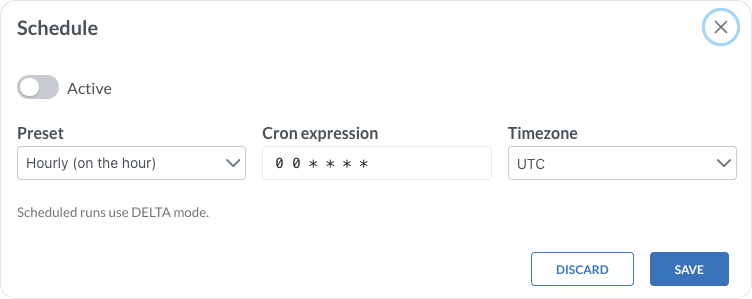
In the **Schedule** dialog, turn on **Active**, then set:

* **Preset** – choose a schedule preset, for example **Hourly (on the hour)**
* **Cron expression** – define or adjust the schedule with a cron expression
* **Timezone** – set the timezone for the schedule
  {% endstep %}

{% step %}

#### Save the schedule

Choose **Save**. The schedule summary shows the preset, cron expression, and timezone.
{% endstep %}
{% endstepper %}

<figure><img src="https://2637457592-files.gitbook.io/~/files/v0/b/gitbook-x-prod.appspot.com/o/spaces%2F9VS91qn3Ylwd58YivX1A%2Fuploads%2Fgit-blob-4dec1c95a8c2fdb4064091a730f41319b1bdfa85%2Fit_streams_schedule.png?alt=media" alt="Schedule dialog with Active, Preset, Cron expression, and Timezone" width="600"><figcaption><p>Schedule configuration for automated DELTA runs</p></figcaption></figure>

{% hint style="success" %}
Scheduled runs always use **DELTA** mode.
{% endhint %}

## Run an import

{% stepper %}
{% step %}

#### Optionally preview the import

Choose **Dry run** to preview how the data will be mapped without writing them to Emporix.
{% endstep %}

{% step %}

#### Open the run options

Choose **Run options**.
{% endstep %}

{% step %}

#### Choose the run mode

Choose the required mode:

* **Delta** – run all enabled streams and import only records that changed, based on each stream's delta field
* **Full** – run all enabled streams and respect any configured record limit
* **Full, Force** – run a full import in force mode
  {% endstep %}
  {% endstepper %}

Runs follow the sequence defined by **Depends on** and **Run order**. Select **Refresh** in [Imports](/import-tool/import-setup-and-jobs/imports.md) after a run to update status, last run time, next run time, and error counts. Use the [Dashboard](/import-tool/dashboard.md) to monitor health and failures across imports.

## Run history

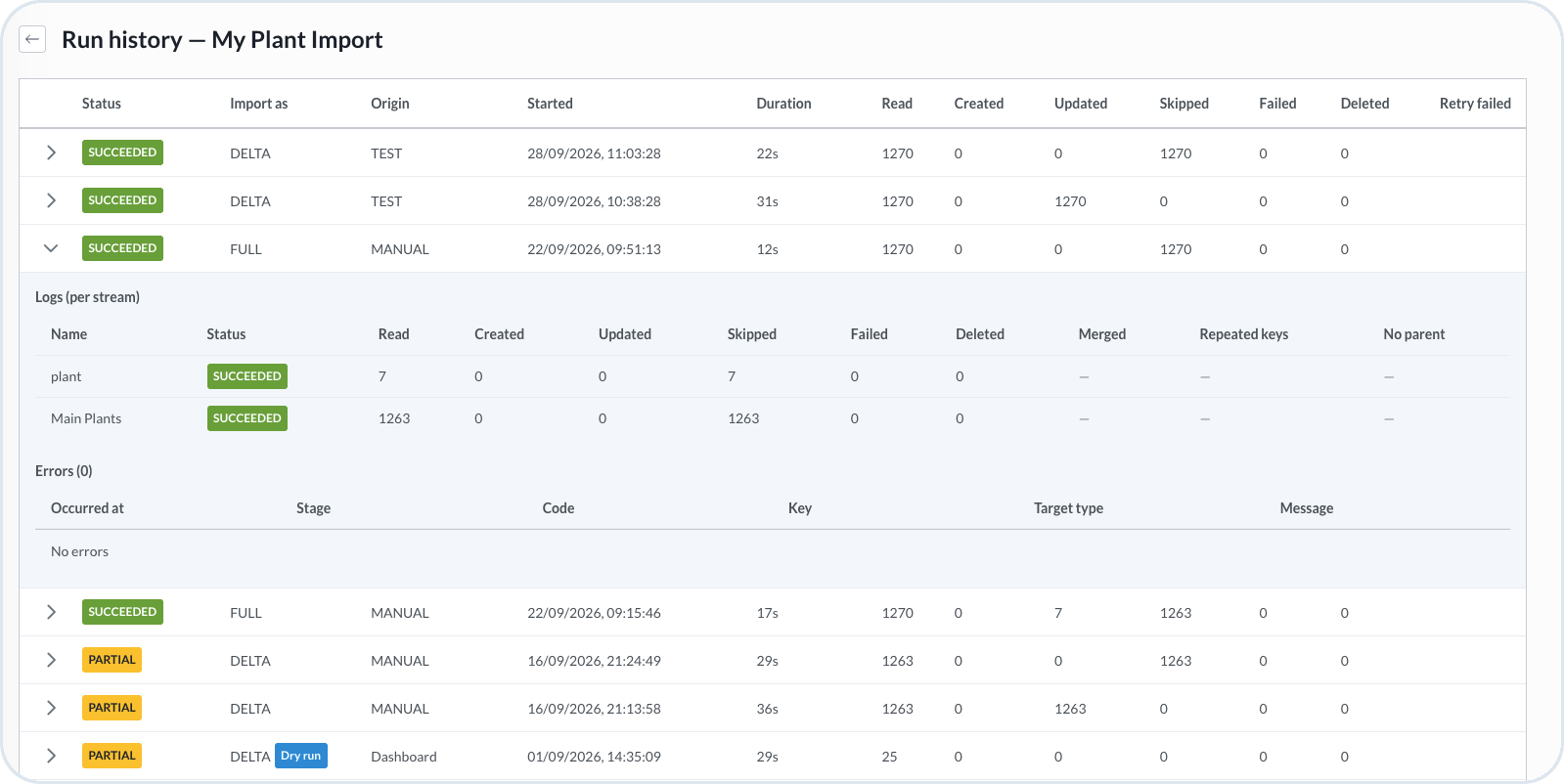
Open **Run history** from the import actions menu to review previous runs. Each row shows **Status**, **Import as**, **Origin**, **Started**, **Duration**, and counts for **Read**, **Created**, **Updated**, **Skipped**, **Failed**, and **Deleted** records. The table also includes a **Retry failed** column.

Expand a row to review per-stream logs and errors for that run.

<figure><img src="https://2637457592-files.gitbook.io/~/files/v0/b/gitbook-x-prod.appspot.com/o/spaces%2F9VS91qn3Ylwd58YivX1A%2Fuploads%2Fgit-blob-1d7a7fdeee3c9c9245d8a3422419fe2720e47828%2Fit_imports_run_history.png?alt=media" alt="Run history with statuses, modes, record counts, stream logs, and errors"><figcaption><p>Run history for an import with an expanded run and per-stream results</p></figcaption></figure>

## Run order and dependencies

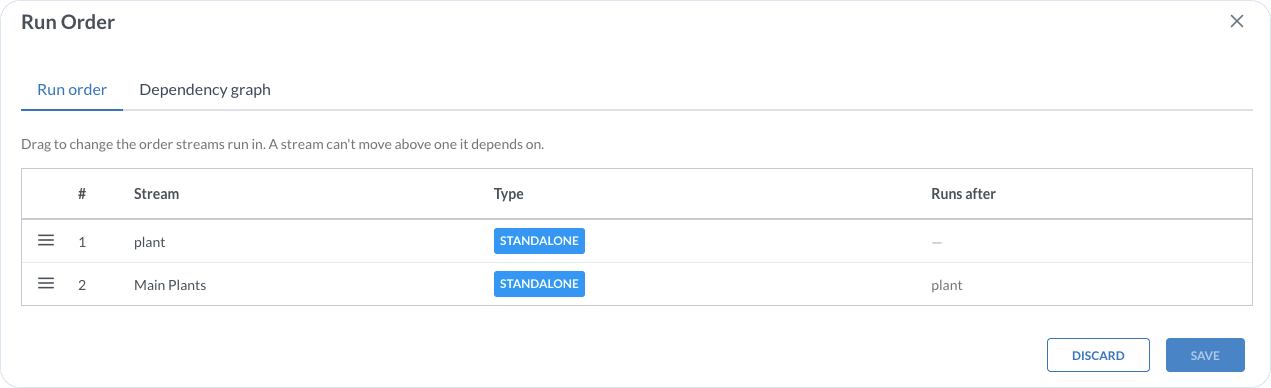
Open **Run order** from the import actions menu. The **Run order** tab shows the sequence, stream type, and the preceding stream in **Runs after**. Drag streams to adjust their order. A stream cannot move above a stream on which it depends.

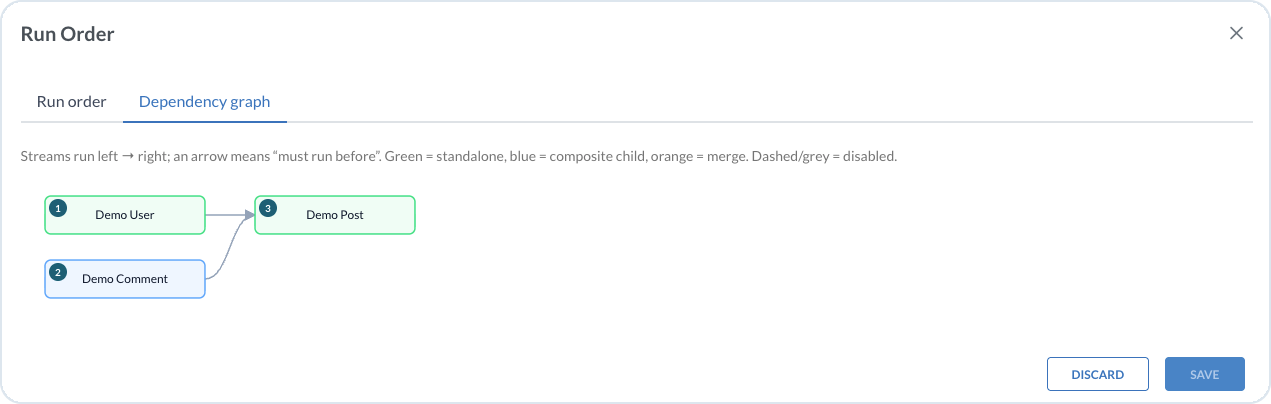
Use the **Dependency graph** tab to visualize the same relationships. An arrow means one stream must run before another.

<figure><img src="https://2637457592-files.gitbook.io/~/files/v0/b/gitbook-x-prod.appspot.com/o/spaces%2F9VS91qn3Ylwd58YivX1A%2Fuploads%2Fgit-blob-6cc1e91beacc618bb91f86065fdadd3ddd8c5b03%2Fit_imports_run_order.png?alt=media" alt="Run Order dialog with stream sequence and dependencies"><figcaption><p>Run order with stream types and dependency sequence</p></figcaption></figure>

## Review imported data

After a run, select **View imported data** for the stream to inspect record outcomes. See [Imported Data](/import-tool/import-setup-and-jobs/imported-data.md) for filters, result fields, and troubleshooting.

{% hint style="warning" %}
If a run or stream fails, check **Run history** and error counts. Follow the troubleshooting guidance in [Imported Data](/import-tool/import-setup-and-jobs/imported-data.md), then review the stream configuration before you run again. Use the [Dashboard](/import-tool/dashboard.md) to see which streams are unhealthy.
{% endhint %}


---

# Agent Instructions
This documentation is published with GitBook. GitBook is the documentation platform designed so that both humans and AI agents can read, navigate, and reason over technical content effectively. Learn more at gitbook.com.

## Querying This Documentation
If you need additional information that is not directly available in this page, you can query the documentation dynamically by asking a question.

Perform an HTTP GET request on the current page URL with the `ask` query parameter, and the optional `goal` query parameter:

```
GET https://developer.emporix.io/import-tool/import-setup-and-jobs/imports/running-imports.md?ask=<question>&goal=<endgoal>
```

`ask` is the immediate question: it should be specific, self-contained, and written in natural language.
`goal` is optional and describes the broader end goal you are ultimately trying to accomplish on behalf of the user. GitBook uses it to tailor the answer towards what is most useful for that goal.

The response will contain a direct answer to the question and relevant excerpts and sources from the documentation.

Use this mechanism when the answer is not explicitly present in the current page, you need clarification or additional context, or you want to retrieve related documentation sections.