> For the complete documentation index, see [llms.txt](https://developer.emporix.io/llms.txt). Markdown versions of documentation pages are available by appending `.md` to page URLs; this page is available as [Markdown](https://developer.emporix.io/import-tool/import-setup-and-jobs/imports/streams.md).

# Streams

Understand import streams, their list and actions, and the workflow for creating, configuring, mapping, and running them.

After you create or edit an import, the import details view is where you manage its streams, mappings, schedules, and runs.

A stream is a feed of records from a selected source that the Import Tool writes to target entities in your tenant. When you run the import, all enabled streams in that import run together.

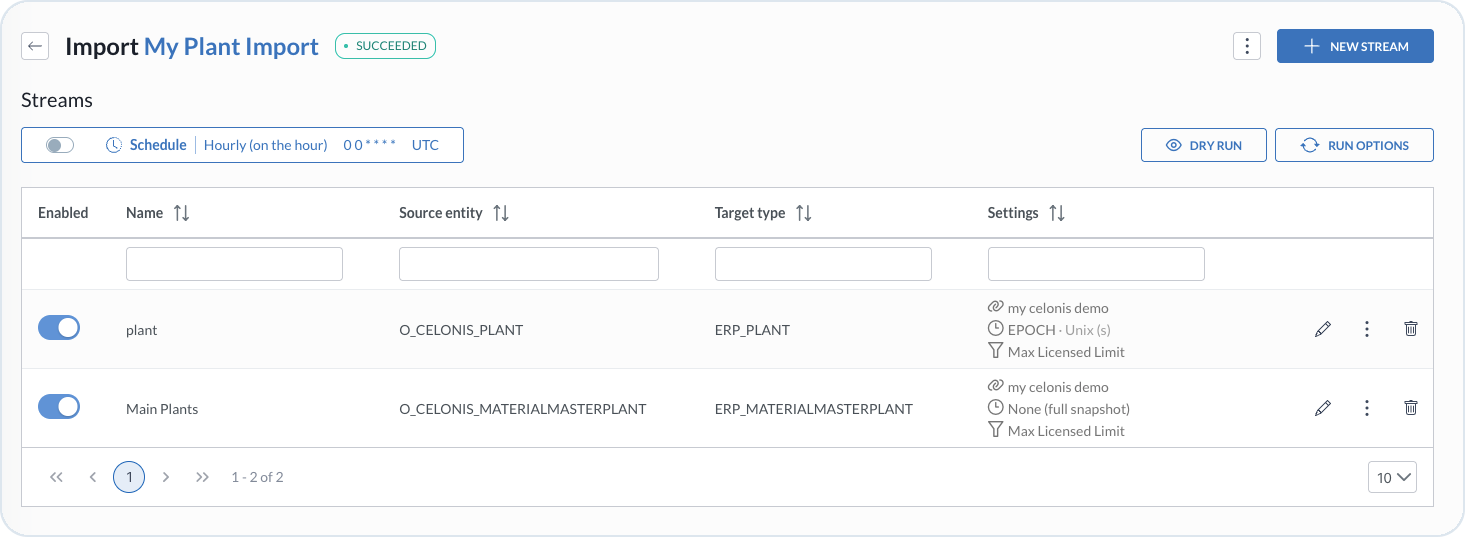
<figure><img src="https://2637457592-files.gitbook.io/~/files/v0/b/gitbook-x-prod.appspot.com/o/spaces%2F9VS91qn3Ylwd58YivX1A%2Fuploads%2Fgit-blob-032b3834304850cc8bae650cfd1bc978bdfe56bb%2Fit_streams.png?alt=media" alt="Import details view with schedule, streams, and run actions"><figcaption><p>Import details with the schedule, stream list, Dry run, Run options, and New stream actions</p></figcaption></figure>

## Stream list

An import can contain multiple stream configurations. For each stream, the list shows **Enabled**, **Name**, **Source entity**, **Target type**, **Settings**, and **Actions**. The settings summarize the connection, delta configuration, and maximum record limit. Use the edit icon to open the stream row and access its [configuration tabs](/import-tool/import-setup-and-jobs/imports/configuring-streams.md).

Additionally, the import details view provides actions for the entire import and for individual streams. Check the tabs to review each set of actions.

{% tabs %}
{% tab title="Import actions" %}

| Action                             | Description                                                   |
| ---------------------------------- | ------------------------------------------------------------- |
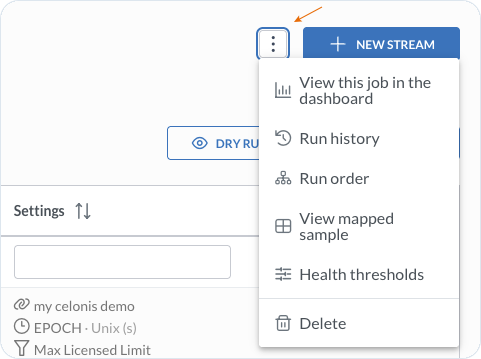
| **View this job in the dashboard** | Open the import on the [Dashboard](/import-tool/dashboard.md) |
| **Run history**                    | Review previous runs and per-stream logs                      |
| **Run order**                      | Arrange streams and review their dependencies                 |
| **View mapped sample**             | Review the mapped output from a dry run                       |
| **Health thresholds**              | Override the default health settings for this import          |
| **Delete**                         | Remove the import                                             |
| **+ New stream**                   | Create a stream in this import                                |
| **Dry run**                        | Preview the import without writing the results                |
| **Run options**                    | Open the available full, delta, and force run actions         |

<figure><img src="https://2637457592-files.gitbook.io/~/files/v0/b/gitbook-x-prod.appspot.com/o/spaces%2F9VS91qn3Ylwd58YivX1A%2Fuploads%2Fgit-blob-82b80999a7798eecb7394b08168dd6411447d531%2Fit_streams_actions.png?alt=media" alt="Import actions menu with dashboard, history, order, sample, thresholds, and delete actions" width="500"><figcaption><p>Actions available for an import</p></figcaption></figure>
{% endtab %}

{% tab title="Stream actions" %}

| Action                 | Description                                                                                                               |
| ---------------------- | ------------------------------------------------------------------------------------------------------------------------- |
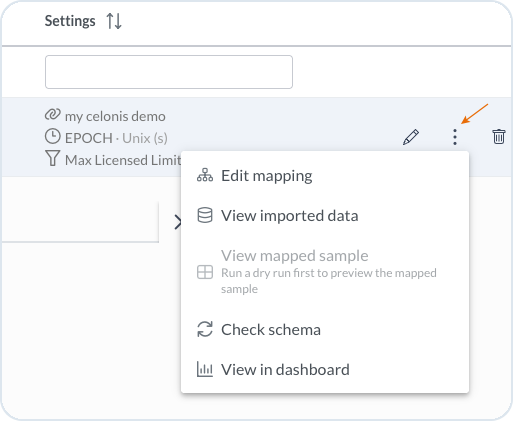
| **Edit mapping**       | Open or update the [field mapping](/import-tool/import-setup-and-jobs/imports/field-mapping.md) between source and target |
| **View imported data** | Review records imported by this stream. See [Imported Data](/import-tool/import-setup-and-jobs/imported-data.md).         |
| **View mapped sample** | Review mapped output after you run a dry run                                                                              |
| **Check schema**       | Detect divergence between source and target, for example fields that are not mapped                                       |
| **View in dashboard**  | Open the stream on the [Dashboard](/import-tool/dashboard.md)                                                             |
| **Delete**             | Remove the stream                                                                                                         |

<figure><img src="https://2637457592-files.gitbook.io/~/files/v0/b/gitbook-x-prod.appspot.com/o/spaces%2F9VS91qn3Ylwd58YivX1A%2Fuploads%2Fgit-blob-f1777451403693fc54cba86240304f2f31273453%2Fit_stream_config.png?alt=media" alt="Stream actions menu with mapping, imported data, mapped sample, schema, and dashboard actions" width="350"><figcaption><p>Actions available for an individual stream</p></figcaption></figure>
{% endtab %}
{% endtabs %}

## Stream workflow

Use the following guides in sequence:

1. [Creating Streams](/import-tool/import-setup-and-jobs/imports/creating-streams.md) – add a stream and define its connection, source record, keys, and target type.
2. [Configuring Streams](/import-tool/import-setup-and-jobs/imports/configuring-streams.md) – configure the source, target, keys, composite behavior, deletes, routing, and health.
3. [Field Mapping](/import-tool/import-setup-and-jobs/imports/field-mapping.md) – map and transform source fields, then save and publish the mapping.
4. [Running and Monitoring Imports](/import-tool/import-setup-and-jobs/imports/running-imports.md) – schedule or run the import, review history and dependencies, and inspect results.


---

# Agent Instructions
This documentation is published with GitBook. GitBook is the documentation platform designed so that both humans and AI agents can read, navigate, and reason over technical content effectively. Learn more at gitbook.com.

## Querying This Documentation
If you need additional information that is not directly available in this page, you can query the documentation dynamically by asking a question.

Perform an HTTP GET request on the current page URL with the `ask` query parameter, and the optional `goal` query parameter:

```
GET https://developer.emporix.io/import-tool/import-setup-and-jobs/imports/streams.md?ask=<question>&goal=<endgoal>
```

`ask` is the immediate question: it should be specific, self-contained, and written in natural language.
`goal` is optional and describes the broader end goal you are ultimately trying to accomplish on behalf of the user. GitBook uses it to tailor the answer towards what is most useful for that goal.

The response will contain a direct answer to the question and relevant excerpts and sources from the documentation.

Use this mechanism when the answer is not explicitly present in the current page, you need clarification or additional context, or you want to retrieve related documentation sections.