> For the complete documentation index, see [llms.txt](https://developer.emporix.io/llms.txt). Markdown versions of documentation pages are available by appending `.md` to page URLs; this page is available as [Markdown](https://developer.emporix.io/partner-library/emporix-components/quote-intake.md).

# Quote Intake

The Quote Intake value stream supports the handling of incoming quote requests received by email by transforming submitted request data into structured, ready-to-process quotes that can be transferred to orders.

By defining a trigger on incoming emails, the process automatically initiates and executes a sequence of steps, including validation of customer and product information, identification of missing or unavailable items, and suggestion of suitable alternatives where needed. The template shows how customer, address, cart, and quote data can be prepared automatically, reducing manual checks and repetitive data entry. Exceptions that require human attention are routed to approvers through forms, while validated quote requests can continue toward quote creation with less manual intervention. The setup is always project specific.

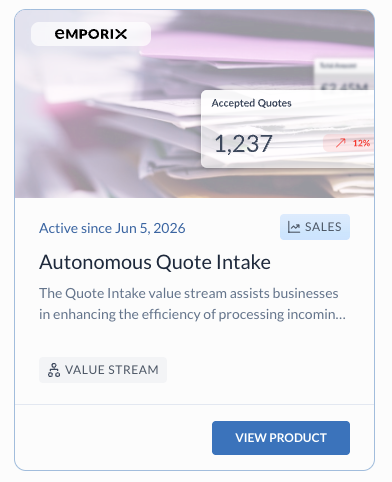
<figure><img src="/files/TNqC0Y6NWCJdB8AY6YEg" alt="Quote Intake component in the Partner Library"><figcaption><p>Quote Intake in the Partner Library</p></figcaption></figure>

## Key features and benefits

| Feature                                             | Description                                                                                                                                                                                            |
| --------------------------------------------------- | ------------------------------------------------------------------------------------------------------------------------------------------------------------------------------------------------------ |
| **Automated quote intake**                          | Incoming quote requests from email are parsed and normalized into a structured payload, then orchestrated through the value stream from initialization to quote creation with minimal manual handling. |
| **Customer validation and creation support**        | Customer records are matched or prepared in Commerce Engine, with legal entity and address alignment so quote data stays consistent before products and pricing are processed.                         |
| **Product validation with alternative suggestions** | Requested lines are checked against the catalog; when matches are partial or missing, the flow can prepare alternative products and structured line data instead of stopping the request.              |
| **Cart creation automation**                        | After price matching and form approval, validated quote data is used to create a quote in Emporix, providing a ready basis for cart and order follow-up without re-entering the request details.       |

## Business use cases

The following use cases are examples of typical business scenarios, your implementation may differ based on project requirements.

<table data-card-size="large" data-view="cards"><thead><tr><th align="center"></th><th align="center"></th><th align="center"></th></tr></thead><tbody><tr><td align="center"><i class="fa-envelope">:envelope:</i></td><td align="center"><strong>Processing email-based quote requests</strong></td><td align="center">A buyer sends a quote request to a dedicated inbox with a spreadsheet or PDF attachment. The **Incoming Email Quote Data** Make scenario extracts customer and line data, the value stream validates the request, and a quote is created in Emporix.</td></tr><tr><td align="center"><i class="fa-boxes-stacked">:boxes-stacked:</i></td><td align="center"><strong>Preparing quotes when only some products match</strong></td><td align="center">Several requested SKUs are found in the catalog, but others are missing or ambiguous. The flow routes to alternative preparation, aligns legal entity and address data where needed, and surfaces the result in a review form so an approver can confirm substitutes before the quote is finalized.</td></tr><tr><td align="center"><i class="fa-clipboard-check">:clipboard-check:</i></td><td align="center"><strong>Reviewing and correcting data before quote creation</strong></td><td align="center">After pricing, the process sends a form link by email. An approver adjusts customer, product, or address details and submits. Validation runs on the latest data; when it passes, the quote is created and can move toward cart or order follow-up.</td></tr><tr><td align="center"><i class="fa-scale-balanced">:scale-balanced:</i></td><td align="center"><strong>Applying automatic acceptance rules by quote value</strong></td><td align="center">After the quote is created, net total is compared to a configured threshold. Requests below the limit can be accepted automatically; higher values trigger an email to the merchant for follow-up. Teams adjust thresholds and predicates in the value stream to match their approval policy.</td></tr></tbody></table>

## Process flow

The process starts when quote data is received from an incoming email and continues through initialization, customer and product validation, conditional data preparation, form-based review, pricing, and quote creation. Each step has explicit events, conditions, and outcomes so that standard requests can run automatically while exceptions are routed for correction.

### Process trigger

The process is triggered when new quote data is received from an incoming email with a quote request attachment. The attachment should contain sufficient customer and product information so the request can be transformed into the target quote model. The **Incoming Email Quote Data** Make scenario that's underneath, handles email reception, attachment storage, and AI extraction. This scenario produces a normalized quote payload and starts the value stream. Then, the **Quote Intake Initialization** scenario prepares the quote intake context, including the mixin link, and creates the quote intake record in Orchestration Engine.

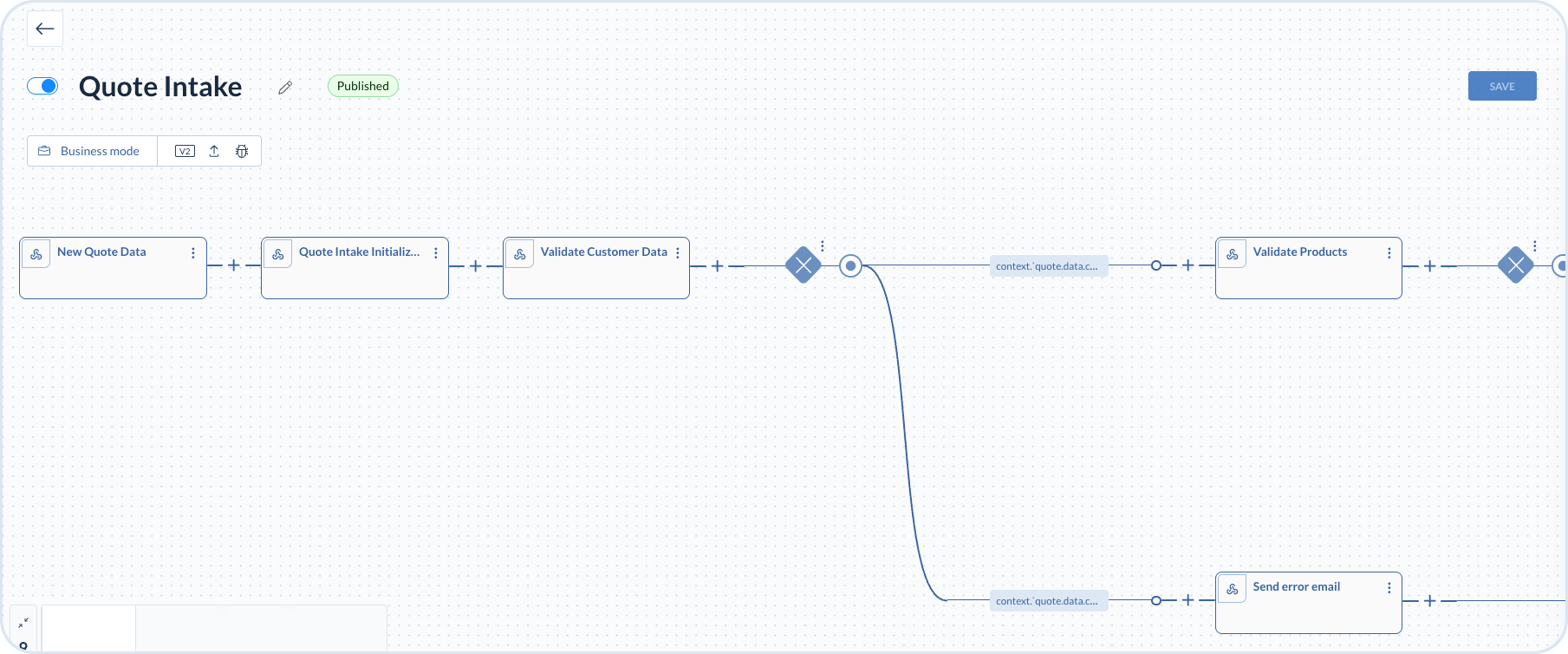
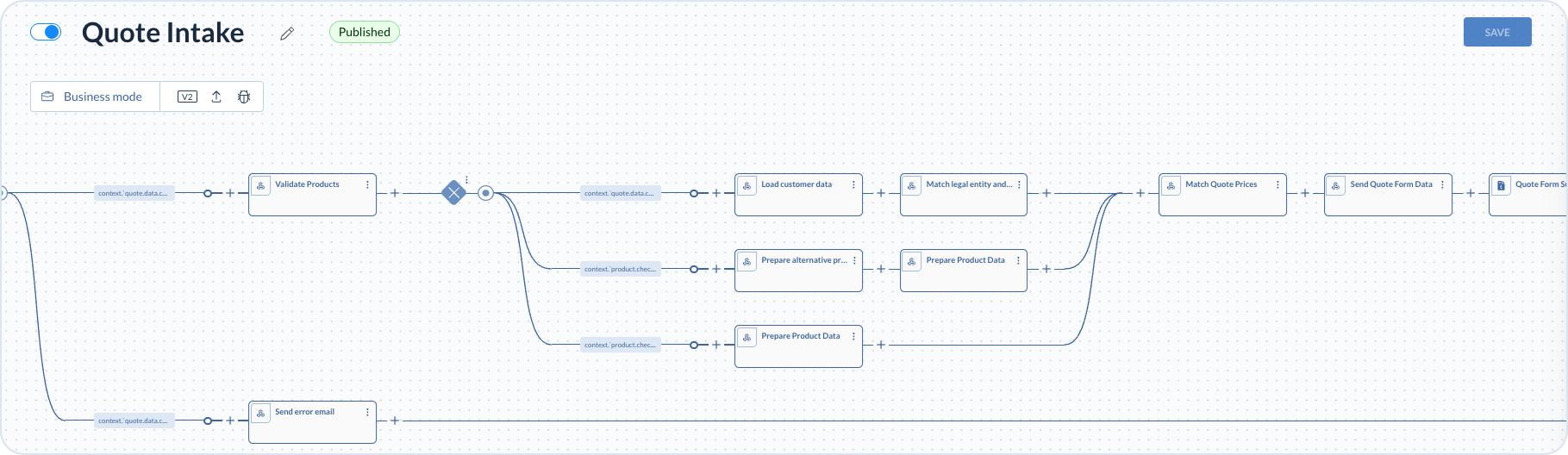
<figure><img src="/files/HKswnt5HPzK6nynEKim2" alt="Quote Intake value stream section showing initialization, customer validation, and routing to product validation or error notification"><figcaption><p>Customer validation with routing to product validation or error notification</p></figcaption></figure>

#### Incoming Email Quote Data

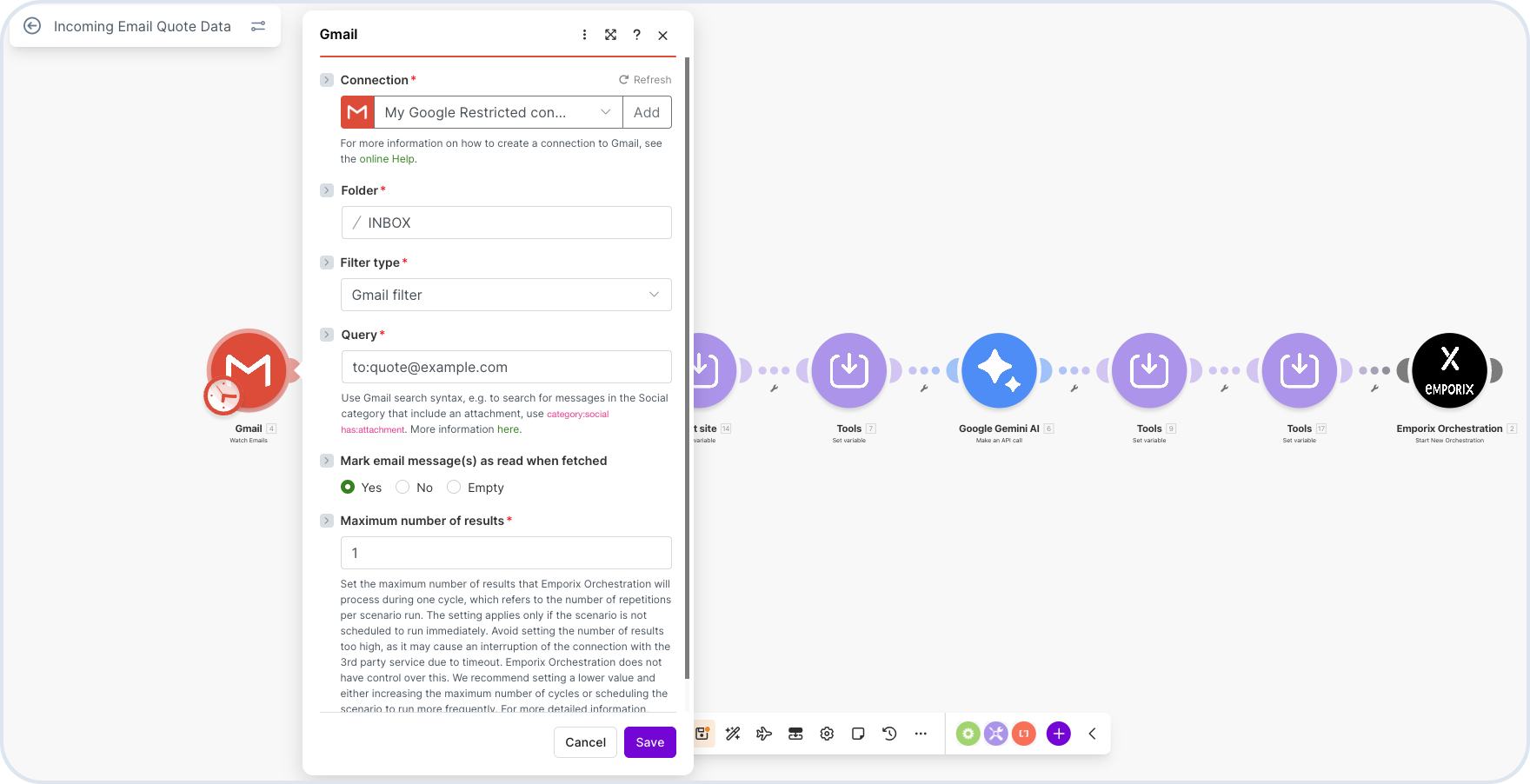
Configure the **Incoming Email Quote Data** scenario to watch for incoming quote requests. In the **Gmail** module, set a dedicated email as the trigger. Configure the mailbox connection, folder (for example `INBOX`), and a filter so only quote requests are picked up. For example, a Gmail filter query such as `to:quote@example.com` for the address that should receive quote requests.

When a sender emails a quote request to that address, the **Incoming Email Quote Data** scenario starts and processes the message and its attachments.

<figure><img src="/files/RI7HXspnkM8dmojRlSVZ" alt="Incoming Email Quote Data Make scenario Gmail module configuration"><figcaption><p>Incoming Email Quote Data — Gmail trigger for incoming quote requests</p></figcaption></figure>

The **Incoming Email Quote Data** scenario then stores attachments in Commerce Engine, prepares context variables (for example site), and passes the data to AI extraction before starting the value stream.

#### Google Gemini quote extraction

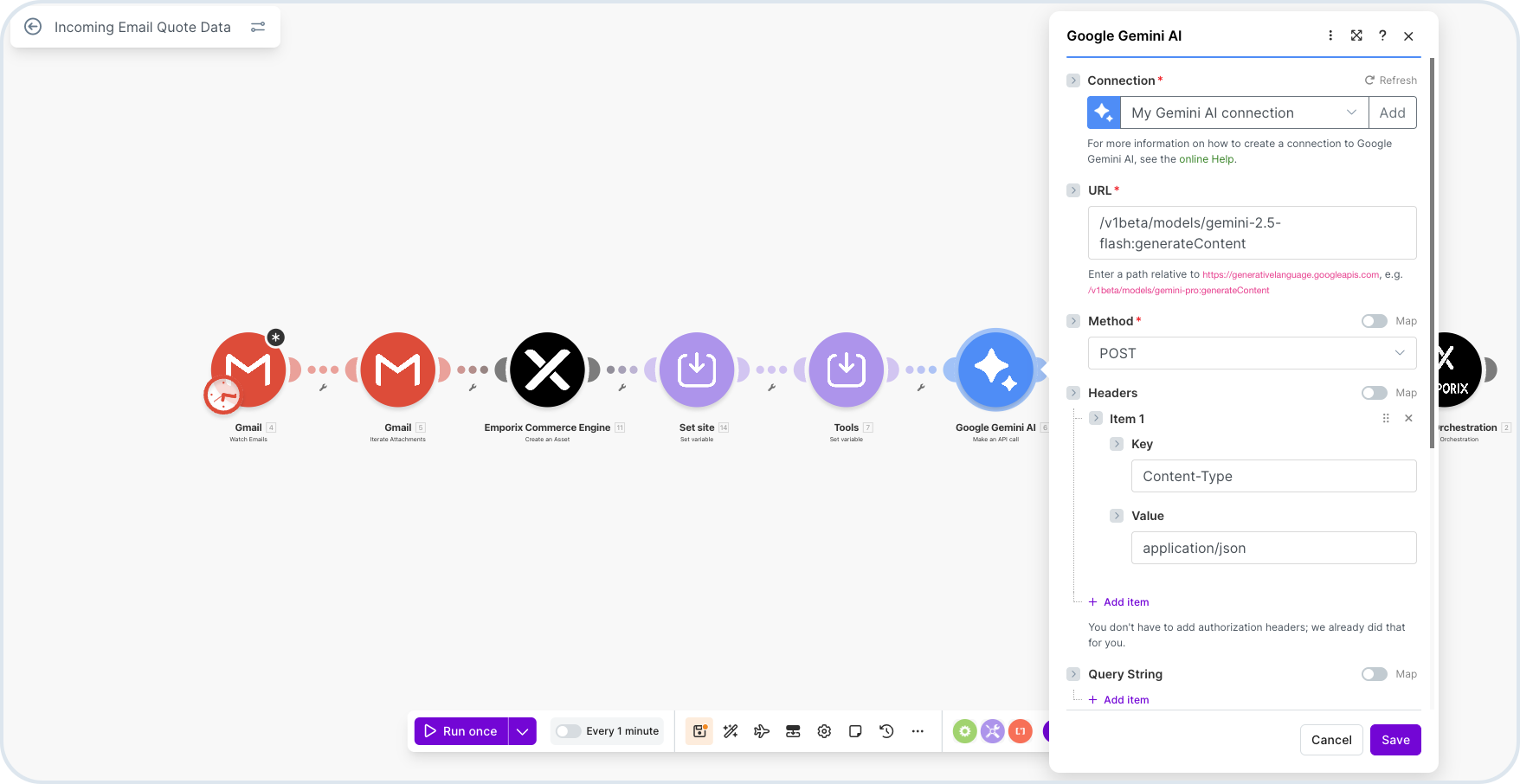
The **Incoming Email Quote Data** scenario includes a **Google Gemini** module for AI-based extraction. You must have a configured connection and token using API credentials from your Google AI account ([Google AI Studio](https://aistudio.google.com/) or the Gemini API keys area for your project). Create or import an API key there, then wire it into the Gemini Make module connection so requests are authorized.

The AI module parses quote information from the email attachment into a valid JSON format for the value stream. In this template, Gemini 2.5 Flash is used in the Make module URL settings, for example: `/v1beta/models/gemini-2.5-flash:generateContent`.

<figure><img src="/files/eyr8SP3kdTHEChhEDQb9" alt="Incoming Email Quote Data Make scenario with Google Gemini module for quote extraction"><figcaption><p>Incoming Email Quote Data — Google Gemini module for quote data extraction</p></figcaption></figure>

{% hint style="warning" %}
You need your own Google account with access to the Gemini API (for example through [Google AI Studio](https://aistudio.google.com/)) so you can create API keys and authorize the Gemini connection for your environment.
{% endhint %}

After the trigger, the value stream initializes the request context, then runs customer and product validation, conditional data preparation, form-based review, and quote creation.

#### Quote Intake Initialization

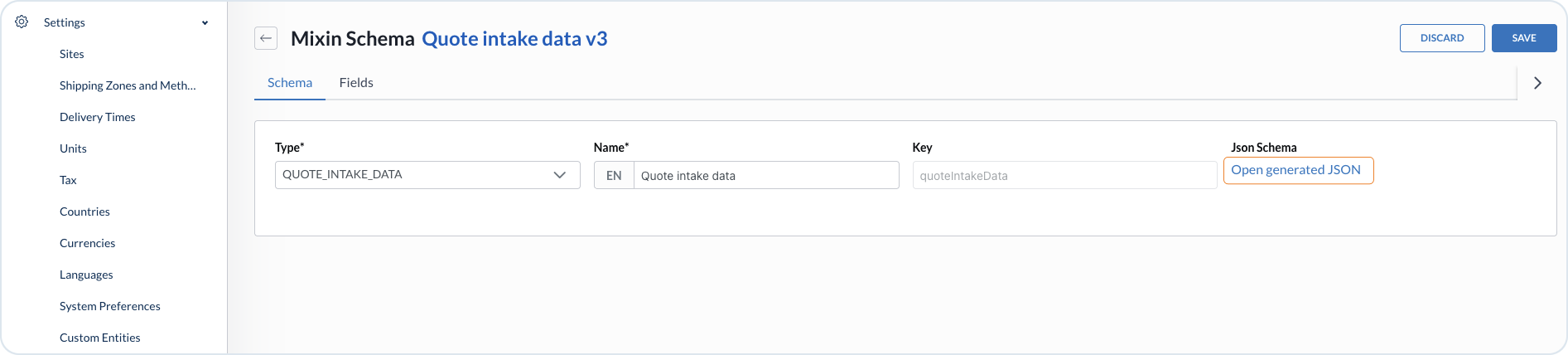
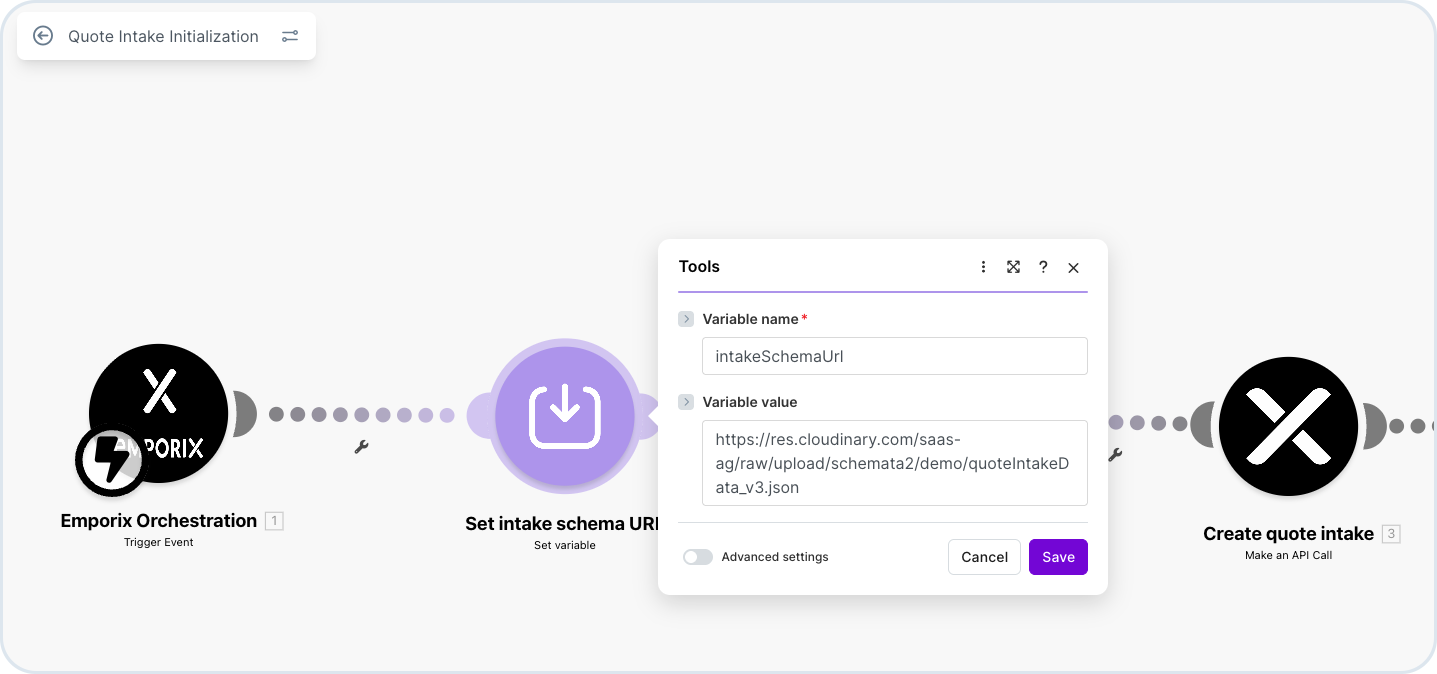
You must configure the **mixin link** in the **Quote Intake Initialization** scenario so the incoming payload maps to the quote intake data model. In **Management Dashboard**, open **Settings → Mixin schemas** and locate the **Quote initialization mixin**. Open the schema and choose **Open Generated JSON** to copy the generated JSON schema URL. Use that link in the **Quote Intake Initialization** scenario, as shown below.

<figure><img src="/files/EHYmfuepGag9JaNiYh3o" alt="Mixin schema detail with Open Generated JSON for Quote intake data"><figcaption><p>Mixin schema — Open Generated JSON to obtain the mixin link for the trigger</p></figcaption></figure>

<figure><img src="/files/DYQQc0BYOLNZRy9c5p4a" alt="Quote Intake Initialization Make scenario with Set intake schema URI step"><figcaption><p>Quote Intake Initialization — set the mixin link as intakeSchemaUrl</p></figcaption></figure>

{% hint style="warning" %}
Remember to always save your Make module configurations.
{% endhint %}

### Customer and product validation

The first steps prepare the quote context for the current request, for example by normalizing the payload from the trigger before customer and product checks run.

The process validates the customer using identifiers from the request. A conditional step evaluates whether the customer could be matched:

* When the customer is found, processing continues to product validation.
* When the customer is not found, an error notification is sent and the flow does not continue through product preparation or quote creation.

### Conditional routing after product validation

After product validation, a conditional step evaluates the check results and routes the flow through one of three paths. The branches then merge before pricing and form steps.

* **Customer and legal entity** — when the customer is identified, the flow loads customer master data and aligns location and address information with the correct legal entity.
* **Product alternatives** — when only some requested products are found, the flow suggests catalog alternatives and prepares the resulting line items for the quote.
* **Product data only** — when all requested products are matched, the flow prepares product and line data without alternative suggestions.

These branches ensure that incomplete or unmatched data is handled on the appropriate path while valid cases can continue without interruption.

After the preparation branches converge, the process matches the prices and sends the quote for review. It then waits for the review submission before proceeding with the final quote creation steps. The review is completed through forms sent by email, with each email containing a link to the relevant form.

<figure><img src="/files/RGjAZRCea8G5JpoVMk7U" alt="Quote Intake value stream section showing product validation branches, data preparation, pricing, and quote form steps"><figcaption><p>Product validation, conditional data preparation, pricing, and quote form steps</p></figcaption></figure>

{% hint style="info" %}
For more details on step filters, conditional steps, and branching in value streams, see [Conditions](/value-stream-modeller/value-stream-designer/process-components/conditions.md).
{% endhint %}

### Quote form validation and quote creation

After the quote form is submitted, the flow validates the submitted data against the current quote context. When validation passes, a quote is created in Emporix.

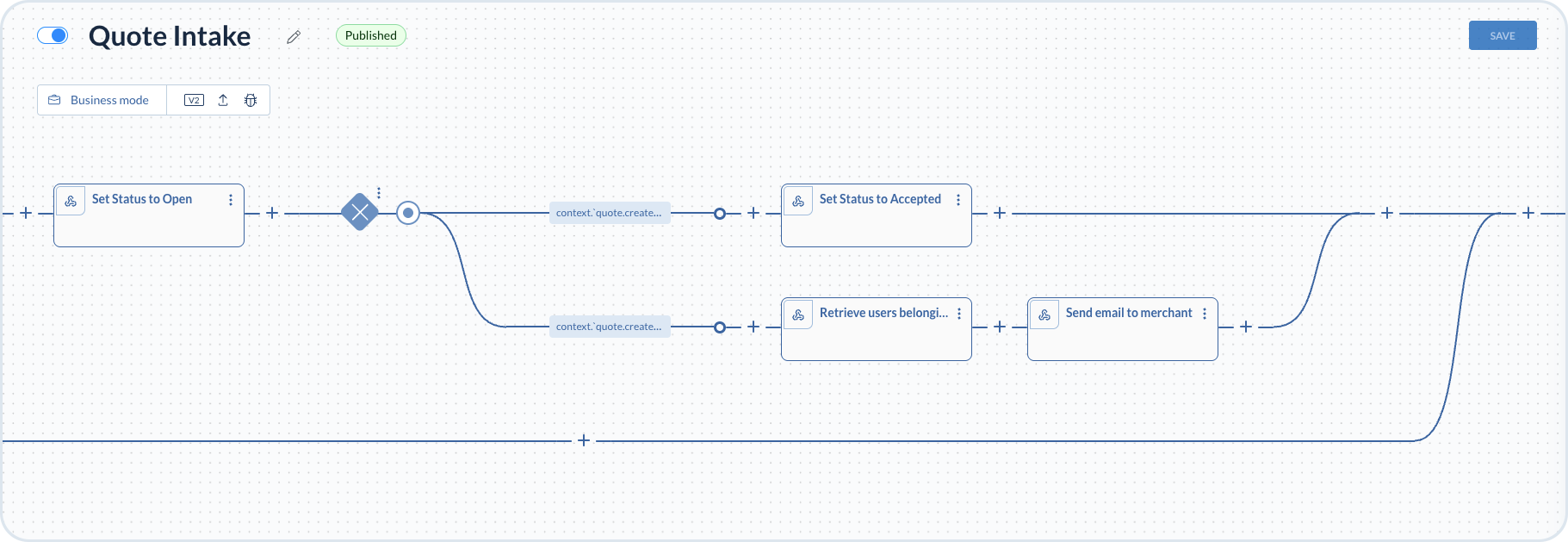
After the quote is created, the flow sets the quote status to open, then a conditional step routes the instance based on the quote net total from the creation response (for example `context.'quote.created'.data.price.netTotal`):

* When the net total is **below** the configured threshold (in this example, less than `30`), the quote status is set to accepted.
* When the net total is **above** the threshold (more than `30`), the flow retrieves users belonging to the merchant and sends an email so the team can follow up on the high-value quote.

<figure><img src="/files/n6yDGdNAGtB0WzghWgRY" alt="Quote Intake value stream after quote creation, with a conditional branch on quote net total routing to accepted status or merchant email notification"><figcaption><p>After quote creation — conditional routing by net total threshold, acceptance, or merchant email</p></figcaption></figure>

{% hint style="info" %}
Quote Intake implementations must be tailored to each project, with the goal of reducing manual effort, accelerating quote processing, and ensuring that incoming quote data remains consistent and reliable.
{% endhint %}


---

# Agent Instructions
This documentation is published with GitBook. GitBook is the documentation platform designed so that both humans and AI agents can read, navigate, and reason over technical content effectively. Learn more at gitbook.com.

## Querying This Documentation
If you need additional information that is not directly available in this page, you can query the documentation dynamically by asking a question.

Perform an HTTP GET request on the current page URL with the `ask` query parameter, and the optional `goal` query parameter:

```
GET https://developer.emporix.io/partner-library/emporix-components/quote-intake.md?ask=<question>&goal=<endgoal>
```

`ask` is the immediate question: it should be specific, self-contained, and written in natural language.
`goal` is optional and describes the broader end goal you are ultimately trying to accomplish on behalf of the user. GitBook uses it to tailor the answer towards what is most useful for that goal.

The response will contain a direct answer to the question and relevant excerpts and sources from the documentation.

Use this mechanism when the answer is not explicitly present in the current page, you need clarification or additional context, or you want to retrieve related documentation sections.