> For the complete documentation index, see [llms.txt](https://developer.emporix.io/llms.txt). Markdown versions of documentation pages are available by appending `.md` to page URLs; this page is available as [Markdown](https://developer.emporix.io/partner-library/introduction.md).
# Introduction
Learn how the Partner Library connects partners and customers around components that can extend the Emporix platform.
The components in the **Partner Library** may support many various scenarios, but the library is **primarily aimed at B2B commerce** where there is a need for modular business logic, repeatable workflows, and integrations.
The Partner Library is available as a perspective in the Management Dashboard.
{% hint style="info" %}
Customer tenants allow to reach the Partner Library straightaway. Partners, willing to participate and contribute, have to request partner access on their tenants first. For more information contact the [Sales Team](mailto:sales@emporix.com).
{% endhint %}
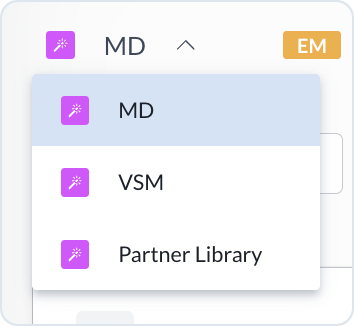
Select the Partner Library perspective from the expanded perspective chooser:
Access the Partner Library
## Key features
The Partner Library serves as a B2B marketplace not only as a list of products but as a set of services around that catalog:
| Feature | Description |
| --------------------- | ------------------------------------------------------------------------------------------------------------------------------------------------------ |
| **Component catalog** | Search, categories, pricing models, trials (where applicable), reviews or ratings, demos or documentation links — so buyers can shortlist and compare. |
| **Trust and quality** | Verification, security and compliance checkpoints, quality expectations, and published policies so listings meet a baseline before customers commit. |
| **Provisioning** | Installation and activation flows, permission or scope alignment, and tenant entitlements so only entitled tenants use paid or restricted offerings. |
| **Lifecycle** | Updates, compatibility, operational monitoring where relevant, and deprecation rules so end-of-life is predictable. |
| **Support model** | Clear ownership for component support (platform vs partner), escalation paths, and SLA expectations tied to what Emporix vs the partner commits to. |
## What you can do in the Partner Library
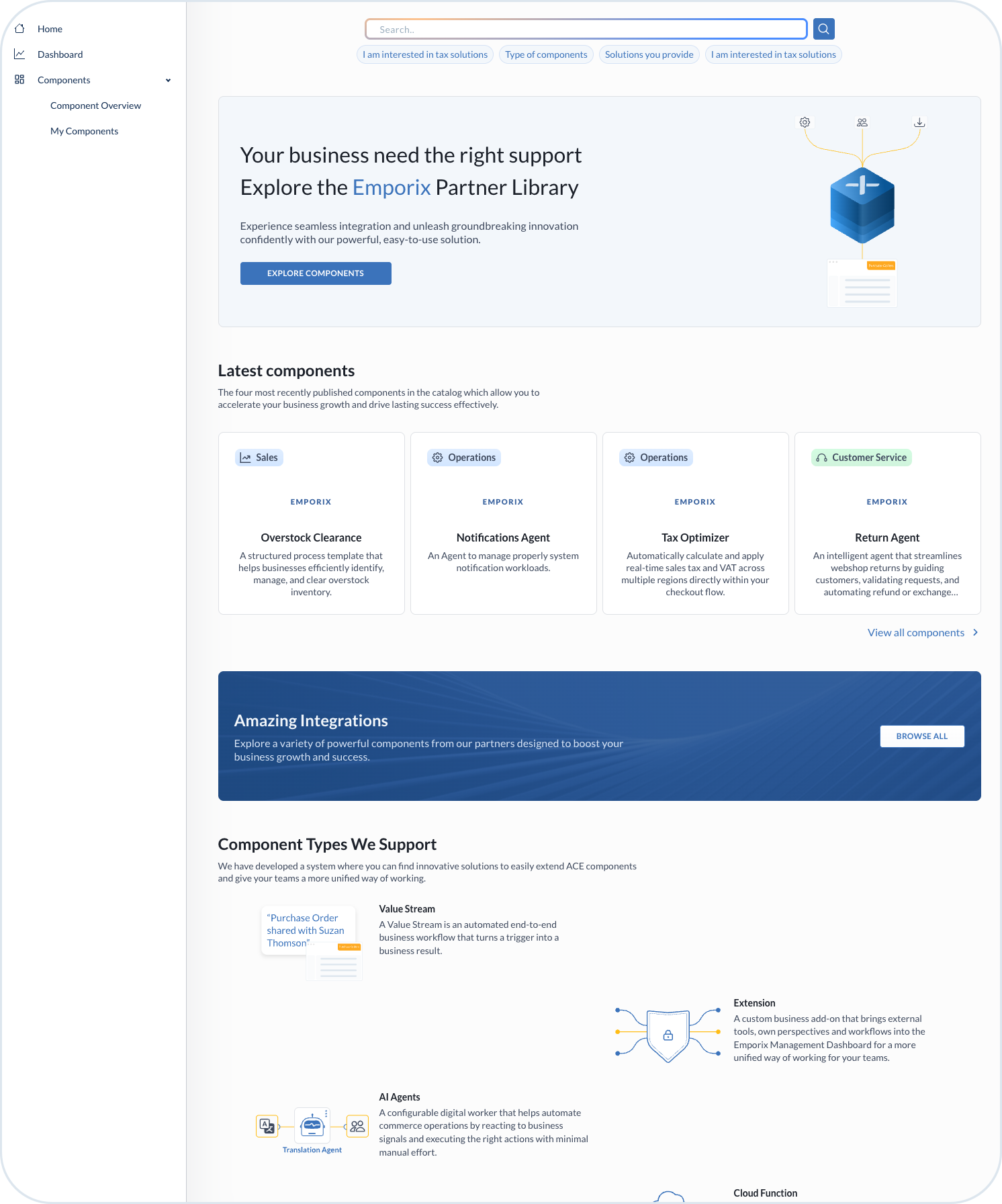
Partner Library Home Page
### Discover and install extensions
Customers can browse integrations and functional extensions—for example payment or tax modules, connectors, and other add-ons aligned with their operating model. Listings are meant to reduce guesswork: you can see what exists, how it maps to your needs, and then activate what fits, within your tenant and permission model. Components are installed and licensed per customer tenant. That keeps boundaries clear for security, compliance, and ownership: what is active, where, and under which entitlements.
### Adopt packaged value streams
You can implement **repeatable business processes** using pre-built value streams, which respond to your complex needs, instead of designing every flow from scratch. The offered value streams provide automation for various workflow patterns, that consist of multiple steps, use AI intelligence or create a chain of subflows. For example, value streams can orchestrate returns handling, fraud discovery, or other process-oriented flows.
### Use AI Agents
AI Agents help automate or assist operational work: for example onboarding, guided selling, or support scenarios, with humans in the loop where required. They are offered as ready-made building blocks rather than one-off custom projects.
### Discover cloud functions
Cloud functions open numerous integration possibilities. You can adopt an external service that enhances digital processes with custom logic, automation, and system connectivity in real time.
### Commercialize as a partner
Partners can list and maintain the solutions they have built for Emporix use cases. The library provides a standardized path to reach customers who already run on ACE™, with room for listing detail, compatibility expectations, and operational handover.
## Components integration within Emporix solution
The Partner Library is tightly integrated with ACE™ platform. It relies on shared tenant context, identity, and permissions, so discovery and activation stay consistent with how the rest of your environment is governed.
After installation, components are visible and manageable in the Management Dashboard (MD). Depending on the component type, you work with the appropriate functionalities, for example, AI Agents, Value Streams, and Extensions, so administrators have a single operational outlook for what is live in the tenant.
All the components submitted by the Emporix partners undergo a dedicated review and approval process from Emporix side to ensure that what appears in the library meets Emporix requirements. The goal is to build a verified, trustworthy catalog of components that customers can adopt with confidence, while partners get a fair, predictable process to publish.
The support for issues related to the partner components is split:
* **Emporix** handles **platform-level** issues related to the general product behavior.
* **Partners** provide **component-specific** expertise, for example, in-depth support related to how a listing behaves, component configuration, and delivering component fixes.
This split allows clear distinction for customers to know whom to contact if any issue arises.
Customers are able to try out the components in a non-production environment first before promoting them to production. This gives time and space for the teams to validate behavior and integrations before going live.
## Request and activation flow
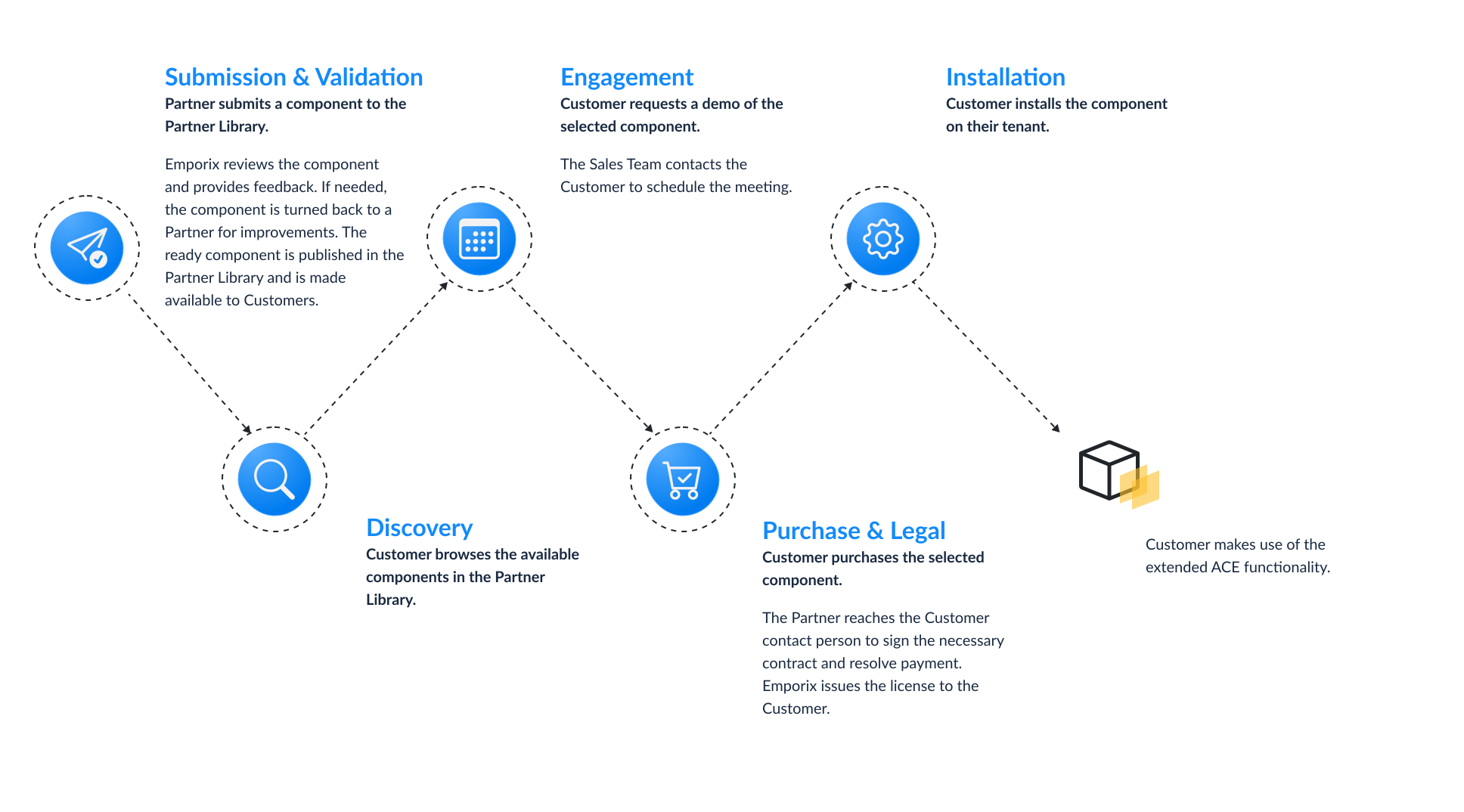
Emporix Partner Library request and activation flow
---
# Agent Instructions
This documentation is published with GitBook. GitBook is the documentation platform designed so that both humans and AI agents can read, navigate, and reason over technical content effectively. Learn more at gitbook.com.
## Querying This Documentation
If you need additional information that is not directly available in this page, you can query the documentation by asking a question.
Perform an HTTP GET request on the following URL with the `ask` and `goal` query parameters:
```
GET https://developer.emporix.io/partner-library/introduction.md?ask=&goal=
```
`ask` is the immediate question: it should be specific, self-contained, and written in natural language.
`goal` is what the user is ultimately trying to achieve, the reason they need the answer. Sharing it helps GitBook give you a better, more relevant answer. A goal is most helpful when it describes the outcome the user wants rather than restating the question. For example, with `ask=how do I create an API token`, a goal like `automate deployments from our CI pipeline` lets GitBook tailor the answer to that use case.
The response will contain a direct answer to the question and relevant excerpts and sources from the documentation.
Use this mechanism when the answer is not explicitly present in the current page, you need clarification or additional context, or you want to retrieve related documentation sections.