> For the complete documentation index, see [llms.txt](https://developer.emporix.io/llms.txt). Markdown versions of documentation pages are available by appending `.md` to page URLs; this page is available as [Markdown](https://developer.emporix.io/user-guides/management-dashboard/administration/audit-logs.md).
# Audit Logs
Review the centralized Global Audit Logs and entity-level change history in the Management Dashboard.
The **Audit Logs** service is a centralized capability in Emporix Commerce Engine. It records meaningful changes across business objects into one unified store, instead of keeping history only inside each entity document. The objects the audit logs apply to include orders, quotes, customers, companies, products, sites, segments, coupons, customer groups, user groups, and custom entities.
Every recorded change includes full context: who made it, or that the system made it, when it happened, what changed, the previous value, and the updated value. The Management Dashboard surfaces this history in two places:
* **Global Audit Logs** under **Administration** — a tenant-wide, immutable list of audit records across supported entity types
* **Audit Logs** tab on supported entity detail pages — records for the currently opened object only
Global Audit Logs
{% hint style="warning" %}
* Only admin users can view audit history. Users without permission see an access-denied message. Audit records cannot be changed or deleted through the Management Dashboard.
* Records are stored centrally and preserved according to the configured retention policy.
{% endhint %}
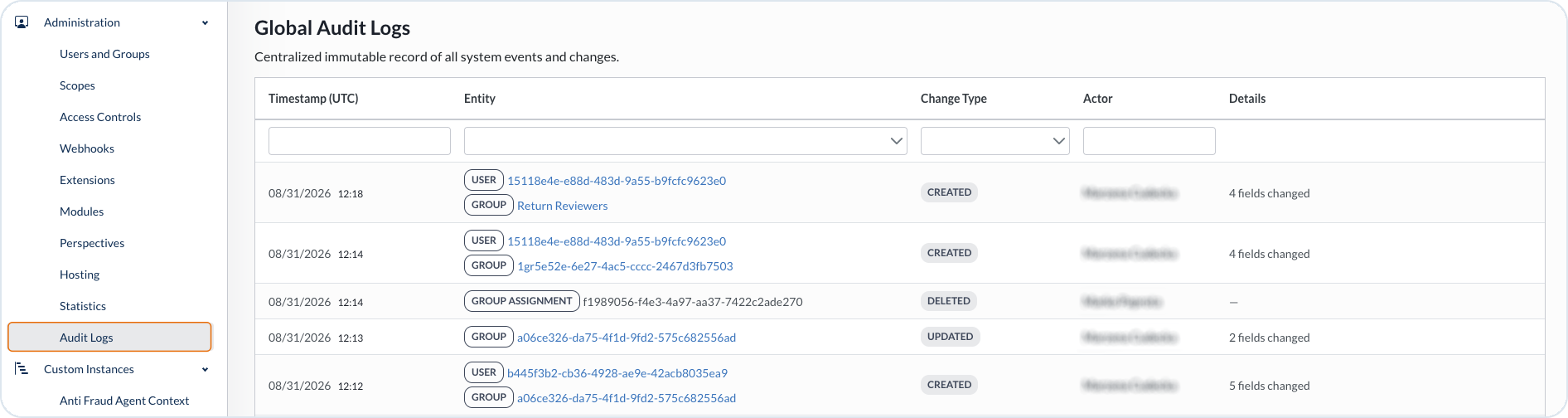
The **Global Audit Logs** view shows a chronological list of system events and changes. Newest entries appear first by default. Each row includes at least:
| Column | Description |
| ------------------- | ------------------------------------------------------------------------------------ |
| **Timestamp (UTC)** | When the change was recorded |
| **Entity** | Entity type and a link to the related object |
| **Change type** | For example `CREATED`, `UPDATED`, or `DELETED` |
| **Actor** | User identifier or display name, or a **SYSTEM** marker for system-generated changes |
| **Details** | Number of the changed fields |
Selecting the linked entity opens that entity.
Recording applies to changes triggered through APIs, Management Dashboard actions, and system processes where technically possible. System-generated changes are marked clearly as system actions. Sensitive values are masked or omitted according to security and privacy rules. Records are tenant-aware and are not exposed across tenants.
## Filtering
In the Global Audit Logs and on entity **Audit Logs** tabs, you can filter by change type (for example update, status change, event, or system action), search by actor where applicable, or filter by date range.
Date and time values follow the user’s locale or tenant configuration. The Global Audit Logs table displays timestamps in UTC.
## Audit Logs on entity pages
For every supported entity detail page, open the **Audit Logs** tab to see audit records for that object only. Entries appear in chronological order with the newest first. Each entry shows:
* Sequential entry number
* Updated by / triggered by - user or system
* Date and time
* Change type, for example `CREATED` or `UPDATED`
* Field-level previous and updated values in a side-by-side comparison
Status changes show the previous status and the updated status. Event records appear even when no field value changed.
{% hint style="info" %}
To see audit logs of a particular entity, see the relevant documentation:
* [Orders](/user-guides/management-dashboard/orders-module/orders.md#audit-logs)
* [Quotes](/user-guides/management-dashboard/quotes/quotes-view.md#audit-logs)
* [Customers](/user-guides/management-dashboard/customer-management/customers.md#audit-logs)
* [Companies](/user-guides/management-dashboard/customer-management/companies.md#audit-logs)
* [Products](/user-guides/management-dashboard/products-module/products.md#audit-logs)
* [Sites](/user-guides/management-dashboard/settings/sites.md#audit-logs)
* [Custom instances](/user-guides/management-dashboard/custom-instances.md#audit-logs)
* [Segments](/user-guides/management-dashboard/customer-management/segments.md#audit-logs)
* [Coupons](/user-guides/management-dashboard/customer-management/coupons.md#audit-logs)
* [Groups](/user-guides/management-dashboard/customer-management/customer-groups.md#audit-logs)
* [User groups](/user-guides/management-dashboard/administration/usersandgroups.md#audit-logs)
{% endhint %}
---
# Agent Instructions
This documentation is published with GitBook. GitBook is the documentation platform designed so that both humans and AI agents can read, navigate, and reason over technical content effectively. Learn more at gitbook.com.
## Querying This Documentation
If you need additional information that is not directly available in this page, you can query the documentation by asking a question.
Perform an HTTP GET request on the following URL with the `ask` and `goal` query parameters:
```
GET https://developer.emporix.io/user-guides/management-dashboard/administration/audit-logs.md?ask=&goal=
```
`ask` is the immediate question: it should be specific, self-contained, and written in natural language.
`goal` is what the user is ultimately trying to achieve, the reason they need the answer. Sharing it helps GitBook give you a better, more relevant answer. A goal is most helpful when it describes the outcome the user wants rather than restating the question. For example, with `ask=how do I create an API token`, a goal like `automate deployments from our CI pipeline` lets GitBook tailor the answer to that use case.
The response will contain a direct answer to the question and relevant excerpts and sources from the documentation.
Use this mechanism when the answer is not explicitly present in the current page, you need clarification or additional context, or you want to retrieve related documentation sections.