> For the complete documentation index, see [llms.txt](https://developer.emporix.io/llms.txt). Markdown versions of documentation pages are available by appending `.md` to page URLs; this page is available as [Markdown](https://developer.emporix.io/user-guides/management-dashboard/introduction.md).
# Introduction
The Management Dashboard is a powerful application that provides you with backoffice tools to administer all types of settings for your online store. Learn what you achieve with MD.
The **Emporix Management Dashboard** is designed to help you manage your store's resources.
## Navigating the Management Dashboard
Emporix Management Dashboard allows you to smoothly navigate through the modules and manage your business configuration settings, customers, orders, catalogs, products, pricing, and other.
* The **navigation menu** on the left lists the available modules. Each module is a collapsible menu itself, grouping together specific sections.
* The **top bar** provides several options:
* change a perspective (if you have also access to the [Value Stream Modeller](https://developer.emporix.io/vsm-guides/)),
* switch to another tenant (if you have access to more than one),
* choose the preferred currency,
* select the language that you want to use for your data and for the UI
Top bar
### Data and interface languages
There are two language choosers in the settings bar at the top:
* The **data language** chooser enables you to see localized values in the preferred language first. For example, when you switch to French data language and then open a product, the localized fields, such as name or description, show the the first displayed values in French. But the other content you see in the UI, like modules names, fields names, buttons etc, is not translated to French.
Data language selector
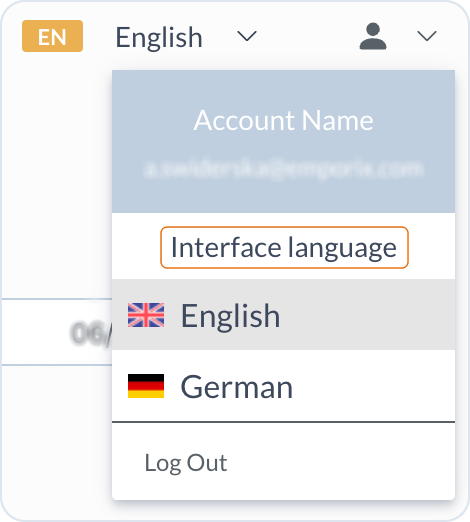
* The **interface language** under your account icon allows you to switch to a different UI language and to have everything translated. Emporix supports English and German as UI languages.
UI language selector
When your Identity and Access Management (IAM) profile contains a preferred language, the Management Dashboard evaluates it independently for each language selector. Regional forms such as `de-DE` or `en_US` are matched to a language code for the interface and for tenant data. If the interface supports your preference but the tenant's data languages do not, only the interface language changes. If the tenant's data languages support your preference but the interface does not, only the data language changes.
If your preferred language is unavailable for one of the selectors, that selector keeps the language last selected in this browser. If no language was previously selected, the interface uses English, while the data language uses the tenant's default language. The same fallback applies when your IAM profile has no preferred language.
Neither selector updates the IAM profile. Other Emporix cockpits work in the same way, and a language change applies in the other cockpits available to you. Reloading the Management Dashboard reapplies the preferred language to each selector that supports it. For an explanation of how the user-profile preference affects language selection, see [Preferred language](/user-guides/management-dashboard/administration/usersandgroups.md#preferred-language).
{% hint style="warning" %}
The possibility to view specific modules and available options that appear in particular views of Emporix Management Dashboard depend on the permissions set for users. If you don't see a specific module, can't see or perform an action described in the documentation, it might mean that you don't have enough permissions.\
To learn how to manage users and their rights and roles in the application, see [Users and Groups](/user-guides/management-dashboard/administration/usersandgroups.md).
{% endhint %}
## Modules
The Management Dashboard provides the following modules:
* [**Dashboard**](/user-guides/management-dashboard/dashboard.md) - monitoring commerce operations, sales rates and other KPIs.
* [**Agentic AI**](/user-guides/management-dashboard/agentic-ai.md) - configuring AI agents to facilitate operational worflows.
* [**Customer Management**](/user-guides/management-dashboard/customer-management.md) — managing data about the companies, contact persons, customers and coupons.
* [**Vendor Management**](/user-guides/management-dashboard/vendors.md) - managing vendors and their access.
* [**Quotes**](/user-guides/management-dashboard/quotes.md) — preparing and managing customers' quotes requests.
* [**Carts**](/user-guides/management-dashboard/carts.md) - monitoring the created carts lifecycle.
* [**Orders**](/user-guides/management-dashboard/orders-module.md) — managing orders.
* [**Catalogs**](/user-guides/management-dashboard/catalogs-module.md) — configuring catalogs and categories to which your products can be assigned.
* [**Products**](/user-guides/management-dashboard/products-module.md) — managing product data: create product templates, labels, manage brands, or gather supplier details.
* [**Pricing**](/user-guides/management-dashboard/pricing.md) — configuring the pricing models and price lists.
* [**Settings**](/user-guides/management-dashboard/settings.md) — managing store settings, such as delivery options or fees.
* [**Administration**](/user-guides/management-dashboard/administration.md) — managing users, permissions and webhooks.
* [**Extensions**](/user-guides/management-dashboard/extensions.md) — additional custom extensions to the product.
* [**Custom Entities**](/user-guides/management-dashboard/custom-instances.md) - managing custom created types with associated mixins.
---
# Agent Instructions
This documentation is published with GitBook. GitBook is the documentation platform designed so that both humans and AI agents can read, navigate, and reason over technical content effectively. Learn more at gitbook.com.
## Querying This Documentation
If you need additional information that is not directly available in this page, you can query the documentation by asking a question.
Perform an HTTP GET request on the following URL with the `ask` and `goal` query parameters:
```
GET https://developer.emporix.io/user-guides/management-dashboard/introduction.md?ask=&goal=
```
`ask` is the immediate question: it should be specific, self-contained, and written in natural language.
`goal` is what the user is ultimately trying to achieve, the reason they need the answer. Sharing it helps GitBook give you a better, more relevant answer. A goal is most helpful when it describes the outcome the user wants rather than restating the question. For example, with `ask=how do I create an API token`, a goal like `automate deployments from our CI pipeline` lets GitBook tailor the answer to that use case.
The response will contain a direct answer to the question and relevant excerpts and sources from the documentation.
Use this mechanism when the answer is not explicitly present in the current page, you need clarification or additional context, or you want to retrieve related documentation sections.