Algolia Search Provider
Configure Algolia for production with the Indexing Service or test direct event forwarding with webhooks.
For production, use the Indexing Service integration for Algolia. Direct webhook processing is intended mainly for testing:
Indexing Service (recommended for production) – Configure Algolia as described in Indexing Service. See Indexing output by strategy for the SPLIT and MERGE document formats.
Webhook-based configuration (testing) – Forward
index-item.updatedandindex-item.deletedevents directly through Svix to Algolia endpoints, with transformations to match Algolia API requirements. See Webhook-based search configuration.
Indexing output by strategy
The following sections describe Algolia index document structure produced by Indexing Service for SPLIT and MERGE strategies.
The example below shows the document format stored in the Algolia index when the SPLIT strategy is active. BatteryIncluded does not support this strategy.
The example below shows the document format stored in the Algolia index when the MERGE strategy is active.
Webhook-based search configuration
Before configuring Algolia endpoints, complete the shared webhook setup in Search Configuration with Webhooks.
Creating and updating products
Add an endpoint
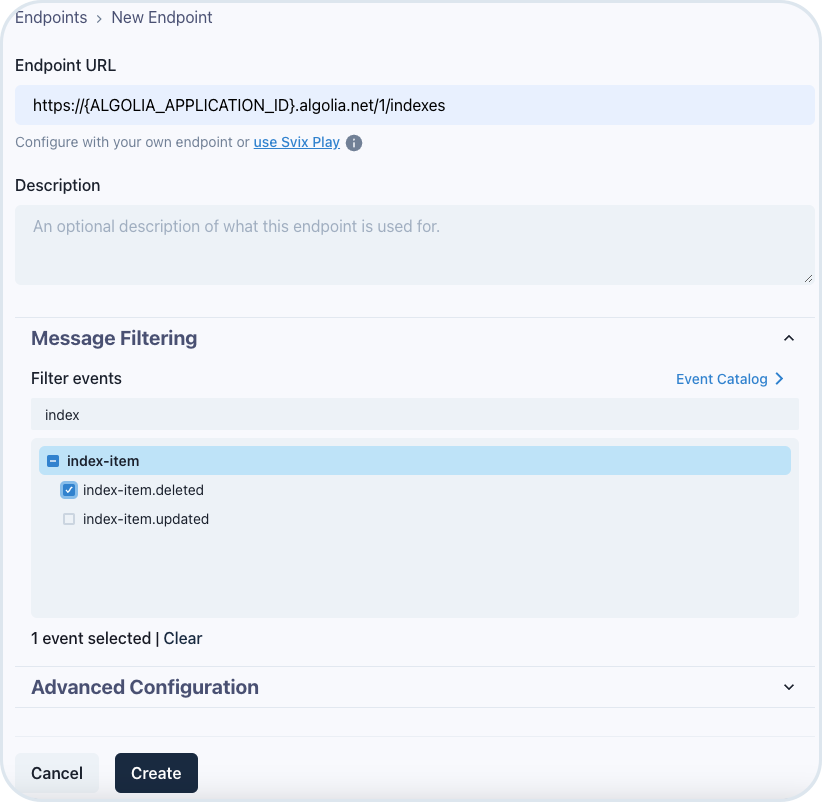
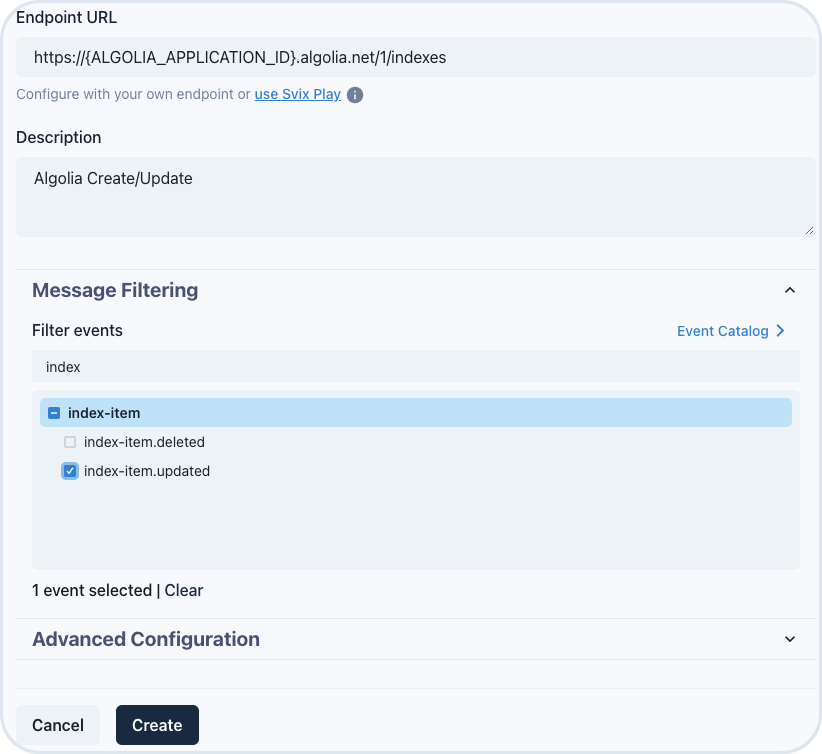
In Endpoints, choose Add Endpoint and fill in the fields with the following values:
Endpoint URL -
https://{ALGOLIA_APPLICATION_ID}.algolia.net/1/indexes- provide your Algolia application IDDescription -
Algolia Create/UpdateMessage filtering - select only the
index-item.updatedevent

Add custom headers
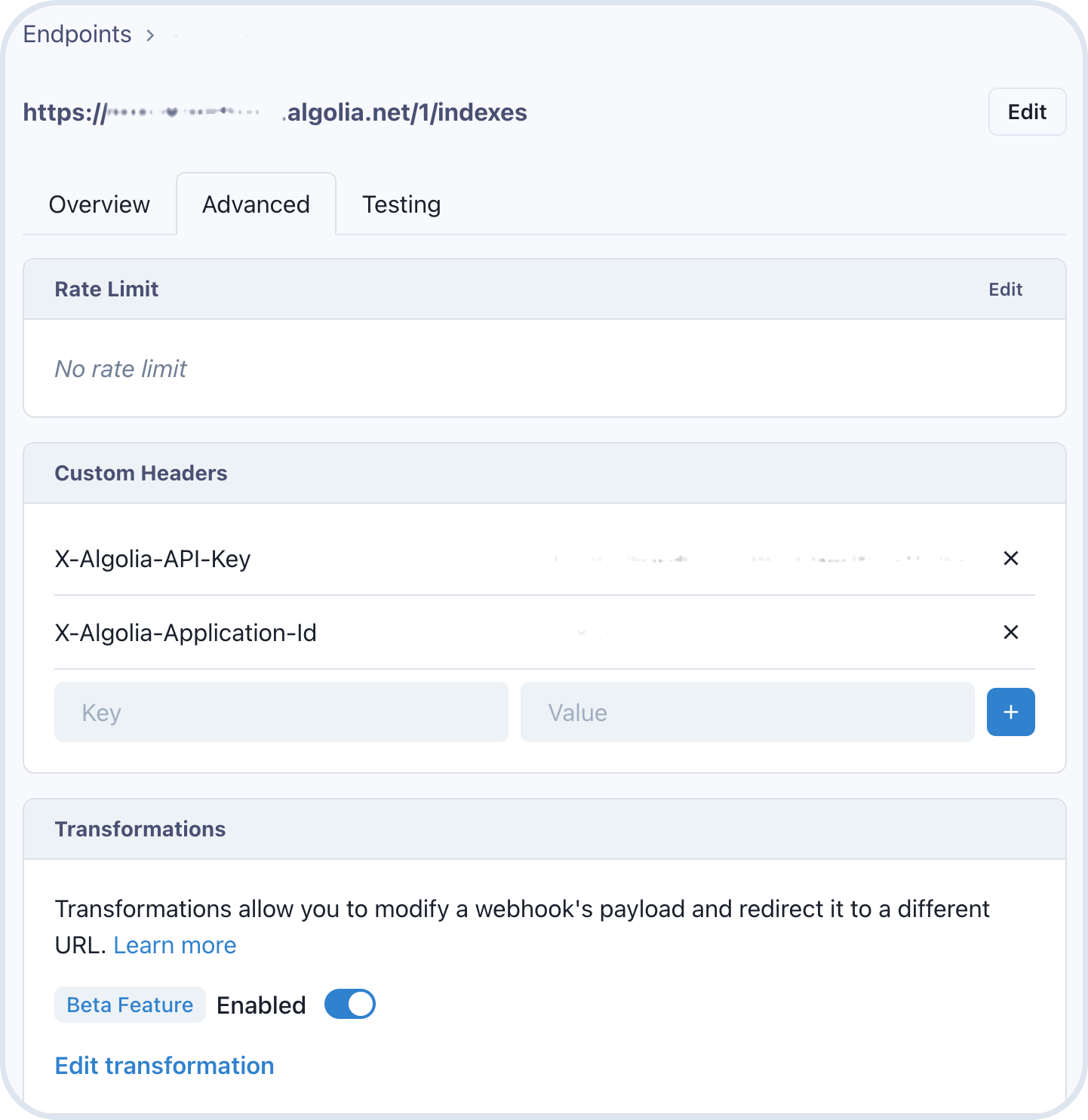
Go to the Advanced tab, provide the required custom headers and enable the transformation feature:
Key:
X-Algolia-API-KeyValue:YOUR_ALGOLIA_ADMIN_API_KEYKey:
X-Algolia-Application-IdValue:YOUR_ALGOLIA_APPLICATION_ID
Find the right values for your keys in your application settings (API Keys) in your Algolia account.
Configure the transformation mapping
In Edit transformation, start working on the Algolia mapping.
Since there are differences between the default mapping in Svix and Algolia requirements, we need to adjust the mapping to make it work properly.
The default mapping available in Svix is as follows:
/**
* @param webhook the webhook object
* @param webhook.method destination method. Allowed values: "POST", "PUT"
* @param webhook.url current destination address
* @param webhook.eventType current webhook Event Type
* @param webhook.payload JSON payload
* @param webhook.cancel whether to cancel dispatch of the given webhook
*/
function handler(webhook) {
// modify the webhook object...
// and return it
return webhook
}According to Algolia API Reference, the request that should be sent is as follows:
curl "https://${APPLICATION_ID}.algolia.net/1/indexes/contacts/myID" \
-X PUT \
-H "X-Algolia-API-Key: ${API_KEY}" \
-H "X-Algolia-Application-Id: ${APPLICATION_ID}" \
-d '{
"name": "Betty Jane Mccamey",
"company": "Vita Foods Inc.",
"email": "betty@mccamey.com"
}'To learn more about Algolia API, see Algolia API Reference.
In the Edit transformation section, change the code to create the right mapping: a. Change the http method:
/**
* @param webhook the webhook object
* @param webhook.method destination method. Allowed values: "POST", "PUT"
* @param webhook.url current destination address
* @param webhook.eventType current webhook Event Type
* @param webhook.payload JSON payload
* @param webhook.cancel whether to cancel dispatch of the given webhook
*/
function handler(webhook) {
webhook.method = "PUT";
return webhook
}b. Modify the target URL:
/**
* @param webhook the webhook object
* @param webhook.method destination method. Allowed values: "POST", "PUT"
* @param webhook.url current destination address
* @param webhook.eventType current webhook Event Type
* @param webhook.payload JSON payload
* @param webhook.cancel whether to cancel dispatch of the given webhook
*/
function handler(webhook) {
var indexName = "emporix_" + webhook.payload.siteCode;
webhook.url = webhook.url + "/" + indexName + "/" + webhook.payload.id;
webhook.method = "PUT";
return webhook
}c. Optional: Modify the message body. For example, you can add additional field like image based on media field:
/**
* @param webhook the webhook object
* @param webhook.method destination method. Allowed values: "POST", "PUT"
* @param webhook.url current destination address
* @param webhook.eventType current webhook Event Type
* @param webhook.payload JSON payload
* @param webhook.cancel whether to cancel dispatch of the given webhook
*/
function handler(webhook) {
if(webhook.payload.medias && webhook.payload.medias.length > 0) {
webhook.payload.image = webhook.payload.medias[0].url;
}
var indexName = "emporix_" + webhook.payload.siteCode;
webhook.url = webhook.url + "/" + indexName + "/" + webhook.payload.id;
webhook.method = "PUT";
return webhook
}Deleting products
Add an endpoint
In Endpoints, choose the Add Endpoint. Fill in the fields with the following values:
Endpoint URL -
https://{ALGOLIA_APPLICATION_ID}.algolia.net/1/indexes- provide your Algolia application IDDescription -
Algolia DeleteMessage filtering - select only the
index-item.deletedevent

Add custom headers
Go to the Advanced tab, provide the required custom headers and enable the transformation feature:
Key:
X-Algolia-API-KeyValue:YOUR_ALGOLIA_ADMIN_API_KEYKey:
X-Algolia-Application-IdValue:YOUR_ALGOLIA_APPLICATION_ID
Find the right values for your keys in your application settings (API Keys) in your Algolia account.
Configure the transformation mapping
According to Algolia API Reference, the request that should be sent is as follows:
To learn more about Algolia API, see Algolia API Reference.
In the Edit transformation section, change the code to create the right mapping: a. Change the http method:
b. Change the target URL:
Last updated
Was this helpful?