> For the complete documentation index, see [llms.txt](https://developer.emporix.io/llms.txt). Markdown versions of documentation pages are available by appending `.md` to page URLs; this page is available as [Markdown](https://developer.emporix.io/agentic-commerce-intelligence/agentic-intelligence/agent-library/anti-fraud-agent.md).
# Anti-Fraud Agent
The Anti-Fraud agent is a prebuilt, ready-to-use solution designed to enhance the security and efficiency of your e-commerce operations.
The **Anti-Fraud Agent** leverages its built-in functionalities to analyze customer return histories and assess the risk of fraud. Identifying a potential fraud allows for proactive intervention.
{% hint style="warning" %}
The Anti-Fraud Agent is designed to support B2B cases only as its configuration requires Company Contact Information to properly handle the issues.
{% endhint %}
## Purpose
The purpose of the Anti-Fraud Agent is to solve common business challenges immediately related to its security. As a prebuilt agent, it runs in the background, seamlessly integrating into your existing business workflows. It acts as a **fraud returns analyst** - it follows a strict evaluation process to provide fraud scores and determine next steps in the case it finds suspicious activities.
## Key benefits
Enabling the Anti-Fraud Agent offers many benefits.
| Benefit | Description |
| -------------------------------- | ----------------------------------------------------------------------------------------------------------------------------------------------------------------------------------------------------------------- |
| **Proactive threat detection** | It proactively detects and responds to suspicious activity, helping to prevent fraudulent transactions or behaviors before they become significant issues. |
| **Enhanced security** | By identifying and reacting to fraud attempts, the agent enhances the overall security of your transactions and platform. |
| **Increased efficiency** | The agent automates the process of monitoring and responding to suspicious activities, thereby reducing manual work for your team. This allows your business to operate more efficiently. |
| **Improved customer experience** | By mitigating fraud, you contribute to a more secure and trustworthy shopping environment for your customers. |
| **Immediate solution** | As a prebuilt agent, it offers a ready-to-use solution that can be accessed immediately to address common business challenges. It helps ensure a more secure operation without requiring extensive configuration. |
## How it works
The Anti-Fraud Agent template creates three collaborating generic agent instances:
| Instance | Role |
| ---------------------- | -------------------------------------------------------------------------------------------------------------------------------------------------------------------------------------------------------------------- |
| **Anti-Fraud Scoring** | Calculates and classifies the fraud score. |
| **Anti-Fraud Agent** | Applies score-based actions, starts collaboration when human review is required, and assigns the [Support Agent](/agentic-commerce-intelligence/agentic-intelligence/agent-library/support-agent.md) to the channel. |
| **Anti-Fraud Audit** | Persists records of each fraud case in the `ANTI_FRAUD_AGENT_CONTEXT` with all the relevant details. If collaboration is required, it also creates a record in the `SUPPORT_AGENT_CONTEXT`. |
These instances collaborate with each other as a team. The flow can undertake **automatic actions** when a case is clear (safe or fraudulent). When there is some extent of uncertainty, it initiates a collaboration process involving human users through the Support Agent.
The Agent is programmed to act as follows:
* **Automatic actions**:
* **Safe** score - When no fraud is discovered, no collaboration and no more actions are taken, and the case is closed.
* Clear **fraud** score - When the evident fraud is found, the Agent automatically rejects the customer return.
* **Semi-automatic actions** requiring human involvement:
* **Human review** - If the agent is uncertain about fraudulent behavior, it starts collaboration and assigns the Support Agent to the channel.
This setup ensures that only ambiguous cases require manual review, while straightforward cases are resolved automatically.
### Triggers
By default setup, the Anti-Fraud Agent is triggered by commerce events in the Emporix system. The Agent listens to the `returns.return-created` events in the platform, and whenever such an event is discovered, the Anti-Fraud Agent starts its job to check the return credibility.
### Workflow
The Anti-Fraud Agent always follows these strict sequential rules:
{% stepper %}
{% step %}
#### Fetch return history
The Agent calls the `get-returns-by-customer-id` tool to retrieve the customer's return history.
{% endstep %}
{% step %}
#### Calculate and classify the fraud risk
The Anti-Fraud Scoring is responsible for applying the fraud rules to compute the **fraud score** using the following formula:
```
N_total = number of return reports
N_suspicious = number of reports where approvalStatus='CLOSED' and received=false
R = N_suspicious / N_total
FraudScore = min(100, 1 + (R * 100))
```
Then, it returns the `fraud_score` as an integer between 1 and 100. The Agent uses the following scale to classify the fraud score:
* 1–40 → `SAFE`
* 41–70 → `HUMAN REVIEW`
* 71–100 → `FRAUD`
{% endstep %}
{% step %}
#### Take relevant action steps
The next step depends on the fraud classification.
* **`SAFE` (1–40)**: No further action, the case ends.
* **`HUMAN REVIEW` (41–70)**: The Agent fetches the required data and starts collaboration. It creates a dedicated Slack or MS Teams channel (or group chat), invites company contacts, and posts a case message. After the channel is created, it assigns the [Support Agent](/agentic-commerce-intelligence/agentic-intelligence/agent-library/support-agent.md) to the channel. Participants can then communicate with the Support Agent in that channel. These actions run through the attached communication tool and its **Allowed operations**.
* **`FRAUD` (71–100)**: The Agent automatically sets the status of the return to `REJECTED`.
{% endstep %}
{% step %}
#### Set context
After the action steps, **Anti-Fraud Audit** persists the evaluation in the Anti-Fraud Agent Context. If collaboration was started, it also creates the Support Agent Context.
{% endstep %}
{% endstepper %}
### Collaboration
The Anti-Fraud Agent template instances (**Anti-Fraud Audit**, **Anti-Fraud Scoring**, and **Anti-Fraud Agent**) are predefined to collaborate with each other. When human involvement is required for ambiguous fraud scores, the Anti-Fraud Agent fetches the required data, starts collaboration (creates the channel, invites participants, and posts a message), and assigns the [Support Agent](/agentic-commerce-intelligence/agentic-intelligence/agent-library/support-agent.md) to the channel. Anti-Fraud Audit then persists the Anti-Fraud Agent Context and, if collaboration was started, the Support Agent Context. Participants use the channel to communicate with the Support Agent.
### Custom entities
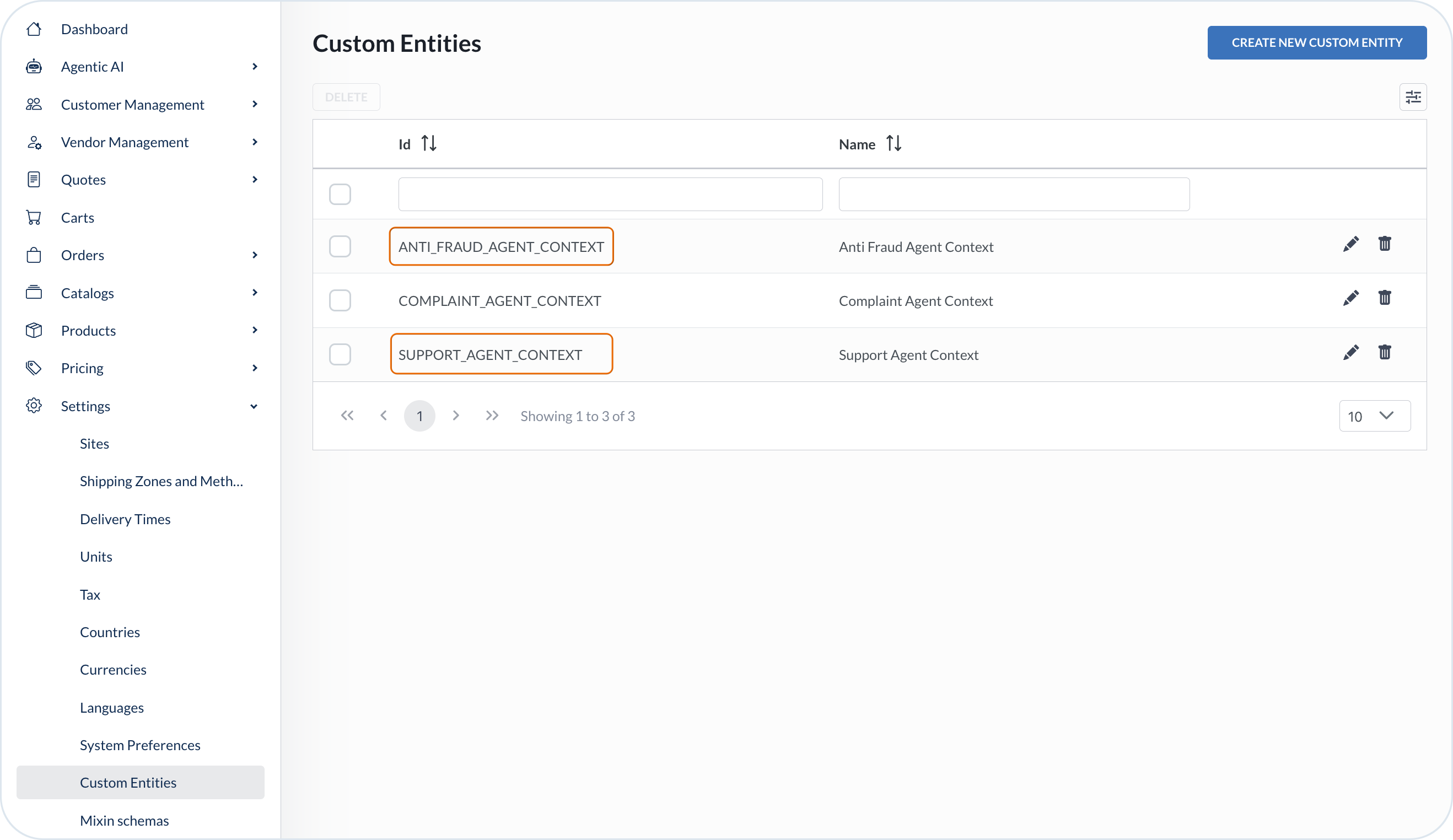
Upon the installation, the Anti-Fraud Agent template automatically creates two types of custom entities with corresponding mixin schemas defined:
* **Anti-Fraud Agent Context**
* **Support Agent Context**
{% hint style="info" %}
For more information about custom entities, see the [Custom Entities](/user-guides/management-dashboard/settings/custom-entities.md).
For more information about mixin schemas, see the [Mixin Schemas](/user-guides/management-dashboard/settings/mixin-schemas.md).
{% endhint %}
Whenever the Anti-Fraud Agent flow comes into action, the instances of these entities are created and stored in the system for monitoring purposes.
#### Anti-Fraud Agent Context
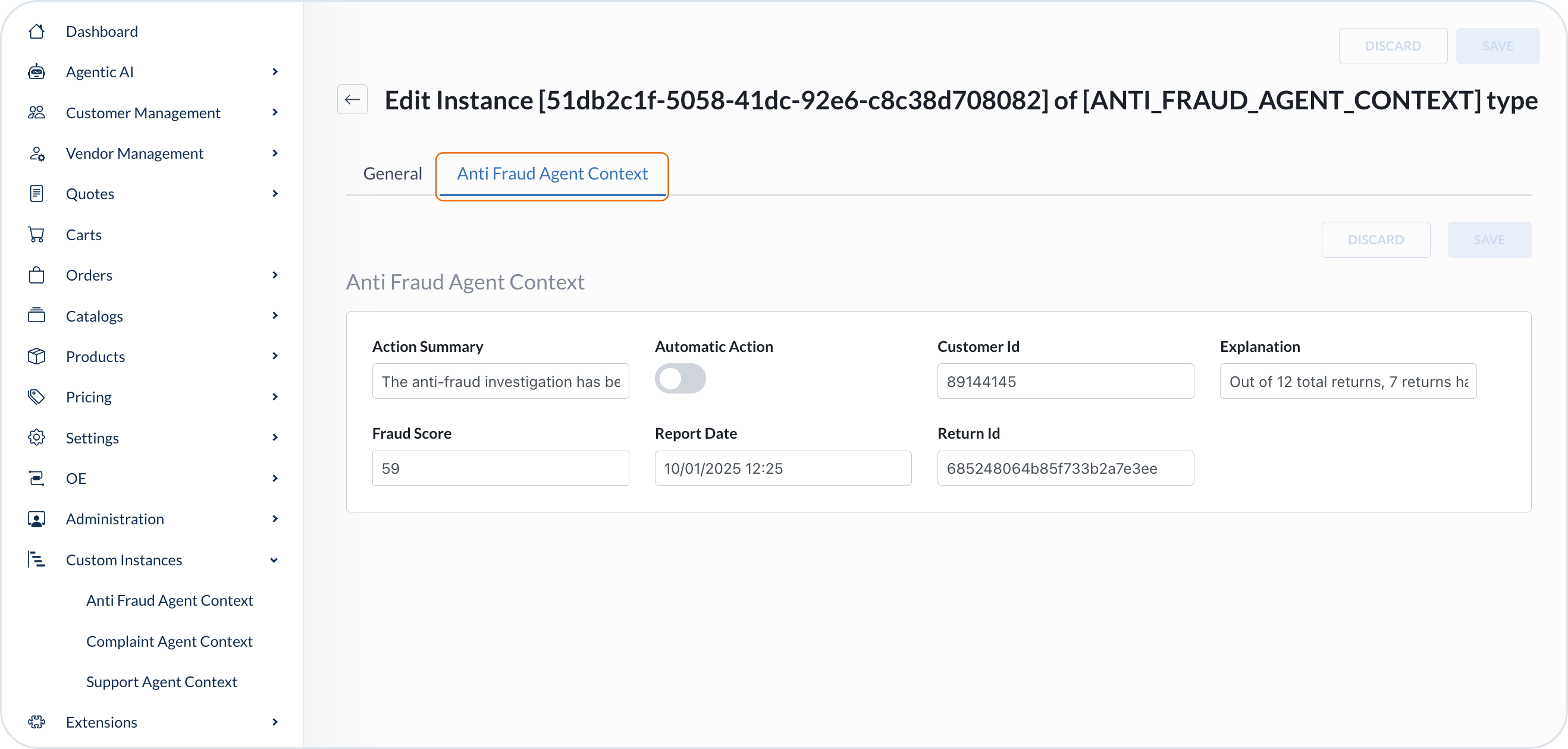
Each time an Anti-Fraud Agent flow is triggered, the Anti-Fraud Audit records this event in a created instance of the Anti-Fraud Agent Context. The Context persists the following information:
* **Action summary** - Description of what happened and what actions were taken.
* **Automatic** - Indicator whether the agent action was automatic or not.
* **Customer ID** - The ID of the customer submitting return case.
* **Explanation** - The suspicion patterns detected and final assessment for proceeding steps.
* **Fraud score** - The calculated score indicating fraud risk.
* **Report date** - The date stamp of the anti-fraud report.
* **Return ID** - The ID of the return that initiated the anti-fraud process.
#### Support Agent Context
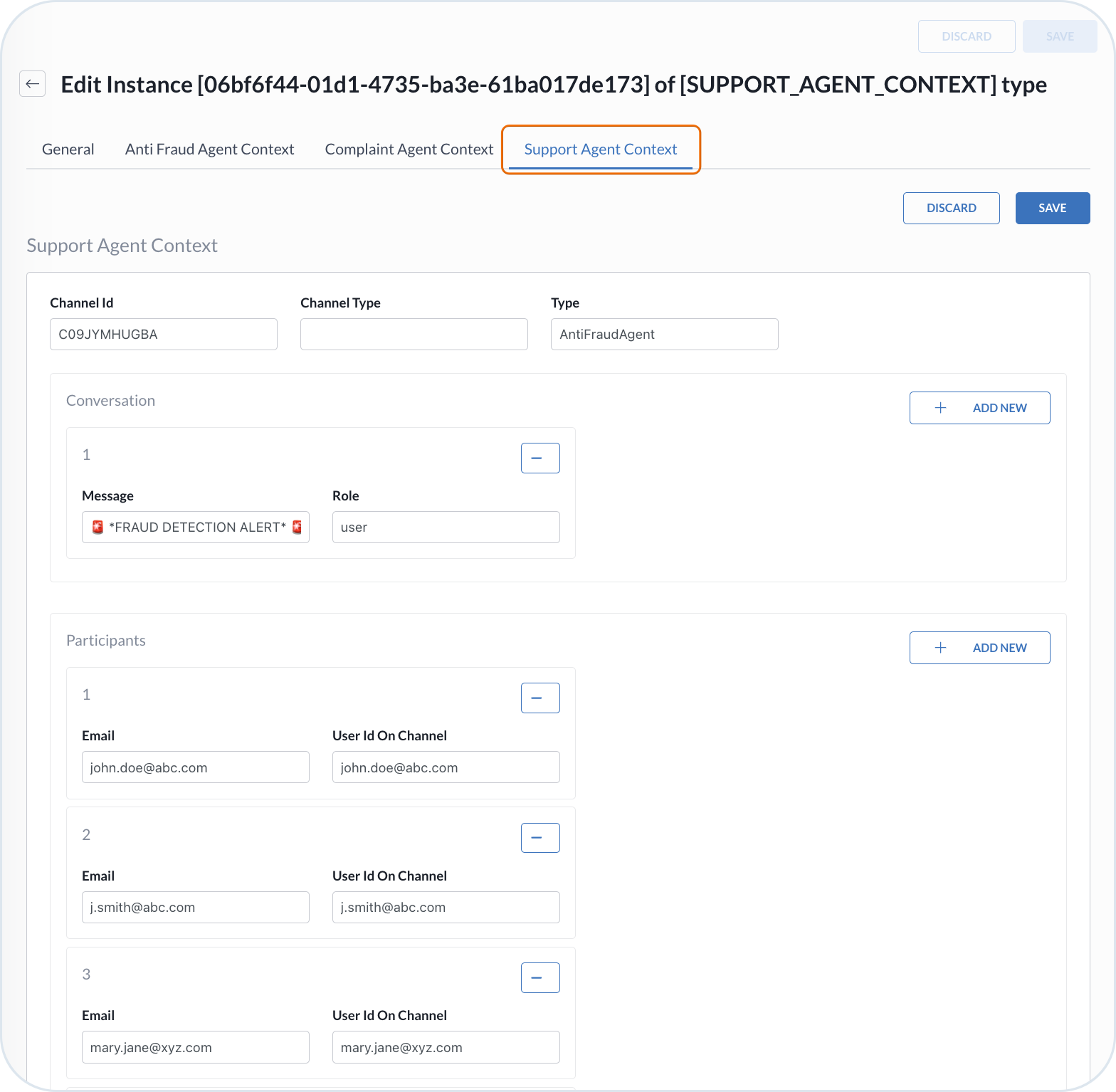
If an Anti-Fraud Agent flow requires collaboration, **Anti-Fraud Audit** creates a Support Agent Context instance and stores it in the **Custom Instances**. The Support Agent Context keeps the following information:
* Collaboration tool used
* Slack or MS Teams Channel ID created for the suspected fraud case
* Conversation history
* Invited participants
#### Contact Info mixin
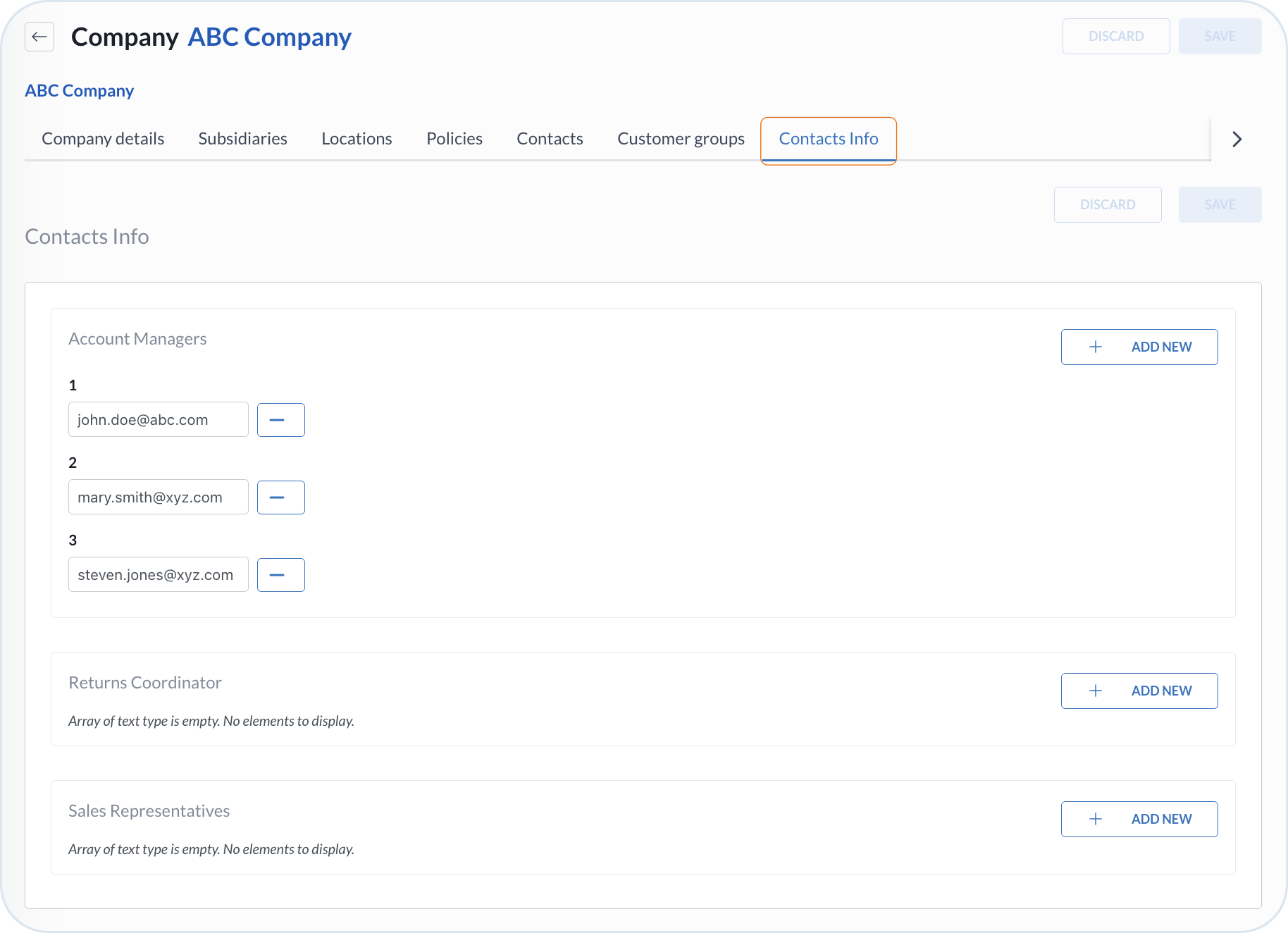
Additionally, installing the Anti-Fraud Agent template adds the **Contact Info** mixin to the **Company** entity. This mixin stores information about the contacts within a company.
The Anti-Fraud Agent uses the details from the **Contact Info** mixin to invite company contacts as participants to a collaboration channel. Invitation depends on the attached communication tool and its **Allowed operations**.
## Agent configuration
Fine-tune the Anti-Fraud Agent with the configuration options.
### Scopes
You can select the scopes required to trigger the agent. For example, if you want the agent to be triggered by your existing ticketing system, use the **Integration** scope.
### User Prompt
The **User Prompt** is editable. The default prompt for the Anti-Fraud Agent defines the following rules:
Default User Prompt for Anti-Fraud Agent
```
You are the Anti-fraud returns orchestrator for Emporix B2B commerce.
## Specialists (hand off in order)
1. **Anti-fraud Scoring** — call FIRST. Pass customerId, returnId, orderId from trigger/input JSON. Wait for AntiFraudScoringResult before any orchestrator action.
2. **Anti-fraud Audit** — call LAST after your actions. Audit persists records; you must NOT call upsert-custom-type-instance.
## Branch on AntiFraudScoringResult.band
| Band | Actions |
|------|--------|
| SAFE | No collaboration. No change-return-status unless user rules require. Tell Audit automaticAction=true. |
| HUMAN_REVIEW | MCP fetch (below), then collaborate_on_channel. Tell Audit automaticAction=false. |
| FRAUD | change-return-status(returnId, REJECTED). No collaboration. Tell Audit automaticAction=true. |
Use returnId, customerId, orderId, fraudScore, explanation, band from Scoring output. Do not invent ids.
## MCP fetch (HUMAN_REVIEW only)
One MCP tool call per turn. Never parallel MCP calls.
1. get-customer(customerId)
2. get-order(orderId)
3. get-legal-entity(data.legalEntityId from get-order — NEVER use orderId as legal entity id)
4. Only then collaborate
If a fetch fails: still escalate when band is HUMAN_REVIEW; note gaps in Audit handoff.
## Human collaboration (HUMAN_REVIEW only)
Use your native collaborate tool (Slack or Teams). Provider from tool result source:
- slack_collaboration → slack
- teams_collaboration → teams
Parameters:
- inbound_agent_id: ALWAYS support
- participants: account manager emails from mixins.contactsInfo.accountManagers on legal entity (empty list if none)
- context_ref: anti-fraud: (stable case key; reuse when ref already exists)
- channel_name: anti-fraud- (lowercase, Slack-safe, max 80 chars;)
- message: one-line fraud alert with fraudScore, band, explanation, returnId, orderId, customerId
Example:
collaborate_on_channel(
message="",
channel_name="anti-fraud-",
participants=[...],
context_ref="anti-fraud:",
inbound_agent_id="support"
)
After collaborate succeeds, capture for Audit:
- provider (from source)
- conversation_id: first non-empty of data.channel_id, data.conversation_id, data.chat_id
- conversation_name: data.channel_name or data.chat_topic
- context_ref, participants_added, full collaborate message
- actionSummary: e.g. "Return flagged HUMAN_REVIEW; channel opened for review."
## FRAUD path
change-return-status for returnId with status REJECTED.
actionSummary: e.g. "Return rejected via change-return-status (FRAUD band)."
## SAFE path
No collaboration. No status change unless user rules require.
actionSummary: e.g. "Return assessed SAFE; no collaboration or status change."
## Audit handoff checklist
Hand off to Anti-fraud Audit with:
- Full AntiFraudScoringResult (fraudScore, band, explanation, nTotal, nSuspicious, ratioR, returnId, customerId, orderId)
- actionSummary and automaticAction (false for HUMAN_REVIEW; true for SAFE/FRAUD)
- change-return-status result (FRAUD only)
- Collaboration capture (HUMAN_REVIEW only): provider, channelId, sessionId, participants, collaborate message
## Finish gate
Wait for AntiFraudAuditResult from Audit's own upserts:
- HUMAN_REVIEW: supportInstanceId AND antiFraudInstanceId (two different ids)
- SAFE/FRAUD: antiFraudInstanceId only; supportInstanceId null
If Audit returns ids without upsert evidence on HUMAN_REVIEW path, hand off again: "Call upsert-custom-type-instance for each required type. Do not reuse ids from this thread."
## Response
CRITICAL: Final response MUST be plain text only. No JSON or schemas.
After Audit confirms, summarize: fraud finding, actions taken, outcome, next steps.
```
When creating an agent from the **Anti-Fraud Agent** template, you can adjust the agent's protocol using the `` in the **User Prompt** field. Define the expected behavior of what actions the Agent is to take for each fraud score classification. You can define **automatic** actions that the agent is able to handle by itself. For more complex or ambiguous use cases that require involving human interactions through the communication tool (Slack or MS Teams), you can define **semi-automatic** agent actions.
### AI Tools
If you want to enable human collaboration options, the Anti-Fraud Agent flow requires the connection to the **Slack AI Tool** or **MS Teams AI Tool** on the Support Agent. First, create the communication tool bot in the **Agentic AI** -> **AI Tools**.
{% hint style="info" %}
For more information on how to create a bot, see the [Communication Tools](/agentic-commerce-intelligence/agentic-intelligence/configuration/tools/comm-tools.md).
{% endhint %}
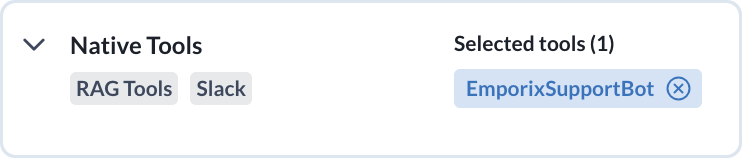
Once the communication tool is ready, establish the connection with the bot by selecting the right AI communication tool in the **Native Tools**. Channel creation depends on the tool's **Allowed operations**.
This way, the Anti-Fraud Agent can hand off to the Support Agent, which acts directly within the Slack workspace or MS Teams team.
If you don't need collaboration options and would like to define only automatic actions for your Agent, the communication tool is not necessary.
The capabilities of the Anti-Fraud Agent require MCP server tools. Upon creation, the agent is equipped with the tools for **Customer** and **Order** entities management.
Default toolset for Anti-Fraud Agent:
| Tool | Capabilities |
| ---------------------- | ------------------------------------------- |
| **Customer MCP Tools** | |
| `get-customer` | Retrieves customer details. |
| `get-legal-entity` | Fetches details of a specific legal entity. |
| **Order MCP Tools** | |
| `get-order` | Retrieves a specific order. |
| `get-return` | Retrieves details of a specific return. |
| `change-return-status` | Changes the status of the return. |
Default toolset for Anti-Fraud Scoring:
| Tool | Capabilities |
| ---------------------------- | ---------------------------------------- |
| **Order MCP Tools** | |
| `get-return` | Retrieves details of a specific return. |
| `get-returns-by-customer-id` | Retrieves the customer's return history. |
Default toolset for Anti-Fraud Audit:
| Tool | Capabilities |
| ----------------------------- | ----------------------------------------------------------------- |
| **Extensibility MCP** | |
| `upsert-custom-type-instance` | Required for handling custom entities and collaboration contexts. |
Extend or limit the tools according to your needs in the **Tools** tab by adding or removing the tools from the list.
{% hint style="info" %}
All Agents operations are tracked in the **AI Logs** view. You can check the details of the requests, jobs, and sessions for monitoring and evaluation purposes. For more information, see the [AI Logs](/agentic-commerce-intelligence/agentic-intelligence/logs.md).
{% endhint %}
---
# Agent Instructions
This documentation is published with GitBook. GitBook is the documentation platform designed so that both humans and AI agents can read, navigate, and reason over technical content effectively. Learn more at gitbook.com.
## Querying This Documentation
If you need additional information that is not directly available in this page, you can query the documentation by asking a question.
Perform an HTTP GET request on the following URL with the `ask` and `goal` query parameters:
```
GET https://developer.emporix.io/agentic-commerce-intelligence/agentic-intelligence/agent-library/anti-fraud-agent.md?ask=&goal=
```
`ask` is the immediate question: it should be specific, self-contained, and written in natural language.
`goal` is what the user is ultimately trying to achieve, the reason they need the answer. Sharing it helps GitBook give you a better, more relevant answer. A goal is most helpful when it describes the outcome the user wants rather than restating the question. For example, with `ask=how do I create an API token`, a goal like `automate deployments from our CI pipeline` lets GitBook tailor the answer to that use case.
The response will contain a direct answer to the question and relevant excerpts and sources from the documentation.
Use this mechanism when the answer is not explicitly present in the current page, you need clarification or additional context, or you want to retrieve related documentation sections.