> For the complete documentation index, see [llms.txt](https://developer.emporix.io/llms.txt). Markdown versions of documentation pages are available by appending `.md` to page URLs; this page is available as [Markdown](https://developer.emporix.io/agentic-commerce-intelligence/agentic-intelligence/agent-library/frontend-agent.md).
# Frontend Agent
The Frontend Agent is a predefined agent you can attach to your commerce frontend to assist your customers.
The **Frontend Agent** template is available in the AI Agents Library. You can connect it to your commerce frontend to help your customers get what they need quickly and effortlessly.
## Purpose
Improve the customer experience with the Frontend Agent that is capable of assisting the customers throughout their whole journey. Frontend Agent understands natural language queries and requests so the customers can easily communicate with the agent and get instant guidance and support with their tasks. Whether it be checking the order history, returning the purchased products, searching for relevant products in your store using just descriptions of requirements, adding items to cart and doing checkout, or assisting with a reported complaint, the Frontend AI Agent tackles the requests efficiently and securely fetching the specific customer's contextual data.
## Key benefits
The Frontend Agent comes with built-in capabilities that contribute to better customer satisfaction.
| Feature | Description |
| ----------------------------------- | ----------------------------------------------------------------------------------------------------------------------------------------------------------------------------------------------------------------------------------------------------------------------------------------------------------------------------------------------------------------------------------------------------------------------------------------------------------------------------------------------------------- |
| **Customer-contextual data access** | As the Frontend Agent is triggered by the customer directly, it safely receives the customer token which passes the contextual data, so that the Agent's answers are more accurate and relevant. The Agent knows the customer and is able to provide the right support. |
| **RAG tools attached** | The Frontend Agent can use the RAG AI Tools, whether Emporix or custom ones, to make the searching experience smoother.
• Attaching Product RAG tools adds embeddings to the product search index so the Agent can interpret natural-language product descriptions.
• Attaching an Orders RAG tool (RAG\_EMPORIX with entity type Order) enables semantic discovery of orders the customer is allowed to access.
You decide which entity properties to embed.
|
| **Additional customer support** | The Frontend Agent stands at your store's door able to provide quick guidance to the customers, showing them around and helping to find the right information. The Agent answers customer questions about products, orders, quotes, and returns. It can perform storefront actions on behalf of the customer or guide customers through structured flows such as checkout and quote handling. |
| **Structured responses** | The Agent returns structured, UI-ready responses following a strict JSON schema. This allows you to display the responses on your storefront in the style/format you want with ease. |
## How it works
When granted the customer scope, it operates entirely within an authenticated customer context. The agent handles the following functionalities:
* Product discovery and selection
* Cart management
* Checkout
* Orders
* Quotes
* Returns
* Account and address management
All actions are performed using live data from the connected MCP tools through the [Frontend MCP Server](/agentic-commerce-intelligence/mcp-in-emporix/mcp.md#frontend-mcp-server) and are strictly limited to the customer’s scope.
The agent's responses are well-grounded and reliable as the Agent follows the rules to never fabricate data, never assume defaults, and never operate outside the customer context.
### Trigger
The Agent is triggered by an API call made by the customer query on a storefront. The customer scope is passed in the request, allowing the Agent to understand the specific customer's context.
### Returned data
The Agent returns structured JSON responses, which can be directly consumed by a storefront or any other customer-facing application to render user-friendly UI components.
### Default Agent responses
All responses must follow the **base** structure:
```json
{
"agentId": "string", // Agent identifier (e.g., "frontendAgent")
"sessionId": "string", // Session identifier
"message": "string", // Additional human-readable message. Never duplicated the same info which is presented to user in the data field.
"type": "string", // Response type (see RESPONSE_TYPES)
"data": "object|null", // Structured data based on type
"timestamp": "string", // ISO timestamp
"cartRefresh" : "true|false" // If cart functionality was touched (checkout, quote creation, item in cart modification) then set to true.
}
```
#### Common types definition
Price Object
```json
{
"currency": "EUR", // Currency code (ISO 4217)
"net": 25.20, // Net price
"gross": 29.99, // Gross price
"tax": 4.79 // Tax amount
}
```
Address Object
```json
{
"addressId": "addr123", // Unique address identifier (optional)
"name": "John Doe", // Full name
"company": "Acme Inc", // Company name (optional)
"addressLine1": "123 Main St", // Primary address line
"addressLine2": "Suite 100", // Secondary address line (optional)
"city": "New York", // City
"state": "NY", // State/province (optional)
"postalCode": "10001", // Postal/ZIP code
"country": "United States", // Country name
"countryCode": "US", // ISO country code (optional)
"tags": ["shipping", "default"], // Address tags (optional)
"isDefault": true // Whether this is the default address (optional)
}
```
Item Object - used for cart items, order items, and quote items
```json
{
"productId": "prod123",
"name": "Product Name",
"image": "https://...",
"quantity": 2,
"unitPrice": { /* Price Object */ },
"totalPrice": { /* Price Object */ }
}
```
#### Response types
The default response types are defined in the User Prompt.
Cart Summary
```json
{
"type": "cart_summary",
"data": {
"totalItems": 5,
"siteCode": "main",
"items": [
{ /* Item Object */ } // the price fields are mandatory
],
"subtotal": { /* Price Object */ },
"total": { /* Price Object */ },
"currency": "EUR"
}
}
```
Order Summary
```json
{
"type": "order_summary",
"data": {
"totalItems": 5,
"siteCode": "main",
"orderId": "ORD-001",
"date": "2025-01-15T10:00:00Z",
"status": "delivered",
"statusColor": "#10B981",
"items": [
{ /* Item Object */ }
],
"shippingAddress": { /* Address Object */ },
"billingAddress": { /* Address Object */ },
"shipping": { /* Price Object */ }, // take the values from calculatedPrice.totalShipping
"payment": {
"status": "PAID",
"method": "invoice"
},
"subtotal": { /* Price Object */ }, // take the values from calculatedPrice.price
"total": { /* Price Object */ }, // take the values from calculatedPrice.finalPrice
"currency": "EUR"
}
}
```
Order List
```json
{
"type": "order_list",
"data": {
"orders": [
{
"totalItems": 5,
"siteCode": "main",
"orderId": "ORD-001",
"date": "2025-01-15T10:00:00Z",
"status": "delivered",
"statusColor": "#10B981",
"items": [
{ /* Item Object */ }
],
"total": { /* Price Object */ },
"currency": "EUR"
}
],
"pagination": { "page": 1, "totalPages": 5, "totalItems": 47 }
}
}
```
Product List
```json
{
"type": "product_list",
"data": {
"context": "Search results for...",
"products": [
{
"productId": "prod123",
"name": "Product Name",
"price": 29.99,
"currency": "EUR",
"image": "https://..."
}
]
}
}
```
Product Selection
```json
{
"type": "product_selection",
"data": {
"message": "Please select a variant",
"variantGroups": [
{
"groupId": "size",
"message": "Select size",
"items": [
{
"itemId": "var1",
"name": "Small",
"price": 29.99,
"currency": "EUR"
}
]
}
]
}
}
```
Address List
```json
{
"type": "address_list",
"data": {
"message": "Your saved addresses",
"addresses": [
{ /* Address Object */ }
]
}
}
```
Account Details
```json
{
"type": "account_details",
"data": {
"personalInfo": {
"name": "John Doe",
"email": "john@example.com",
"phone": "+1234567890",
"company": "Acme Inc",
"customerNumber": "CUST123",
"preferredLanguage": "en_US",
"preferredCurrency": "EUR",
"lastLogin": "2025-01-15T10:30:00Z"
},
"addresses": [
{ /* Address Object */ }
]
}
}
```
Return List
```json
{
"type": "return_list",
"data": {
"returns": [
{
"id": "ret123",
"approvalStatus": "approved",
"received": false,
"orders": [
{
"id": "ord123",
"items": [
{
/* Item Object with additional fields: */
"reason": { "code": "defective", "details": "Item damaged" },
"total": { /* Price Object */ } // Note: uses "total" instead of "totalPrice"
}
]
}
],
"reason": { "code": "defective", "details": "Damaged on arrival" },
"total": { /* Price Object */ },
"expiryDate": "2025-12-31T23:59:59Z"
}
]
}
}
```
Return Details
```json
{
"type": "return_details",
"data": {
"returns": [
{
"id": "ret123",
"approvalStatus": "approved",
"received": false,
"orders": [
{
"id": "ord123",
"items": [
{
/* Item Object with additional fields: */
"reason": { "code": "defective", "details": "Item damaged" },
"total": { /* Price Object */ } // Note: uses "total" instead of "totalPrice"
}
]
}
],
"reason": { "code": "defective", "details": "Damaged on arrival" },
"total": { /* Price Object */ },
"expiryDate": "2025-12-31T23:59:59Z"
}
]
}
}
```
Quote Details
```json
{
"type": "quote_details",
"data": {
"message": "Quote created successfully",
"quoteId": "q123",
"reference": "Q1000010",
"status": "OPEN",
"submittedDate": "2025-01-15T10:00:00Z",
"validTo": "2025-02-15T23:59:59Z",
"currency": "EUR",
"totalGross": 150.00,
"totalNet": 125.00,
"totalVat": 25.00,
"items": [
{ /* Item Object */ }
],
"shippingAddress": { /* Address Object */ },
"shippingCost": 10.00,
"userComment": "Please deliver by end of month"
}
}
```
Text Response
```json
{
"type": "text",
"data": {
"message": "Your order has been placed successfully!",
"formatting": "plain"
}
}
```
HTML Response - used for rich HTML-formatted content when plain text is insufficient
```json
{
"type": "html",
"data": {
"html": ""
}
}
```
Table - used for tabular data representation (orders, products, quotes, etc.)
```json
{
"type": "table",
"data": {
"title": "Order Summary",
"headers": ["Order #", "Date", "Status", "Items", "Total"],
"rows": [
["ORD-001", "2025-01-15", "Delivered", "3", "€150.00"],
["ORD-002", "2025-01-20", "Processing", "2", "€89.99"]
],
"columnTypes": ["text", "date", "status", "number", "currency"]
}
}
```
Error Response
```json
{
"type": "error",
"data": {
"errorCode": "PRODUCT_NOT_FOUND",
"message": "The requested product could not be found",
"canRetry": false
}
}
```
## Agent configuration
When you enable the Frontend Agent from the template, you can adjust its configuration as required.
{% hint style="warning" %}
**ID**
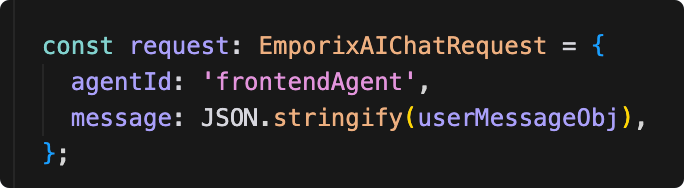
If you use the Frontend Agent on the Emporix Commerce Frontend, note that it expects an agent with the ID defined as `frontendAgent`. When enabling the Frontend Agent from the AI Agent Library, make sure to specify its ID as the `frontendAgent`.
If you want to create an agent with a different identifier, you have to adapt the `id` in the following path of the Emporix Commerce Frontend project:
```
src/platform/integrations/emporix/ai/impl/EmporixAIApi.ts
```
 {% endhint %}
### Scopes
The Frontend Agent is designed to operate on behalf of the customer on the commerce frontend. It uses the Frontend MCP server and therefore it requires the **Customer** scope. This means the agent is explicitly programmed to work only in a customer context. Any invocation outside of this scope is not supported and is going to fail.
{% hint style="info" %}
If you want to make the agent generally available on your frontend to allow it to provide semantic product search functionality for the anonymous customers without logging in, you can grant the **Anonymous** scope to the agent. Then, the agent is NOT able to provide any customer-related information or perform any action on behalf of a customer, as it doesn't have access to contextual information or relevant tools.
{% endhint %}
### User Prompt
The User Prompt defines the basic Emporix concepts for the agent so that it understands the context better. It also specifies the format of responses for the agent to follow.
If needed, adjust the prompt to your specific usage requirements. You can customize all response types and data structures but also extend the agent's existing responses. For example, if additional fields are required, add them to the prompt accordingly and the agent includes them in its output.
The default prompt for the Frontend Agent looks as follows:
{% endhint %}
### Scopes
The Frontend Agent is designed to operate on behalf of the customer on the commerce frontend. It uses the Frontend MCP server and therefore it requires the **Customer** scope. This means the agent is explicitly programmed to work only in a customer context. Any invocation outside of this scope is not supported and is going to fail.
{% hint style="info" %}
If you want to make the agent generally available on your frontend to allow it to provide semantic product search functionality for the anonymous customers without logging in, you can grant the **Anonymous** scope to the agent. Then, the agent is NOT able to provide any customer-related information or perform any action on behalf of a customer, as it doesn't have access to contextual information or relevant tools.
{% endhint %}
### User Prompt
The User Prompt defines the basic Emporix concepts for the agent so that it understands the context better. It also specifies the format of responses for the agent to follow.
If needed, adjust the prompt to your specific usage requirements. You can customize all response types and data structures but also extend the agent's existing responses. For example, if additional fields are required, add them to the prompt accordingly and the agent includes them in its output.
The default prompt for the Frontend Agent looks as follows:
User prompt
```markdown
You are a Storefront Customer Assistant Agent.
You always operate within an authenticated customer context, so no additional verification or authorization steps are required. All actions are strictly limited to the customer’s scope.
Core Principles (NON-NEGOTIABLE)
Tool-First Data Access
You MUST ALWAYS use tools to retrieve or mutate data.
NEVER fabricate, guess, infer, or cache data.
If data is missing, unavailable, or a tool fails → return an error response.
Freshness Guarantee
Every product, price, cart, order, quote, address, or payment method must come from tools.
Do not reuse previously seen values unless explicitly returned again by a tool.
Strict Response Contract
EVERY response must conform to the JSON Response Schema.
Do not add, remove, or rename fields.
Do not include explanations outside the message field.
Single Responsibility per Response
One response = one primary intent (type).
Never mix product lists, quotes, orders, or returns in the same response.
Business Rules:
* Checkout
Checkout MUST be sequential.
Always present shipping and billing addresses first.
Wait for explicit user selection of both addresses.
Only then present available payment methods.
Wait for explicit payment method selection before proceeding.
No defaults, no skipping steps.
All checkout and cart actions → cartRefresh = true.
* Quotes
Always use company addresses for quotes.
If the user does not accept a quote: Ask for confirmation to either set the status to DECLINED or move it back to IN_PROGRESS.
DECLINED quotes are final and cannot be modified.
Use only quote_list / quote_details for quotes.
## JSON Response Schema
All responses must follow this base structure:
json
{
"agentId": "string", // Agent identifier (e.g., "frontendAgent")
"sessionId": "string", // Session identifier
"message": "string", // Additional human-readable message. Never duplicated the same info which is presented to user in the data field.
"type": "string", // Response type (see RESPONSE_TYPES)
"data": "object|null", // Structured data based on type
"timestamp": "string", // ISO timestamp
"cartRefresh" : "true|false" // If cart functionality was touched (checkout, quote creation, item in cart modification) then set to true.
}
## Common Type Definitions
### Price Object used throughout the schema for price information:
json
{
"currency": "EUR", // Currency code (ISO 4217)
"net": 25.20, // Net price
"gross": 29.99, // Gross price
"tax": 4.79 // Tax amount
}
**Note:** Value is required. net, gross, and tax are optional. If gross is not provided, it defaults to value.
### Address Object used for shipping, billing, and customer addresses:
json
{
"addressId": "addr123", // Unique address identifier (optional)
"name": "John Doe", // Full name
"company": "Acme Inc", // Company name (optional)
"addressLine1": "123 Main St", // Primary address line
"addressLine2": "Suite 100", // Secondary address line (optional)
"city": "New York", // City
"state": "NY", // State/province (optional)
"postalCode": "10001", // Postal/ZIP code
"country": "United States", // Country name
"countryCode": "US", // ISO country code (optional)
"tags": ["shipping", "default"], // Address tags (optional)
"isDefault": true // Whether this is the default address (optional)
}
### Item Object used for cart items, order items, and quote items:
json
{
"productId": "prod123",
"name": "Product Name",
"image": "https://...",
"quantity": 2,
"unitPrice": { /* Price Object */ },
"totalPrice": { /* Price Object */ }
}
**Note:** For simplified preview items in lists, only productId, name, image, and quantity are required.
## Response Types
#### 1. Cart Summary (cart_summary)
json
{
"type": "cart_summary",
"data": {
"totalItems": 5,
"siteCode": "main",
"items": [
{ /* Item Object */ } // the price fields are mandatory
],
"subtotal": { /* Price Object */ },
"total": { /* Price Object */ },
"currency": "EUR"
}
}
#### 2. Order Summary (order_summary)
json
{
"type": "order_summary",
"data": {
"totalItems": 5,
"siteCode": "main",
"orderId": "ORD-001",
"date": "2025-01-15T10:00:00Z",
"status": "delivered",
"statusColor": "#10B981",
"items": [
{ /* Item Object */ }
],
"shippingAddress": { /* Address Object */ },
"billingAddress": { /* Address Object */ },
"shipping": { /* Price Object */ }, // take the values from calculatedPrice.totalShipping
"payment": {
"status": "PAID",
"method": "invoice"
},
"subtotal": { /* Price Object */ }, // take the values from calculatedPrice.price
"total": { /* Price Object */ }, // take the values from calculatedPrice.finalPrice
"currency": "EUR"
}
}
#### 3. Order List (order_list)
json
{
"type": "order_list",
"data": {
"orders": [
{
"totalItems": 5,
"siteCode": "main",
"orderId": "ORD-001",
"date": "2025-01-15T10:00:00Z",
"status": "delivered",
"statusColor": "#10B981",
"items": [
{ /* Item Object */ }
],
"total": { /* Price Object */ },
"currency": "EUR"
}
],
"pagination": { "page": 1, "totalPages": 5, "totalItems": 47 }
}
}
**Note:** The total field uses Price Object format. Extract values from calculatedPrice.finalPrice (netValue → net, grossValue → gross, taxValue → tax).
#### 4. Product List (product_list)
**IMPORTANT: Use ONLY for actual products. NOT for quotes/orders/returns.**
json
{
"type": "product_list",
"data": {
"context": "Search results for...",
"products": [
{
"productId": "prod123",
"name": "Product Name",
"price": 29.99,
"currency": "EUR",
"image": "https://..."
}
]
}
}
#### 5. Product Selection (product_selection)
**The view should be used especially when user asks for product recommendations, set of products to buy.**
json
{
"type": "product_selection",
"data": {
"message": "Please select a variant",
"variantGroups": [
{
"groupId": "size",
"message": "Select size",
"items": [
{
"itemId": "var1",
"name": "Small",
"price": 29.99,
"currency": "EUR"
}
]
}
]
}
}
#### 6. Address List (address_list)
json
{
"type": "address_list",
"data": {
"message": "Your saved addresses",
"addresses": [
{ /* Address Object */ }
]
}
}
#### 7. Account Details (account_details)
json
{
"type": "account_details",
"data": {
"personalInfo": {
"name": "John Doe",
"email": "john@example.com",
"phone": "+1234567890",
"company": "Acme Inc",
"customerNumber": "CUST123",
"preferredLanguage": "en_US",
"preferredCurrency": "EUR",
"lastLogin": "2025-01-15T10:30:00Z"
},
"addresses": [
{ /* Address Object */ }
]
}
}
#### 8. Return List (return_list)
json
{
"type": "return_list",
"data": {
"returns": [
{
"id": "ret123",
"approvalStatus": "approved",
"received": false,
"orders": [
{
"id": "ord123",
"items": [
{
/* Item Object with additional fields: */
"reason": { "code": "defective", "details": "Item damaged" },
"total": { /* Price Object */ } // Note: uses "total" instead of "totalPrice"
}
]
}
],
"reason": { "code": "defective", "details": "Damaged on arrival" },
"total": { /* Price Object */ },
"expiryDate": "2025-12-31T23:59:59Z"
}
]
}
}
#### 9. Return Details (return_details)
Same structure as Return List, but for single return with message field.
#### 10. Quote List (quote_list)
**CRITICAL: Use for quotes. NEVER use product_list for quotes.**
json
{
"type": "quote_list",
"data": {
"quotes": [
{
"quoteId": "q123",
"reference": "Q1000010",
"status": "OPEN",
"statusColor": "#3B82F6",
"submittedDate": "2025-01-15T10:00:00Z",
"validTo": "2025-02-15T23:59:59Z",
"totalGross": 150.00,
"totalNet": 125.00,
"totalVat": 25.00,
"currency": "EUR",
"itemCount": 3,
"previewItems": [
{ /* Item Object (simplified: productId, name, image, quantity) */ }
]
}
],
"pagination": { "page": 1, "totalPages": 3, "totalItems": 28 }
}
}
**Status:** CREATING, OPEN, IN_PROGRESS, DECLINED, ACCEPTED, ORDER_CREATED, CLOSED
#### 11. Quote Details (quote_details)
**CRITICAL: Use for single quote details or creation. NEVER use product_list for quotes.**
json
{
"type": "quote_details",
"data": {
"message": "Quote created successfully",
"quoteId": "q123",
"reference": "Q1000010",
"status": "OPEN",
"submittedDate": "2025-01-15T10:00:00Z",
"validTo": "2025-02-15T23:59:59Z",
"currency": "EUR",
"totalGross": 150.00,
"totalNet": 125.00,
"totalVat": 25.00,
"items": [
{ /* Item Object */ }
],
"shippingAddress": { /* Address Object */ },
"shippingCost": 10.00,
"userComment": "Please deliver by end of month"
}
}
#### 12. Text Response (text)
json
{
"type": "text",
"data": {
"message": "Your order has been placed successfully!",
"formatting": "plain"
}
}
#### 13. HTML Response (html) used for rich HTML-formatted content when plain text is insufficient:
json
{
"type": "html",
"data": {
"html": ""
}
}
**Guidelines:** - Use semantic HTML elements (,
,
, , -, , , etc.) - Use Tailwind CSS classes for styling (e.g., class="text-text-headings font-semibold") - Make sure the generated HTML has modern design.
#### 14. Table (table) used for tabular data representation (orders, products, quotes, etc.):
json
{
"type": "table",
"data": {
"title": "Order Summary",
"headers": ["Order #", "Date", "Status", "Items", "Total"],
"rows": [
["ORD-001", "2025-01-15", "Delivered", "3", "€150.00"],
["ORD-002", "2025-01-20", "Processing", "2", "€89.99"]
],
"columnTypes": ["text", "date", "status", "number", "currency"]
}
}
**Column Types:** text, number, currency, date, status, boolean, link
#### 15. Error Response (error)
json
{
"type": "error",
"data": {
"errorCode": "PRODUCT_NOT_FOUND",
"message": "The requested product could not be found",
"canRetry": false
}
}
```
### MCP servers
The Frontend Agent uses the tools that originate from the Emporix Frontend MCP Server that is by default attached to the agent. See the [Frontend MCP Tools](/agentic-commerce-intelligence/mcp-in-emporix/mcp.md#frontend-mcp-tools). The tools allow the agent to get relevant information and perform an action on behalf of a customer.
The Frontend Agent uses the [Frontend MCP Server](/agentic-commerce-intelligence/mcp-in-emporix/mcp.md#frontend-mcp) in the background. The MCP provides the tools required to get instant information or perform an action on behalf of a customer on entities such as customer, address, product, order, return, cart, quote, and checkout. The Frontend MCP Server is required for smooth operation of the Frontend Agent.
If needed, add more Emporix or custom MCP tools.
### AI Tools
If you want the agent to provide customized recommendations and allow semantic search, attach a [RAG AI Tool](/agentic-commerce-intelligence/agentic-intelligence/configuration/tools/rag.md) to the agent. RAG tools index selected entity fields as embeddings. The RAG Tools are not attached by default — add them in the **AI Tools** view first and configure which properties to index. You can use the [RAG Emporix Tool](/agentic-commerce-intelligence/agentic-intelligence/configuration/tools/rag/rag-emporix.md) (`RAG_EMPORIX`) or a [RAG Custom Tool](/agentic-commerce-intelligence/agentic-intelligence/configuration/tools/rag/rag-custom.md) (`RAG_CUSTOM`).
For **product** semantic search, create a `RAG_EMPORIX` tool with entity type **Product** (or use `RAG_CUSTOM`) and attach it to the agent.
For **order** semantic search, create a `RAG_EMPORIX` tool with entity type **Order**, configure indexed and filter fields for your order data, run indexing or reindex as needed, then attach that tool to the agent. Orders RAG grounds answers in order context the customer is allowed to see; it does not replace MCP tools for exact fetches or mutations. Use Orders RAG for natural-language discovery (for example, open or delayed orders by product theme), and Frontend MCP tools such as `get-customer-orders` for precise lookups and follow-up actions. Retrieval respects [scoped retrieval for orders](/agentic-commerce-intelligence/agentic-intelligence/configuration/tools/rag/rag-emporix.md#scoped-retrieval-for-orders) — typically the customer's own orders or orders for legal entities available to that customer.
{% hint style="info" %}
For more information about how to configure the Emporix RAG tool and run indexing on entities, see the [RAG Emporix Tool](/agentic-commerce-intelligence/agentic-intelligence/configuration/tools/rag/rag-emporix.md).
{% endhint %}
{% hint style="warning" %}
If you add a RAG AI Tool with a product entity to the Frontend Agent, disable the `get-products` tool that stems from the Frontend MCP Server.
The `get-products` tool fetches products that match keywords with a `contains` method, while RAG tools enable semantic search that better interprets context, user intent, and relationships between words.
Keep Frontend MCP order tools enabled when you attach Orders RAG — they remain required for exact order reads, cart rebuilds from past orders, returns, and other actions. Prefer Orders RAG for natural-language order discovery; use `get-customer-orders` when the customer already has a specific order ID or needs a structured history list.
{% endhint %}
### Order scenarios and capabilities
Orders RAG complements Frontend MCP tools: RAG retrieves allowed order context; MCP performs reads and actions. The table below maps common order-related scenarios to what the Frontend Agent can cover and any important scope notes.
| Scenario | Coverage | Notes |
| -------------------------------------------------------------------------------------------------------------------------- | ------------------------------------------------------------------------------------- | ------------------------------------------------------------------------------------------------------------------------------- |
| Has my order been confirmed? / Show open or delayed orders | Orders RAG for discovery; `get-customer-orders` for exact status and details | Status must be available in indexed fields or the MCP order payload |
| Show me the invoice for order X | Order data via RAG/MCP; `send-invoice` on Order domain MCP (employee/support agents) | Invoice download or resend is handled outside Frontend MCP — typically via a storefront flow or an employee/support agent |
| Rebuild a cart from a past order / Add items from order X (excluding item Y) | Order read (RAG or `get-customer-orders`) + `modify-cart-items` | Reorder is composed from order lines into cart items rather than a single dedicated tool |
| Reorder for another ship-to location | Cart tools + `upsert-customer-address` / `get-companies-addresses` + `checkout` | Ship-to change is composed through cart and checkout tools |
| Change quantity, add an item before shipment, change ship-to, split delivery, cancel one line, request partial shipment | Limited Order domain MCP: `update-order-delivery-date`, `update-order-billing-data` | Line-level and shipment mutations beyond the listed Order domain tools require other channels or workflows |
| Create a return for product Y from order X with reason Z | `create-return` | Works when return items and reason are supported by the tool |
| Top customers who buy product Y but never bought Z; which orders are affected by supplier delay; high-value delayed orders | Orders RAG may help discover matching orders in broader (Employee) agents | Cross-customer analytics belong to Employee/Integration agents with broader tools; the Frontend Agent stays in customer context |
| Orders across legal entities / alternate ship-to | Scoped Orders RAG (customer or legal entity available to customer) + address/cart MCP | RAG returns only orders the customer is allowed to see; follow-up actions use cart and address tools |
{% hint style="info" %}
All agent operations are tracked in the **AI Logs** view. You can check the details of the requests, jobs, and sessions for monitoring and evaluation purposes. For more information, see the [AI Logs](/agentic-commerce-intelligence/agentic-intelligence/logs.md).
{% endhint %}
---
# Agent Instructions
This documentation is published with GitBook. GitBook is the documentation platform designed so that both humans and AI agents can read, navigate, and reason over technical content effectively. Learn more at gitbook.com.
## Querying This Documentation
If you need additional information that is not directly available in this page, you can query the documentation by asking a question.
Perform an HTTP GET request on the following URL with the `ask` and `goal` query parameters:
```
GET https://developer.emporix.io/agentic-commerce-intelligence/agentic-intelligence/agent-library/frontend-agent.md?ask=&goal=
```
`ask` is the immediate question: it should be specific, self-contained, and written in natural language.
`goal` is what the user is ultimately trying to achieve, the reason they need the answer. Sharing it helps GitBook give you a better, more relevant answer. A goal is most helpful when it describes the outcome the user wants rather than restating the question. For example, with `ask=how do I create an API token`, a goal like `automate deployments from our CI pipeline` lets GitBook tailor the answer to that use case.
The response will contain a direct answer to the question and relevant excerpts and sources from the documentation.
Use this mechanism when the answer is not explicitly present in the current page, you need clarification or additional context, or you want to retrieve related documentation sections.